
A 7.1 surround sound adapter adds multichannel audio connectivity to a computer through USB. The Vantec is a straightforward choice for USB-based 7.1 audio, while the StarTech offers multiple output formats and inputs. The Cubilux adds high-resolution headphone playback alongside 5.1/7.1 support, and the 1Mii is suited to buyers who want virtual surround and headset controls. The fifth option is a 5.1 adapter, not a 7.1 model, so it is relevant only if six-channel audio meets your needs.
| Adapter | Best For | Key Difference |
|---|---|---|
| Vantec USB External 7.1 | Simple USB 7.1 setup | USB 2.0; 44.1/48 kHz playback and recording |
| 1Mii USB Sound Card | Headset users and gaming | Virtual 7.1 and mute/volume controls |
| StarTech ICUSBAUDIO7D | Multiple connection options | Analog jacks and SPDIF features |
| Cubilux 7.1 USB Sound Card | Headphone listening and multichannel output | High-resolution stereo headphone playback |
| USB 6 Channel 5.1 Adapter | Six-channel 5.1 setups | 5.1 support, not 7.1 |
Vantec USB External 7.1 Channel Audio Adapter

The Vantec is a direct option for buyers who want a USB-connected adapter with listed 7.1-channel surround sound. It connects through USB 2.0 and is specified as backward compatible with USB 1.1, which gives it a simple connection profile for compatible computers.
It supports 44.1 kHz and 48 kHz sampling rates for both playback and recording. That specification is useful when comparing basic audio input and output needs without requiring a higher-rate feature set.
- Best for: Buyers seeking a straightforward USB adapter with 7.1-channel audio.
- Why it was selected: Its listed 7.1 support, USB connection, and playback and recording rates directly match the central requirements.
- Consider: The provided product details do not list extra controls, headset features, or other connection formats.
Choose this model if the priority is a simple USB connection and the stated 7.1 capability. Check the connection and channel requirements of your computer and audio equipment before purchasing.
1Mii USB Sound Card With Virtual 7.1

The 1Mii is a better fit for buyers using 3.5 mm headphones or microphones who want virtual 7.1 processing and convenient headset controls. The listing specifies compatibility with Windows 10, Windows 7, and Windows XP, and says it works with most desktop and laptop equipment and almost all 3.5 mm headphones.
Its controller lets users adjust microphone and headphone volume and mute the microphone with a dedicated button. LED indicators show the virtual 7.1 and microphone-mute states. The listed microphone support includes TRS and TRRS microphones.
- Best for: PC gamers and headset users who want virtual surround and quick mic controls.
- Why it was selected: It combines a 3.5 mm audio connection with virtual 7.1 and accessible volume and mute controls.
- Consider: The provided compatibility details name specific Windows versions; verify support for your operating system before buying.
Choose this if virtual surround and headset convenience matter more than a stated discrete-speaker output configuration. The product information describes virtual 7.1; it does not specify the multiple analog speaker outputs listed for some other adapters.
StarTech 7.1 USB Audio Adapter
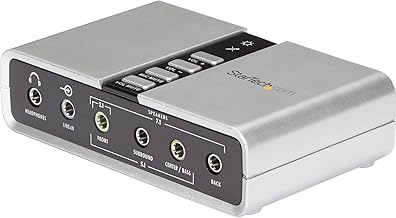
The StarTech ICUSBAUDIO7D is suited to buyers who need multiple ways to connect audio equipment. It supports 7.1-, 5.1-, and 2-channel output through 3.5 mm jacks and includes a headphone port, line-in, and stereo microphone inputs. The listing also specifies a one-meter USB cable and bus-powered operation.
For digital connections, it provides SPDIF output and optical input passthrough. Analog playback and recording support 44.1 kHz and 48 kHz sampling rates. SPDIF digital output is specified for 48 kHz playback, while optical input passthrough supports up to two-channel audio at 48 kHz.
- Best for: Buyers who want several analog connection choices and specified SPDIF features.
- Why it was selected: Its listed 7.1 output and mix of analog and digital connections make it a flexible comparison choice.
- Consider: The SPDIF input passthrough specification is limited to two-channel audio, and SPDIF output is specified at 48 kHz.
Choose this adapter if your setup needs more than a basic USB audio connection. Confirm that the ports and digital-channel limits suit the equipment you plan to connect.
Cubilux 7.1 USB Surround Sound Card

The Cubilux is a useful option for buyers who want both multichannel output and a stated high-resolution headphone playback range. It supports 5.1 and 7.1 surround sound, stereo headphone output, line-in, and microphone input. The product describes its use for gaming, movies, and music.
Its headphone output supports sampling rates from 44.1 kHz/16-bit up to 384 kHz/24-bit. That is distinct from its 7.1 surround audio, which is specified at sampling rates up to 48 kHz. The housing is described as full aluminum alloy and intended to isolate electronic interference.
- Best for: Buyers who switch between headphone listening and multichannel audio.
- Why it was selected: It lists 7.1 and 5.1 output, headphone and microphone connections, and separate high-resolution headphone specifications.
- Consider: The 384 kHz/24-bit figure applies to headphone output, not 7.1 surround audio.
Choose this if the separate headphone and surround specifications fit your use. Avoid assuming that the maximum headphone playback rate also applies to multichannel surround playback.
USB 6 Channel 5.1 Surround Adapter

This USB audio adapter is included for buyers comparing channel-based options, but it is not a 7.1 adapter. Its listed analog playback supports six-channel 5.1 audio, and its digital playback description says that only left and right PCM channels can be conveyed in digital playback mode.
The listing describes analog and digital recording and playback, with sampling-rate details that vary by mode. It names Windows 98, XP, 2000, Vista, and Windows 7/8 as supported operating systems. Those are older Windows versions, so buyers with a newer system should verify compatibility before purchase.
- Best for: Buyers who specifically need a listed six-channel 5.1 adapter rather than 7.1.
- Why it was selected: It offers an alternative for shoppers deciding whether 5.1 is sufficient for their equipment.
- Consider: It does not meet a requirement for 7.1 output, and its listed operating systems are older Windows versions.
Choose this only if 5.1 is adequate and the operating-system details match your setup. If your requirement is 7.1, compare one of the four 7.1-listed adapters instead.
Buying Guide: How To Choose A 7.1 Surround Sound Adapter
Do you need true multichannel output or virtual 7.1?
Check how the product describes its surround feature. The 1Mii listing specifically says virtual 7.1, while Vantec, StarTech, and Cubilux list 7.1-channel or 7.1 surround audio. Virtual surround processing and multichannel output are different descriptions; choose based on the audio device and connection method you intend to use.
If you plan to connect a multichannel speaker system, look closely at the listed output ports and channel formats. The StarTech specifies 3.5 mm outputs for 7.1, 5.1, and two-channel audio. The Cubilux lists 5.1/7.1 output, but the supplied details do not describe the individual output-jack layout. Confirm the connection arrangement before ordering.
Which connections and controls matter?
Start with the ports on your headphones, speakers, and microphone. A 3.5 mm headset user may value the 1Mii’s headphone and microphone volume controls and dedicated mic mute. A buyer with separate audio sources may prefer the StarTech’s listed line-in, stereo microphone input, headphone port, and SPDIF features. The Vantec may suit a simpler USB-based setup if its listed capabilities meet the need.
USB connection type and included cable details can also matter. The Vantec specifies USB 2.0 and backward compatibility with USB 1.1. The StarTech includes a one-meter USB cable and is described as bus-powered. Do not assume that a product has an unlisted port or accessory; use the full listing to confirm the physical configuration.
How should you compare audio specifications?
Compare sampling rates in the mode you plan to use. Vantec lists 44.1 and 48 kHz for playback and recording. StarTech lists those rates for analog playback and recording, with separate limits for SPDIF. Cubilux lists up to 384 kHz/24-bit for headphone output but up to 48 kHz for 7.1 surround audio. These figures describe different functions and should not be treated as interchangeable.
For gaming, headphone listening, movies, or music, decide whether the main priority is virtual surround, multichannel speaker output, microphone handling, or higher-resolution stereo headphone playback. A higher sample-rate number alone does not establish which adapter is best for every use.
What should you check for computer compatibility?
Verify the operating system and connection requirements against the current product listing before buying. The 1Mii details name Windows 10, Windows 7, and Windows XP. The six-channel adapter lists older Windows versions through Windows 8. The other supplied descriptions do not specify operating-system support, so do not assume compatibility from the USB connection alone.
Also confirm whether your intended application, computer, and audio equipment support the channel format you want. A 7.1 adapter cannot make a 5.1-only output requirement into 7.1, and a product described as virtual surround may not provide the same output configuration as a multi-jack adapter.
Frequently Asked Questions
What does a 7.1 surround sound adapter do?
It adds an audio connection or processing option that supports 7.1-channel audio, depending on the product. Check whether the listing describes multichannel output or virtual 7.1 processing.
Is virtual 7.1 the same as 7.1 speaker output?
No. Virtual 7.1 describes surround processing, while 7.1 speaker output refers to a multichannel output configuration. Review the adapter’s connection details to determine which type it offers.
Can a 5.1 adapter provide 7.1 audio?
The six-channel adapter listed here is specified for 5.1, not 7.1. Choose a product that explicitly lists 7.1 if that channel format is required.
Which adapter is best for a headset with a microphone?
The 1Mii is the clearest fit among these options for headset controls because it lists microphone and headphone volume adjustment, mic mute, and support for TRS and TRRS microphones.
Does a higher headphone sample rate mean higher-rate 7.1 audio?
No. The Cubilux lists up to 384 kHz/24-bit for headphone output but specifies 7.1 surround audio up to 48 kHz. Compare specifications by audio mode.
Should I check operating-system compatibility before buying?
Yes. The supplied product details name operating systems for the 1Mii and six-channel adapter but do not specify them for every model. Verify your computer’s operating system against the current listing.