
The best way to add TV-style entertainment to a car is to use an HDMI car adapter with a compatible factory screen, or install a replacement touchscreen when the vehicle lacks a suitable display. The 2-in-1 Car TV Mate Pro is aimed at drivers seeking an HDMI-based add-on; the AUSATOYN adapter is another option for factory wired CarPlay vehicles. The Laukowind adapter focuses on phone mirroring, while the SOOEMAKA and double-DIN radios are replacement-screen options rather than dedicated TV-streaming adapters.
| Product | Best suited for | Screen approach |
|---|---|---|
| 2-in-1 Car TV Mate Pro | Cars from 2016 seeking an HDMI add-on | Adapter for the vehicle screen |
| AUSATOYN Car TV Adapter | Factory wired CarPlay or Android Auto users | HDMI input adapter |
| Laukowind 4-in-1 Adapter | Compatible cars needing phone mirroring | Wireless phone connection |
| SOOEMAKA Single-DIN Radio | Older cars needing a flip-out display | Replacement radio screen |
| Double-DIN Touchscreen Stereo | Cars suited to a double-DIN receiver | Replacement touchscreen radio |
2-in-1 Car TV Mate Pro

Best for: Drivers looking to add an HDMI connection to a compatible car screen while also using wireless CarPlay. The product name describes it as a two-in-one wireless CarPlay adapter and HDMI multimedia adapter, with support for TV sticks, game consoles, set-top boxes, and screen mirroring.
It is listed as compatible with cars from 2016, a useful starting point for shoppers seeking an adapter rather than a full stereo replacement. Its HDMI input approach is suited to buyers who already have an HDMI entertainment device and want to connect it to the car display.
Why it was selected: It directly addresses the goal of adding TV-style content to an existing vehicle screen and includes both HDMI multimedia and wireless CarPlay functions in its product description.
Limitation: The supplied information does not identify specific compatible makes and models or explain the exact wired-CarPlay requirements. Verify compatibility and screen input requirements before buying.
AUSATOYN Car TV Adapter With HDMI

Best for: Owners of cars with factory wired CarPlay who want to connect an HDMI source, such as a Fire TV Stick, Roku, or Chromecast. The listing also describes wireless CarPlay and Android Auto features, along with a stated 2K multimedia output.
The HDMI port is the central feature for adding entertainment from an external device. The product description also mentions streaming services and game consoles, plus phone mirroring. These features make it a more direct TV-adapter choice than a standard replacement radio when the existing vehicle screen is compatible.
Why it was selected: Its listing explicitly combines an HDMI input with car-screen entertainment and identifies factory wired CarPlay cars as the intended vehicle type.
Limitation: The listing’s stated vehicle requirement is factory wired CarPlay, even though it also mentions Android Auto. Confirm support for the exact car and device combination. The product description does not establish that streaming will work without an internet connection or a separate streaming source.
Laukowind 4-in-1 Wireless Adapter

Best for: Buyers who want wireless CarPlay or Android Auto along with AirPlay or Mirror Link screen mirroring in a compatible vehicle. The product description lists support for iPhones running iOS 9 or later and Android phones running Android 11 or later.
This is a phone-mirroring option rather than an HDMI-input adapter. It is designed for vehicles with original wired CarPlay or Android Auto and is not listed as compatible with factory wireless CarPlay systems. The manufacturer description asks shoppers to scan a QR code to check vehicle compatibility.
Why it was selected: It provides a different route to car-screen content: connecting a phone through mirroring instead of plugging in a separate TV streaming stick.
Limitation: The listing says screen mirroring can only be used when the car is not running. It also names Tesla, BMW, Jeep, Skoda, a 2018 Toyota SUV, a 2014 Mini Cooper, and a 2021 Subaru Forester as unsupported. Check the current compatibility information before purchase.
SOOEMAKA Single-DIN Flip-Out Radio

Best for: Owners of older cars who are considering replacing a single-DIN radio with a screen-equipped receiver. The product name lists a motorized 7-inch QLED touchscreen, wireless Apple CarPlay and Android Auto, Bluetooth, dual-band Wi-Fi, and a backup camera.
This is a broader dashboard upgrade, not a dedicated TV adapter. It may suit a buyer whose main need is adding a screen and modern phone connectivity to a car that does not already have a suitable display. Its flip-out format is the distinguishing feature in this selection.
Why it was selected: It offers a screen-replacement route for adding display capability, especially when an adapter cannot connect to the existing vehicle system.
Limitation: The supplied product details do not list an HDMI input or establish that it can play TV streaming apps. Check vehicle fit and installation requirements before choosing it for entertainment use.
Double-DIN 7-Inch Touchscreen Stereo
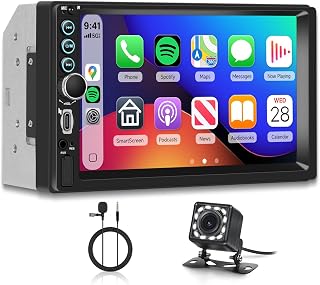
Best for: Drivers whose vehicle can accept a double-DIN receiver and who want a touchscreen head unit with wireless CarPlay and Android Auto. The product name also lists Bluetooth, steering-wheel control, FM radio, backup-camera support, mirror link, AUX, and EQ.
Compared with a small adapter, a replacement receiver changes the dashboard system and provides a built-in 7-inch display. It is therefore a better fit for someone upgrading the car stereo as a whole than for someone who only wants to add an HDMI streaming source.
Why it was selected: It is a screen-upgrade alternative for cars where an existing display is unavailable or unsuitable.
Limitation: The supplied details do not specify HDMI input or TV streaming-app support. Confirm the vehicle’s double-DIN fit and the receiver’s inputs before purchasing.
Buying Guide: How To Add A TV To A Car
Do you need an adapter or a new stereo?
Choose an HDMI adapter if your car already has a compatible screen and the adapter can connect through the vehicle’s supported interface. This approach is intended to add a source to the existing display. Choose a replacement stereo if your car lacks a usable screen or if you want to update the head unit as well. The two radio products listed here provide touchscreen displays, but their supplied details do not confirm HDMI-based TV streaming.
Before buying an adapter, check whether the vehicle has factory wired CarPlay or Android Auto, as applicable. Similar product names do not guarantee the same compatibility. Verify the vehicle year, make, model, trim, and original system against the manufacturer’s compatibility information.
Do you want HDMI streaming or phone mirroring?
An HDMI adapter is suited to an external device with an HDMI output, such as a streaming stick or other listed compatible source. The external device and its content access are separate considerations. Phone mirroring instead sends content from a phone to the vehicle screen, where the product and vehicle support that function.
- Choose HDMI when you plan to connect a separate HDMI source and the adapter explicitly supports your car.
- Choose mirroring when you want to display phone content and the adapter supports your phone operating system and vehicle.
- Choose a replacement receiver when your main goal is adding a screen or upgrading the stereo, not simply connecting an HDMI source.
Do not assume that every adapter supports every streaming service, phone, or video source. Compare the listed inputs and supported functions with the equipment you already own.
What should you check before installation?
Confirm the physical connection, vehicle system requirements, and the adapter’s power and setup instructions. The supplied product descriptions do not provide complete installation details for every model, so consult the product documentation before purchase. For a replacement stereo, verify the dashboard opening and installation needs; a single-DIN flip-out radio and a double-DIN receiver are different formats.
Also consider where passengers will view the screen and how cables or connected devices will be secured. Keep the driver’s attention on driving. The Laukowind listing specifically restricts its screen-mirroring feature to when the car is not running; follow the product’s safety instructions and applicable local laws for any in-car video use.
How can you compare the five options?
| Buyer priority | Option to investigate | Key check |
|---|---|---|
| HDMI entertainment on an existing screen | Car TV Mate Pro or AUSATOYN adapter | Confirm the car’s required factory system and HDMI source support |
| Phone-based screen mirroring | Laukowind 4-in-1 adapter | Check vehicle and phone compatibility, plus stationary-use limitation |
| Adding a screen to an older car | SOOEMAKA single-DIN radio | Confirm dashboard fit and whether its inputs meet your needs |
| Replacing a double-DIN stereo | Double-DIN touchscreen stereo | Confirm fit and verify any desired video input separately |
Frequently Asked Questions
Can I watch TV on my car’s existing screen?
Possibly. An HDMI car adapter or compatible mirroring adapter may send content to an existing screen, but the vehicle and adapter must support the connection. Check the exact vehicle compatibility and input requirements.
Does a wireless CarPlay adapter automatically stream TV?
No. Wireless CarPlay support alone does not establish HDMI input or TV streaming. Look for an explicitly listed HDMI or screen-mirroring feature, and verify which sources it supports.
Do I need an internet connection to stream video?
Streaming services generally require a way to access their content, but the supplied product information does not specify a connection method for every adapter. Check the streaming device’s requirements and the adapter’s instructions.
Can I use phone mirroring while driving?
Product and vehicle rules vary. The Laukowind listing says its screen-mirroring function can only be used when the car is not running. Follow the device’s restrictions and local laws, and do not watch video while driving.
Is a replacement touchscreen better than a car TV adapter?
Neither is universally better. An adapter is more relevant when you have a compatible screen and want to connect an external source. A replacement touchscreen is more relevant when you need a display or want to replace the existing radio, but confirm its inputs before expecting TV playback.