
The best aftermarket overhead DVD player depends on whether you need a built-in disc drive, a larger screen, or streaming and device connections. The Pyle PLRD146 is a strong fit for buyers seeking a 13.3-inch screen with USB and SD playback. Audiovox offers 10.1-inch options with DVD playback and HDMI connectivity. XTRONS models provide larger displays and media features, but several listed models do not include a DVD drive.
| Product | Best For | DVD Drive Information |
|---|---|---|
| Pyle PLRD146 | Large screen with USB and SD support | Listed as a DVD player |
| Audiovox 10.1-inch SmartTV Ready | DVD and HDMI device connections | DVD included in product name |
| Audiovox MTGBAVX10 | DVD playback and wireless headphones | Built-in DVD player |
| XTRONS 14-inch Flip-Down Monitor | Large screen and USB video playback | No DVD drive |
| XTRONS 11.6-inch Overhead Player | Compact screen with 1080p playback | DVD drive not specified |
Pyle PLRD146 13.3-Inch Roof-Mount DVD Player

The Pyle PLRD146 is an overhead flip-down entertainment system with a 13.3-inch widescreen display. Its listed features include support for several media formats, SD cards, and USB flash drives. It also has a built-in IR transmitter for wireless IR headphones.
- Best for: Buyers who want a relatively large screen and options for playing digital media from USB or SD storage.
- Why it stands out: The feature list combines a widescreen display, digital-drive support, and wireless headphone transmission.
- Consideration: The listed feature information does not specify HDMI input, and buyers should confirm the included connections and installation requirements before purchasing.
Choose this model if screen size and USB or SD playback matter alongside disc-based entertainment. The provided features list formats including MP3, MP4, JPG, MPEG4, WMA, and AVI. It also mentions an RCA audio/video wiring harness for connecting an additional device control panel. Check the product details for the exact components and connection arrangement that apply to the version being considered.
Audiovox 10.1-Inch DVD And HDMI Monitor

This Audiovox overhead system pairs a 10.1-inch, high-resolution, LED-backlit monitor with DVD playback and HDMI. The listing describes it as SmartTV Ready and says HDMI can connect smart devices such as smartphones and streaming sticks.
- Best for: Buyers who want a smaller overhead display with both a DVD player and a way to connect an external HDMI device.
- Why it stands out: Its listed capabilities cover two different viewing sources: discs and HDMI-connected devices.
- Consideration: The supplied feature details do not give the full input list, sound options, or installation dimensions. Confirm those details before choosing it for a particular vehicle.
Choose this Audiovox model if DVD playback is important but you also want the option to use a compatible external device through HDMI. Its 10.1-inch screen is smaller than the Pyle and large-format XTRONS displays in this guide. That may suit buyers prioritizing a more compact screen, although the available product information does not establish vehicle fit or installation compatibility.
Audiovox MTGBAVX10 DVD System
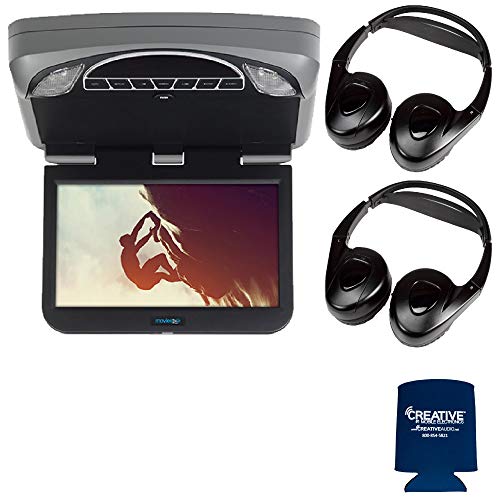
The Audiovox MTGBAVX10 is a 10.1-inch high-definition overhead mobile video system. Its listed features include a built-in DVD player, two HDMI inputs, and a dual-channel infrared transmitter for wireless headphones. The product name also identifies two pairs of headphones as included.
- Best for: Buyers looking for DVD playback, multiple HDMI connections, and infrared headphone support in one overhead system.
- Why it stands out: Two HDMI inputs provide more connection options than a single-input setup, based on the listed specifications.
- Consideration: The screen is 10.1 inches, so it is a smaller-display choice compared with the 13.3-inch and larger options here.
Choose this system if the two HDMI inputs and dual-channel IR transmitter match your intended setup. The headphone feature can be useful when passengers need private audio, but the listing does not provide details here about headphone controls or other audio outputs. Confirm the exact package contents and vehicle installation requirements before ordering.
XTRONS 14-Inch Flip-Down Monitor

This XTRONS monitor has a 14-inch display with a listed resolution of 1366 by 768. It supports USB media playback and 1080p-format video, and it includes built-in stereo speakers and Bluetooth audio transmission. The product description explicitly says it does not come with a DVD drive.
- Best for: Buyers who want a larger overhead display for USB-based video playback and do not require an integrated disc player.
- Why it stands out: The listed feature set includes built-in speakers and Bluetooth audio transmission, as well as USB input.
- Consideration: This is not a complete aftermarket DVD player by itself because the product description says the DVD drive is not included.
Choose this monitor if you already plan to use digital media or another connected source instead of loading DVDs directly into the overhead unit. The listed compatible formats include AVI, 3GP, MP4, TS, MP3, WMA, WAV, JPG, JPEG, and BMP. Buyers seeking a built-in DVD mechanism should choose one of the DVD-equipped Audiovox or Pyle options instead.
XTRONS 11.6-Inch Overhead Player

The XTRONS 11.6-inch overhead player features a TFT widescreen with a listed resolution of 1366 by 768. It supports video playback up to 1080p, has an ultra-thin profile when folded, and opens to an angle of up to 170 degrees. Its listed connections and audio features include HDMI, AV input, a built-in speaker, and IR support.
- Best for: Buyers who want a mid-size overhead screen with several playback and connection options.
- Why it stands out: It combines 1080p video support with a 170-degree maximum opening angle and an ultra-thin folded profile.
- Consideration: The supplied features do not confirm a built-in DVD drive. Verify the exact model specification if disc playback is essential.
Choose this XTRONS unit if the display and digital-video features suit your needs and you are prepared to confirm how DVD playback would be provided. The listed specifications focus on screen performance, playback, and connections rather than clearly stating that a disc mechanism is included. Do not assume that the word “player” in a product title guarantees a DVD drive.
Buying Guide: How To Choose An Aftermarket Overhead DVD Player
Does the unit have a built-in DVD drive?
Start by checking whether the product explicitly includes a DVD player or drive. An overhead monitor can support video playback without accepting discs. In this selection, the Pyle PLRD146 and two Audiovox products are presented as DVD systems. The XTRONS 14-inch model explicitly has no DVD drive, while the supplied details for the 11.6-inch model do not confirm one.
If you already own DVDs and want to insert them directly into the overhead unit, prioritize a product whose listing clearly states that a DVD player is built in. If you mainly use files stored on a USB drive or another connected device, a monitor without a disc drive may still meet your needs.
What screen size is suitable for your passengers?
Compare screen sizes in the context of your vehicle and seating layout. The products here range from 10.1 inches to 14 inches. A larger display may be easier for passengers to see, while a smaller screen may be preferable if you want a more compact overhead unit. Product size alone does not establish whether a unit will fit a particular headliner or installation location.
Before buying, compare the product’s physical dimensions and mounting details with the space available in your vehicle. The supplied information does not list complete mounting measurements for every product, so check the product listing or manufacturer information for the specific unit.
Which connections and media sources do you need?
Look at how you expect to play content. USB and SD-card inputs can support files stored on removable media when the unit lists those inputs. HDMI can connect compatible external devices, and some listings also mention RCA or AV input. The Audiovox MTGBAVX10 lists two HDMI inputs; the Pyle lists USB and SD support; and the XTRONS 14-inch monitor lists USB input.
Check the supported file formats rather than assuming every video or audio file will play. A device’s ability to connect through HDMI is also different from built-in streaming capability: the connection lets you use an external source, while streaming features depend on the connected device and setup.
How will passengers hear the audio?
Audio options differ across models. The Pyle lists a built-in IR transmitter for wireless IR headphones. The Audiovox MTGBAVX10 lists a dual-channel infrared transmitter and two pairs of headphones in its product name. The XTRONS 14-inch unit lists built-in stereo speakers and Bluetooth audio transmission.
Choose a setup based on whether passengers need private listening or shared sound. Confirm which audio components are included and which may need to be purchased separately. Do not assume that all wireless headphones work with every IR transmitter; check the product’s specific audio requirements.
What should you verify before installation?
Check the product dimensions, mounting approach, required wiring, and connection details against your vehicle and intended installation. The products are described as overhead or roof-mount systems, but that description alone does not guarantee fit in every car, SUV, van, or other vehicle. If installation requires vehicle-specific work, confirm the requirements with the product information or a qualified installer.
Also consider who will use the screen and where they will sit. A flip-down display needs room to open and a viewing angle that works for its passengers. The XTRONS 11.6-inch model lists a maximum opening angle of 170 degrees, while the 17.3-inch XTRONS model in the product selection lists 180-degree rotation; neither measurement by itself confirms fit in a given vehicle.
Frequently Asked Questions
What is an aftermarket overhead DVD player?
It is a vehicle entertainment system installed overhead, typically with a flip-down display. A DVD-equipped model plays discs, while some overhead monitors rely on USB media or external devices instead.
Do all overhead monitors include a DVD drive?
No. Some overhead monitors support USB, HDMI, or other video sources without including a disc mechanism. Check the product specifications for an explicit statement that a DVD drive is included.
Can an overhead DVD player connect to a phone?
Some listed systems include HDMI inputs for compatible external devices. The Audiovox 10.1-inch SmartTV Ready model and Audiovox MTGBAVX10 list HDMI connectivity. Confirm the phone’s connection needs and the unit’s input requirements before choosing an adapter or setup.
Are wireless headphones included?
It depends on the product. The Pyle lists an IR transmitter, and the Audiovox MTGBAVX10 product name identifies two pairs of headphones. Check the current product details to confirm package contents for the specific model.
Which option is best for USB or SD playback?
The Pyle PLRD146 lists both USB flash-drive and SD-card support. The XTRONS 14-inch monitor lists USB input but explicitly does not include a DVD drive. Compare supported formats and inputs to the media you plan to use.
How can I tell whether a unit will fit my vehicle?
Compare the unit’s physical dimensions and installation requirements with the available overhead space in your vehicle. The product category alone does not guarantee compatibility. Verify the manufacturer’s fit and mounting information before purchasing.