
The best all-in-one podcast studio depends on whether you need a standalone production console, a complete two-person kit, or a simple microphone-and-interface setup. The RØDECaster Pro II is best for creators who want a capable desk-based studio, while the Brvomussy and SINWE bundles suit buyers seeking microphones and live sound controls together. The Focusrite bundle is a better fit for recording vocals or instruments, and the FIFINE kit offers a USB/XLR microphone setup with a boom arm.
| Product | Best For | Setup Type |
|---|---|---|
| RØDE RØDECaster Pro II | Standalone podcast production | Desk unit with four XLR inputs |
| Focusrite Scarlett Solo Studio | Solo recording and songwriting | USB-C interface bundle |
| Brvomussy Podcast Bundle | Two-person streaming | Two microphones and sound card |
| FIFINE AmpliTank K688CT | USB or XLR microphone recording | Microphone kit with boom arm |
| SINWE F993 Podcast Bundle | Beginner streaming with voice effects | Sound card and microphone kit |
RØDE RØDECaster Pro II

The RØDECaster Pro II puts core podcast and recording controls in a single desk unit. It has four XLR microphone inputs, headphone outputs, sound pads, and effects. Its listed features include APHEX audio processing presets intended to make voice processing easier to apply.
Best for: Podcasters who want several XLR inputs and the option to record or produce without a separate computer mixer. It supports multitrack recording to a computer, microSD card, or USB drive and can operate standalone.
Why it stands out: Among these choices, it is the clearest fit for a dedicated all-in-one production desk, especially when multiple microphones and sound pads are part of the workflow.
Consideration: This is a desk-based production unit rather than a complete microphone-and-accessory kit, so plan separately for microphones and other recording essentials.
Focusrite Scarlett Solo Studio 4th Gen

This bundle pairs the Scarlett Solo 4th Gen USB-C interface with a CM25 MkIII microphone and SH-450 headphones. Its features also include a 120 dB dynamic range and Air mode, which is designed to add presence and harmonic drive to vocals and guitars.
Best for: A solo creator who wants a compact recording setup for vocals, guitar, or songwriting. The included microphone and headphones make it a more complete starting point than an interface alone.
Why it stands out: It combines recording hardware with key monitoring and microphone components, while Air mode offers a selectable tonal option for vocals and guitar recordings.
Consideration: The listed bundle centers on a Solo interface and is aimed at individual recording. Choose another option if your priority is a standalone console or a kit specified for two simultaneous hosts.
Brvomussy Podcast Equipment Bundle

The Brvomussy bundle includes two podcast microphones, two microphone arm clips, and an audio interface mixer. The sound card offers controls and features such as noise reduction, accompaniment, reverberation, treble and bass adjustment, voice changing, and sound effects.
Best for: Two-person livestreams or podcasts where both hosts need microphones and the creator wants built-in audio effects. The listed setup supports two people broadcasting at the same time.
Why it stands out: It combines two microphones with a mixer and a range of voice and sound options, making it a relevant option for beginners who want a bundled live-streaming setup.
Consideration: The listed controls and effects are geared toward live content creation. Buyers who prioritize standalone multitrack recording or a detailed computer-based production workflow should compare those needs before choosing.
FIFINE AmpliTank K688CT Microphone Kit

The FIFINE AmpliTank K688CT is a dynamic microphone kit with both USB and XLR connections. The kit includes a metal boom arm, and the microphone has a mute button, headphone jack, and gain knob. Its cardioid pickup pattern is designed to reduce ambient noise, and the product information recommends speaking within two to six inches for better input volume.
Best for: A creator who wants a single microphone setup that can connect by USB or XLR. USB offers a direct route for compatible recording setups, while XLR provides an option for use with a mixer or audio interface.
Why it stands out: It includes a boom arm and offers two connection types, giving buyers more flexibility than a microphone with only one connection method.
Consideration: This is a microphone kit, not a full all-in-one studio with a multi-input production console. It is less suitable for buyers who need multiple microphones and built-in sound pads in one unit.
SINWE F993 Podcast Equipment Bundle
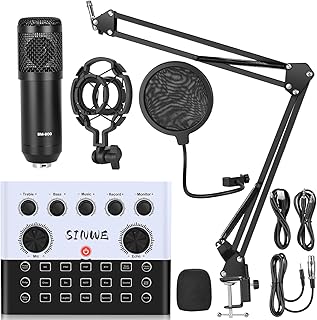
The SINWE F993 bundle combines a sound card with a BM-800 condenser microphone, scissor arm, shock mount, pop filter, and windscreen. Its listed features include four voice effects, 10 audio effects, and controls for treble, bass, music, and monitoring levels. The maker describes it as plug-and-play and lists PC, Mac, iOS, and Android use.
Best for: New streamers or podcasters looking for a microphone, sound card, and basic mounting accessories in one bundle. Its voice presets and built-in effects suit creators who want to alter or add sounds during content creation.
Why it stands out: The accessory package covers several common setup components, and the listed connectivity options include USB or 3.5 mm connections for supported devices.
Consideration: The product information says phones without a 3.5 mm jack require an OTG adapter, which is not included. Check the connection requirements of your device before buying.
Buying Guide: How To Choose An All-In-One Podcast Studio
“All-in-one podcast studio” can describe very different setups. Some products combine inputs, effects, and recording controls in a standalone unit. Others bundle a microphone, interface, headphones, or mounting accessories. Start by identifying which parts of the recording chain you need included.
Do you need a standalone console or a computer-based setup?
A standalone console can reduce reliance on a computer during recording. The RØDECaster Pro II is specifically listed as able to work without a computer and record to microSD or USB, as well as multitrack to a computer. In contrast, the Focusrite bundle is a USB-C interface package for connecting recording equipment to a computer-based workflow.
For a simple streaming setup, a sound card bundle may provide effects and controls in one package. Check the connection method and device requirements, especially if you plan to use a phone. “All-in-one” does not always mean that every accessory or adapter is included.
How many people will record at once?
Count the number of hosts or guests who need microphones at the same time. The RØDECaster Pro II lists four XLR microphone inputs. The Brvomussy bundle lists two microphones and support for two people broadcasting at once. The Focusrite Scarlett Solo bundle is oriented toward solo recording.
A microphone kit such as the FIFINE K688CT is centered on one microphone. It can be a straightforward choice for one host, but buyers planning a group show should check how additional microphones will connect and whether the selected interface has enough inputs.
Which microphone connection should you choose?
USB can make a microphone easier to connect directly to a computer, while XLR is used with an audio interface or mixer that accepts that connection. The FIFINE microphone offers both USB and XLR, giving it two connection options. The Focusrite bundle includes an interface and microphone, creating a different kind of bundled recording path.
Before selecting a kit, confirm that the microphone, interface, and intended recording device can connect as required. A product that includes a microphone does not necessarily include every cable, adapter, or accessory needed for a particular device.
Do built-in effects matter for your show?
Sound pads, voice effects, and processing can be useful for live shows, interviews, or streams that include clips and audience-style sounds. The RØDECaster Pro II lists sound pads, effects, and APHEX processing presets. The Brvomussy and SINWE bundles list voice-changing and sound-effect features.
For straightforward spoken-word recording, prioritize microphone placement, connection needs, and the number of inputs before choosing based on effects. If you expect to use effects, look at the specific controls included and whether they match your intended workflow.
What should be included in the box?
Make a checklist of required components: microphone, headphones, interface or mixer, stand or boom arm, pop filter, and device adapters. The Focusrite package lists a microphone and headphones. The FIFINE kit lists a boom arm. The SINWE package lists a microphone, scissor arm, shock mount, pop filter, and windscreen.
Compare that checklist with the product description and the equipment you already own. For phone recording, verify the port and adapter requirements. For a desk setup, consider whether the included mount fits your intended workspace; the product information should be checked for specific mounting details.
Frequently Asked Questions
What is an all-in-one podcast studio?
It is a recording setup that combines several podcasting functions or components, such as microphone inputs, audio controls, effects, a microphone, or headphones. The exact contents vary, so check whether a product is a standalone console or a bundled kit.
Which option is best for recording without a computer?
The RØDECaster Pro II is listed as able to work standalone without a computer and record to microSD or USB drive. It also supports multitrack recording to a computer.
Which product is best for a two-person podcast?
The Brvomussy bundle is listed with two microphones and support for two people broadcasting at once. It is the clearest fit in this selection for buyers seeking a two-microphone live-streaming package.
Is a USB microphone kit enough to start podcasting?
A USB microphone kit can provide a microphone and some mounting or control features, but it may not include every component needed for a complete studio. The FIFINE kit includes a microphone and boom arm, but it is not a multi-input production console.
Can I use these podcast bundles with a phone?
Device support depends on the specific bundle and connection. The SINWE listing specifies iOS and Android support, but says an OTG adapter is needed for phones without a 3.5 mm jack and that the adapter is not included. Check the connection requirements before ordering.
Should I choose a bundle with voice effects?
Choose voice effects if changing voices or triggering sounds is part of your show or stream. If your priority is clean, straightforward speech recording, compare microphone and input requirements first; built-in effects may not be essential.