
The best Android tablet guitar interface depends on whether you need simple recording, headphone monitoring, or a more feature-rich connection. The KYXAIN is a strong fit for buyers who want stated 24-bit/48 kHz recording and headphone monitoring; the JOYO is suited to players seeking a compact interface with direct monitoring; and the Ueteto is a basic option for beginner recording and streaming. Check your tablet’s USB connection and app support before buying, because compatibility can vary.
| Interface | Best suited for | Key point |
|---|---|---|
| KYXAIN Pocket Interface | Recording with headphone monitoring | 24-bit/48 kHz audio is listed |
| JOYO MOMIX CAB | Portable monitored practice | Direct monitoring and USB-C connection |
| Ueteto Guitar Interface | Basic beginner recording | Plug-and-play; Android OTG may be needed |
| Bluetooth Pocket Interface | Buyers considering a compact, wireless-featured model | Confirm the full connection details first |
| IK Multimedia iRig USB | Buyers prioritizing stated audio specifications | Android tablet support is not specified |
KYXAIN Pocket Guitar Interface

Best for: Android tablet users who want a compact interface with stated recording specifications and a headphone output. KYXAIN lists 24-bit/48 kHz recording, a 1/4-inch (6.35 mm) input for electric guitar or bass, and a 1/8-inch (3.5 mm) headphone output for monitoring.
The product description says it connects through USB-C and includes a Lightning-to-USB-C adapter for iPad and iPhone. It also describes low-latency digital audio processing and compatibility with most live-streaming apps. Recording is its stated function; editing and mixing are not included.
Why it was selected: The listed input, headphone output, and audio specification make it one of the clearest choices for guitarists who want to record or monitor from a mobile setup.
Limitation: App compatibility is not universal, and the interface does not provide editing or mixing functions. Verify that your Android tablet and preferred app support the connection.
JOYO MOMIX CAB Interface

Best for: Players who want a pocket-size guitar interface with direct monitoring and a headphone connection. The product name lists a 6.35 mm input, a 3.5 mm headphone output, and USB-C and Lightning plug options.
Direct monitoring is useful when you want to hear your guitar signal through headphones while connecting to a phone or tablet. Its compact format may also suit a simple travel or practice setup. The listed USB-C connection makes it a candidate for a USB-C Android tablet, but the product details provided do not specify Android tablet or app compatibility.
Why it was selected: It combines the core guitar input and headphone-monitoring features many mobile players look for, while offering a portable form factor.
Limitation: Confirm that the included connection option works with your tablet. The available product information does not provide recording resolution, app support, or detailed Android compatibility.
Ueteto Portable Guitar Interface
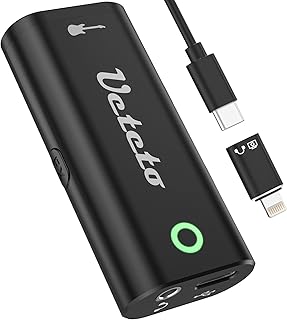
Best for: Beginners who need a small interface for straightforward guitar recording or live streaming. Ueteto describes the device as plug-and-play, portable, and compatible with Android phones, iPhones, and iPads. A USB-C cable and Lightning converter are included, and the product does not require charging.
This is a basic recording interface rather than a complete production tool. Its listing says it records but does not provide editing or mixing. The seller also warns that it is not compatible with every app and specifically says it is not compatible with GarageBand.
Why it was selected: The stated Android support and simple, portable setup make it relevant to buyers looking for an uncomplicated mobile recording option.
Limitation: Android users may need to turn on OTG, and app support is limited. Check your tablet’s OTG settings and the intended app before choosing it.
Bluetooth Pocket Guitar Interface
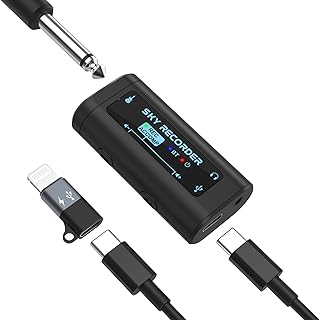
Best for: Buyers comparing compact interfaces that advertise Bluetooth and Android compatibility. The product name also lists iPhone, Mac, and laptop compatibility, as well as recording, streaming, and playing uses.
The information available for this model is limited to its product name. It does not specify the guitar input size, headphone monitoring, recording resolution, power method, or how Bluetooth relates to the audio connection. Those details matter because a wireless feature does not, by itself, confirm that the guitar signal can be monitored or recorded wirelessly in a particular Android app.
Why it was selected: Its stated Android compatibility makes it relevant to the search, and its Bluetooth designation may appeal to shoppers comparing feature sets.
Limitation: Confirm the full connection method and required accessories before purchase. Do not assume Bluetooth replaces a wired guitar input or guarantees low-latency monitoring.
IK Multimedia iRig USB

Best for: Buyers who want a guitar interface with stated 24-bit/48 kHz recording, direct monitoring, and an amp output, and who use a listed compatible device. The product description lists Mac, PC, iPad, and iPhone 15 compatibility through USB-C.
Its headphone output supports silent practice, while its dedicated amp output connects to an amp and pedal rig. The listing also describes selectable FX (processed) or THRU (direct) settings. These features give it more specified routing options than a simple record-only interface.
Why it was selected: It offers clear audio specifications and monitoring and amp-output features that may suit a more flexible recording or practice setup.
Limitation: Android tablet compatibility is not stated in the supplied product details. The listing says it will not work properly with a Lightning cable, so buyers should verify both device support and the required connection before choosing it for Android.
Buying Guide: Choosing An Android Tablet Guitar Interface
Will the interface connect to your Android tablet?
Start with the tablet’s physical port. Many newer Android tablets use USB-C, but port shape alone does not guarantee that an audio interface will work. Check the product’s Android support, required cable or adapter, and whether your tablet supports USB audio or OTG when the manufacturer calls for it. The Ueteto listing specifically says Android users may need to enable OTG.
Do not treat iPhone or iPad compatibility as proof of Android compatibility. For example, the iRig listing names Mac, PC, iPad, and iPhone 15, but does not name Android. If Android support is not clearly stated, confirm it with the seller or manufacturer before buying.
Do you need recording, monitoring, or both?
A recording interface sends the guitar signal to an app. Headphone monitoring lets you listen while playing, and direct monitoring refers to hearing the input signal through the interface rather than relying only on the app’s monitored signal. If you plan to practice quietly or record while listening, look for a listed headphone output or direct-monitoring feature.
For a basic recording task, a simple interface may be enough. If you want to connect headphones or an amp, choose a model that explicitly lists those outputs. Do not assume every pocket interface includes them; compare the stated connections for each product.
Which guitar input and cables should you check?
Electric guitars and basses commonly use a 1/4-inch instrument cable. Confirm that the interface has a matching input; the KYXAIN and JOYO product names or descriptions identify a 6.35 mm input. Also check what connects the interface to the tablet. A USB-C cable, a Lightning adapter, and a compatible data connection are not interchangeable in every setup.
Before ordering, list the connections you need: guitar to interface, interface to tablet, and interface to headphones or amp if required. Check whether the relevant cable or adapter is included rather than assuming it comes in the box.
Are you recording in an app or live streaming?
Mobile interfaces depend on software as well as hardware. Check that the Android app recognizes an external audio input and supports your intended task. The Ueteto listing warns that it does not work with every app and excludes GarageBand. The KYXAIN listing says it works with most live-streaming apps but does not provide a complete app list.
Also distinguish recording from editing. A simple interface may capture sound without mixing or editing tools. If you need to trim takes, add effects, or combine tracks, confirm that your Android app supplies those functions or choose separate production software.
What does audio resolution tell you?
Audio resolution is one specification to compare, not a guarantee that an interface will suit every use. The KYXAIN and IK Multimedia listings state 24-bit/48 kHz recording. Other supplied product details do not provide a resolution. A missing specification should be treated as unknown, not as evidence that the product performs better or worse.
For a beginner, reliable device and app compatibility may matter more than a specification on its own. First establish that the tablet can connect and the app can record; then compare listed audio features.
When should you choose a simpler interface?
Choose a basic pocket interface if your main goal is to connect a guitar to a supported mobile app for recording or streaming. A small, no-charging design can reduce setup steps, as stated for the Ueteto. Choose a model with direct monitoring, a headphone output, or an amp output when those functions are part of your routine.
Avoid choosing solely by terms such as “plug and play” or “Bluetooth.” Check the exact cable path, supported devices, and monitoring options. These details determine whether the product fits your tablet and playing setup.
Frequently Asked Questions
Can I connect an electric guitar directly to an Android tablet?
Yes, if you use a compatible guitar audio interface and the tablet and recording app support its connection. Check the guitar input, USB connection, Android support, and any OTG requirement.
Do Android tablet guitar interfaces need an app?
Usually, you need an app to record, stream, or process the input. An interface carries the audio signal, but it may not include editing or mixing software. Confirm that your preferred Android app recognizes external audio.
Does a USB-C interface work with every Android tablet?
No. USB-C describes the connector, not guaranteed compatibility. Tablet support, interface requirements, cable type, and app support can affect whether the setup works.
Can I use headphones while recording guitar?
Yes, if the interface provides a headphone output and supports monitoring. The KYXAIN and JOYO listings identify headphone outputs; check whether your chosen model provides the monitoring method you need.
Is Bluetooth enough for a wireless guitar connection?
Not necessarily. A product’s Bluetooth label does not explain how the guitar input, recording signal, or monitoring works. Verify the complete connection method and app support before relying on wireless use.
Which option is best for a beginner?
The Ueteto is described as a simple beginner recording interface with Android phone support, but the listing warns that OTG may need to be enabled and that app compatibility is limited. Check whether your tablet and recording app are supported before choosing it.