
The best at-home recording microphone depends on your setup: the FIFINE T669 is best for a straightforward USB recording kit, the Logitech Blue Yeti suits people who want multiple pickup patterns, and the MXL 990 is an option for buyers considering a condenser microphone. Two bundled microphone-and-isolation-shield kits may appeal to shoppers who want recording accessories included. Compare connection type, intended use, and included equipment before choosing.
| Microphone | Best For | Key Consideration |
|---|---|---|
| FIFINE T669 | USB podcasting and voice recording | USB connection to PC or laptop |
| Logitech Blue Yeti | Multiple recording scenarios | Four pickup patterns |
| MXL 990 Blaze | Buyers considering a condenser mic | Check connection and setup requirements |
| Studio Mic With Isolation Shield | A bundled recording setup | Includes a shield, pop filter, and tripod stand |
| Upgraded Studio Mic With Shield | Home recording with bundled accessories | Verify device and connection details |
FIFINE T669 USB Condenser Microphone

The FIFINE T669 is a USB condenser microphone kit for recording, podcasting, and computer-based voice audio. Its listed features include direct plug-and-play USB connection to a PC or laptop, a cardioid condenser capsule, a boom arm, an 8.2-foot USB cable, and a double-layer pop filter.
Best for: Newer home-recording users who want a mic and positioning accessories in one kit. The USB connection is intended to simplify setup without additional hardware or drivers on a compatible PC or laptop. The adjustable arm provides more positioning options than a fixed desktop stand.
Limitation: The listed details say it is incompatible with Xbox. The supplied connection information specifically describes PC and laptop use, so check the requirements for any other device before buying.
Logitech Blue Yeti USB Microphone

The Blue Yeti is a USB condenser microphone listed for PC, Mac, gaming, streaming, podcasting, and studio use. Its product information highlights four pickup patterns, plug-and-play operation, and Blue VO!CE effects. Multiple pickup patterns give buyers options to consider for different recording arrangements, rather than limiting the microphone to one stated pattern.
Best for: A home creator who records more than one kind of content and values a choice of pickup patterns. It is a better fit than a single-pattern model when the user expects to change recording arrangements and wants the listed software effects.
Limitation: The supplied product details do not specify which four patterns are included or explain their individual uses. Review the current product information to confirm that its controls and connection meet your recording needs.
MXL 990 Blaze Condenser Microphone
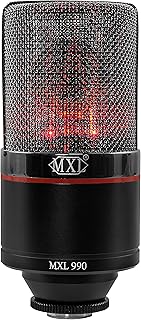
The MXL 990 Blaze is identified in the supplied listing as a condenser microphone. That makes it relevant to shoppers comparing condenser models for an at-home recording setup. However, the provided product information does not specify its connection, included accessories, or operating requirements.
Best for: Buyers who are already comparing condenser microphones and are prepared to verify the complete setup before purchasing. It may be a candidate when the buyer has confirmed that the mic’s connection and power requirements fit existing equipment.
Limitation: The available listing details are limited. Do not assume it connects directly to a computer or includes a stand, cable, or other recording accessories without checking the full current product description.
Studio Recording Mic With Shield And Tripod

This studio recording microphone listing names an isolation shield, pop filter, and metal tripod stand as part of the product package. It is also marketed for recording singing and podcasting, with PC, laptop, and smartphone mentioned in the title. Those details make it a bundle-oriented option for buyers looking for a microphone and accessories together.
Best for: A shopper who prefers a microphone kit with a shield, pop filter, and tripod rather than sourcing each item separately. Choose this if those included accessories match your workspace and the seller’s full connection information confirms compatibility with your device.
Limitation: The supplied details do not explain the connection type or the specific smartphone and computer requirements. Confirm what adapters or cables are included before relying on the title’s device references.
Upgraded Studio Mic With Isolation Shield

This listing describes an upgraded studio recording microphone with an isolation shield and pop filter. It is marketed for podcasting, singing, and home-studio use, and names PCs, laptops, and smartphones as intended sound sources or devices. The listed title supports comparing it with other bundled kits, particularly when included accessories are a priority.
Best for: Home creators who want to consider a microphone bundle with a shield and pop filter for vocal recording. It may be a better fit than buying a microphone alone if the included accessories suit the intended recording position.
Limitation: The provided product data does not state the connection standard, cable details, or device-specific setup steps. Check those details before buying, especially if you plan to record directly to a phone.
Buying Guide: How To Choose an At-Home Recording Mic
Which connection works with your recording device?
Start with the device and application you plan to use. USB microphones can connect directly to a compatible computer, as the FIFINE listing describes for PC and laptop use. This can make setup simpler than a microphone that requires additional audio equipment. Still, USB does not guarantee compatibility with every computer, phone, game console, or recording app.
For a smartphone, check the exact connection and any required adapter before ordering. Product titles may mention phone use without explaining which phone models, ports, or accessories are needed. If a product listing does not state its connection type, treat that as an open question rather than assuming it is USB.
Do you need a single pickup pattern or several?
A microphone’s pickup pattern describes the direction or area from which it captures sound. The Blue Yeti listing specifies four pickup patterns, while the FIFINE T669 listing specifies a cardioid capsule. Consider how you record: a solo speaker may prioritize a focused voice setup, while a creator who changes recording arrangements may value pattern choices.
Do not select a microphone based only on the number of patterns. Look for the pattern names and instructions in the complete product information, then compare them with your intended use. The supplied details do not identify all the Blue Yeti patterns, so buyers should confirm which modes are available and how to select them.
Will a condenser microphone suit your room?
Several products here are described as condenser microphones. Room noise matters when choosing and positioning a mic: a computer fan, traffic, household activity, and room echo can all affect a home recording. A microphone accessory such as a pop filter is intended to help with plosive bursts from speech, but it does not make a room soundproof.
An isolation shield is an included accessory in two of the listed bundles. Compare the shield’s size and setup requirements in the full listing, and avoid assuming it will eliminate all background noise. Close microphone placement, a quieter recording time, and careful room positioning can also be part of a practical setup.
Which accessories are useful for your workflow?
- Pop filter: Consider one if you record close-up speech or vocals and want an accessory designed to reduce plosive air bursts.
- Boom arm: The FIFINE kit lists an adjustable boom arm, which can help position the microphone at a chosen height and angle.
- Tripod stand: One shield bundle lists a metal tripod stand. Check whether its footprint and height suit your desk.
- Isolation shield: Two microphone listings include one, but verify its dimensions and mounting method before planning your workspace.
- Cable and adapters: Confirm what is included and whether it matches the ports on your computer or phone.
What should beginners prioritize?
For a first home recording setup, prioritize a clear connection path, a stable way to position the microphone, and compatibility with the device and software you intend to use. A kit with a cable and stand can reduce the number of separate accessories to select. The FIFINE listing specifically includes a USB cable, boom arm, and pop filter; other listings need to be checked for equivalent package details.
Ease of setup is not the same as guaranteed sound quality in every room. Speaking distance, microphone angle, recording levels, and background noise remain important. Choose a model whose listed features address your workflow, rather than relying on broad phrases such as “studio quality” in a product title.
How should you compare bundled kits with standalone microphones?
A bundle may be convenient if it includes accessories you need, but check each item rather than judging the package by its title. Confirm the microphone connection, cable, stand type, and whether accessories are included. A standalone microphone may be a better fit if you already own suitable supports or prefer to select accessories separately.
Compare the total setup requirements as well as the microphone itself. A model that needs extra equipment can involve more steps than a direct USB option. Conversely, a USB model may not fit a workflow that calls for a different connection. The best choice is the one whose documented requirements align with the recording device and setup you have.
Frequently Asked Questions
What is a good at-home recording microphone for beginners?
The FIFINE T669 is a practical option to compare for beginners recording on a compatible PC or laptop because its listing describes USB plug-and-play setup and includes a boom arm, cable, and pop filter. Confirm device compatibility before buying.
Is a USB microphone suitable for podcasting?
A USB microphone can suit computer-based podcasting when it is compatible with the computer and recording software. The FIFINE T669 and Logitech Blue Yeti listings describe USB use for podcast-related applications.
Do I need an isolation shield to record at home?
No. An isolation shield is an optional accessory, not a requirement for recording at home. It does not guarantee that a recording will be free of room noise, so evaluate the room and the shield’s dimensions before choosing a bundle.
Can I use these microphones with a smartphone?
Some product titles mention smartphone use, but the supplied details do not establish exact phone compatibility or required adapters for every model. Check the full listing for the connection type and device-specific setup instructions.
What is the difference between a pop filter and an isolation shield?
A pop filter is an accessory intended to reduce plosive air bursts during close speech or singing. An isolation shield is a separate accessory included in some bundles. They serve different purposes, and neither should be treated as a guarantee against all unwanted sound.
What should I check before ordering a microphone kit?
Verify the connection type, supported devices, included cable, stand or arm, and any adapters required. Also check the dimensions and mounting details for bundled accessories so they fit your desk and recording position.