
If you need to rewind a cassette, the TOMASHI portable cassette player is the clearest match in this selection because its listed controls include rewind and fast-forward. The other products are cassette players, converters, or blank tapes—not dedicated standalone rewinders. Use the comparison below to choose an option based on whether you need tape transport, playback, or digitizing rather than a rewind-only device.
| Product | Best suited for | Rewind information provided |
|---|---|---|
| TOMASHI Portable Cassette Player | Portable playback and basic tape controls | Rewind and fast-forward buttons are listed |
| Auto Reverse Stereo Cassette Player | Listening and cassette-to-MP3 conversion | Auto reverse is listed; a separate rewind control is not specified |
| ClearClick Cassette-to-USB Converter | Making MP3 copies without a computer | Rewind control details are not provided |
| Reshow Cassette-to-Digital Player | Listening or converting tapes with a computer | Rewind control details are not provided |
| Maxell UR 90 Blank Cassettes | Recording audio onto new tapes | Blank media; not a rewinder or player |
TOMASHI Portable Cassette Player
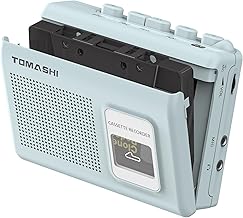
Best for: Someone who wants a compact cassette player with explicitly listed rewind and fast-forward controls. Of the products provided, this is the strongest match for a buyer searching for an audio cassette tape rewinder, although it is a multifunctional player rather than a dedicated rewind-only unit.
The TOMASHI model measures 4.57 by 3.54 by 1.38 inches, according to its product name. Its listed features include rewind, fast-forward, stop, play, and record buttons. It has a built-in speaker, a headphone mode, and a built-in microphone for recording. The automatic stop system releases the play button when a tape reaches its end, which the listing describes as a way to reduce unnecessary tape and mechanism wear.
Why it was selected: It is the only provided listing that directly names a rewind control. Choose this if you need a portable unit that can rewind tapes and also play or record audio.
Limitation: The product is not described as a dedicated high-speed rewinder. Its automatic stop feature is specified for the end of playback; the listing does not explain what happens at the end of rewind.
Auto Reverse Stereo Cassette Player

Best for: Buyers who want a cassette player with an auto-reverse feature and a way to convert tapes to MP3. The product name also lists a copper-wheel movement, earphone, conversion software, and power by USB cord or AA battery.
Auto reverse can be useful for listening because the player is described as reversing tape direction. However, the provided information does not say that this model has a dedicated rewind button or a fast-rewind mode. Auto reverse and rewind are different functions: reverse playback changes direction for listening, while rewinding moves the tape back toward its beginning.
Why it was selected: It combines tape playback with digital conversion and may suit someone who wants more than a basic transport device. Choose it if those features matter more than a confirmed, standalone rewind function.
Limitation: Do not assume auto reverse means the unit can rapidly rewind a tape. Check the product controls and instructions if rewind is the main requirement.
ClearClick Cassette-To-USB Converter

Best for: People whose main goal is transferring cassette audio to digital files, not buying a dedicated rewinder. The listed package includes a 16 GB USB drive, and the converter saves recordings as MP3 files directly to USB.
The ClearClick is described as requiring no computer, software, or drivers for setup. Its automatic track-splitting mode can divide recordings into individual MP3 files. These features make it a practical choice for digitizing a cassette collection when a computer-based transfer workflow is not desired.
Why it was selected: It addresses a common reason people handle old tapes: preserving their audio in a digital format. It is more suitable for conversion than for buyers who only need to rewind tapes.
Limitation: The supplied product details do not specify rewind controls, rewind speed, or whether the device can be used as a standalone player. Confirm transport functions before choosing it for tape handling alone.
Reshow Cassette-To-Digital Player

Best for: Buyers who want to listen to standard cassettes and convert them to MP3 through a USB connection to a laptop or personal computer. The listed description calls it lightweight and compact and says it works with standard headphones.
The Reshow player also has a 3.5 mm AUX connection, which the listing says can connect to earbuds, headphones, or a car stereo with a suitable input. Its conversion function is described as transferring cassette audio to digital format through USB. This makes it a better fit for listening and computer-assisted conversion than for rewind-only use.
Why it was selected: It combines cassette playback with a digital preservation option and offers several listed audio connection uses.
Limitation: The supplied features do not state that the unit includes a rewind button, automatic reverse, or fast-rewind capability. If you need to reposition tapes, verify those controls rather than relying on its conversion description.
Maxell UR 90 Blank Cassette Tapes

Best for: People looking for blank media for everyday music or voice recording. This five-pack is not a rewinder, cassette player, or tape converter, but it is relevant if the reason for searching is recording or replacing cassette media.
The listed features identify the tapes as normal-bias audio cassettes with a 90-minute recording time. The product description also notes a low-noise surface and says the tapes are intended for everyday recording. A blank cassette can be used in a compatible cassette recorder, but the product listing does not provide a recorder or rewind mechanism.
Why it was selected: It covers the recording-media side of cassette use and helps distinguish a tape supply from a device that moves or plays tape.
Limitation: This is a pack of blank tapes only. Choose a player or recorder separately if you need to rewind, record, or play audio.
Buying Guide: How To Choose A Cassette Rewinder
Do you need a dedicated rewinder or a cassette player?
A dedicated cassette rewinder is designed primarily to move tape back or forward without playing it through a full listening setup. A cassette player may include rewind as one of several transport controls, but its speed and operation can differ. If quick tape repositioning is your only need, look for a listing that explicitly says “rewinder” or clearly documents fast rewind. Among the products here, only the TOMASHI listing explicitly names a rewind button.
Do not treat “auto reverse” as proof of rewind. Auto reverse changes playback direction so a tape can play on its other side. Rewind moves the tape toward the start of a side. Product descriptions should identify the specific function you need.
Will you use the device for playback too?
If you want to listen to tapes as well as reposition them, a portable player with physical transport buttons may be more useful than a rewind-only unit. The TOMASHI listing includes play, stop, fast-forward, rewind, and record controls, plus a built-in speaker and headphone listening. The auto-reverse model is described as a player and converter, but the supplied details do not confirm a separate rewind control.
For listening, check how the product outputs audio. A built-in speaker is useful when you do not want to wear headphones. Headphone and AUX connections suit private listening or connection to compatible audio equipment, but verify the ports and required cables in the listing before buying.
Are you trying to preserve tapes digitally?
Choose a converter when your priority is making digital copies rather than rewinding. ClearClick is listed as recording MP3 files to a USB flash drive without requiring a computer, software, or drivers, and it includes automatic track splitting. Reshow is described as converting tapes through a USB cable to a laptop or personal computer. The auto-reverse player also lists tape-to-MP3 conversion software.
Conversion devices still need to handle tape transport during playback, but the provided feature lists do not confirm their rewind controls. If you need both digitizing and reliable rewind operation, check the exact controls and instructions before purchase.
What should you check before ordering?
- Transport controls: Confirm that rewind is explicitly listed. Look for separate play, stop, fast-forward, and rewind functions if you need full control.
- Purpose: Decide whether you need rewinding, listening, recording, or MP3 conversion. These are related tasks, but not interchangeable features.
- Power: The auto-reverse model lists USB-cord or AA-battery power. Check the chosen model’s listed power method and whether required accessories are included.
- Audio connections: Compare built-in speakers, headphone support, USB transfer, and AUX input based on how you plan to use the device.
- Tape condition: A rewind device cannot repair damaged or tangled tape. Handle fragile cassettes carefully and stop if the tape binds or does not move normally.
- Recording supplies: Blank tapes such as the Maxell UR 90 pack are media, not machines. Confirm that you already have an appropriate recorder if you plan to record on them.
Which option is most appropriate for each buyer?
| Buyer priority | Most relevant listed option | Reason |
|---|---|---|
| Explicit rewind and fast-forward controls | TOMASHI portable cassette player | Those controls are named in the supplied features |
| Playback with auto reverse | Auto Reverse Stereo Cassette Player | Auto reverse is named, though rewind is not confirmed |
| MP3 files saved to USB without a computer | ClearClick converter | The listing specifies USB storage and no-computer setup |
| USB conversion through a computer | Reshow player | The listing describes conversion via USB to a laptop or PC |
| Blank recording media | Maxell UR 90 tapes | The pack contains five 90-minute normal-bias cassettes |
Frequently Asked Questions
What is the difference between a cassette rewinder and auto reverse?
A rewinder moves tape back toward the beginning of a side. Auto reverse changes tape direction for playback so the other side can be played. One feature does not necessarily provide the other.
Which listed product explicitly includes rewind?
The TOMASHI portable cassette player lists rewind and fast-forward buttons. The other supplied product descriptions do not explicitly confirm a rewind control.
Can a cassette-to-MP3 converter also rewind tapes?
It may have tape transport controls, but the supplied descriptions for the ClearClick, Reshow, and auto-reverse converter do not establish their rewind functions. Check the product’s control details before relying on it as a rewinder.
Is a blank cassette a cassette rewinder?
No. The Maxell UR 90 pack contains blank recording tapes. It does not play, rewind, or record audio by itself.
What should I buy if I only need to rewind tapes?
Look for a product specifically described as a cassette rewinder, or choose a player whose listing clearly confirms rewind and the type of rewind operation you need. From this selection, the TOMASHI is the closest match because rewind is explicitly listed.
Does a rewind button guarantee that a device is a high-speed rewinder?
No. A listed rewind button confirms a rewind control, but it does not establish the device’s speed or that it is designed as a dedicated high-speed rewinder. Check the manufacturer’s product details for those specifications.