
The best choice for surround sound depends on whether you need multichannel playback, an optical-audio decoder, or a recording interface. The StarTech adapter is a practical pick for computer-based 7.1 playback, while the SOUTHSKY decoder is designed to convert optical or coaxial digital audio to analog outputs for an older receiver. The Focusrite Scarlett Solo is better suited to recording a microphone or instrument than to driving a surround speaker system.
| Product | Best suited for | Key capability |
|---|---|---|
| StarTech 7.1 USB Audio Adapter | PC or laptop surround playback | Up to 7.1 audio, SPDIF, and analog 3.5mm connections |
| Focusrite Scarlett Solo 3rd Gen | Single-mic or instrument recording | One XLR mic preamp and one Hi-Z instrument input |
| SOUTHSKY 5.1/2.1 Audio Decoder | Connecting a digital source to an older receiver | Optical or coaxial input to six RCA outputs |
| Cubilux 7.1 USB Surround Sound Card | Computer audio with line-in and stereo mic input | USB-A connection and stated 7.1 support |
| USB 2.0 6-Channel Sound Card | Basic PC 5.1 output | Six-channel audio and S/PDIF |
StarTech 7.1 USB Audio Adapter

This external USB sound card is the most direct match for a buyer looking to add surround playback to a laptop or desktop. The listed capabilities include up to 7.1 surround sound, digital S/PDIF, and analog 3.5mm connections. It may suit a setup where the computer needs an external audio device rather than relying on built-in audio ports.
Best for: PC and laptop users who want a USB-connected sound adapter with both digital and analog connection options. It was selected because its stated 7.1 support aligns directly with surround-sound playback needs.
Choose this if you need a computer-oriented adapter and want to compare S/PDIF and analog connection options. Limitation: The product name does not specify which speaker configurations or operating-system settings are required, so check the computer and speaker instructions before buying.
Focusrite Scarlett Solo 3rd Gen

The Scarlett Solo is a recording interface, not a dedicated surround decoder. Its listed features include one XLR microphone preamp, one Hi-Z instrument input, 24-bit/192kHz audio, a 56dB gain range, and Air Mode. The product listing names macOS, Windows, and iPadOS compatibility.
Best for: A musician, podcaster, or creator recording one microphone and one instrument at a time. It was included to clarify an important distinction: an audio interface can be useful in a surround-related workflow without providing 5.1 or 7.1 speaker outputs.
Choose this if recording is your priority and you need the listed mic and instrument inputs. Avoid this if your main goal is to connect a multichannel speaker system; the product information provided does not describe surround outputs.
SOUTHSKY 5.1/2.1 Digital Audio Decoder
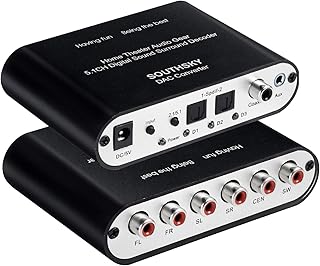
This decoder is intended to convert optical S/PDIF or coaxial digital audio to analog outputs. Its name specifies 5.1 and 2.1 channel modes and six RCA outputs, with older AV receivers identified as a target use. That makes it a different kind of product from a USB sound card: it connects digital audio equipment to analog receiver inputs.
Best for: Someone with a digital-output source and an older receiver that accepts analog RCA connections. It was selected for its stated digital-to-analog conversion and explicit 5.1/2.1 purpose.
Choose this if your source provides optical or coaxial audio and your receiver needs analog inputs. Limitation: The product details provided do not identify supported audio formats or explain whether a particular source sends a compatible multichannel signal. Confirm those details for your equipment.
Cubilux 7.1 USB Surround Sound Card

The Cubilux is a USB-A external sound card described as supporting 7.1 surround sound. The product name also lists a 48kHz–384kHz sample-rate range, line-in, and stereo microphone input. Its full aluminum-alloy construction is another stated feature, though the listing information supplied does not establish how those specifications work with any particular computer or application.
Best for: A computer user who wants a USB-A sound card with stated surround capability and additional line-in and stereo mic connections. It was selected as an alternative to the StarTech adapter for buyers comparing external USB options.
Choose this if the listed USB-A connection and inputs match your setup. Limitation: The high sample-rate figure alone does not guarantee that surround audio will work in every operating system or program. Verify the supported channel configuration before purchase.
USB 2.0 6-Channel 5.1 Sound Card

This USB 2.0 external sound card is described as a six-channel 5.1 surround adapter for PC, with S/PDIF audio. Its stated use makes it a straightforward option to compare when a computer needs multichannel output and the target system is 5.1 rather than 7.1.
Best for: PC owners looking for an external adapter specifically identified as six-channel 5.1. It was selected because its channel count and stated surround format make its intended role easy to distinguish from recording interfaces and digital-to-analog decoders.
Choose this if your setup needs 5.1 output and the listed USB 2.0 connection fits your computer. Limitation: The product name does not provide detailed connector layouts, channel-configuration steps, or operating-system support. Check those requirements before relying on it for a specific speaker system.
Buying Guide: How To Choose A Surround-Sound Audio Device
Do you need playback, conversion, or recording?
Start by identifying the job the device needs to do. A USB sound card can add audio connections to a computer. A digital decoder takes an optical or coaxial signal and converts it to analog outputs. A recording interface provides inputs for microphones and instruments. These categories overlap in broad audio workflows, but they are not interchangeable.
For computer-based surround playback, compare the StarTech and Cubilux options, which are both described as USB surround devices. The six-channel USB adapter is specifically identified as 5.1. For a source with optical or coaxial output and a receiver with RCA inputs, consider the SOUTHSKY decoder instead. For recording, the Scarlett Solo’s listed inputs are more relevant than surround channel count.
Should you choose 5.1 or 7.1?
Match the device to the speaker system and the audio source. A 5.1 system uses six audio channels, while 7.1 adds two channels. The products here are described as supporting either up to 7.1 or 5.1, but a device’s label alone does not confirm that every application or source will send discrete surround audio. Check the computer’s output settings, the application’s audio options, and the speaker or receiver inputs.
Which connection does your equipment require?
- USB: Consider a USB sound card when the computer is the source and needs an external audio connection.
- Optical or coaxial: Consider a decoder when the source sends digital audio through one of these connections.
- Analog RCA: Check whether the receiver accepts the decoder’s listed RCA outputs.
- 3.5mm: Confirm that the sound card’s analog connections match the cables and input arrangement in your setup.
Do not assume that a connector guarantees a specific channel format. Confirm the signal format supported by the source, the device, and the receiving equipment.
What should you verify before buying?
- Confirm whether you need 5.1 or 7.1 channels.
- Check the number and type of inputs and outputs against your cables and receiver.
- Verify operating-system and application support from the product documentation.
- For a decoder, confirm that its input signal and output type match the source and receiver.
- For recording, count the microphone and instrument inputs you need; do not select a recording interface based on a surround-sound label alone.
These checks help prevent a common mismatch: buying a device with the right general purpose but the wrong connection type or channel configuration. Product names provide useful starting points, but the full specifications should settle compatibility questions.
Frequently Asked Questions
Can a regular audio interface output 5.1 surround sound?
Not necessarily. Many recording interfaces are designed for microphone and instrument recording rather than multichannel speaker output. Check the interface’s documented output channels and connections. The Scarlett Solo listed here is described with one mic preamp and one instrument input, not surround outputs.
Is a USB sound card the same as a digital audio decoder?
No. A USB sound card connects to a computer and provides audio functions through USB. A digital decoder such as the SOUTHSKY is described as converting optical or coaxial digital audio to analog RCA outputs. Choose based on the source and receiver connections.
Does 7.1 support mean every movie will play in 7.1?
No. The source, application, operating-system settings, device, and speaker system must all support the intended channel format. Check the settings and documentation for each part of the chain.
What does six-channel audio mean for a 5.1 system?
A 5.1 system is commonly described as six channels: five main channels and one low-frequency effects channel. Confirm that the product’s outputs and the receiver’s inputs support the configuration you plan to use.
Which option is best for connecting an older AV receiver?
The SOUTHSKY decoder is the most directly targeted option here if the source has optical or coaxial output and the receiver accepts analog RCA inputs. Verify compatible signal formats and connections before buying.