
Best Audio Mic Extension Cables for Flexible Setups
Answer: An audio mic extension cable adds reach between your headset, mic, or speaker system and the host device, improving comfort and setup flexibility. This guide highlights five suitable options for different buyers, from gamers needing longer mic-ready extensions to professionals who want sturdy, distortion-free connections. Ideal for gamers, streamers, remote workers, and portable setups seeking easier mic access and durable connections.
| Product | Length | Best For | Key Benefit |
|---|---|---|---|
| UGREEN Headphone Extension Cable | 3.3 ft | Gamers and casual users | 4-pole TRRS with mic support; gold-plated for durability |
| Audio Mic Extension Cable 3Ft | 3 ft | Mobile and desktop users | Protects ports, keeps mic and audio connected |
| DUKABEL Headphone Extension Cable | 4 ft | PC/console use | CTIA TRRS standard; mic-ready extension |
| MCSPER Headphone Extension Cable | 6.6 ft | Long-range gaming and music | Two-pack; gold-plated connectors; durable braided cable |
| Cable Matters 2-Pack Headset Extension | 6 ft | Multi-device setups | Supports mic and audio; compatible with many devices |
UGREEN Headphone Extension Cable 3.5mm Aux 4 Pole TRRS

Best for: Gamers and voice chat users who need a reliable mic-enabled extension. This 3.5mm TRRS extension adds reach while preserving both audio and mic signals. The 24K gold-plated connectors and oxygen-free copper deliver sturdy conductivity and minimal degradation, making it suitable for live streams and in-game chat. It also helps protect the device’s 3.5mm port from frequent plugging and unplugging.
Why selected: It combines mic support with a durable build and high-quality conductors. The protection benefit helps extend device lifespan in busy setups where cables are moved often.
Caution: Not all TRRS jacks perfectly fit every device; if your headset uses a non-standard pinout, compatibility may vary.
Audio Mic Extension Cable 3Ft, 3.5mm Aux Headphone Extender

Best for: Desktop and mobile users needing a compact, mic-enabled extender. The cable supports microphone function and full audio transmission, enabling hands-free calls and in-game chat with extended distance from devices like smartphones, laptops, and consoles.
Why selected: It emphasizes distortion-free audio with 24K gold-plated connectors and a stepped design for snug device fit, reducing signal loss during extension.
Caution: When using with iPhone/Apple earbuds, mic functionality may vary; verify compatibility with your headset’s mic requirements before purchasing.
DUKABEL Headphone Extension Cable
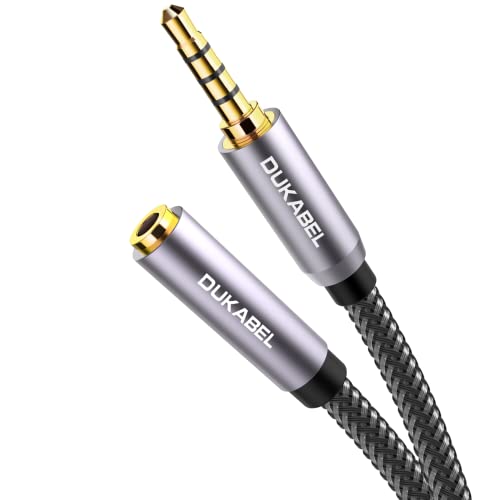
Best for: PC and console users who need a longer headset reach with mic support. The extension uses the CTIA TRRS standard, allowing simultaneous audio output and microphone input for compatible headsets and devices.
Why selected: The TRRS design ensures compatibility with mic-enabled headsets, making it a practical choice for gaming or remote work scenarios where mic access is crucial.
Caution: Not recommended for some iPhone/Apple earbuds with certain mic configurations; check mic compatibility before use.
MCSPER Headphone Extension Cable 2-Pack

Best for: Users needing long reach and budget-friendly options. This 2-pack provides extra length and reliable signal with gold-plated connectors and braided copper wire for durability and improved conductivity.
Why selected: The two-pack offers value and flexibility for multi-device setups, ensuring you have a spare extension for future needs.
Caution: Note that with TRRS headphones (3-conductor), mic functionality may not work in some configurations; test mic use if you rely on it for calls or streams.
Cable Matters 2-Pack Headset Extension Cable

Best for: Users who want a versatile, multi-device solution with mic support. This 6-foot extension helps bridge longer distances between headsets and PCs, gaming consoles, or car AUX ports.
Why selected: It clearly communicates that the cable carries both audio and microphone signals, which is essential for gaming, calls, and voice chat in car or desktop setups.
Caution: As with any extension, ensure your headset mic and inline controls remain accessible and functional after extension length increases.
Buying Guide: Key Purchase Considerations
- Connection type: Look for CTIA TRRS if you need both audio and microphone signals. TRRS is compatible with most headsets that combine audio and mic in one jack.
- Length vs. signal quality: Longer cables can introduce signal loss. Choose gold-plated connectors and multi-shielded designs to minimize distortion and noise.
- Device compatibility: Some adapters or Apple devices may have unique mic-pinouts. Verify mic support for your headset and device combination.
- Durability: Braided or coated cables resist tangling and wear. Consider the intended environment—desktop, console, or mobile usage.
- Port protection: If you frequently plug in and unplug, opt for extensions marketed as portable or protective to spare your device’s port from wear.
FAQ
- What is a TRRS extension cable?
A: It supports four conductors, carrying left/right audio plus microphone signals in one cable, enabling mic use with compatible headsets. - Will these cables work with all gaming headsets?
A: Most TRRS headsets will work, but some combinations may require adapters or may not support inline mic controls. - Is longer always better?
A: Not necessarily. Longer cables can introduce a small signal loss; choose the shortest length that meets your needs while preserving quality. - Should I buy a two-pack extension?
A: Yes if you want a spare or plan to extend multiple devices; it adds value and flexibility for varied setups. - Do these cables protect device ports?
A: They reduce wear by keeping frequent plugging away from the device’s own ports, potentially extending device life. - Can I use these for mobile and car setups?
A: Yes, especially models marketed for 3.5mm audio and mic extension; check compatibility with car stereo systems when used in vehicles.