
Best Vinyl to Digital Conversion Solutions for Preserving Your Records
Looking to convert vinyl records into high-quality digital files? This guide highlights five top options designed for different needs, from USB live capture to portable on-the-go digitization. Best for beginners: plug-and-play turntables; best for travelers: compact, battery-powered units; best for home studios: multi-input USB grabbers. A quick summary table of the chosen products follows to help you compare at a glance.
| Product | Best For | Key Benefit |
|---|---|---|
| DigitPro USB 2.0 Audio Capture Card | PC/Mac users seeking direct USB recording | Easy transfer to MP3/WAV without extra software |
| Fly Kan USB 2.0 Audio Grabber | Multi-device nostalgia projects | USB-C adapter included, dual RCA/3.5mm inputs |
| DIGITNOW Bluetooth Record Player Turntable | All-in-one home setup | CD/USB/SD encoding with built-in amplification |
| DANFI AUDIO DF Vinyl Record Player | Simple turnkey digitization | Vinyl to USB with built-in controls and Bluetooth |
| VICTRESS Vinyl Record Player with Bluetooth | Portable, wireless-friendly listening | 3-speed, USB conversion, Bluetooth in/out |
DigitPro USB 2.0 Audio Capture Card

Best for computer-based digitization projects that require straightforward file creation. This device is plug-and-play with no extra power supply. It captures analog audio from cassette tapes, LPs, and radio directly to a PC or Mac for MP3 or WAV conversion. It supports a wide operating system range, including Windows and certain Mac OS versions. Limitations: Mac OS compatibility does not cover newer MacOS versions beyond 10.14 in some configurations, so verify your system before purchase. Choose this if you want a simple, USB-connected path to digital files without installing drivers.
Xixian Turntable to MP3 Converter

Best for record enthusiasts who want a portable, no-PC solution. This turntable converts LPs into MP3 or WAV files without requiring a computer connection, relying on USB or battery power. It’s ideal for quick, on-the-go digitization. Limitation: output formats are generally MP3 or WAV, which may affect your ability to edit metadata later. Choose this if travel and simplicity are your priorities and you don’t need complex software integration.
DIGITNOW Bluetooth Record Player Turntable
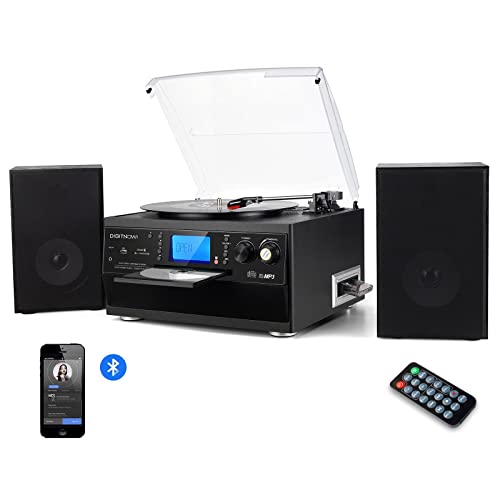
Best for households seeking an all-in-one entertainment hub with recording capabilities. This turntable includes built-in speakers and a CD/USB/SD encoding option, plus Bluetooth for wireless playback. It’s a convenient choice for casual listening and digitization without adding separate gear. Caution: Built-in amplification can color the sound; for critical archiving, connect to an external preamp or powered speakers. Choose this if you want an integrated media center with vinyl-to-digital aside from other playback features.
DANFI AUDIO DF Vinyl Record Player

Best for users who want a dedicated USB recording workflow with built-in listening features. The DANFI AUDIO unit provides USB recording directly from vinyl with a built-in system, plus Bluetooth streaming. It suits those who prefer a single, self-contained device for turning records into digital files. Limitation: external preamps may be unnecessary for some setups and could affect tone if your source needs more gain. Choose this if you want a simple, all-in-one digitization and playback experience.
Buying Guide
- What’s your primary setup? Desktop PC/Mac users may benefit from USB capture devices like DigitPro for direct file creation, while tablet or mobile users might gravitate toward portable turntables that store on USB drives or SD cards.
- What formats do you need? If you want edit-ready files, aim for WAV or high-quality MP3 encoding options. Some devices emphasize ease of transfer to MP3, while others support WAV/AIFF.
- Do you need independent power or a plug-and-play unit? USB grabbers typically require no extra power, but portable or all-in-one machines may rely on internal batteries or built-in preamps. Consider your travel and storage needs.
- Sound quality and source compatibility Choose devices that accommodate line-level outputs when possible and note if your turntable requires a preamp for proper recording. Some units are optimized for casual listening rather than archival-grade preservation.
- Connectivity options Dual inputs (RCA and 3.5mm) offer flexibility but may not operate simultaneously. If you plan to digitize from multiple sources, verify simultaneous input support and software compatibility.
- Limitations to watch Mac OS compatibility, driver requirements, and preamp needs can affect usability. Check for software requirements and operating system support before buying.
FAQ
- Can I digitize vinyl without a computer? Yes, some portable turntables can record directly to USB drives or SD cards, but formats may be limited and editing options reduced.
- Do I need a preamplifier? Many modern turntables are line-level and do not require a separate preamp. If your source outputs weak signals, a preamp can improve recording quality.
- What file formats should I target? WAV or FLAC provide lossless quality for archival purposes, while MP3 is convenient for portable playback.
- Is Bluetooth recording reliable for vinyl archiving? Bluetooth adds convenience but can introduce latency or compression. For high-quality archiving, use wired connections when possible.
- Will these devices preserve metadata? Metadata handling varies by device and software. Plan to add titles, artists, and album info in your chosen editor after recording.
- Do these units work with both Windows and Mac? Most listed devices offer broad OS compatibility, but confirm specific version support before purchase.