Best Audio to Fiber Converter Solutions for Crisp Digital-to-Analog Sound
Answering the need for converting digital audio signals from fiber (Toslink/SPDIF) to analog or vice versa, these devices help users connect TVs, gaming consoles, DVD players, and receivers with different inputs. The top picks below are best for home entertainment setups, personal listening rooms, and small media rigs. Each product is matched to specific use cases such as PCM/LPCM compatibility, 192 kHz support, and ease of setup.
| Product | Best For | Why Pick | Notes |
|---|---|---|---|
| PROZOR 192KHz Digital to Analog Audio Converter (Aluminum) | TV lovers and compact home theaters | Optical or coaxial to analog RCA and 3.5mm jack; PCM/LPCM compatible | Upgrade option with volume knob available from PROZOR |
| PROZOR 192KHz Digital to Analog Audio Converter (Optical/Coaxial to Analog) | Streaming devices and game consoles | Dual output (RCA and 3.5mm) with PCM/LPCM; high-res up to 192 kHz | Optical output note: some devices may not support optical output |
| MICROWARE 192KHz DAC Audio Converter | Home theater enthusiasts | Includes optical cable and power adapter; supports 32–192 kHz | Not suitable for 5.1 channel outputs |
| Neoteck 192kHz DAC Converter | HDTV and gaming setups | Built-in amplifier; up to 192 kHz/24-bit; SPDIF to RCA | Optical to RCA with clean signal; ensure proper format on source |
| AMANKA 192kHz DAC Optical to RCA Converter with 2×3.5mm Jacks | Multi-output listening and shared setups | Double 3.5 mm jacks for simultaneous outputs; PCM/LPCM | Not compatible with 5.1 channel signals; set to PCM |
Prozor 192KHz Digital to Analog DAC With Optical/Coaxial Input

Best for users who need a straightforward conversion from digital PCM audio to analog stereo signals. It supports 192 kHz/24-bit input, converting coaxial or Toslink digital PCM signals to both RCA L/R and a 3.5mm jack output simultaneously. The device is particularly suited for people who want a compact, aluminum-enclosed DAC for a simple home theater or media PC setup. It explicitly notes PCM output and provides guidance to keep TV audio in PCM format to avoid distortion. Caution: ensure the source is set to PCM; it is not an ADC (analog-to-digital) device.
Prozor 192KHz DAC, Optical To Analog, 3.5mm And RCA Outputs

This model emphasizes optical-to-analog conversion with dual outputs and 192 kHz sampling. It supports uncompressed LPCM/PCM and aims to deliver low-distortion sound with clean amplification. It suits setups where you want to connect a TV or game console to traditional wired speakers or a stereo receiver. Limitation: Optical output compatibility varies by device; verify that your source can emit PCM/LPCM over Toslink.
Hdiwousp Analog to Digital Converter for RCA to Coaxial/Toslink
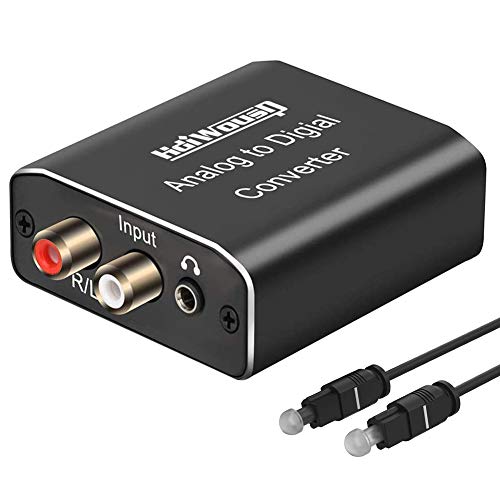
Best for converting analog signals into digital output for devices that accept coaxial or Toslink SPDIF. This is an analog-to-digital converter, so it’s ideal when you need to feed an older analog source into a digital system. It supports 8–96 kHz sampling and PCM/LPCM formats, with aluminum housing for better heat dissipation. Choose this if your goal is to digitize analog audio for a digital-enabled home theater or streaming device. Caution: not a digital-to-analog converter; use with compatible downstream gear.
MICROWARE 192KHz Digital to Analog DAC

Designed for easy integration into home cinema setups, this DAC converts coaxial or optical digital PCM audio to analog RCA and 3.5mm outputs. It supports multiple sampling rates up to 192 kHz and 24-bit depth. It’s a practical choice for users who want a plug-and-play solution with included optical cable and power supply. Best for consoles or Blu-ray players that output PCM/LPCM. Limitation: does not support 5.1-channel output.
Neoteck 192kHz DAC Converter

Best for users seeking a reliable SPDIF-to-RCA conversion with a built-in amplifier stage for stronger RCA output. It supports up to 192 kHz/24-bit and offers a clean digital-to-analog conversion from optical SPDIF sources. This model is well-suited for HDTVs, set-top boxes, and game consoles that output a PCM signal. Caution: verify that your source is configured to PCM/LPCM when using this converter.
AMANKA 192kHz Optical To RCA DAC With Dual 3.5mm Outputs

Best for flexible listening setups requiring two 3.5mm outputs alongside RCA. It converts SPDIF optical audio to L/R RCA and dual 3.5mm jacks, enabling simultaneous headphone and speaker connections. It supports PCM/LPCM up to 192 kHz but is not compatible with 5.1-channel signals. Ideal for shared headphone-listening and small speaker pairs.
Blackmagic Design Mini Converter Optical Fiber 12G

Best for professional video and audio workflows that require reliable SDI to optical fiber conversion and vice versa. While it focuses on video infrastructure, its optical fiber interface is central to modern signal distribution. It’s a specialized tool for studios and high-end setups needing robust fiber transport of digital signals. Caution: designed for SDI/video workflows; ensure compatibility with your specific audio path before purchase.
Buying Guide: Key Points To Consider When Choosing An Audio To Fiber Converter
- Input and output formats: Confirm if the device handles optical Toslink or coaxial SPDIF, and whether it outputs analog L/R, 3.5mm, or supports bi-directional conversion.
- Direction of conversion: Decide if you need digital-to-analog (DAC) or analog-to-digital (ADC). Some products in this space are one-way only.
- Sampling rate and bit depth: Look for 192 kHz and 24-bit support for high-fidelity audio, especially for PCM/LPCM content.
- Output compatibility: Check if your amplifier or speakers accept RCA or 3.5mm jacks and ensure your TV/source can output in PCM/LPCM.
- Ease of use: Plug-and-play, included cables, and simple TV or device settings (PCM/LPCM mode) reduce setup friction.
- Build quality and heat management: Aluminum enclosures provide durability and better heat dissipation for longer use.
- Bidirectional capability: If you need to switch between inputs and outputs, consider a bidirectional converter with clear controls.
FAQ
- What does PCM mean in these converters?
– PCM stands for Pulse Code Modulation. It is a method used to encode analog audio into digital form. Many DACs require PCM/LPCM to avoid distortion when converting digital audio to analog. - Can I use these devices with a 5.1 channel system?
– Most consumer DACs listed support stereo PCM/LPCM and are not designed for 5.1-channel output. Check the product notes for any 5.1 compatibility. - Is optical output always required for these converters?
– No. Some devices accept coaxial SPDIF as input or output. Verify the exact inputs and outputs before purchase. - Will these converters improve sound from a TV or gaming console?
– They can improve clarity by providing a clean analog signal or better amplification, especially if your TV’s built-in DAC is limited. Real gains depend on the source format and your speakers. - Do I need to configure my TV to PCM/LPCM when using these converters?
– Yes. Many devices require PCM/LPCM to ensure stable, distortion-free output. Follow the device’s setup guidance to enable PCM on the TV or source.
The selected products present a range of options from straightforward optical-to-analog conversions to more versatile, bidirectional devices. Use the Buying Guide to align a model with your source formats, desired outputs, and speaker setup.