
The best audiophile external sound card depends on whether you prioritize high-resolution playback, headphone amplification, surround output, or simple connectivity. The Creative Sound Blaster G8 is best for advanced high-resolution listening and two USB audio sources; the Cubilux is best for high-resolution headphone playback plus surround connections; and the SMSL Nano ONE Pro suits listeners who want several listening modes in a compact, driverless device. The Creative Play! 3 and StarTech adapter offer simpler ways to add headphone, microphone, or multichannel connections.
| Product | Best for | Key feature |
|---|---|---|
| Creative Sound Blaster G8 | High-resolution audio and two USB sources | Playback up to 32-bit/384 kHz; dual USB-C inputs |
| Cubilux 7.1 USB Surround Sound Card | Hi-res headphones and surround connections | Headphone playback up to 384 kHz/24-bit |
| SMSL Nano ONE Pro | Music, gaming, and voice modes | Four DSP modes and driverless USB-C connection |
| Creative Sound Blaster Play! 3 | Simple headset upgrades | 24-bit/96 kHz USB audio adapter |
| StarTech 7.1 USB Audio Adapter | Multiple analog and digital outputs | 7.1, 5.1, stereo, and SPDIF connections |
Creative Sound Blaster G8

Best for: Listeners seeking high-resolution playback, a dedicated headphone amplifier, and audio from two USB devices. The G8 supports playback up to 32-bit/384 kHz and has dual USB-C inputs with mixing, so it can receive audio from two USB sources simultaneously.
Creative’s Xamp discrete bi-amplifier drives the left and right headphone channels individually. This combination of high-resolution playback, amplification, and dual-source mixing makes the G8 the most feature-rich pick in this selection for a desk setup that combines music, games, or streaming devices.
Choose this if you want to connect two USB audio sources and value high-resolution file playback. Limitation: The listed features do not specify headphone output power or supported headphone impedance, so check the product details against demanding headphones before choosing it.
Cubilux 7.1 USB Surround Sound Card

Best for: Buyers who want high-resolution stereo headphone playback alongside 5.1 or 7.1 surround connections. Its headphone output supports sampling rates from 44.1 kHz/16-bit to 384 kHz/24-bit, while its surround audio supports up to 48 kHz.
The listed connections include stereo headphone output, line-in, stereo microphone input, and 5.1/7.1 output. The aluminum-alloy case is described as isolating electronic interference. This makes the Cubilux a versatile choice for a computer setup that needs both music listening and additional analog audio connections.
Choose this if you want one adapter for high-resolution headphone playback and surround audio. Limitation: The maximum 384 kHz/24-bit rate applies to headphone output; the listed surround audio rate is up to 48 kHz.
SMSL Nano ONE Pro

Best for: Listeners who want selectable sound modes for music, games, movies, and voice. The Nano ONE Pro offers Music, Game, 7.1 Virtual Cinema, and Voice Enhancement modes, covering several common desktop audio uses in one compact device.
It connects over USB-C and is described as driverless across Windows, Mac, iOS, and Android. Its listed 16-bit/48 kHz DSP and 20 mW at 600 ohms output are relevant specifications for shoppers comparing its processing and headphone-driving claims with other devices.
Choose this if you want mode switching and a straightforward USB-C setup for supported devices. Limitation: Its specified DSP format is 16-bit/48 kHz, so it is not the strongest match for buyers whose main requirement is a higher listed playback format.
Creative Sound Blaster Play! 3

Best for: Buyers who want a straightforward USB adapter for analog headphones or headsets. The Play! 3 supports 24-bit/96 kHz audio and works with analog headsets ranging from mobile earbuds to gaming and studio-grade headphones.
It supports headsets with either a single or split stereo-and-microphone connector, without requiring a Y-splitter cable. Creative also lists downloadable control-panel software with audio enhancements and optimized profiles for multiple earphone brands. That software gives users more adjustment options than a basic plug-in adapter.
Choose this if you want simple headset connectivity with optional software controls. Limitation: The provided product details do not list multichannel surround output or a dedicated headphone amplifier, so buyers seeking those functions should compare other options here.
StarTech 7.1 USB Audio Adapter
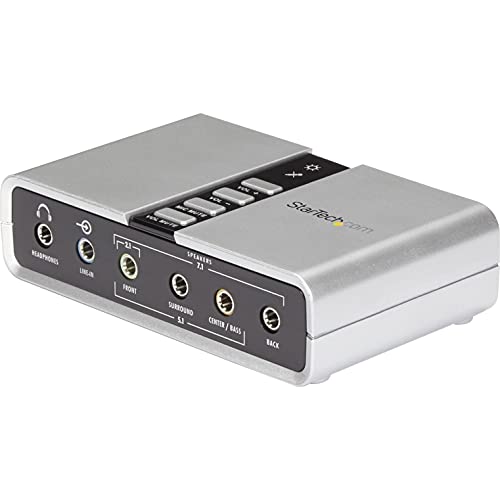
Best for: Desktop or laptop users who need several types of audio connections, including multichannel output. The adapter supports 7.1, 5.1, and two-channel output through 3.5 mm jacks, and it includes headphone, line-in, and stereo microphone connections.
It also provides analog and SPDIF digital audio output. Analog playback and recording support 44.1 kHz and 48 kHz sampling rates. SPDIF digital output supports 48 kHz playback, while SPDIF optical input passthrough supports up to two-channel audio at 48 kHz. It is bus-powered and includes a one-meter USB cable.
Choose this if connection variety and multichannel output matter more than high-resolution stereo playback. Limitation: The listed sampling rates are lower than those specified for the G8 and Cubilux headphone outputs.
Buying Guide: How To Choose An Audiophile External Sound Card
An external sound card, USB DAC, and headphone amplifier can overlap in function, but product specifications do not make them interchangeable for every setup. Start with the headphones, speakers, microphone, and computer or phone you plan to connect. Then compare the output format, available ports, channel support, and operating-system requirements against those needs.
Do you need high-resolution stereo playback?
Check the maximum playback format for the specific output you will use. The Creative G8 lists playback up to 32-bit/384 kHz. The Cubilux lists headphone output up to 384 kHz/24-bit, while the SMSL Nano ONE Pro lists a 16-bit/48 kHz DSP. These figures help compare stated capabilities, but they do not by themselves establish that one device will sound better in every system.
Match the specification to your source material and listening setup. If you mainly stream standard-resolution music, a higher maximum rate may not be your deciding factor. If you use high-resolution files, verify that the source, software, device, and selected output path all support the format you intend to play.
Will it drive your headphones?
Look for headphone output power and supported impedance when those figures are provided. The SMSL listing specifies 20 mW at 600 ohms. The supplied product details for the G8 do not include output power or impedance support, and the Cubilux details focus on supported formats and connections. If you own hard-to-drive headphones, confirm the relevant output specifications before buying.
A high-resolution playback rating and a headphone amplifier specification answer different questions. The first describes supported digital audio formats; the second helps indicate how a device can drive headphones. Do not assume that a higher sample-rate figure means greater headphone power.
Do you need surround sound or stereo?
Choose a multichannel model when you need connections for a 5.1 or 7.1 speaker arrangement or want the listed virtual surround feature. The StarTech and Cubilux adapters specify multichannel outputs, while the SMSL Nano ONE Pro offers a 7.1 Virtual Cinema mode. Confirm whether the product provides physical multichannel outputs or virtual processing, because those are different approaches.
For ordinary headphones or powered stereo speakers, a stereo-focused adapter may be sufficient. The Creative Play! 3 is a simple headset-oriented option. The Sabrent adapter, which is not included in the five picks, is explicitly a two-channel stereo device and does not add surround sound.
Which connections do your devices require?
Make a port checklist before purchasing. Consider whether you need USB-C or USB-A, separate headphone and microphone jacks, line-in, SPDIF, or multiple USB audio sources. The G8’s dual USB-C inputs support simultaneous audio from two USB devices. The StarTech includes several analog connections and SPDIF, while the Play! 3 supports single or split analog headset connections.
Also check whether your headset uses one combined four-pole plug or separate headphone and microphone plugs. Connector layout can determine whether an adapter works with your headset without additional accessories. Do not infer support for a connection type that is not listed in the product information.
How important are operating-system support and software?
Driverless operation can simplify setup, but the listed platform claims vary. SMSL states support for Windows, Mac, iOS, and Android without driver installation. Sabrent lists driverless operation for specified legacy Windows versions, Linux, and Mac OS X, and describes compatibility with systems supporting class-compliant USB audio. Check the product’s current details for your exact device and operating-system version.
Some adapters rely on optional software for sound adjustments. The Play! 3 lists downloadable control-panel software and earphone profiles. If you prefer controls built into the hardware or want to avoid installing software, compare that requirement with the features of each model.
Are materials and portability priorities?
Aluminum housings are listed for the Cubilux and HUANGENG adapters, while the StarTech adapter is bus-powered and includes a one-meter USB cable. Consider where the sound card will sit and whether you need to move it between a laptop and another device. A compact adapter may be convenient, but the available ports and cable arrangement should still fit your desk or travel setup.
Finally, separate verified specifications from broad promotional language. Compare concrete details such as sample rate, bit depth, channel support, inputs, outputs, and power requirements. If a specification important to your headphones or computer is absent, consult the product listing or manufacturer rather than assuming compatibility.
Frequently Asked Questions
What does an external sound card do?
It connects to a computer or other supported device and provides audio functions such as headphone output, microphone input, digital conversion, or multichannel connections. The exact functions depend on the model.
Is a higher sample rate always better for listening?
No. A higher listed maximum describes format support, not guaranteed audible improvement. The source file, playback software, connected equipment, and output path also affect the result.
Can an external sound card power any headphones?
No. Headphone output capability varies. Check the product’s output power and supported impedance against your headphones, especially if they are difficult to drive.
Do all USB sound cards support 7.1 surround sound?
No. Some offer multichannel outputs, some offer virtual surround processing, and some are stereo-only. Confirm the specific channel support and connection type in the product specifications.
What should I check before connecting a headset?
Check whether the headset has one combined plug or separate headphone and microphone plugs, then verify that the adapter lists the matching connection. Also confirm that the host device supports the adapter’s USB connection and operating system.
Which option is best for a simple headphone-and-microphone setup?
The Creative Play! 3 is a headset-oriented choice with support for single or split analog headset connectors and optional control-panel software. For a more basic two-jack stereo adapter, compare the Sabrent’s explicitly listed headphone output and mono microphone input.