
The best auto radio DVD player depends on your dashboard, preferred screen size, and need for phone features. A single-DIN receiver is best for drivers seeking a compact replacement, while a 7-inch double-DIN model is better for buyers who want a touchscreen and smartphone integration. The options below include disc playback, Bluetooth, and other listed inputs, with a marine/RV receiver for buyers considering more than a standard car installation.
| Receiver | Best For | Listed Features |
|---|---|---|
| Single-DIN CD/DVD stereo with app control | Compact installation with multiple media options | Bluetooth, FM, USB, AUX, SD, seven-color display |
| 7-inch double-DIN touchscreen | Touchscreen and smartphone features | DVD, wireless CarPlay and Android Auto, backup camera support |
| Single-DIN stereo with knob | Simple controls and disc playback | CD/DVD, Bluetooth, USB, AM/FM, AUX, SD, RCA |
| BOSS Audio Systems 850BRGB | Double-DIN Bluetooth and DVD playback | USB, DVD, AM/FM |
| Magnadyne multimedia receiver | Marine, RV, or car use with zone control | DVD/CD, USB, AUX, Bluetooth, remote control |
Single-DIN DVD Receiver With App Control

This single-DIN receiver combines CD and DVD playback with Bluetooth, FM radio, USB, AUX, and SD playback. Its listed features also include hands-free calling, a seven-color display, iOS and Android compatibility, and app control. That range of input choices makes it a flexible option for drivers who want to use discs as well as digital media.
Best for: Drivers who need a single-DIN format and want several ways to play audio or video media. It is a suitable choice if Bluetooth calling and app control are priorities alongside DVD playback.
Why it stands out: The combination of disc playback, SD and USB inputs, and a multicolor display covers more use cases than a receiver described only with DVD and radio functions.
Limitation: The supplied product details do not specify screen size or provide vehicle fitment information. Check the receiver’s dimensions and your vehicle’s dashboard opening before choosing it.
7-Inch Double-DIN Touchscreen DVD Stereo

This double-DIN receiver has a 7-inch touchscreen and a CD/DVD player. Its listed features include wireless CarPlay and Android Auto, mirror link, backup camera support, AM/FM radio, steering-wheel control support, subwoofer output, USB, TF, and AUX connections. It is the most feature-rich touchscreen option in this group based on the information provided.
Best for: Drivers who want a larger touchscreen and smartphone integration in a double-DIN dashboard opening. Choose this if CarPlay or Android Auto and backup camera support matter as much as disc playback.
Why it stands out: It pairs DVD playback with modern phone features and several connection options, including USB, TF, and AUX. The listing also specifically mentions steering-wheel control support.
Limitation: The product details do not explain the exact camera connection requirements or vehicle compatibility. Confirm installation needs and dashboard fit before purchase.
Single-DIN DVD Stereo With Physical Knob
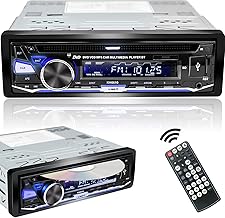
This single-DIN receiver is listed with a CD/DVD player, Bluetooth, USB, AM/FM radio, AUX, SD, RCA audio, and a control knob. Its stated feature set emphasizes common media sources and physical controls rather than a large touchscreen or smartphone projection features.
Best for: Buyers seeking a single-DIN unit with a knob and multiple audio inputs. It is a practical comparison choice for someone who wants disc playback and radio functions without selecting a touchscreen-focused model.
Why it stands out: The listed RCA audio connection and SD, AUX, and USB inputs give buyers several connection types to consider when comparing receivers.
Limitation: The provided details do not specify a screen size, app features, or phone projection. Avoid choosing it on the assumption that it offers those functions; confirm them in the product listing if required.
BOSS Audio Systems 850BRGB

The BOSS Audio Systems 850BRGB is described as a double-DIN Bluetooth car stereo with USB, DVD, and AM/FM radio. Its listed feature set is more concise than those of the touchscreen models, making it a straightforward option to compare if the core requirements are Bluetooth, disc playback, and radio.
Best for: Buyers looking for a double-DIN receiver with Bluetooth, DVD, USB, and AM/FM features listed. Consider it when those functions are sufficient and you do not need a listed touchscreen or phone-projection feature.
Why it stands out: The product name clearly identifies a double-DIN design and the listing includes both DVD playback and Bluetooth.
Limitation: The supplied information does not list CarPlay, Android Auto, a touchscreen, or camera support. Confirm the full product specifications if any of those features are essential.
Magnadyne Multi-Zone Multimedia Receiver

This Magnadyne receiver is described for marine, RV, and car use. Listed features include multi-zone control, DVD/CD playback, USB, AUX, Bluetooth, a remote control, and 40 watts by four. The marine and RV positioning makes it a distinct option for buyers comparing receivers beyond conventional passenger-car use.
Best for: Buyers considering a receiver for a marine, RV, or car setup who want multi-zone control and disc playback. It is also worth comparing when a remote control and Bluetooth are desired.
Why it stands out: The listing explicitly names multiple intended settings and multi-zone control, features not stated for the other choices here.
Limitation: The supplied information does not provide installation dimensions or details about the supported zones. Verify that the unit’s form factor and zone controls suit your specific vehicle or vessel.
Buying Guide: How To Choose An Auto Radio DVD Player
Start with the receiver’s physical format, then compare media and phone functions. A model can have the right disc features but still be unsuitable if it does not fit the dashboard or lacks a connection you use. The product details supplied here do not establish compatibility with individual vehicles, so check the receiver specifications and installation requirements before ordering.
Will a Single-DIN or Double-DIN Receiver Fit?
Single-DIN and double-DIN describe different receiver form factors. The products above include both, so identify the opening in your dashboard before comparing features. Do not assume that a receiver will fit based only on its appearance or the vehicle’s make and model. Dashboard trim, mounting hardware, wiring, and installation requirements may also need checking against the product’s full listing or an installer’s guidance.
- Choose single-DIN if your dashboard requires that format or you prefer a compact receiver layout.
- Choose double-DIN if your dashboard accepts that format and you want to compare larger touchscreen-style options.
- Verify before purchase if your vehicle has an unusual dash opening or factory controls you want to retain.
Which Media Inputs Do You Need?
DVD playback is the central feature across these choices, but the additional inputs differ. Some models list CD playback, USB, AUX, SD or TF cards, or RCA audio. Match the receiver to the media sources you actually plan to use. If you need to play audio from a particular device or storage card, confirm that the exact input is supported rather than relying on a general description such as “multimedia receiver.”
For a broad set of named connections, compare the first single-DIN model, which lists USB, AUX, and SD playback, with the knob-equipped model, which lists USB, AUX, SD, and RCA audio. The double-DIN touchscreen receiver lists USB, TF, and AUX. These are product-listing details, not confirmation that every file type or device will work; check the complete specifications for format support.
Do You Want a Touchscreen or Smartphone Integration?
If smartphone integration is important, the 7-inch double-DIN option specifically lists wireless CarPlay and Android Auto, plus mirror link. The first single-DIN option lists iOS and Android compatibility and app control, but the supplied information does not describe those functions as CarPlay or Android Auto. Treat those terms as distinct features and verify the exact connection method and supported functions in the product listing.
A touchscreen can be useful for buyers who want a display-centered interface, but screen size alone does not confirm compatibility with a phone, camera, or steering-wheel control system. Check each feature independently. The touchscreen model explicitly lists backup camera and steering-wheel control support; confirm the required accessories and vehicle-specific installation details before purchase.
How Important Are Bluetooth and Hands-Free Calling?
Bluetooth appears in the listed features for all five receivers. The first single-DIN model specifically mentions hands-free calling. If call handling is a primary reason for upgrading, check the full listing for microphone details and supported calling controls because those specifics are not included in the product information provided here. Bluetooth audio and hands-free calling are related but should not be assumed to have identical capabilities.
What Should You Check Before Installation?
Confirm the receiver’s dimensions, dashboard format, wiring needs, and any extra components required for the functions you want. Camera support, steering-wheel controls, and multi-zone operation can depend on the vehicle setup and required connections. The product summaries do not identify vehicle-specific fitment, installation parts, or complete wiring instructions. Use the manufacturer’s full documentation or consult a qualified installer when those details are unclear.
- Match the listed DIN format to the dashboard opening.
- Check which disc types and digital inputs are explicitly supported.
- Verify phone integration, camera, and steering-wheel control requirements separately.
- For an RV or marine installation, confirm that the receiver’s dimensions and intended use suit the installation.
Frequently Asked Questions
What is the difference between single-DIN and double-DIN?
They are different receiver form factors. Check your dashboard opening and the receiver’s dimensions to determine which format fits; do not select a unit based on features alone.
Do all five receivers list DVD playback?
Yes. Each product name or description provided lists DVD playback. Some also list CD playback, but buyers should verify supported disc formats in the complete product specifications.
Which option lists wireless CarPlay and Android Auto?
The 7-inch double-DIN touchscreen receiver lists wireless CarPlay and Android Auto, as well as mirror link. Confirm the full listing for connection and vehicle requirements.
Which receiver is described for an RV or marine installation?
The Magnadyne multimedia receiver is described for marine, RV, and car use. Its listed features include multi-zone control, DVD/CD, Bluetooth, USB, AUX, and a remote control.
Can I assume a DVD receiver will fit my vehicle?
No. A product’s DVD feature does not establish vehicle fit. Confirm its DIN format, dimensions, mounting needs, and wiring requirements for your specific dashboard.
Do the product details confirm every phone or camera will work?
No. The details identify some phone and camera features, but do not provide full compatibility lists or installation requirements. Check the receiver’s complete specifications before buying.