
The best automatic page turner for piano is a wireless foot pedal that sends page-navigation commands to your sheet-music app while your hands stay on the keys. PageFlip Firefly is best for performers who want illuminated, programmable pedals; JOYO is a strong fit for musicians who value multiple control modes and long battery life; and Yueyinpu suits buyers seeking broad device and reading-app support. Check that your app accepts the pedal’s commands before choosing.
| Product | Best For | Notable Features |
|---|---|---|
| PageFlip Firefly | Live performance and low-light use | Illuminated pedals, programmable controls, Bluetooth or USB-C |
| JOYO SP-01 | Multiple app-control options | Five modes, repeat function, stated 60-hour battery life |
| Donner Wireless Page Turner | Multi-device use | Multiple platforms and music, reading, and media controls |
| Yueyinpu Plus | Tablet and phone readers | Broad listed app support and stated 60-hour use |
| AITONE A-SP1 | Mode and battery monitoring choices | Five modes, LED power display, stated 30-foot range |
PageFlip Firefly Bluetooth Page Turner
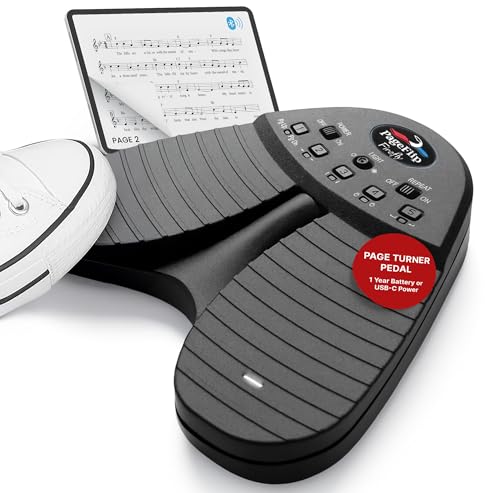
The PageFlip Firefly is best for piano players who perform in dim rooms or want to customize how a foot pedal controls digital sheet music. Its pedals are illuminated, and the product is described as operating silently for hands-free page turns. That combination can be useful when a pianist needs to keep attention on the score without reaching toward a screen.
The Firefly supports iPad, Android, Mac, Windows, and Linux devices, with Bluetooth or USB-C connection listed. It is also described as compatible with apps including forScore, MobileSheets, and OnSong. Five preset modes and software-based hotkey assignment let users tailor pedal commands to their setup.
- Best for: Performers who need pedal visibility and configurable controls.
- Why it stands out: Its combination of illuminated pedals, multiple connection options, and programmable controls is distinctive among these picks.
- Limitation: The listing does not state battery life, so compare power requirements and connection preferences before buying.
Choose this if lighting and command customization matter more than a stated long battery-life figure. Confirm the app and device connection method you plan to use.
JOYO SP-01 Wireless Page Turner

The JOYO SP-01 is best for pianists who want several ways to send navigation commands and a clearly stated battery-life estimate. It offers five control modes, including page up/down, arrow keys, space/enter, and mouse clicks. The listing also identifies a repeat function that continues scrolling while the pedal is held, which may suit scores or documents that need continuous movement.
JOYO says the pedal pairs with an iPad, tablet, or smartphone and works with apps such as forScore and OnSong when the app supports arrow keys or page up/down commands. Its rechargeable battery is listed for more than 60 hours of continuous use, and a tri-color LED indicates power level. The product is also described as silent and non-slip.
- Best for: Players who need to match pedal input to different app controls.
- Why it stands out: Its five modes, repeat function, and stated battery duration provide useful setup flexibility.
- Limitation: The repeat function may take practice to time comfortably during a passage.
Choose this if you want to test different command types with your score app. Avoid assuming every app supports every mode; the listing specifically notes the need for compatible keyboard or navigation commands.
Donner Wireless Bluetooth Page Turner
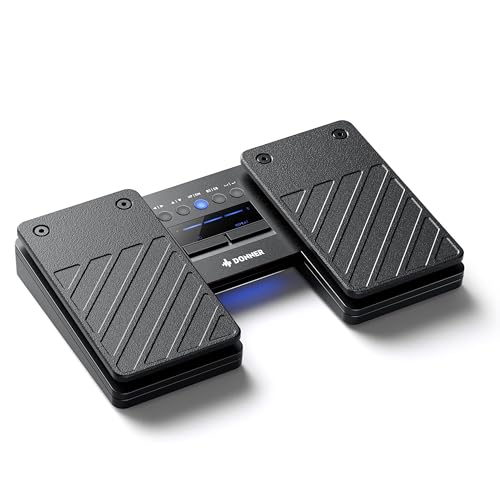
This Donner pedal is best for musicians who also want a foot controller for reading, lyric scrolling, presentations, or media. The listing describes five page-turning modes and two Bluetooth connection modes, with commands that include page turns, scrolling, and mouse-click simulation. It lists support for phones, tablets, Mac, and PC.
The stated wireless range is up to 10 meters, or about 33 feet, using Bluetooth 5.0. That may give a player room to position a device away from the piano, provided the connection remains suitable in the actual setup. Donner also notes that app compatibility depends on whether the app supports external Bluetooth pedals, and advises checking the app’s settings if the pedal does not work.
- Best for: Buyers who want one pedal for music and other hands-free controls.
- Why it stands out: Its listed modes and cross-device support make it a versatile option beyond sheet music.
- Limitation: App support is not universal; buyers may need to enable or confirm external pedal input.
Choose this if you value multiple uses and use a compatible app. Check the app’s external-controller settings before relying on it for a performance.
Yueyinpu Plus Wireless Page Turner

The Yueyinpu Plus is best for pianists who read scores on a tablet or phone and want a pedal that also handles general reading. The product description lists support for iOS, Android, and Windows devices, and names apps and formats including iBooks, Kindle, WPS, PDF readers, Piascore, and forScore. It uses left and right pedals for hands-free page navigation.
The listing states a wireless range of 33 feet, or 10 meters, and approximately 60 hours of use after a full charge. It also describes a rechargeable battery and an anti-skid pad. Those details make it a practical candidate for a home piano setup where the device and pedal need to stay in position during practice.
- Best for: Tablet and phone users who want music and reading-app support.
- Why it stands out: The listed compatibility spans several device systems and common document or reading apps.
- Limitation: Device and app requirements vary; the listing specifies iPad or iPhone version 11 and above.
Choose this if your device and app appear in its compatibility information. Confirm your operating-system version and test page navigation before using it in a recital or lesson.
AITONE A-SP1 Wireless Music Pedal

The AITONE A-SP1 is best for piano players who want several command modes and a visible battery indicator. Its five modes include page up/down, left/right arrows, up/down arrows, left/right clicks, and space/enter. The listing names apps such as forScore, OnSong, MobileSheets, Planning Center Music Stand, Ultimate Guitar, and Songsterr, along with other sheet-music and PDF readers.
AITONE states that its rechargeable battery supports up to 60 hours of continuous use and that an LED display shows remaining power. The product listing also gives a 30-foot Bluetooth range. These details can help buyers compare power monitoring and placement needs, though actual app behavior depends on supported commands.
- Best for: Players who want multiple navigation modes and a battery display.
- Why it stands out: The mode list is specific, and the product names a range of music and tab apps.
- Limitation: The 30-foot range is a stated maximum; placement and the surrounding setup may affect practical use.
Choose this if its control modes match your score app. Test the selected mode with your device before a performance, especially if your app uses a less common navigation command.
Buying Guide: How To Choose A Piano Page Turner
Will the pedal work with your sheet-music app?
Start with app compatibility, not just the device’s Bluetooth connection. A pedal typically sends keyboard-like commands, mouse clicks, or page-navigation inputs; the app must recognize the command for a page to turn. Check the app’s documentation or settings for support for external Bluetooth pedals, keyboard commands, or page up/down input. Product listings name apps, but support can differ by app version and configuration.
If you use more than one app, look for multiple control modes. A pedal with arrow-key, page-up/down, click, or space/enter options gives you more ways to match the app’s behavior. Before rehearsing, test both forward and backward navigation and confirm that the pedal does not trigger an unintended action.
Which wireless range and connection do you need?
Consider where the device will sit relative to the piano and pedal. Some listings state ranges of 30 or 33 feet, but those are product specifications rather than a guarantee for every room. Keep the device positioned so you can see the score and maintain a dependable connection. If a product offers USB-C as well as Bluetooth, compare the available connection method with your device and preferred setup.
Pair the pedal well before a lesson, rehearsal, or performance. Check whether the device remembers the connection and whether you must select a particular mode. A simple test at the piano can reveal pairing or app-setting issues before they interrupt playing.
How important are battery life and power indicators?
For regular practice or performances, compare the stated battery duration and whether the pedal provides a power indicator. The JOYO, Yueyinpu Plus, and AITONE listings state approximately 60 hours or more of use under their described conditions. The PageFlip Firefly listing does not provide a battery-life figure in the supplied product details, so buyers should confirm its power requirements before purchase.
Battery estimates are not a substitute for checking charge status. Recharge the pedal ahead of an important session, and learn what its indicator means if one is included. If you practice for long stretches, choose a power setup you can monitor easily.
Do illuminated or programmable pedals matter?
Illuminated pedals can be useful in low-light performance spaces because they help make the controls visible. PageFlip Firefly specifically lists illuminated pedals. Programmable controls can help when an app requires a command that is not the pedal’s default; the Firefly lists hotkey assignment through software, while other options provide preset modes.
For a pianist who only needs to advance and reverse pages, a basic two-pedal arrangement may be enough. If the score app scrolls continuously or uses different navigation commands, adjustable modes may reduce setup friction. Match the feature to your actual playing and app habits rather than choosing the largest feature list automatically.
What should you check before playing?
- Confirm the pedal supports your device’s operating system and your specific sheet-music app.
- Verify that the selected mode sends the correct forward and backward commands.
- Place the pedal where your feet can reach it without changing your normal piano posture.
- Test the wireless connection from the position you will use during practice or performance.
- Check battery level and learn whether the pedal has a repeat, scroll, or hold function that could affect page timing.
Frequently Asked Questions
What does an automatic page turner do for piano?
An automatic page turner lets a pianist advance or move back through digital sheet music using a foot pedal. It can reduce the need to take a hand off the keys, provided the device and app support the pedal’s navigation commands.
Can a Bluetooth page turner work with any piano app?
No. The app must support the commands sent by the pedal, such as arrow keys, page up/down, or mouse clicks. Check compatibility and app settings, then test the exact mode you plan to use.
Can I use a page-turning pedal with a phone as well as a tablet?
Some listed pedals support phones and tablets, but device support varies by product. Check the product’s stated operating-system and device compatibility before choosing one.
Are page-turning pedals useful outside music?
Yes. Several products describe use with e-books, PDFs, lyrics, presentations, or media controls. Those functions still depend on whether the relevant app accepts the pedal’s commands.
Which features matter most for live piano performance?
Prioritize dependable app compatibility, easy-to-reach controls, a suitable connection method, and enough battery for the session. Illuminated pedals may help in a dark venue, while programmable modes can help when the app needs a particular command.