
If you need an automotive diagnostic tool that connects directly to a PC, none of the five products below is identified as a PC-based interface. They are standalone OBD2 scanners with their own screens. They can still help DIYers read engine codes, check live or readiness data, and investigate common warning lights. The ANCEL AD310 and MOTOPOWER MP69033 suit basic code reading; the FOXWELL NT301 adds inspection-readiness checks; and the THINKCAR and FOXWELL NT301 Plus offer broader functions.
| Tool | Best suited for | Notable listed capability |
|---|---|---|
| ANCEL AD310 | Basic OBD2 code checks | Reads and clears engine fault codes |
| FOXWELL NT301 | DIY diagnosis and readiness checks | Live data and I/M readiness indicator |
| MOTOPOWER MP69033 | Budget-minded buyers wanting more data | Freeze frame, data flow, and built-in code lookup |
| THINKCAR THINKSCAN 662 | Buyers needing broader system functions | Bidirectional tests and 12 reset functions |
| FOXWELL NT301 Plus | Engine-code and 12-volt battery checks | Battery, cranking, and charging tests |
ANCEL AD310 Classic OBD2 Scanner

The ANCEL AD310 is a straightforward choice for drivers who want a dedicated code reader rather than a PC-connected diagnostic setup. Its listed functions include reading and clearing engine fault codes, and its name identifies it as a CAN diagnostic scan tool for OBD2 vehicles from 1996 or newer. It is a practical starting point for checking a check-engine warning before deciding whether more diagnosis is needed.
- Best for: Owners who mainly need to read or clear engine codes on a compatible OBD2 vehicle.
- Why it was selected: It directly covers the core code-reading task and is described as a universal OBD II scanner.
- Limitation: The supplied product information does not list PC connectivity, live-data functions, or enhanced system coverage.
Choose this if simple engine-code access matters more than advanced data or computer integration. Avoid choosing it specifically for PC logging or functions beyond those stated in the product name; that information is not provided here.
FOXWELL NT301 Live Data Scanner

The FOXWELL NT301 is a better fit for DIYers who want more than a basic code readout. Its listed features include reading and clearing engine diagnostic trouble codes, live data, and dedicated I/M readiness hotkeys. A red-yellow-green indicator and built-in speaker provide readiness feedback, which can help a driver check inspection status before heading to a test center.
- Best for: Car owners who want engine-code checks, live data, and a quick emissions-readiness indication.
- Why it was selected: The combination of live data and I/M readiness functions makes it more informative than a reader described only for basic code access.
- Limitation: The listed information describes a scanner operated through the vehicle’s diagnostic port, not a PC-connected tool.
The product description says the scanner clears the check-engine light after the underlying issue has been fixed; if the fault remains, the code may return. Treat a code as a diagnostic clue rather than a complete repair instruction. Choose this model if readiness checks are important, but look elsewhere if computer-based analysis is essential.
MOTOPOWER MP69033 OBD2 Code Reader
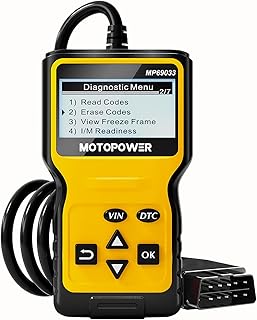
The MOTOPOWER MP69033 is suited to buyers who want several engine-diagnostic data points in a handheld reader. Its listed features include a built-in OBD2 trouble-code lookup library, freeze-frame viewing, I/M readiness, vehicle information, data flow, and a real-time curve. It can also display vehicle speed, calculated load, coolant temperature, and engine speed.
- Best for: DIY users who want code lookup and a wider selection of basic engine data in one device.
- Why it was selected: Its stated functions extend beyond reading and erasing codes, while its 2.8-inch LCD displays diagnostic information on the scanner itself.
- Limitation: It is not described as PC-connected, and the listed capabilities focus on OBD2 functions rather than every vehicle system.
The product information states support for nine protocols and most U.S.-based 1996-and-newer vehicles, plus many 2000-and-newer European and Asian vehicles. It also lists six interface languages. Confirm protocol and vehicle compatibility before buying, since “most” does not mean every car. The scanner draws power from the vehicle’s OBD2 data link connector and does not require a separate battery or charger.
THINKCAR THINKSCAN 662 Diagnostic Tool

The THINKCAR THINKSCAN 662 is the broadest-function choice in this group based on its listed features. The product name identifies bidirectional active testing, engine, ABS, SRS, and transmission diagnostics, plus 12 reset functions. It also lists CAN FD and FCA SGW support and lifetime free updates.
- Best for: Buyers seeking diagnostic and service functions that go beyond basic engine-code reading.
- Why it was selected: Its stated coverage includes multiple vehicle systems and active tests, making it more suitable for advanced troubleshooting than an engine-only reader.
- Limitation: The supplied information does not specify PC connectivity or list the individual reset functions and vehicle coverage by make and model.
Choose this tool if the listed system access and bidirectional testing align with your vehicle and repair needs. Check the product’s current compatibility details before purchase, especially if you need a particular service procedure or module. Its advanced functions should not be assumed to work on every vehicle merely because they are listed in the product name.
FOXWELL NT301 Plus Scanner And Battery Tester

The FOXWELL NT301 Plus combines an OBD2 code reader with a 12-volt battery tester. Its listed functions include check-engine code reading, live data, and battery health, cranking, and charging-system tests. That makes it a useful match for drivers who want to investigate both engine warnings and basic battery or starting-system concerns with one product.
- Best for: Owners who want engine diagnostics and 12-volt battery checks in the same tool.
- Why it was selected: Its two-in-one design adds battery testing to the engine-code and live-data functions.
- Limitation: The product is described for OBDII vehicles from 1996 onward, but the supplied information does not identify it as a PC interface or give detailed vehicle-specific coverage.
Choose this model if battery condition and charging checks are useful alongside check-engine diagnosis. It is less relevant if you only need a basic code reader or specifically require data transfer to a computer. Confirm that the battery-test procedures and vehicle connection requirements match your intended use.
Buying Guide: How To Choose An Automotive Diagnostic Tool
Do you need a PC-connected scanner or a handheld reader?
Start by deciding where you want diagnostic information to appear. A PC-based tool generally requires an interface that connects to the vehicle’s OBD2 port and communicates with software on a computer. The five products reviewed here are presented as handheld scanners with their own diagnostic functions; the provided product details do not confirm USB, Bluetooth, or PC software support. If computer display, data logging, or exporting reports is essential, verify those exact capabilities before choosing a device.
A standalone reader can be simpler for quick checks because it displays information on the scanner itself. It may suit a driver who wants to read a trouble code at home or check readiness without setting up a computer. It is not automatically a substitute for a PC-based platform, advanced shop equipment, or vehicle-specific diagnostic software.
Which diagnostic functions matter most?
For a basic check-engine light, prioritize reading diagnostic trouble codes. Clearing a code is a separate function, but clearing it does not fix the underlying fault. A warning can return if the problem remains. The ANCEL AD310 is described for reading and clearing engine codes, while the FOXWELL NT301 also lists live data and readiness checks.
Buyers who want more information may compare freeze-frame data, live data, code lookup, and system coverage. MOTOPOWER lists a code lookup library, freeze-frame viewing, and several live engine-data values. For functions beyond basic engine diagnostics, THINKCAR lists several vehicle systems and bidirectional tests. Match the feature list to a specific task rather than assuming every scanner supports every module or repair procedure.
Will the scanner work with your car?
Check the vehicle’s model year, market, OBD2 status, and supported protocol. The MOTOPOWER description gives coverage guidance for many U.S. vehicles from 1996 and European and Asian vehicles from 2000, but it does not claim universal compatibility. The ANCEL and FOXWELL product names also refer to OBD2 vehicles from 1996 or newer. These broad descriptions are not a guarantee for every make, model, engine, or diagnostic function.
For advanced tools, look up compatibility by exact vehicle details and the function you need. A scanner may connect to a car yet have limited access to certain modules or service features. Verify whether the desired operation—such as an ABS readout, a reset, or an active test—is supported for that vehicle.
Do you need live data, readiness status, or battery tests?
Live data helps display changing engine information, while I/M readiness status can show whether relevant monitors report ready for inspection. The FOXWELL NT301 lists live data and a readiness indicator; MOTOPOWER lists I/M readiness and several real-time data items. These features serve different purposes from reading a stored trouble code, so decide which information you expect to use.
For battery-related questions, the FOXWELL NT301 Plus is the only product in this group that lists battery health, cranking, and charging-system tests. A battery tester does not replace a full vehicle diagnosis, but those functions may be useful when the concern involves starting or charging rather than an engine warning alone.
What should you check before buying?
- Confirm that your vehicle uses a supported OBD2 connection and that the scanner covers the systems you need.
- Check whether the tool is standalone or explicitly supports a computer, phone, or tablet.
- Compare code reading, clearing, live data, freeze-frame information, readiness status, and special tests.
- Verify which languages, updates, or reset functions are included if those features matter to you.
- Use diagnostic codes as starting points for investigation, not as proof that a particular part has failed.
Frequently Asked Questions
Can these scanners connect to a PC?
The supplied details do not confirm PC connectivity for any of these five products. They are described as handheld OBD2 scanners. If you need PC software or computer-based data logging, confirm that a product explicitly supports that setup before buying.
Which scanner is best for basic check-engine codes?
The ANCEL AD310 is a direct option for reading and clearing engine fault codes. The FOXWELL NT301 also reads and clears codes and adds live data and I/M readiness features.
Can an OBD2 scanner tell me exactly what part to replace?
No code reader should be treated as a guaranteed parts diagnosis. A trouble code identifies a detected condition or system for further investigation. Confirm the cause with appropriate testing before replacing components.
Which option includes battery testing?
The FOXWELL NT301 Plus is listed as a 2-in-1 OBD2 scanner and 12-volt battery tester, with battery-health, cranking, and charging-system tests.
Can I clear a check-engine light before fixing the problem?
A scanner may provide a code-clearing function, but clearing a code does not repair the cause. The FOXWELL NT301 description notes that a fault can reappear if the underlying issue is not resolved.
Are all OBD2 scanners compatible with every car?
No. Compatibility depends on the vehicle and the scanner’s supported protocols and functions. Check the manufacturer’s compatibility information for your exact vehicle before relying on a particular diagnostic or service feature.