
The best aux cord car charger depends on your phone’s connector: USB-C models suit compatible Android phones and newer iPhones, while Lightning models are for older iPhones and iPads. These five cables combine 3.5mm audio output with charging, so you can play audio through a car’s aux input while powering a device. The USB-C options are best for USB-C phones; the Lightning options are better for older Apple devices. Check your device’s connector and the cable’s stated limitations before buying.
| Product | Best For | Key Difference |
|---|---|---|
| USB-C cable with PD 18W charging | USB-C users wanting one cable | Lists 18W charging and a Realtek DAC |
| Lightning cable with USB-A charging | Older iPhone and iPad users | Apple MFi certification stated in product name; not for calls |
| CableCreation USB-C cable | USB-C users with a USB-A power source | Specifies an 18W maximum |
| USB-C cable for a broad device range | USB-C device owners seeking wide listed compatibility | Lists many phone families; excludes Moto and OnePlus |
| Upgraded Lightning cable | Lightning users seeking a 2-in-1 cable | Lists a 3.94-foot length |
USB-C Aux Cable With PD 18W Charging

This two-in-one cable connects a compatible USB-C device to a car stereo’s 3.5mm aux input while providing charging. Its listed features include PD 18W charging and a Realtek DAC, with audio specified as 24-bit/96kHz. It is best for USB-C phone owners who want to reduce the number of cables used for in-car music and charging.
The listing names iPhone 15 and newer models, Samsung Galaxy S-series devices, Google Pixel phones, and select iPads among its compatible devices. It specifically says it is not compatible with Moto or OnePlus phones, so check the model rather than relying only on the connector type. Choose this if you need the stated 18W charging feature; avoid it if your device is one of the excluded brands.
Lightning Aux Cable With USB-A Charging

This 2-in-1 cable is designed for Lightning-equipped Apple devices. It provides a 3.5mm audio connection for a car stereo, speaker, or headphones while its USB-A connection supplies charging. The product name states that it is Apple MFi certified, and the feature list describes a Realtek DAC and 24-bit/96kHz audio.
It is best for owners of listed devices such as iPhone 14, 13, 12, 11, XS, XR, X, and older models, as well as certain iPads and iPod touch devices. The clear limitation is that the listing says it is not for calls. Choose this when you need music playback and charging from a Lightning device; avoid it if you need the cable for phone-call audio or have a USB-C-only device.
CableCreation USB-C Aux And Charging Cable
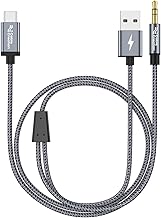
CableCreation’s cable combines USB-C audio output to a 3.5mm jack with a USB-A-to-USB-C charging connection. The listing specifies PD 18W charging and a maximum charging power of 18W. It also describes a Realtek DAC for audio transmission. This makes it a practical choice for USB-C devices when the available charging source has a USB-A port.
It is best for drivers who want the charging limit stated clearly and whose phone or tablet charges through USB-C. The listing cautions that the cable does not support charging high-power devices such as laptops. Choose this if your intended device fits the stated 18W limit and your car charger has USB-A output. Avoid it if you expect laptop charging or need a USB-C power-source connection.
USB-C Aux Cable For Broad Device Compatibility

This two-in-one cable is intended to send audio from a USB-C device to a 3.5mm car stereo connection while charging the device. Its listed compatibility covers several generations of iPhone, Samsung Galaxy, and Google Pixel phones, along with some iPad Pro and Razer Phone models. The product description also calls out upgraded audio chips and HiFi sound transmission.
It is best for USB-C users who want a cable with a broad set of explicitly named device families. The listing says it is not compatible with Moto and OnePlus phones, so those users should choose another connection method. Unlike some alternatives here, the supplied feature information does not state a charging wattage. Choose it if your device appears on the compatibility list; confirm charging expectations if a particular power level matters.
Upgraded Lightning Aux Cable, 3.94 Feet

This Lightning cable combines a 3.5mm aux connection for audio with USB-A charging. The listing gives its length as 3.94 feet and describes it as an option for playing music through a car stereo, speaker, or headphones while charging an iPhone, iPad, or iPod. It also describes an upgraded chip and compatibility with multiple iOS versions.
It is best for Lightning-device owners who want one cable for audio and charging and prefer a stated cable length when planning the route from phone to car connections. Its charging connector is USB-A, so the power source must have a matching port. The listed features do not specify a charging wattage or state that it supports calls. Choose it for music playback with a Lightning device, not when a particular charging speed or call function is essential.
Buying Guide: How To Choose An Aux Cord Car Charger
Which connector does your phone use?
Start with the port on your phone. A Lightning cable is intended for compatible Lightning-equipped Apple devices. A USB-C cable is intended for compatible USB-C devices, including many Android phones and newer iPhones. The connector alone does not guarantee that every device will work: the product listings name specific compatible models and, in some cases, excluded brands. Confirm your exact phone or tablet before choosing.
Does your car have a 3.5mm aux input?
These products send audio through a 3.5mm plug, so the car stereo needs a matching aux input. If the vehicle has no 3.5mm aux jack, this cable type will not provide the described wired audio connection. Also check where the aux jack and charging port are located, since cable length and routing can affect whether a particular cable reaches comfortably.
What charging port and power level do you need?
Check the cable’s charging connection as well as the phone connection. The CableCreation model, for example, specifies USB-A-to-USB-C charging and a maximum of 18W. Other USB-C listings also mention PD 18W, while the two Lightning listings describe USB-A charging without a wattage in the supplied features. Do not assume that every cable delivers the same power or supports every charger.
Do you need calls or just music?
Audio accessories do not always handle every audio use case. One Lightning cable explicitly says it is not for calls. The listed features for the other products focus on music or audio output and do not establish call support. If you need hands-free calling through the car, verify that the particular cable and your intended setup support it before buying.
How should you compare audio claims?
Several listings mention a DAC or HiFi audio, and some specify 24-bit/96kHz. Treat those as product specifications, not a guarantee that every phone, audio app, or car stereo will reproduce audio at that level. The practical connection requirements remain the right phone port, a working 3.5mm aux input, and a compatible charging source.
What should you check before ordering?
- Match the cable’s device connector to your phone or tablet.
- Look for your exact device model in the compatibility information.
- Confirm that your car has a 3.5mm aux input.
- Match the charging plug to the available car charger or power source.
- Check listed exclusions, charging limits, cable length, and call support if those features matter.
Frequently Asked Questions
Can an aux cord charge a phone while playing music?
These two-in-one cables are designed to provide 3.5mm audio output and charging at the same time. Confirm that the cable matches your device and charging source.
Will a USB-C aux charging cable work with every USB-C phone?
No. Compatibility depends on the device, not just the connector shape. Some listings name exclusions, including Moto and OnePlus for two of the USB-C products here.
Can I use a Lightning aux cable with a USB-C phone?
No. A Lightning cable is designed for compatible Lightning devices. Choose a cable made for your phone’s connector.
Do these cables work in a car without an aux input?
The audio connection described uses a 3.5mm plug. A car without a matching aux input cannot use that wired audio connection as described.
Are these cables suitable for phone calls?
Call support is not established for most products in the supplied features, and one Lightning cable explicitly says it is not for calls. Verify call support if you need it.