
The best AUX device for a car depends on the connection you need: choose a Bluetooth receiver to stream wirelessly through an AUX input, a USB-C-to-AUX cable for a wired connection, or an FM transmitter if your car lacks an AUX jack. COMSOON is best for battery-powered use, JOYROOM adds dual microphones, and the Seulliya cable offers a simple wired option. The picks below compare connection type, power needs, and useful features.
| Device | Best For | Connection |
|---|---|---|
| COMSOON Bluetooth Receiver | Portable wireless streaming and calls | 3.5mm AUX |
| UGREEN Bluetooth Receiver with LDAC | Bluetooth audio with LDAC support | 3.5mm AUX |
| JOYROOM Bluetooth AUX Adapter | Hands-free calls and two-device use | 3.5mm AUX and USB power |
| AILKIN FM Bluetooth Transmitter | Cars without AUX input | FM radio and car power socket |
| Seulliya USB-C to AUX Cable | Direct wired audio from USB-C devices | USB-C to 3.5mm AUX |
COMSOON Bluetooth Receiver

The COMSOON receiver adds wireless audio to a car stereo with a 3.5mm AUX input. Pair a phone with the receiver, connect it to the AUX jack, and stream music through the car speakers. Its Bluetooth 5.0 chip is described as supporting a stable connection and fast transmission.
Best for: Drivers who want Bluetooth streaming and hands-free calls without keeping a phone physically connected to the stereo. The listed CVC8.0 noise cancellation and DSP processing are intended to reduce echo and background noise during calls.
The receiver provides up to 16 hours of working time for calls or music, recharges through USB-C in about 2.5 hours, and can be used while charging. That makes it a flexible choice for drivers who prefer a battery-powered adapter rather than a unit that must remain plugged in.
Limitation: It requires a 3.5mm AUX input and needs periodic charging. It will not connect to a car stereo that has no AUX jack unless another audio connection method is available.
UGREEN Bluetooth Receiver With LDAC

This UGREEN adapter is a Bluetooth receiver for a car stereo, speaker, or home audio system with a 3.5mm AUX input. It uses Bluetooth 6.0 and lists LDAC codec support. The built-in microphone enables hands-free calling through the connected audio system.
Best for: Buyers who want a compact AUX-connected receiver and specifically value the listed LDAC support. Codec support can matter when the phone and audio setup also support the relevant format; the adapter’s feature list does not establish that every connected device will use LDAC.
Choose this model if you want Bluetooth audio without replacing the existing stereo. Its microphone is another useful feature for calls, while the receiver format keeps the installation focused on a 3.5mm cable connection.
Limitation: The product data does not state battery life or a charging method, so check the device’s power requirements before buying. It also requires an AUX input and a compatible phone for wireless playback.
JOYROOM Bluetooth AUX Adapter
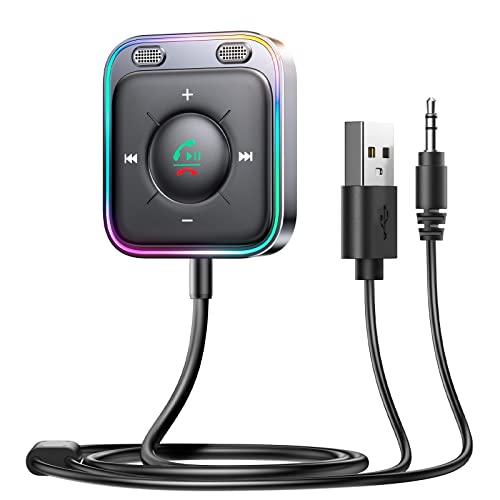
The JOYROOM adapter connects to a car’s 3.5mm AUX jack and receives wireless audio over Bluetooth 6.0. It is powered through USB, and its plug-and-play design is intended to pair with a phone when the car starts. The listed features also include support for two devices simultaneously.
Best for: Drivers who want a USB-powered receiver and prioritize call features. JOYROOM lists dual microphones, CVC8.0 noise cancellation, and a filter IC to help reduce road noise and other distractions during hands-free calls.
For music, the product description highlights stable transmission and minimal sound loss. Its stated working distance is up to 100 feet, although actual connection performance can vary with the vehicle interior and surrounding conditions.
Limitation: This adapter needs both a 3.5mm AUX input and USB power. It may be less suitable for a car that has an AUX jack but no convenient USB power source.
AILKIN Bluetooth FM Transmitter

Unlike an AUX receiver, the AILKIN is an FM Bluetooth transmitter. It sends audio from a paired phone to a selected FM frequency, which the car radio receives. This makes it a relevant option for a vehicle without a 3.5mm AUX input, provided its radio can tune to the selected frequency.
Best for: Drivers who need a wireless connection but have no AUX jack. The unit fits a standard cigarette-lighter-style power socket and lists Bluetooth 5.4, full FM frequencies, and four charging ports: two USB-C and two USB-A.
The product specifies up to 54W maximum charging output, with supported charging protocols and output depending on the connected device. Its blue LED ring indicates power and is designed to improve visibility at night.
Limitation: Audio travels through FM radio rather than a direct AUX connection. You must match the transmitter’s frequency with the car radio, and the device occupies the vehicle’s power socket while in use.
Seulliya USB-C To AUX Cable

The Seulliya cable connects a USB-C device directly to a car stereo’s 3.5mm AUX input. It is a wired alternative to Bluetooth, with no pairing step. The cable is 3.3 feet long and includes a built-in DAC decoding chip; the listed audio support is up to 16-bit/48 kHz.
Best for: Drivers who prefer a direct wired connection, do not want to charge a separate Bluetooth receiver, or want to avoid wireless pairing. The cable is described as plug and play and can also connect USB-C devices to other equipment with a 3.5mm audio input.
Before choosing it, check that the phone or other source has a USB-C port and that the car stereo has an AUX input. A cable connection can also keep the phone physically tethered, which may be inconvenient if the cable does not reach a suitable storage spot.
Limitation: It is not a wireless adapter and does not add Bluetooth. Its usefulness depends on having the correct ports on both the source device and the car audio system.
Buying Guide: How To Choose An AUX Device For Your Car
Does your car have a 3.5mm AUX input?
Check the stereo faceplate, center console, glove compartment, or nearby storage area for a round 3.5mm audio jack labeled AUX or Audio In. If the car has this input, a Bluetooth receiver or a compatible audio cable can send sound directly into the stereo. If it does not, an AUX adapter cannot plug in; consider an FM transmitter or another connection method supported by the vehicle.
Confirm that the jack is an audio input, not a headphone output. A port’s location and label can help distinguish it, and the car’s manual may identify supported audio connections.
Should you choose Bluetooth or a wired cable?
A Bluetooth receiver is convenient when you want to keep the phone untethered and stream audio wirelessly. It may also provide a microphone for hands-free calls. Battery-powered receivers need recharging, while USB-powered models need a suitable power source in the car.
A USB-C-to-AUX cable offers a direct wired connection without Bluetooth pairing. It is a straightforward choice for compatible devices, but the phone remains attached by cable. Check your device’s port and the adapter’s stated compatibility before purchasing; do not assume a USB-C connector alone guarantees support for every phone.
What if the car has no AUX jack?
An FM transmitter can send audio from a phone to the car radio over an FM frequency. Tune the car radio to the transmitter’s chosen frequency to hear the audio. This option is useful when there is no AUX input, but it depends on the radio receiving the selected frequency clearly. If the vehicle has another connection such as USB or built-in Bluetooth, check whether that method already meets your needs.
How important are microphones and call features?
For music-only use, focus on the connection type, power needs, and whether the phone can stream to the receiver. For calls, look for a listed built-in microphone and any stated noise-reduction features. Microphones in an adapter may capture sound differently depending on where the adapter sits, so placement and cabin noise can affect call quality.
Hands-free calling does not remove the need to drive attentively. Set up the device before driving, keep the phone secured, and follow local laws on phone use while driving.
How should you compare power and charging?
Battery-powered models offer flexibility but need to be recharged. USB-powered receivers avoid relying on an internal battery but occupy a USB power source. FM transmitters typically plug into a vehicle power socket and may add charging ports, but can use the socket you might otherwise need for another accessory.
Review the listed charging method and working time rather than assuming all Bluetooth AUX adapters operate the same way. If the product data does not specify its power needs, verify them before purchase.
Frequently Asked Questions
What does an AUX Bluetooth adapter do in a car?
A Bluetooth AUX receiver connects to the car stereo’s 3.5mm AUX input and receives audio wirelessly from a paired phone or other source. It lets a compatible non-Bluetooth stereo play streamed audio without replacing the stereo.
Can I use a Bluetooth AUX adapter without an AUX port?
No. A standard AUX receiver needs a 3.5mm audio input to connect to the car stereo. If the car lacks that input, consider an FM transmitter or another audio connection supported by the vehicle.
Does an AUX Bluetooth receiver need to be charged?
It depends on the model. Some receivers have rechargeable batteries, while others require USB power. Check the specific product’s power and charging details before buying.
Is an FM transmitter the same as an AUX adapter?
No. An AUX adapter connects directly to a 3.5mm input. An FM transmitter broadcasts audio to a radio frequency that the car stereo tunes into, making it an alternative when the vehicle has no AUX jack.
Will a USB-C-to-AUX cable work with every phone?
Not necessarily. The phone must have a compatible USB-C audio output, and the cable must support the device. Check the cable’s compatibility information and confirm that the car has a 3.5mm AUX input.