
Best HDMI ARC to AUX Adapters for TV Audio
When your TV’s HDMI ARC or eARC output is the only built‑in audio path, you still want to send sound to older speakers, soundbars, or amplifiers that use a 3.5mm or RCA input. The top options below provide direct ARC/eARC to AUX or multi‑output solutions, so you can enjoy clear, synchronized audio without extra boxes. This guide highlights five reliable choices, explains who they’re best for, and notes practical limitations.
| Product | Best For | Key Feature |
|---|---|---|
| HDMI ARC to 3.5mm AUX Audio Extractor Converter Cable – 8 ft (Veeloon) | Modern TVs with ARC/eARC, lean wiring | Integrated ARC/eARC cable with USB power and 3.5mm output |
| HDMI ARC Audio Extractor (DONGJIAN) | Older speakers with RCA/3.5mm outputs | Toslink + 3.5mm output with PCM/LPCM |
| XPTSFDU HDMI ARC Adapter 4K60Hz | ARC‑enabled TVs needing simultaneous L/R and 3.5mm | ARC audio to L/R and 3.5mm outputs |
| 192KHz HDMI ARC to 3.5mm Female (MEEKI) | High‑fidelity PCM playback to AUX | 192kHz, 24‑bit PCM, 32/44.1/48/96/192kHz support |
| 192KHz Unidirectional HDMI ARC/eARC to 3.5mm AUX (Adoreen) | Unidirectional ARC/eARC to 3.5mm for home theater | USB powered, integrated ARC/eARC to AUX |
HDMI ARC to 3.5mm AUX Audio Extractor Converter Cable (Veeloon)

Best for: Viewers who want a single, compact cable solution with built‑in USB power and a 3.5mm output. It directly converts ARC/eARC digital audio to analog stereo for amplifiers, speakers, or home theater systems. The integrated design reduces clutter and improves stability compared with separate adapters.
Why selected: Combines HDMI ARC/eARC plug, USB power, and AUX in one cable, simplifying setup and cable management. It supports up to 24‑bit/192kHz PCM and 192kHz sampling for clear stereo sound. The gold‑plated connectors and nylon braided jacket boost durability.
Caution: It does not decode surround formats like Dolby Digital or DTS. Ensure your output device accepts PCM/LPCM stereo signals for best results.
HDMI ARC Audio Extractor (DONGJIAN)

Best for: Users with older speakers or headphones that need either RCA or 3.5mm outputs from a TV’s ARC port. Particularly suitable when you want both Toslink optical and 3.5mm stereo outputs.
Why selected: It provides Toslink and 3.5mm options, enabling connection to a wider range of devices. It emphasizes ARC compatibility while noting that some TVs require ARC activation and volume control on the external device.
Caution: Not all HDMI devices in the system are ARC‑friendly; ensure your TV’s ARC function is enabled and that you choose PCM/LPCM output for audio compatibility.
XPTSFDU HDMI ARC Adapter 4K60Hz

Best for: Viewers seeking simultaneous L/R and 3.5mm audio outputs from ARC, with emphasis on maintaining PCM compatibility. Ideal for connecting to soundbars or amplifiers while using a 3.5mm input for headphones or secondary speakers.
Why selected: Notable for enabling dual output (L/R plus 3.5mm) and highlighting the need to set TV audio output to PCM2.0. It also guides users to locate the ARC port and enable CEC settings if needed.
Caution: This device is designed for TVs with ARC; some brands require additional TV settings to activate ARC mode and stable audio transmission.
192KHz HDMI ARC to 3.5mm Female (MEEKI)
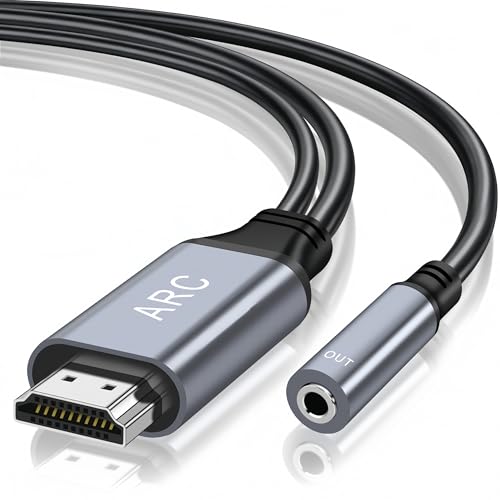
Best for: High‑fidelity stereo needs when PCM 2‑channel audio is sufficient. Good for fans of precise audio reproduction who want a 192kHz/24‑bit capable solution for TV to sound systems.
Why selected: It supports 192kHz sampling and multiple PCM formats while distinguishing that eARC/5.1 formats are not supported. Its simplicity helps users seeking straightforward ARC to 3.5mm conversion.
Caution: Not compatible with eARC or multi‑channel surround formats. Ensure PCM output on the TV is enabled for clean stereo sound.
192KHz Unidirectional HDMI ARC/eARC to 3.5mm AUX (Adoreen)

Best for: TV setups using ARC or eARC that want a dedicated, USB‑powered inline converter to analog stereo. Suitable for home theaters and older speakers that rely on 3.5mm input.
Why selected: The unit is designed to be an all‑in‑one breakout cable with a separate USB power line for stable operation, making wired setups neater and more stable. It emphasizes PCM/LPCM stereo and a plug‑and‑play approach.
Caution: As a unidirectional converter, it only converts from TV ARC/eARC to AUX; reverse audio control and multi‑channel formats are not supported.
Buying Guide: Key Considerations For HDMI ARC To AUX Adapters
- ARC vs eARC: Confirm your TV’s port supports ARC or eARC. eARC delivers higher bandwidth and can handle more formats, but not all adapters support it. If you only need stereo PCM, ARC is usually sufficient.
- Output formats: Many adapters convert ARC to PCM/LPCM stereo. If you need surround formats (Dolby Digital, DTS), these devices may not support them. Check whether you require optical or RCA outputs in addition to 3.5mm.
- Power requirements: USB power is common. Some units draw power from the TV USB port; others require a separate power source. Ensure you have a convenient power option.
- Output options: Decide if you need 3.5mm only, or also Toslink/ RCA outputs. Some models offer simultaneous outputs (L/R, 3.5mm, Toslink), which adds flexibility for multiple devices.
- Compatibility notes: Some TVs require manual ARC enabling, turning off TV speakers, or selecting PCM output. Review your TV’s manual or on‑screen settings to optimize compatibility.
- Durability and build: Devices with gold‑plated connectors and durable housings can improve longevity and reduce interference, especially in space‑constrained setups.
- Cable length: Longer cables may introduce minor latency or signal degradation; consider models with short, integrated form factors if space is limited.
- Limitations: Most of these adapters do not decode multi‑channel audio and are designed for stereo PCM; plan your home theater setup accordingly.
Frequently Asked Questions
- What is ARC and why do I need an ARC to AUX adapter?
– ARC returns audio from a TV to an external speaker system. An ARC to AUX adapter enables this signal to be converted to a standard analog 3.5mm or RCA input for older amplifiers or speakers. - Can these adapters support Dolby or DTS audio?
– Most listed adapters focus on PCM/LPCM stereo. Multi‑channel formats like Dolby Digital or DTS may not be supported unless explicitly stated. - Do I need a separate power supply?
– Several models use a USB power cable; some can draw power from the TV, others require a dedicated USB power source. Check the product’s power requirements. - Will using ARC to AUX affect TV remote volume control?
– In many cases, volume control on the TV remote does not adjust external speakers when using PCM/LPCM outputs; you may need to adjust volume on the external device. - Is eARC supported by these adapters?
– Some adapters list eARC compatibility, while others are limited to ARC. Verify compatibility with your TV’s port and desired audio formats before purchasing. - Which setup is best for a soundbar with a 3.5mm input?
– An ARC to 3.5mm adapter that supports PCM/LPCM and provides a stable analog output is ideal, as it minimizes latency and ensures compatibility with the soundbar’s input.
Note: This article compiles information from product listings to help buyers compare options. For precise compatibility with your TV, verify ARC/eARC support, required output formats, and power requirements in the product manual before purchase.