
If you need an AV receiver that can send video to two displays, the Onkyo TX-RZ50 is the closest match in this list: its listed features include discrete Zone 2 HDMI switching. For simultaneous wireless viewing, the YUYUNLOMN kit supports multiple receivers, while the TJCXELE transmitter offers a local HDMI loop-out. The other products are switches or converters, not AV receivers, and have important display limitations.
| Product | Best For | What to Know |
|---|---|---|
| Onkyo TX-RZ50 | Home theater with a separate HDMI zone | Supports discrete Zone 2 HDMI switching |
| YUYUNLOMN Wireless HDMI | Sending one source to multiple TVs | Supports up to six receivers; distance varies by surroundings |
| TJCXELE Wireless HDMI | A local display plus a wireless display | Transmitter has HDMI loop-out |
| GANA HDMI Switch | Choosing between two displays | Only one display works at a time |
| Uzifhdhi RCA/HDMI Adapter | Combining legacy RCA and HDMI sources | One HDMI output; not a two-output AVR |
Onkyo TX-RZ50 AV Receiver
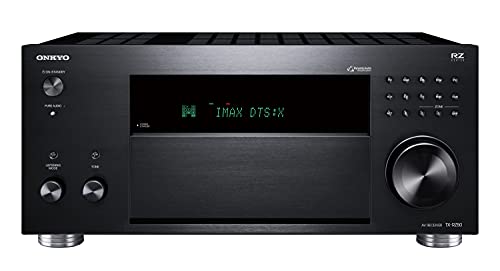
Best for: A home theater owner seeking an AV receiver with separate HDMI entertainment in a second room. The listed features describe HDMI 2.1 with 8K and discrete Zone 2 HDMI switching, allowing different Ultra High-Definition entertainment in two rooms.
The TX-RZ50 also offers up to 11.2 channels of processing, pre-outs for 7.2.4 layouts, and Dirac Live room calibration with a smartphone and the included wired microphone. Its THX certification is identified in the product listing.
Why it was selected: It is the only listed product that is an AV receiver and explicitly describes HDMI Zone 2 switching. This is more relevant to a two-room receiver setup than a basic HDMI switch.
Check before buying: The provided feature details do not specify the physical count or exact behavior of its HDMI output ports. Confirm the receiver’s output configuration and whether Zone 2 meets your needs before choosing it.
YUYUNLOMN Wireless HDMI Multi-Receiver Kit

Best for: Sending one HDMI source to two or more TVs without running long HDMI cables. The listing says the kit includes two receivers and can support up to six large screens or TVs when additional receivers are added.
It is described as a plug-and-play wireless system with a claimed range of up to 165 feet in open environments. The listing also notes that distance may fall to about 50 feet when the signal passes through walls. Included adapters are described for USB-C, Micro HDMI, and Mini HDMI connections.
Why it was selected: It directly addresses multi-display distribution, which may be the actual goal behind looking for two HDMI outputs.
Limitation: This is a wireless HDMI kit, not an AV receiver. The listing says it cannot transmit from TV to TV, and performance range depends on the environment.
TJCXELE Wireless HDMI With Loop-Out

Best for: A setup that needs a local monitor near the source and a second display reached wirelessly. The transmitter includes an HDMI loop-out, which the listing says can connect a local monitor while the same video stream is sent to a remote display.
The kit is described as pre-paired and plug-and-play. It is intended to transmit audio and video from HDMI sources such as PCs, set-top boxes, DVD players, and game consoles to TVs, projectors, or monitors. Both transmitter and receiver must be powered for operation.
Why it was selected: Loop-out gives it a direct two-display use case without requiring a separate HDMI splitter.
Limitation: This is not an AV receiver, and the listing describes wireless transmission rather than the receiver’s HDMI output specifications. Both units need power.
GANA Bidirectional HDMI Switch
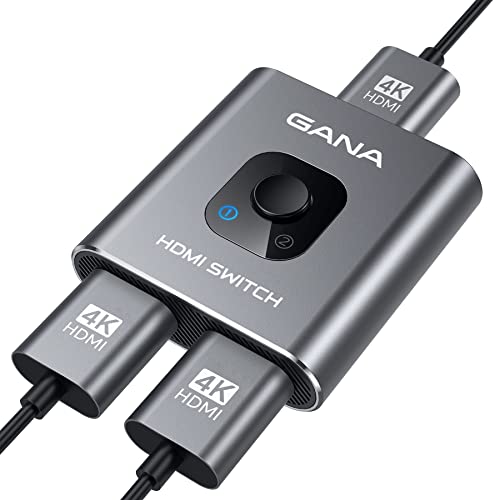
Best for: Switching one HDMI source between two displays, or selecting between two sources for one display. The product listing describes both directions of use and includes LED indicators for the active port.
It supports 4K at 60 Hz and is backward compatible with 2K and 1080p, according to the listing. The stated bandwidth is 3.4 Gbps. It is a compact, direct alternative when the requirement is manual selection rather than a full receiver.
Why it was selected: It can route HDMI between two displays, making it relevant to buyers comparing simple output-selection equipment with an AVR.
Limitation: Only one display works at a time. Choose this if you want to toggle between TVs; avoid it if both screens must show the signal simultaneously. HDMI cables are not included.
Uzifhdhi RCA And HDMI Adapter

Best for: Someone connecting an older RCA video source and an HDMI source to an HDMI display. Its combined design provides an RCA-to-HDMI conversion mode and an HDMI switching mode.
The listing says the RCA input converts composite video to 720p or 1080p HDMI output and names devices such as DVD players, VCRs, and older game consoles. In HDMI switcher mode, it has one HDMI input and one HDMI output and supports HDMI 2.0 up to 4K at 30 Hz, with backward compatibility listed for earlier versions.
Why it was selected: It may help buyers whose two-device setup includes legacy composite equipment as well as HDMI gear.
Limitation: It does not provide two HDMI outputs. It is a converter and switcher, not an AV receiver or simultaneous multi-display solution.
Buying Guide: Choosing HDMI For Two Displays
Do you need an AV receiver or an HDMI splitter?
An AV receiver combines audio processing, amplification, and source switching. A splitter or wireless distribution kit sends a source’s video to multiple displays but does not replace those receiver functions. If you need surround sound and a second viewing zone, start with an AVR that explicitly supports the required HDMI Zone 2 features. If you only need the same video on two screens, compare HDMI distribution products instead.
Do not assume that an AVR with multiple HDMI inputs has multiple HDMI outputs. Inputs connect sources such as a game console or streaming box. Outputs connect TVs or projectors. Check the product specifications for the number of outputs and whether they can operate simultaneously.
Should both displays show the same content?
For the same picture on two TVs, look for a product that explicitly states simultaneous output or multi-display support. The YUYUNLOMN kit is described for multiple TVs, while the TJCXELE listing describes a local HDMI loop-out alongside wireless transmission. Confirm that the source and display arrangement matches the product’s supported configuration.
If you only need to select which TV is active, a switch may be sufficient. The GANA device can route one source between two displays, but its listing explicitly states that only one display works at a time.
Do you need separate content in another room?
A second HDMI output does not always mean two independent programs. Some setups mirror the same source, while a receiver with Zone 2 features may offer a separate room or zone configuration. The Onkyo listing specifically mentions discrete Zone 2 HDMI switching and different entertainment in two rooms. Check whether the receiver supports the sources, resolutions, and independent playback behavior you require.
What resolution and connection types should you check?
Match the product’s stated resolution to the source and displays. The listed products vary: the GANA switch claims up to 4K at 60 Hz, the Uzifhdhi HDMI mode lists up to 4K at 30 Hz, and the RCA converters describe 1080p output. A converter’s output resolution does not mean it creates the same detail as a native high-resolution source.
Check whether your equipment uses HDMI, composite RCA, USB-C, Micro HDMI, or Mini HDMI. Legacy RCA devices need a compatible converter to connect to HDMI displays. Also check required power, cable types, and whether cables or power supplies are included; the Tengchi listing, for example, says its converter needs USB power from a 5V, 1A source and that the power supply is not included.
Is wireless HDMI suitable for your room?
Wireless HDMI can reduce cable runs, but stated range is not a guarantee for every home. Walls and other obstacles can reduce the usable distance. Compare the manufacturer’s open-environment range with the actual distance and layout between the transmitter and receiver. Confirm that every required unit is powered and that the product supports your intended number of screens.
What should you verify before choosing?
- Count HDMI outputs separately from HDMI inputs.
- Confirm whether two displays work simultaneously or only one at a time.
- Check whether the displays need identical content or separate content.
- Match resolution and refresh-rate support to your source and screens.
- Verify audio routing, receiver zone features, power needs, and included accessories.
- For wireless systems, account for walls, distance, and the number of receivers.
Frequently Asked Questions
Does an AV receiver with two HDMI outputs show different content on both TVs?
Not necessarily. Some receivers mirror the same source to both outputs, while zone-capable models may support separate content or switching. Check the receiver’s specifications for simultaneous output and Zone 2 behavior.
Is the Onkyo TX-RZ50 a match for a two-room HDMI setup?
Its listing describes discrete Zone 2 HDMI switching and different entertainment in two rooms. The provided features do not specify the physical output count, so verify the exact output configuration for your setup.
Can the GANA HDMI switch show the same source on two TVs at once?
No. Its product information says that when one HDMI source is toggled between two displays, only one display works at a time.
What is the difference between an HDMI switch and an HDMI splitter?
A switch selects one source or display path at a time. A splitter is intended to distribute one source to multiple displays. Check the device’s stated operating mode because some products support switching in only one direction.
Can an RCA-to-HDMI converter provide two HDMI outputs?
No. The listed Uzifhdhi adapter converts RCA to HDMI and provides one HDMI output in switcher mode. It is not a dual-output receiver or HDMI splitter.
Will wireless HDMI work through walls?
It may, but range can decrease. The YUYUNLOMN listing says its range can reduce from up to 165 feet in open environments to about 50 feet when passing through walls. Actual results depend on the room and obstacles.