
For Bluetooth audio on a PC without built-in Bluetooth, a USB adapter is usually the simplest route. The TP-Link Bluetooth 5.4 adapter is best for buyers seeking a newer Bluetooth version, while the UGREEN USB adapter suits Windows users who want to connect several types of devices. For a 3.5 mm audio jack or a USB-C audio-only connection, the other adapters below serve different setups. Check each product’s operating-system and connection requirements before choosing.
| Product | Best for | Connection |
|---|---|---|
| TP-Link Bluetooth 5.4 USB Adapter | A newer Bluetooth version | USB |
| UGREEN Bluetooth 5.3 USB Adapter | Windows users connecting multiple device types | USB |
| TP-Link Bluetooth 5.3 Long-Range Adapter | Buyers prioritizing stated coverage | USB |
| OiDiPi Bluetooth Transmitter and Receiver | PCs with a 3.5 mm audio jack | 3.5 mm AUX |
| UGREEN USB-C Bluetooth Audio Adapter | USB-C audio and compatible headphones | USB-C |
TP-Link Bluetooth 5.4 USB Adapter
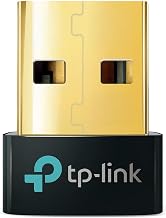
Best for: PC owners who want a compact USB adapter with Bluetooth 5.4 and backward compatibility. This dongle adds Bluetooth to a desktop or laptop that does not have it, and its listed Bluetooth versions include 5.3, 5.0, 4.2, 4.0, 3.0, 2.1, 2.0, and 1.1.
The product includes EDR and Bluetooth Low Energy technology. TP-Link says it can provide up to twice the data-transfer speed and four times the coverage compared with Bluetooth 4.0. Those are stated comparisons, not a guarantee of a particular range in every room or PC setup.
Why it was selected: It is the only product in this group listed with Bluetooth 5.4, making it a relevant option for shoppers comparing adapter versions. Choose it if you want a standard USB Bluetooth dongle for PC audio and other Bluetooth connections.
Limitation: The supplied product details do not specify operating-system support or installation requirements. Confirm those details for your computer before buying.
UGREEN Bluetooth 5.3 USB Adapter

Best for: Windows users who want to connect several different kinds of Bluetooth devices through one USB dongle. UGREEN says the adapter can connect up to five devices of different types at the same time, such as a mouse, keyboard, phone, or headphones.
The adapter uses Bluetooth 5.3 BR+EDR technology. The product description says this version improves connection stability and transfer speed while reducing the possibility of signal interruptions and power consumption. It also states an important audio limitation: when two devices of the same audio type, such as two headphones or two speakers, are connected, only one can play music.
Why it was selected: Its stated multi-device support makes it better suited to a PC setup with audio and non-audio accessories than an adapter intended only for listening.
Limitation: It supports Windows 11, Windows 10, and Windows 8.1 without driver installation, according to the listing. Windows 7, Linux, and macOS are not supported, so avoid this option if you use one of those systems.
TP-Link Bluetooth 5.3 Long-Range Adapter

Best for: Buyers looking for a USB Bluetooth adapter whose listed advantages include extended coverage. The TP-Link UB500 Plus adds Bluetooth capability to a non-Bluetooth desktop or laptop and supports Bluetooth 5.3 with EDR.
The product is backward compatible with Bluetooth versions 4.2, 4.0, 3.0, 2.1, 2.0, and 1.1. TP-Link states that the adapter can provide up to twice the speed and four times the coverage compared with Bluetooth 4.0. It also includes Bluetooth Low Energy technology.
Why it was selected: It provides a useful comparison with the standard USB dongles in this list for shoppers who specifically care about the manufacturer’s stated coverage and speed claims. Choose it if those claims are a priority and your PC has an appropriate USB port.
Limitation: The listing information provided does not name supported operating systems. Check current compatibility details before purchasing, particularly if your PC uses a less common operating system.
OiDiPi 3.5 mm Bluetooth Transmitter And Receiver

Best for: People who want to send audio from a PC’s 3.5 mm output to Bluetooth headphones or a speaker, or receive Bluetooth audio on wired equipment. Unlike the USB dongles above, this product connects through a 3.5 mm audio interface and works in transmitter and receiver modes.
In transmitter mode, it sends audio from a non-Bluetooth device, including a PC, to Bluetooth headphones, speakers, or a soundbar. In receiver mode, it can receive audio from a phone, tablet, or computer and pass it to wired speakers, headphones, or a car stereo with a compatible 3.5 mm connection. The listing describes status indicators and pairing initiated with its multifunction button.
Why it was selected: It is a flexible alternative when using a 3.5 mm audio connection is more practical than adding Bluetooth through a PC’s USB port.
Limitation: This is an audio-jack adapter, not a general-purpose USB Bluetooth adapter for connecting PC peripherals. Check that the PC or audio equipment has a compatible 3.5 mm interface.
UGREEN USB-C Bluetooth Audio Adapter

Best for: PC or laptop users with a USB-C port who want to transmit audio to Bluetooth headphones or a speaker. The adapter is designed for audio devices only, not general Bluetooth data connections, and the listing says it works with Windows and macOS but not Linux.
Its supported audio decoding options include aptX Low Latency, aptX Adaptive Low Latency, aptX Adaptive High Quality, aptX HD, and SBC. The product has LED indicators for operating status. UGREEN notes that headphones must support the same standard for the corresponding codec to be used.
Why it was selected: It offers a specialized USB-C option for audio, including listed low-latency codec support. Choose it if your PC has USB-C and your headphones support a matching audio standard.
Limitation: It does not add general-purpose Bluetooth connectivity for devices such as keyboards or mice. It is not compatible with Linux, and the listing also says it is not compatible with PS4.
Buying Guide: How To Choose Bluetooth Audio For A PC
Does your PC already have Bluetooth?
Check the PC’s settings or device information before buying an adapter. If Bluetooth is already available, you may be able to pair headphones or speakers without additional hardware. If it is not, a USB Bluetooth dongle can add Bluetooth capability. A USB-C audio transmitter or a 3.5 mm transmitter may be a better fit when you need audio transmission through a specific port rather than broader Bluetooth functions.
Should you choose USB, USB-C, or 3.5 mm?
- Choose a standard USB dongle if you want to add Bluetooth to a PC and connect audio devices or, depending on the product, other Bluetooth accessories.
- Choose a USB-C audio adapter if your PC has USB-C and you need an audio-only transmitter with listed codec options. Check that your headphones support the codec you want.
- Choose a 3.5 mm transmitter and receiver if your setup uses an AUX audio jack or you want to send audio to wireless headphones or receive it on wired audio equipment.
Which Bluetooth version and range claims matter?
The products listed here include Bluetooth 5.3 or 5.4 adapters and backward compatibility with selected earlier versions. A newer version can be a useful comparison point, but it does not by itself guarantee better audio quality, low latency, or a specific connection range. Range depends on the adapter, paired device, surroundings, and placement. Treat manufacturer comparisons such as “up to” speed or coverage as stated claims rather than a promise for every room.
Do you need to connect more than headphones?
If the PC will connect to headphones alongside a keyboard, mouse, or phone, check the adapter’s device limits and operating-system support. The UGREEN Bluetooth 5.3 USB adapter lists support for up to five different types of devices, but it states that only one device of the same audio type can play music at a time. The UGREEN USB-C option is specifically for audio devices, so it is not the better choice for a general set of Bluetooth peripherals.
How important are codecs and latency?
Codec support matters only when both the adapter and the headphones support the same codec. The USB-C UGREEN adapter lists aptX options and SBC, and its description specifies that headphones must support the same standard. If you are selecting an adapter for video or gaming audio, compare the codec support on both products and confirm that your PC’s operating system is supported. Do not assume that every Bluetooth adapter includes the same codecs.
What should you verify before purchase?
- Confirm the adapter uses a port available on your computer.
- Check the product’s supported operating systems; the UGREEN Bluetooth 5.3 USB model excludes macOS, Linux, and Windows 7.
- Determine whether you need audio transmission only or Bluetooth for other devices too.
- For a 3.5 mm product, confirm the PC or audio equipment has a compatible AUX connection.
- For codec-specific listening, verify that both the adapter and headphones support the same codec.
Frequently Asked Questions
Can I use Bluetooth headphones with a desktop PC?
Yes, if the desktop has Bluetooth built in or you add a compatible Bluetooth adapter. Pair the headphones through the PC’s Bluetooth settings after confirming that the adapter supports the operating system.
Does a USB Bluetooth adapter improve sound quality?
Not necessarily. The adapter provides a Bluetooth connection, but sound quality also depends on the headphones, supported audio codecs, the PC, and the listening setup. Compare codec support when it matters.
Can one Bluetooth adapter connect headphones and a keyboard?
Some adapters support multiple device types. The UGREEN Bluetooth 5.3 USB model lists up to five different types of connected devices. Its listing also says only one device of the same audio type can play music at a time.
Will every adapter work with macOS or Linux?
No. Compatibility varies by product. The UGREEN Bluetooth 5.3 USB adapter does not support macOS or Linux, while the UGREEN USB-C audio adapter lists Windows and macOS support but not Linux. Check the specific adapter’s requirements.
Can a 3.5 mm Bluetooth transmitter connect directly to wireless headphones?
A transmitter with a 3.5 mm input can send audio from a compatible PC or other audio source to Bluetooth headphones or a speaker. The OiDiPi product listed here supports transmitter mode as well as receiver mode.