
Best Bluetooth Audio Input Devices for Wireless Listening and TV Enjoyment
Answering the need for easy, wireless audio input from non-Bluetooth sources, this guide highlights five reliable Bluetooth audio adapters. Each product is suited for a different use case—whether you want to stream music from a phone to home speakers, add Bluetooth to a TV or car stereo, or share audio with two listeners. The table below helps compare core options at a glance.
| Product | Best For | Key Benefit |
|---|---|---|
| Esinkin Bluetooth Audio Adapter | Home stereo systems and computers | Simple plug-and-play 3.5 mm or RCA connection |
| 1Mii B06TX Bluetooth 5.3 Transmitter | TV-to-headphones setup | Dual-device connection for sharing TV audio |
| XTREME Monster Bluetooth Transmitter & Receiver | 2-in-1 TX/RX versatility | Separate modes for transmitting to headphones or receiving from wired devices |
| UGREEN Aux to Bluetooth 6.0 Adapter | Car and home audio with hands-free calls | Built-in mic and SBC codec for clear calls |
| MEE audio Connect Hub Bluetooth Transmitter/Receiver | TV or home theater with dual headphones | AptX Low Latency and pass-through options |
Esinkin Bluetooth Audio Adapter For Music Streaming Sound System

Best for: Users who want to wirelessly stream music from a phone or tablet to existing speakers. The adapter supports 3.5 mm and RCA outputs to connect to most home stereo setups. It is ideal for turning non-Bluetooth speakers into wireless speakers. Limitations include a reliance on proximity for the best connection and straightforward pairing, which may require occasional re-pairing if devices are moved far apart.
1Mii B06TX Bluetooth 5.3 Transmitter for TV to 2 Wireless Headphone/Speaker

Best for: TV owners who want to add Bluetooth headphones or speakers without replacing the TV. This transmitter supports dual connections, letting two listeners enjoy synchronized audio. A caution: this is a transmitter only; it will not receive audio from Bluetooth devices, so use it with non-Bluetooth TVs or audio sources.
XTREME Monster Bluetooth Transmitter & Receiver (2-in-1)

Best for: A flexible setup where a single device can act as both transmitter and receiver. It supports two devices simultaneously, with a practical 33-foot range and low-latency performance in compatible configurations. Better for mixed-use environments (TV, gaming, or music) but may require attention to codec compatibility for optimal latency.
UGREEN Aux to Bluetooth 6.0 Adapter

Best for: Car or home audio setups needing hands-free calling and a stable 10 m connection. The built-in microphone supports hands-free calls, and the Bluetooth 6.0 chipset offers improved power efficiency and range. Choose this if you want clear calls and reliable wireless streaming in a compact form factor. Caution: car environments with metal can reduce range slightly.
MEE audio Connect Hub Bluetooth Transmitter/Receiver
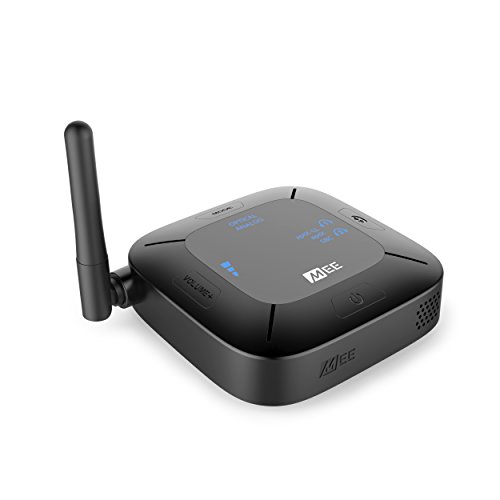
Best for: TV or home theater users who want both TX and RX modes with pass-through to share audio to multiple headphones or speakers. It supports aptX Low Latency for reduced lag and can handle dual-headphone streaming. Limitation to consider: performance depends on device compatibility with aptX codecs for optimal lip-sync.
MEE audio Connect Bluetooth Audio Transmitter for Up to 2 Wireless Headphones
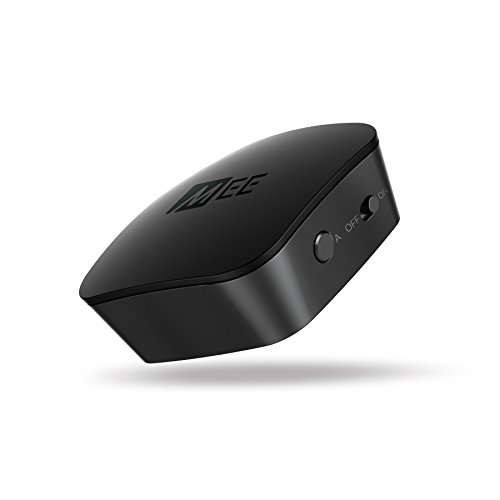
Best for: People who want to connect a TV or PC to two Bluetooth headphones with minimal setup. It emphasizes high-fidelity wireless audio and low-latency with aptX Low Latency when supported by the receiving devices. Caution: not all playback sources output Dolby Digital; use PCM with optical connections as needed.
Buying Guide: Key Considerations for Bluetooth Audio Input Devices
- Connection type: Choose adapters with the inputs you already have (3.5 mm, RCA, optical, or HDMI ARC) to minimize extra cables.
- Transmit vs receive: Determine whether you need a transmitter (TX), a receiver (RX), or a dual TX/RX device for your setup.
- Latency and codecs: Look for aptX Low Latency or aptX Adaptive support if lip-sync is important for TV, movies, or gaming.
- Range and environment: Indoor range varies; consider brick walls, furniture, and interference when planning placement.
- Multi-device support: If sharing audio, verify how many devices can connect simultaneously and how pairing works.
- Power and portability: Some adapters are USB-powered; others rely on battery or car power. Consider where you’ll use the device most.
- Hands-free calling: If phone calls are a use case, a built-in microphone and call handling may be valuable.
Frequently Asked Questions
- Do Bluetooth adapters improve sound quality?
They enable wireless streaming from non-Bluetooth sources but audio quality depends on the source, codec, and device capabilities. - Can I use a Bluetooth transmitter with a TV?
Yes, many transmitters connect to TVs via optical, RCA, or AUX outputs to send audio to Bluetooth headphones or speakers. - Is lag a problem with Bluetooth audio adapters?
Low-latency codecs (aptX LL, aptX Adaptive) minimize lip-sync issues when both transmitter and receiver support them. - Can I connect two wireless headphones at the same time?
Some adapters support dual pairing; verify compatibility and codecs to ensure synchronized audio. - Will a Bluetooth car adapter work with a non-Bluetooth car stereo?
Yes, many car adapters turn non-Bluetooth car stereos into wireless receivers for hands-free use. - Do I need to install drivers?
Most consumer Bluetooth adapters are plug-and-play; drivers are rarely required for modern devices.