
Best Bluetooth Head-Up Displays for Cars: Safe Navigation on the Road
Looking for a heads-up display (HUD) to keep your eyes on the road while navigation, calls, and speed data stay in view? This guide covers top Bluetooth HUDs that project essential information onto your windshield. Best for tech-savvy drivers who want wireless CarPlay/Android Auto, easier daily commutes, and safer highway trips.
The following table highlights five strong options, focusing on compatibility, ease of use, brightness, and real-time speed readouts. Use this quick reference to compare features and determine which HUD fits your vehicle and driving style.
| Product | Key Benefit | Best For |
|---|---|---|
| Wireless Hud Car V3 | Real-time speedometer and overspeed alerts | Safety-focused drivers needing overspeed warnings |
| VIVIHUD V3-SE | Wireless CarPlay/Android Auto and auto-brightness | Users wanting seamless smartphone integration |
| HUD Car GPS V3 Ultra | Dual-power options and high-temp resilience | Vehicles with varied climates and long drives |
| Universal 2.99″ HUD | Compact display with stable Bluetooth and CarPlay/Android Auto | Discreet HUD users who still want full connectivity |
| KUOWEIHUD HUD Series | GPS speed projection with auto brightness | Budget-conscious buyers needing reliable speed readouts |
Wireless Hud Car V3 & Android Auto HUD

The Wireless Hud Car V3 integrates CarPlay and Android Auto to project GPS navigation, calls, and music onto your windshield. Best for drivers who want hands-free navigation with a large, in-line display. The built-in GPS speedometer shows your real-time speed prominently, with an overspeed warning that flashes and beeps when you exceed set limits. It installs in under five minutes with plug-and-play power from the OBD port or USB. Best for drivers who prioritize speed awareness and easy installation; caution: some vehicles may require additional mounting for optimal glare reduction.
VIVIHUD V3-SE Wireless HUD

VIVIHUD V3-SE offers wireless CarPlay and Android Auto with a plug-and-play setup. It supports instant access to maps, calls, music, and voice assistants, all without touching the phone. The display uses anti-reflection technology to remain legible in daylight and at night. Best for users who want seamless smartphone interaction and a straightforward install; limitation: image brightness may vary with sunlight, requiring occasional brightness adjustments.
HUD Car GPS V3 Ultra HD Display
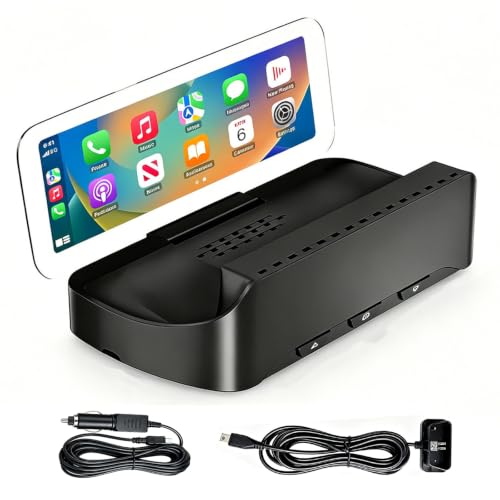
This Ultra HD HUD provides wireless CarPlay/Android Auto with an emphasis on robust power options (OBD cable and cigarette lighter). It supports a built-in cooling system and high-temperature operation, designed for extreme conditions. It is best for drivers who want reliable performance across seasons and long trips. Choose this if you need dual-power flexibility and strong temperature tolerance; caution: setup documentation notes Wi‑Fi/Bluetooth pairing steps which can be confusing for some users.
Universal 2.99″ HUD

This compact 2.99″ display offers stable Bluetooth connectivity with CarPlay/Android Auto and optional OBD/GPS data. It provides adaptive brightness and an anti-glare screen so you can read speed and navigation in various lighting conditions. Best for drivers who want a small, inconspicuous HUD with solid connectivity; limitation: smaller display may be harder to read at a distance for some users.
KUOWEIHUD Advanced HUD Series

KUOWEIHUD HUD focuses on dual-mode GPS + BDS with a 10Hz refresh rate and real-time speed projection onto the windshield. The design emphasizes clear speed display and auto brightness for any lighting. Best for budget-conscious buyers who still want reliable speed data; caution: some users report glare under harsh sun, so use the anti-glare option when possible.
Buying Guide
- Display size and brightness: Larger screens are easier to read without glances away from the road. Look for auto-brightness to adapt to daylight and night driving.
- Connectivity: Ensure CarPlay/Android Auto support matches your phone. Wireless connections reduce clutter and simplify setup.
- Power options: Check whether the HUD uses OBD power, USB, or cigarette-lighter cables. Dual-power models offer flexibility for older vehicles.
- GPS data reliability: A robust GPS/BDS system with a fast refresh rate improves speed accuracy and navigation cues.
- Installation ease: Plug-and-play units save time. Some models may require minor mounting or additional cables.
- Safety features: Overspeed alerts and visual prompts help maintain lawful speeds. Consider whether you need audio alerts or on-screen warnings.
- Durability: Temperature tolerance matters for extreme climates. Look for units rated to operate across a wide temperature range.
Frequently Asked Questions
- What is a Bluetooth HUD for cars?
It is a windshield projection device that uses Bluetooth and other connections to display navigation, speed, and calls in your line of sight.
- Do HUDs require professional installation?
Most are plug-and-play and installable in minutes, though some setups may benefit from minor mounting assistance.
- Will a HUD work with iPhone and Android?
Yes, many units support CarPlay and Android Auto, providing compatibility with both ecosystems.
- Can HUDs project at night?
Yes, most models include auto-brightness and anti-glare screens to improve visibility in low-light and daytime conditions.
- What should I watch for regarding safety?
Look for overspeed warnings, stable display readability, and non-distracting alerts to maintain focus on the road.
- Are HUDs compatible with all vehicles?
Most fit a wide range of sedans, SUVs, and trucks, but verify power options and mounting fit for your specific vehicle.