
The best Bluetooth plug-and-play adapter depends on what you want to connect: a USB dongle can add Bluetooth to a compatible computer, while an AUX receiver can add wireless audio to a car stereo. The TP-Link Bluetooth 5.4 adapter is a practical choice for a compact PC upgrade, the UGREEN 5.3 model suits Windows users connecting several devices, and the JOYROOM AUX adapter is designed for car audio and calls. Check operating-system and port requirements before choosing, because plug-and-play does not mean every adapter works with every device.
| Product | Best For | Connection Type | Key Consideration |
|---|---|---|---|
| TP-Link Bluetooth 5.4 USB Adapter | Broad Bluetooth version support | USB for a PC | Confirm operating-system requirements |
| UGREEN Bluetooth 5.3 USB Adapter | Windows users pairing multiple devices | USB for a PC | Windows 11, 10, and 8.1 are specified |
| TP-Link Bluetooth 5.3 Long-Range Adapter | PC users prioritizing coverage | USB for a PC | Actual range depends on the environment |
| UGREEN Bluetooth 6.0 USB Adapter | Buyers seeking a newer-version PC dongle | USB for a PC | Provided details do not specify compatibility |
| JOYROOM Bluetooth AUX Car Adapter | Car stereos with a 3.5 mm AUX input | AUX and USB power | Requires both an AUX jack and USB power |
TP-Link Bluetooth 5.4 USB Adapter
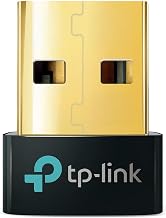
This TP-Link USB dongle is best for PC owners who want to add Bluetooth while retaining support for a broad range of older Bluetooth versions. Its listed Bluetooth 5.4 support is backward compatible with versions 5.3, 5.0, 4.2, 4.0, 3.0, 2.1, 2.0, and 1.1. That makes it a flexible option when the Bluetooth version of a peripheral is uncertain.
TP-Link lists EDR and Bluetooth Low Energy (BLE) technology, with improved data-transfer speed and power consumption. The product description also claims up to twice the data-transfer speed and four times the coverage compared with Bluetooth 4.0. Treat those as stated comparisons rather than a guarantee of performance in every room or setup.
- Best for: Buyers who want a PC Bluetooth adapter with extensive backward compatibility.
- Why it was selected: It combines a newer Bluetooth version with support for numerous earlier versions.
- Consider: The supplied details do not identify supported operating systems. Check the listing and your computer’s requirements before buying.
Choose this if version flexibility matters more than a listed multi-device limit. Avoid assuming that a USB connection alone guarantees immediate setup on every computer; operating-system support and driver requirements can vary.
UGREEN Bluetooth 5.3 USB Adapter

This UGREEN dongle is best for users of Windows 11, Windows 10, or Windows 8.1 who want to connect several types of Bluetooth peripherals to a PC. Its product details say it can connect up to five different Bluetooth devices at once, including examples such as a mouse, keyboard, phone, and headphones. The description also specifies Bluetooth 5.3 BR+EDR technology.
The listing says no driver installation is required on Windows 11, 10, and 8.1, making this the clearest plug-and-play choice in this group for those operating systems. It does not support Windows 7, Linux, or macOS according to the provided information. If you need music from multiple audio devices at the same time, note that only one connected Bluetooth audio device can play music at a time.
- Best for: Windows users pairing a mix of peripherals with one computer.
- Why it was selected: It provides a specific five-device connection claim and identifies supported Windows versions.
- Consider: It is not a suitable choice for macOS, Linux, or Windows 7 based on the stated compatibility.
Choose this if your computer runs a listed Windows version and you want to keep several device connections available. The five-device claim does not mean five headphones or speakers can play audio simultaneously.
TP-Link Bluetooth 5.3 Long-Range Adapter

The TP-Link UB500 Plus is best for PC owners who want to add Bluetooth and prioritize the product’s stated range and speed benefits. It uses Bluetooth 5.3 with EDR and is backward compatible with Bluetooth versions 4.2, 4.0, 3.0, 2.1, 2.0, and 1.1. The product description says it can turn a non-Bluetooth PC, desktop, or laptop into a Bluetooth-capable device.
TP-Link describes the adapter as offering up to twice the speed and four times the coverage compared with Bluetooth 4.0. It also lists BLE technology, which is designed for low-energy Bluetooth connections. These claims can help narrow a choice, but walls, nearby wireless devices, the connected peripheral, and the computer’s placement can affect real-world connection quality.
- Best for: Buyers who want a USB Bluetooth upgrade and value the stated coverage comparison.
- Why it was selected: It specifies Bluetooth 5.3, backward compatibility, EDR, and BLE.
- Consider: The provided features do not name supported operating systems, so verify compatibility before purchase.
Choose this if the listed version support and coverage focus fit your setup. Do not treat “long range” or the comparison with Bluetooth 4.0 as a guaranteed distance in a particular home or office.
UGREEN Bluetooth 6.0 USB Adapter
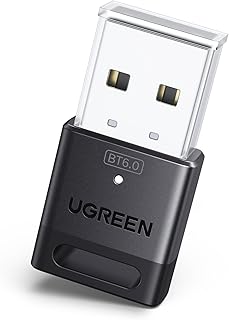
This UGREEN adapter is best considered by buyers specifically looking for a USB Bluetooth dongle identified as Bluetooth 6.0. The supplied product name describes it as a PC adapter and receiver, but no feature list was provided for this item. That means its operating-system support, setup requirements, connection range, supported device count, and other performance details cannot be confirmed from the available information.
- Best for: Shoppers comparing USB adapters who want to investigate a Bluetooth 6.0 model.
- Why it was selected: Its name directly identifies it as a Bluetooth USB adapter, making it relevant to plug-and-play PC searches.
- Consider: Verify compatibility and setup instructions in the current product details before buying; the supplied information does not establish that it is driver-free.
Choose this only after confirming that the listing supports your operating system and intended peripherals. A Bluetooth version number alone does not establish whether an adapter will work with a particular computer or deliver a specific range.
JOYROOM Bluetooth AUX Car Adapter

The JOYROOM Bluetooth AUX adapter is best for drivers whose car stereo has a 3.5 mm AUX input and who want Bluetooth audio and hands-free calling. It plugs into the AUX jack and receives power through USB. The product description says it automatically pairs with a phone when the car starts and supports two devices simultaneously.
For calls, it includes dual microphones, CVC8.0 noise cancellation, and a built-in filter IC, according to the supplied features. The listing also describes HiFi stereo audio, Bluetooth 6.0, and a working distance of up to 100 feet. These are product claims, not assurances of a specific call or audio result in every vehicle.
- Best for: Drivers adding wireless playback and calling to a car with AUX and USB connections.
- Why it was selected: Its plug-in AUX-and-USB setup is a direct alternative to a PC Bluetooth dongle for car use.
- Consider: It requires both a 3.5 mm AUX jack for audio and USB power. It will not suit a car lacking those connections.
Choose this if your stereo accepts AUX audio and you want the adapter to pair with a phone when the car starts. This is not a USB Bluetooth adapter for a computer; it is a car audio receiver.
Buying Guide: How To Choose A Plug-And-Play Bluetooth Adapter
What device are you trying to make Bluetooth-capable?
Start by identifying the receiving device. A USB Bluetooth dongle is intended to add Bluetooth to a computer with a compatible USB port and operating system. A car AUX receiver sends audio to a stereo through its 3.5 mm input and may need a separate USB connection for power. These categories solve different problems and are not interchangeable.
If you want to connect wireless headphones, a keyboard, or a mouse to a computer, compare USB adapters. If you want to stream phone audio through an older car stereo, look for an AUX receiver. Confirm that your device has the required port before selecting a product.
Does plug-and-play mean no setup at all?
Not always. Plug-and-play usually refers to a simpler connection process, but the exact steps depend on the product and operating system. Among the products here, the UGREEN Bluetooth 5.3 adapter explicitly states that no driver installation is required for Windows 11, Windows 10, and Windows 8.1. It also explicitly excludes Windows 7, Linux, and macOS.
For the other USB adapters, the supplied product information does not specify operating-system support or driver requirements. Check the current listing before purchase, especially if you use macOS, Linux, an older version of Windows, or a managed work computer.
Which Bluetooth version should you choose?
Bluetooth version labels help distinguish product generations, but they do not guarantee compatibility with every device or describe all practical performance. The TP-Link 5.4 adapter lists broad backward compatibility, while the TP-Link 5.3 model also supports several earlier versions. The UGREEN 5.3 adapter focuses on supported Windows systems and connecting multiple device types.
When your existing peripheral is older, look for explicit backward-compatibility details rather than choosing solely by the newest version number. For a car receiver, also confirm the audio connection method and power source, since Bluetooth version is only one part of the setup.
How many devices do you need to connect?
Consider the number and type of peripherals you expect to use. The UGREEN 5.3 dongle lists support for up to five different Bluetooth devices connected at once, including a mouse, keyboard, phone, and headphones. Its description clarifies that only one Bluetooth audio device can play music at a time when multiple audio devices are connected.
Do not assume that other products support the same device count. The supplied information for the TP-Link adapters does not specify a maximum number of connected devices. The JOYROOM car receiver says it supports two devices simultaneously, but that does not mean both can play audio at the same time.
Should you prioritize speed or range?
TP-Link describes its 5.4 and 5.3 adapters as offering up to twice the data-transfer speed and four times the coverage compared with Bluetooth 4.0. Use those statements as product comparisons, not guaranteed results. Physical barriers, interference, placement, and the connected device can affect performance.
For a computer in a crowded or obstructed area, compare the product’s stated features and consider where the USB adapter will sit. For a car receiver, check whether the phone can remain within the adapter’s stated working distance during normal use. A claimed maximum range may not reflect every vehicle interior or environment.
What ports and power sources should you check?
For a PC dongle, confirm that the computer has an available compatible USB port and that the operating system is supported. For the JOYROOM adapter, the vehicle must have both a 3.5 mm AUX input and a USB power source. An AUX jack carries the audio connection; USB supplies power, according to the listed setup.
Also consider whether the ports are accessible and whether connecting an adapter will block neighboring ports. Check the product dimensions and setup instructions in the listing if physical clearance is a concern.
Frequently Asked Questions
What is a plug-and-play Bluetooth adapter?
It is an adapter designed to add Bluetooth connectivity through a straightforward connection process. Depending on the product, it may plug into a computer’s USB port or connect to a car stereo’s AUX input and receive USB power. Setup and operating-system support vary.
Which adapter in this list states that no driver is required?
The UGREEN Bluetooth 5.3 USB adapter states that no driver installation is required on Windows 11, Windows 10, and Windows 8.1. Its listed compatibility does not include Windows 7, Linux, or macOS.
Can a USB Bluetooth dongle add Bluetooth to any computer?
No. Compatibility depends on the adapter’s operating-system support, the computer’s USB connection, and any required setup. Check the product details for your specific computer before buying.
Can the JOYROOM adapter work with any car stereo?
It requires a 3.5 mm AUX input for audio and USB power. A car stereo without those connections does not match the listed setup.
Can five Bluetooth audio devices play music at once through the UGREEN 5.3 adapter?
No. The product description says it can connect up to five different types of Bluetooth devices, but only one connected Bluetooth audio device can play music at a time.
Does a newer Bluetooth version guarantee longer range?
No. A version number by itself does not guarantee range or performance. Compare the product’s stated features, confirm compatibility, and account for barriers and interference in your setup.