
The best Bluetooth speakers to connect to a computer depend on whether you prioritize wireless convenience, USB audio, desk space, or richer stereo sound. The Logitech Z207 is best for straightforward device switching, the Cyber Acoustics CA-2890BT suits calls and compact setups, and the Sanyun SW208 is a better fit for a two-speaker desktop system. The H1 and OHAYO models add multiple wired input options alongside Bluetooth.
| Speaker | Best For | Connection Highlights |
|---|---|---|
| H1 Computer Speakers | Flexible desktop connections | Bluetooth, USB-C, optical, AUX |
| Sanyun SW208 | Compact stereo bookshelf sound | Bluetooth 5.0, USB, AUX |
| Cyber Acoustics CA-2890BT | Calls and a space-saving desk | USB, Bluetooth 5.0 |
| Logitech Z207 | Switching between audio devices | Bluetooth, 3.5mm input |
| OHAYO 60W Speakers | Gaming and desktop listening | Bluetooth 5.3, AUX, RCA, USB |
H1 Computer Speakers

The H1 is best for a desktop user who wants Bluetooth but does not want to depend on it as the only way to connect. Its listed options include Bluetooth, USB-C with a 24-bit DAC, optical, and 3.5mm AUX. The product is described as a powered 2.0 stereo system rated at 60W, with bass and treble controls.
Choose this model if you want to compare wireless pairing with wired computer audio, or if your setup has more than one type of audio output. The multiple inputs give it more connection flexibility than a Bluetooth-only speaker. Bass and treble controls also let you adjust those aspects of the sound directly on the speakers.
Limitation: The supplied product details do not specify Bluetooth version, speaker dimensions, or how input selection works. Check the product listing for those details if they affect your setup.
Sanyun SW208 Bluetooth Bookshelf Speakers

The Sanyun SW208 is best for buyers who want a pair of compact speakers rather than a single bar. The listed configuration is a 2.0 active bookshelf system with 3-inch carbon-fiber speakers, Bluetooth 5.0, a built-in 24-bit DAC, USB and 3.5mm AUX inputs. Its product description lists 60W and dynamic 3D surround sound.
Choose this pair if you have room to place two speakers around a monitor and want both wireless and wired connection choices. Bluetooth suits a compatible computer without a cable, while USB or AUX offers a direct alternative. The bookshelf format may be better for a desk where left-right speaker placement is preferred over a monitor-mounted bar.
Limitation: A pair requires space for two units. The provided details do not give exact dimensions or specify the computer operating systems supported by the USB DAC.
Cyber Acoustics CA-2890BT Speaker Bar

The Cyber Acoustics CA-2890BT is best for a small desk, monitor-based setup, or computer user who needs a speakerphone for calls. It connects to a desktop or laptop by USB and can connect to a smartphone through Bluetooth 5.0. The listing describes a 5W output and a space-saving bar that attaches below a monitor.
Its controls cover switching between USB and Bluetooth, playback, volume, and microphone mute. An LED indicator shows when the mic is muted. These features make it a better fit for people who regularly alternate between computer audio and a Bluetooth-connected device, or who want call controls close at hand.
Limitation: This is a compact 5W speaker bar, not a pair of separate stereo bookshelf speakers. The listed Bluetooth connection is described for a smartphone; confirm the desired computer Bluetooth use in the product details before choosing it for wireless PC audio.
Logitech Z207 Bluetooth Computer Speakers

The Logitech Z207 is best for a computer user who wants both wireless Bluetooth and a 3.5mm wired input. The 2.0 system is listed at 10 watts peak power and includes one active driver and one passive radiator in each speaker. According to the product details, the passive radiators provide bass extension.
Its Easy-Switch feature is designed to switch between audio devices: pause playback on one device and press play on the other. This makes the Z207 a practical choice for someone who uses speakers with a computer and another audio source. Choose it over a single-input model if switching between devices is important.
Limitation: The listed peak power is 10 watts, so this model is not the match for buyers prioritizing a higher stated output. The product details do not provide a Bluetooth version or a USB audio connection.
OHAYO 60W Bluetooth Desktop Speakers
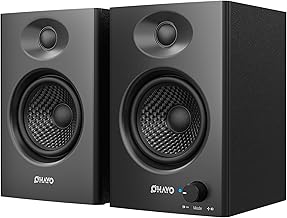
The OHAYO speakers are best for desktop users who want a compact stereo pair with multiple input types. The listing identifies Bluetooth 5.3, 3.5mm AUX, RCA, and USB inputs. It describes the system as 30W per channel, with a 0.75-inch carbon-fiber silk-dome tweeter, a 3-inch carbon-fiber full-range driver, and a rear bass port.
The MDF enclosure and front-facing volume knob are also listed features. Choose this model if you want to connect a computer wirelessly or use a supported wired output, and prefer speaker controls within reach. The product description positions it for music, gaming, desktop setups, and small-room audio.
Limitation: The available information does not explain whether USB carries audio from every computer or what USB format is used. Check the specific input instructions before buying if USB connection is essential.
Buying Guide: How To Choose Computer Bluetooth Speakers
Can your computer connect to Bluetooth speakers?
A computer needs Bluetooth hardware and Bluetooth support enabled to pair directly with a wireless speaker. Many laptops include Bluetooth, while desktop computers may or may not have it. Check your computer’s Bluetooth settings or specifications before choosing a Bluetooth-only connection. If Bluetooth is unavailable, a speaker with a compatible wired input may be a more practical option.
Bluetooth pairing does not always mean the speaker will be selected for sound automatically. After pairing, open the computer’s sound settings and choose the speaker as the audio output. If the speaker does not appear, confirm that it is powered on, in pairing mode, and not already connected to another device.
Should you connect by Bluetooth, USB, or AUX?
Bluetooth avoids a direct audio cable between the computer and speaker, which can keep a desk less cluttered. It is useful when the computer supports Bluetooth and wireless playback meets your needs. A wired connection can be simpler when pairing is inconvenient or when you want a direct connection. The right cable depends on the speaker input and the audio outputs available on the computer.
- Bluetooth: Choose it for cable-free audio when the computer and speaker support pairing.
- USB: Consider it when the speaker lists USB audio or a built-in DAC and your computer has a suitable USB connection.
- 3.5mm AUX: Choose it when both the speaker and computer have compatible analog audio connections.
- Optical or RCA: These are useful only when the computer or another part of the audio setup provides the corresponding connection.
Do not assume that every USB port on a speaker carries audio. Some product descriptions identify USB as an audio input, while others do not explain the port’s purpose. Review the input specifications for the exact model before relying on a cable connection.
Do you want a speaker bar or a stereo pair?
A speaker bar can be a space-saving choice if you want one unit near or below a monitor. The Cyber Acoustics model also includes a speakerphone and mic mute control, which makes it relevant for calls. A two-speaker system takes more desk space, but lets you position one speaker on each side of a monitor. The H1, Sanyun, Logitech, and OHAYO models are described as 2.0 systems or pairs.
Which features matter for work, calls, and gaming?
For calls, check for an explicitly listed microphone or speakerphone rather than assuming that a speaker includes one. The Cyber Acoustics CA-2890BT lists a speakerphone and a mic mute button. For everyday work, consider whether controls are easy to reach and whether wired fallback is available. For gaming, compare input choices, system layout, and the features you value rather than relying on power figures alone.
Power ratings are not a complete measure of sound quality. The products here list different output descriptions, including peak power, total system power, or per-channel power. Those figures are not necessarily presented on the same basis, so compare them alongside speaker design, input options, size, and how you plan to use the system.
How can you troubleshoot a Bluetooth connection?
- Check power and pairing mode. Make sure the speaker is on and ready to pair according to its instructions.
- Enable Bluetooth on the computer. Open the computer’s Bluetooth settings and look for the speaker name.
- Select the speaker for output. Pairing and choosing the active sound output are separate steps on many computers.
- Check other connections. If the speaker is connected to another device, disconnect it or use its input-switching controls if provided.
- Try a listed wired input. If pairing remains unsuccessful, use a compatible USB, AUX, or other input supported by both devices.
Menu names and pairing steps vary by computer operating system and speaker. Follow the instructions for the specific devices, and avoid assuming that a product supports a connection type that is not listed.
Frequently Asked Questions
How do I connect Bluetooth speakers to a computer?
Turn on Bluetooth on the computer, place the speaker in pairing mode, and select it from the computer’s Bluetooth device list. After pairing, choose it as the active audio output in sound settings.
Can I connect computer speakers without Bluetooth?
Yes, if the speaker and computer share a compatible wired input and output. Depending on the model, options may include USB audio, 3.5mm AUX, optical, or RCA. Check both devices’ specifications.
Will Bluetooth speakers work with a desktop PC?
They can if the desktop has Bluetooth support. If it does not, choose a speaker with a compatible wired input or confirm what connection options your computer supports before purchasing.
Can I use Bluetooth speakers for computer calls?
You can use a Bluetooth speaker for call audio when the computer supports the connection, but a speaker does not necessarily include a microphone. The Cyber Acoustics CA-2890BT listing specifically describes a speakerphone and mic mute control.
Why is there no sound after pairing?
The computer may still be using its built-in speakers or another audio output. Open sound settings, select the Bluetooth speaker, and check the volume on both the computer and speaker.
Is a wired connection better than Bluetooth for a computer?
Neither is universally better. Bluetooth reduces cable use, while a wired input can provide a direct alternative when pairing is unavailable or inconvenient. Choose based on your computer’s ports and preferred setup.