
The best budget surround sound speakers depend on whether you want simple TV audio, dedicated rear speakers, or a more immersive multi-channel setup. The Saiyin sound bar with subwoofer is best for shoppers seeking a straightforward system with bass and three listening modes. The ULTIMEA 5.1 system adds wired rear speakers, while LG’s 4.1 model includes wireless rear speakers. For virtual surround without separate rear speakers, consider the ULTIMEA Poseidon M60.
| System | Best For | Standout Feature |
|---|---|---|
| Saiyin Sound Bar with Subwoofer | Simple, flexible TV audio | Dedicated subwoofer and three EQ modes |
| ULTIMEA 5.1 Sound Bar | Movies and gaming with rear effects | Two wired rear speakers and wireless subwoofer |
| LG S40TR 4.1 Soundbar | Surround sound with wireless rear speakers | Wireless rear speakers and subwoofer |
| ULTIMEA Aura A40 7.1 | Buyers prioritizing multiple surround speakers | Four surround speakers and adjustable levels |
| ULTIMEA Poseidon M60 | Simple setup without rear speakers | Dolby Atmos and built-in side-firing drivers |
Saiyin Sound Bar With Subwoofer
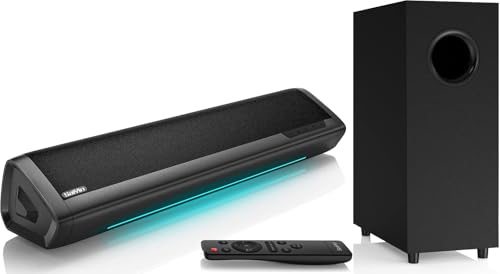
Best for: Buyers who want to add a dedicated subwoofer and adjustable sound modes without choosing a system built around multiple rear speakers. Saiyin describes this as a home theater system for TV and PC, with a sound bar and separate subwoofer.
The subwoofer is designed to provide deeper bass for movies, music, and games. Three equalizer modes let listeners select settings for content such as news, movies, or music. The system also has optical, Bluetooth, and auxiliary connection modes, identified by different LED colors. A volume progress indicator shows the overall or bass level.
Why it stands out: Its combination of a separate subwoofer, multiple connection modes, and content-specific EQ makes it a practical entry-level choice for varied everyday use.
Consideration: The product information does not describe dedicated rear speakers, so choose another system if physical speakers behind the listening position are a priority. The included remote is not compatible with universal or TV remotes.
ULTIMEA 5.1 Sound Bar With Rear Speakers

Best for: Viewers and gamers who want actual rear speakers as part of a 5.1-channel package. This ULTIMEA system includes two wired rear speakers and a wireless subwoofer, providing a more distributed setup than a sound bar alone.
ULTIMEA says its SurroundX technology upgrades 2.0 PCM audio to 5.1 surround sound. The system also uses aerospace-grade magnets in its speakers, according to the listed product features. A 19.6-foot cable is included for flexible rear-speaker placement, while the subwoofer connects wirelessly.
Why it stands out: The two rear speakers make this a better fit than a bar-only model for buyers who want sound sources positioned behind them. The wireless subwoofer avoids an audio cable running from the bar to the subwoofer.
Consideration: The rear speakers are wired, and the included long cable may still need to be routed across the room. Choose a simpler virtual-surround model if you want to avoid placing and wiring rear speakers.
LG S40TR 4.1 Soundbar With Rear Speakers

Best for: Buyers looking for a named 4.1-channel system that includes rear speakers and a wireless subwoofer. LG lists wireless connectivity for both the rear speakers and subwoofer, helping reduce the need for long audio cables across the room.
The system supports Dolby Digital and DTS Digital compatibility, and LG highlights Dolby Audio for movies, shows, and music. Its rear speakers are intended to add surround sound without requiring a special receiver. The 4.1-channel layout offers a clear comparison point for shoppers deciding between a compact bar-only system and a package with separate rear speakers.
Why it stands out: It combines discrete rear speakers with wireless connections and a subwoofer. That makes it a useful option for buyers who want a more room-based arrangement but want to limit cable clutter.
Consideration: The listed features specify Dolby Digital and DTS Digital compatibility; they do not establish support for every surround format. Check the audio formats used by your sources if format compatibility is a deciding factor.
ULTIMEA Aura A40 7.1 Sound Bar

Best for: Buyers who want more separate surround speakers and adjustable surround intensity. The Aura A40 is described as a 7.1-channel virtual surround system with three main channels and four surround speakers.
Two surround speakers connect at the front using dedicated cables, and two are positioned at the rear. The rear setup uses a surround cable, with the rear-right speaker pairing wirelessly with the sound bar. The system offers 13 surround levels, allowing users to adjust the effect. ULTIMEA also lists SurroundX technology and AI sound tuning to coordinate speaker output.
Why it stands out: Compared with a bar and subwoofer alone, the four surround speakers provide more placement options for front-to-back effects. Adjustable levels can help buyers tailor the surround presence to their room and preferences.
Consideration: This system involves several speakers and cables. The product instructions include a manual pairing process if the rear speaker connection does not establish automatically, so it is less suited to shoppers seeking the simplest possible setup.
ULTIMEA Poseidon M60 Dolby Atmos System

Best for: Buyers who want Dolby Atmos and a simplified surround-style setup without separate rear speakers. The Poseidon M60 is described as a 5.1-channel system with five built-in speakers, including two side-firing drivers, and a dedicated wired wooden subwoofer.
ULTIMEA lists 300 watts of peak power, six drivers, a frequency response of 45 Hz–18 kHz, and a maximum sound pressure level of 99 dB. Its VoiceMX processing is designed to enhance vocal frequencies in real time, which may help dialogue stand out against music and effects. The company also describes setup as taking less than a minute.
Why it stands out: It combines a Dolby Atmos feature set, built-in side-firing drivers, and a separate subwoofer without requiring the buyer to position rear speakers around the room.
Consideration: The subwoofer is wired, and the system does not include separate rear speakers. Choose a 5.1 or 7.1 package with rear speakers if physical sound sources behind the seating area are more important than a simpler layout.
Buying Guide: How To Choose Budget Surround Sound Speakers
Start by deciding whether you need physical speakers behind the listening position. A sound bar with virtual surround can simplify placement, while a system with rear speakers can place audio sources behind the listener. The listed products range from Saiyin’s sound bar and subwoofer to multi-speaker ULTIMEA and LG packages.
Do You Want Rear Speakers Or A Simpler Setup?
Choose a system with rear speakers if you want dedicated speakers positioned behind or beside the seating area. The ULTIMEA 5.1 includes two wired rear speakers, the LG S40TR includes wireless rear speakers, and the ULTIMEA Aura A40 has four surround speakers. The Poseidon M60 uses built-in side-firing drivers instead of separate rear speakers.
Room layout matters. Rear speakers need suitable locations, and wired models require cable routing. If you cannot place speakers behind the seating area, a sound bar designed to create a wider or virtual surround field may be easier to arrange.
How Much Setup And Wiring Can You Manage?
Check what connects wirelessly and what still needs a cable. A wireless subwoofer can reduce audio-cable clutter, but it does not mean every component is wireless. The ULTIMEA 5.1 has wired rear speakers, and the Poseidon M60 has a wired subwoofer. The Aura A40 uses multiple speaker connections and may require manual pairing if the rear connection does not complete.
Before choosing, consider the distance between your TV, seating area, outlets, and possible speaker locations. Confirm that the included cable arrangement suits your room. A more elaborate channel layout can involve more placement and connection steps than a sound bar with one subwoofer.
Is Dialogue Clarity A Priority?
Look for features specifically intended to make speech easier to hear. The Poseidon M60 and the separate ULTIMEA sound bar with wireless subwoofer list VoiceMX processing, which is designed to isolate and enhance vocal frequencies. The Aura A40 identifies three main channels for focused dialogue. These features describe the manufacturers’ intended sound processing; actual results can depend on room acoustics and content.
What Do Channel Counts Tell You?
Channel labels offer a quick way to compare system layouts, but they do not tell the whole story. The listed products include 4.1, 5.1, and 7.1-channel options. Compare the number and location of included speakers as well as the channel label. In particular, distinguish systems with separate rear speakers from systems that create surround effects through a sound bar.
Also check whether the product specifies the audio formats you use. The LG S40TR lists Dolby Digital and DTS Digital compatibility, while the Poseidon M60 lists Dolby Atmos. Do not assume that a channel count or a surround feature guarantees compatibility with every TV, streaming service, game console, or audio format.
Should You Prioritize Bass, Connectivity, Or Adjustments?
A dedicated subwoofer can be important if you want stronger low-frequency effects for films and games. The Saiyin, ULTIMEA, and LG choices here include a separate subwoofer. If you switch between movies, music, and speech-focused programs, look for useful controls such as Saiyin’s three EQ modes or the Aura A40’s 13 surround levels.
Review the connection types and controls that matter to your equipment and habits. Saiyin lists optical, Bluetooth, and auxiliary modes. The Aura A40 lists optical, auxiliary, and Bluetooth connections. The information provided for each system is not identical, so verify the exact ports and controls in the product listing before buying.
Frequently Asked Questions
Are budget surround sound speakers worth buying?
They can be a practical way to improve on built-in TV audio and add a subwoofer or rear speakers without assembling a separate receiver-based system. Compare the included speakers, connection needs, and audio formats rather than relying on the word “surround” alone.
What is the difference between virtual surround and rear speakers?
Virtual surround uses processing and speaker placement, such as side-firing drivers, to create a wider sound field. A system with rear speakers places separate speakers behind or near the listener. Rear-speaker systems require suitable placement and may involve additional cables.
Does a wireless subwoofer need no cables?
Wireless usually refers to the audio connection between the subwoofer and sound bar. The product details do not specify power arrangements for every model, so check the included components and setup requirements before purchase.
Is a 7.1 system always better than a 5.1 system?
Not automatically. A 7.1 label may indicate more channels or speakers, but room size, speaker placement, wiring, and content also affect the experience. Choose the layout that fits your room and installation preferences.
Which system is easiest to set up?
The Poseidon M60 is described as having setup that takes less than a minute and does not require separate rear speakers. By comparison, systems with several surround speakers require more placement and connection steps.
Which option is best if I want physical rear speakers?
The ULTIMEA 5.1, LG S40TR, and ULTIMEA Aura A40 all list rear or surround speakers. The ULTIMEA 5.1 uses wired rear speakers, LG lists wireless rear speakers, and the Aura A40 includes four surround speakers with a more involved cable and pairing arrangement.