
If you want to play CDs in a car without a built-in CD player, a portable CD player with a car connection is a practical option. The MEGATEK is best for drivers who want several connection choices, including FM transmission and AUX output; the ENVYCLOUD is aimed at vehicles with USB or AUX access. If you mean converting CD tracks into MP3 files, note that these products are described as players, not CD-ripping devices.
| Product | Best For | Listed Standout Features |
|---|---|---|
| MEGATEK Portable CD Player | Flexible car and personal listening | FM transmitter, Bluetooth RX/TX, USB, AUX |
| ENVYCLOUD Portable Car CD Player | Cars with USB or AUX access | USB/AUX, vehicle adapter |
| Portable CD Player for Car | Road playback with resume support | USB drive, anti-skip, resume playback |
| Sunoony Portable CD Player | CD and MP3 playback with built-in speaker | Bluetooth, FM transmitter, USB/AUX |
| ARAFUNA Portable CD Player | Wireless listening and home use | Bluetooth RX/TX, dual speakers, LCD |
MEGATEK Portable CD Player

Best for: Drivers who want multiple ways to route CD audio, rather than relying on just one connection. The listed features include Bluetooth receiving and transmitting, an FM transmitter described as car FM compatible, USB, AUX output, a headphone jack, and built-in stereo speakers.
The large LCD display, anti-skip feature, and rechargeable battery make this a flexible choice for listening in the car or away from it. Choose this model if you want to compare FM transmission with a wired AUX connection and also value Bluetooth options for other listening setups.
Limitation: The product description does not establish that it converts or saves CD tracks as MP3 files. It is described as a CD player, so confirm that its connection method suits your particular car stereo.
ENVYCLOUD Portable Car CD Player

Best for: Drivers whose vehicle stereo has a USB or AUX connection they can use. This external CD player is described for car radio stereos as well as laptops, TVs, and computers, and its name specifies USB/AUX ports and an adapter.
Its appeal is straightforward: it provides an external way to play CDs in a car that does not have a built-in disc player. It may also suit a household that wants one external player for more than one type of audio setup. Choose it if the listed wired connection options match the equipment you plan to use.
Limitation: The supplied product details do not list Bluetooth, an FM transmitter, anti-skip protection, or MP3-file conversion. Check the exact connection and power requirements before purchase; the name mentions an adapter but does not specify its details.
Portable CD Player for Car With Resume Playback

Best for: Listeners who prioritize anti-skip and resume playback during road trips. The product is described as an external USB compact disc drive for vehicles without built-in audio, with dual connection and resume playback.
Resume playback is a useful listed distinction for someone who may stop and restart a listening session. The anti-skip feature is also relevant for car use, where movement can interrupt playback. Choose this option if these playback functions are more important to you than having built-in speakers or an explicitly listed FM transmitter.
Limitation: The description does not specify Bluetooth, AUX output, a display, or MP3 ripping. “USB” and “dual connection” are not enough on their own to establish how the device connects to every car stereo, so verify the connection details before relying on it.
Sunoony Portable CD Player With FM Transmitter
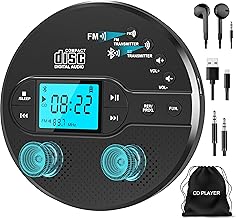
Best for: People who want a portable player with CD and MP3 playback, plus options for car and personal listening. The product name lists Bluetooth, an FM transmitter for car use, a built-in speaker, USB/AUX output, headphones, anti-skip, and a rechargeable battery described as lasting up to nine hours.
Choose this model if its combination of a car FM transmitter and built-in speaker fits your intended setup. The product is also described for home and road-trip use, so it is aimed at buyers who want more than a car-only accessory.
Limitation: “Supports CD/MP3” describes playback support, not necessarily the ability to create MP3 files from a CD. Confirm which media and connection functions you need; the listed nine-hour figure is a stated battery claim, not a guarantee for every use condition.
ARAFUNA Portable CD Player With Bluetooth

Best for: Buyers who want Bluetooth options and built-in speakers for listening at home or in a car. The listed features include Bluetooth RX/TX for headphones, speakers, and a phone; dual speakers; a large LCD screen; anti-skip; and a rechargeable design.
Choose this player if wireless connections and on-device speakers are key priorities. Bluetooth RX/TX indicates that the product is presented for both receiving and transmitting Bluetooth audio, while the dual speakers offer a built-in listening option. The large display is another feature to weigh if you prefer a visible screen.
Limitation: The supplied details do not list an FM transmitter, USB/AUX output, or a specific MP3-file conversion function. If you need to connect directly to a car radio, confirm the supported method rather than assuming Bluetooth alone will work with your vehicle.
Buying Guide: How to Choose a Car CD-to-MP3 Option
Start by deciding whether you want to play a CD in the car or convert CD tracks into MP3 files. These are different tasks. The products above are presented as portable or external CD players. Some list MP3 playback, but that does not by itself mean they can rip, encode, or save tracks from a CD.
Do you need playback or file conversion?
If you want to hear CDs through a car stereo, focus on the connection method: FM transmitter, AUX, USB, or Bluetooth, as applicable to the product and your vehicle. If you want MP3 files to store on a phone, computer, or USB drive, look specifically for a CD drive and software or a device that explicitly supports audio extraction and MP3 encoding. Do not treat “MP3 support” as proof of ripping capability.
Which connection works with your car?
- FM transmitter: A player sends audio to the car radio over FM. The MEGATEK and Sunoony product names explicitly list an FM transmitter.
- AUX: A wired AUX output can be useful if your stereo has a matching input. MEGATEK, ENVYCLOUD, and Sunoony list AUX-related features.
- USB: USB appears in several product names, but the description may not explain exactly how it functions. Confirm whether it is an audio connection, power input, or another purpose before buying.
- Bluetooth: Bluetooth features vary by product. Check whether the player transmits audio to another device or receives audio from one, and whether that matches the car stereo you intend to use.
Are anti-skip and resume playback important?
Anti-skip is a relevant feature to compare for mobile listening. MEGATEK, Sunoony, and ARAFUNA list anti-skip, while the separate portable car player lists both anti-skip and resume playback. The descriptions do not provide a shared test standard, so compare the stated features rather than assuming they offer identical performance.
Do you want built-in speakers or headphones?
Built-in speakers can make a portable CD player usable without connecting it to a car stereo, but they are not the same as playing through the vehicle’s audio system. MEGATEK and ARAFUNA list built-in speakers, and Sunoony lists a built-in speaker and headphones. If your main goal is car playback, prioritize a connection compatible with your stereo.
What should you check before ordering?
- Confirm that your vehicle has the required input or can tune to an FM transmission.
- Check whether the listed USB port is for audio, power, or another function.
- Verify whether the player supports the discs or files you plan to use.
- Look for a rechargeable battery or an included adapter if portability matters, and verify the exact power details.
- For MP3 creation, require an explicit ripping or encoding feature; do not infer it from MP3 playback support.
Frequently Asked Questions
Can a portable CD player convert CDs to MP3 files?
Not necessarily. A portable CD player may play discs or MP3 files without creating MP3 files from a CD. Look for an explicit CD-ripping or MP3-encoding feature if conversion is your goal.
How can I play a CD in a car without a built-in CD player?
Use an external CD player that offers a connection compatible with your car stereo. Depending on the product and vehicle, that may mean an FM transmitter, AUX input, USB connection, or Bluetooth.
Is an FM transmitter better than AUX for car CD playback?
Neither is universally better. FM transmission can suit a car radio without an available AUX input, while AUX is a wired option when the stereo has a compatible input. Choose based on your vehicle’s connections.
Does “supports MP3” mean a CD player can rip CDs?
No. “Supports MP3” usually indicates that a product can play MP3 files, but it does not confirm that it can extract audio from a CD and save it as an MP3 file.
Which listed option includes resume playback?
The portable car CD player described as an external USB drive lists resume playback and anti-skip. Check its connection details against your car before choosing it.
What is the most important feature for choosing a car CD player?
The connection method is usually the first thing to verify. A player needs a supported way to send audio to your specific car stereo; additional features matter only if they fit your listening needs.