
A car fault finder computer reads diagnostic trouble codes to help explain why a check engine light is on. For basic home checks, the ANCEL AD310 is a straightforward pick; the ANCEL AD410 adds more diagnostic functions and code lookups, while the ANCEL AD530 includes a one-touch readiness check and a color screen. The MOTOPOWER MP69033 offers a larger display and multiple languages, and the BluSon YM319 adds battery testing and report sharing features.
| Product | Best For | Notable Features |
|---|---|---|
| ANCEL AD310 | Basic code checks | Reads and clears codes, live data, freeze frame |
| ANCEL AD410 | Broader OBDII checks | 42,000+ code lookups, O2 and EVAP tests |
| MOTOPOWER MP69033 | Display and language options | 2.8-inch LCD, six languages, live data |
| ANCEL AD530 | Readiness checks at home | Color screen, I/M shortcut, plain-text code help |
| BluSon YM319 | Battery and engine checks | Battery test, live-data curves, cloud printing |
ANCEL AD310: Best For Basic Code Checks

The ANCEL AD310 is a compact, corded OBDII scanner for drivers who want to read engine and emission-system trouble codes without using a phone app. It can also clear codes after a repair, show live data and freeze-frame information, check I/M monitor readiness, and retrieve vehicle information.
Best for: Drivers seeking a simple, direct way to investigate a check engine light. Its labeled buttons and large screen are intended to make basic operation accessible, and it receives power through the vehicle’s OBDII connector rather than a separate battery or charger.
Why it stands out: The listed features cover common first steps in engine diagnosis, including reading codes and checking whether monitors are ready. Its 2.5-foot cable and compact body are useful details for storing and handling the tool.
Limitation: The feature list focuses on engine and emission diagnostics. Choose a different tool if you need the additional listed tests or features of a more advanced scanner.
ANCEL AD410: Best For More OBDII Functions

The ANCEL AD410 reads and clears engine-related codes, displays code definitions, and supports live data, freeze frame, I/M readiness, O2 sensor tests, EVAP tests, vehicle information, and MIL status. Its built-in database includes more than 42,000 DTC lookups, according to the product details.
Best for: DIY users who want more than a basic code reader but prefer a handheld scanner with information shown on the device. Live readings such as RPM, coolant temperature, fuel trim, and oxygen-sensor data can provide context beyond the warning light itself.
Why it stands out: The range of standard OBDII functions makes it a useful choice for checking readiness and reviewing available engine data, as well as identifying a code before speaking with a repair shop.
Limitation: The listed functions are OBDII-focused. The product information does not establish that it diagnoses every vehicle system or every make-specific fault.
MOTOPOWER MP69033: Best For Display Options
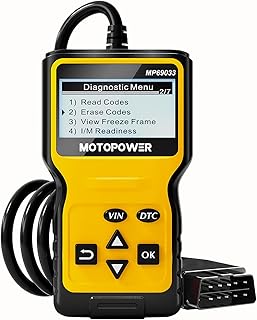
The MOTOPOWER MP69033 is a corded OBD2 code reader with a 2.8-inch LCD, white backlight, and contrast adjustment. Its functions include reading and erasing codes, viewing freeze-frame data, checking I/M readiness, retrieving vehicle information, and displaying data flow and real-time curves.
Best for: Drivers who prefer a larger screen or want a choice of six listed interface languages: English, German, Dutch, Spanish, French, and Italian. It also displays information such as vehicle speed, engine speed, coolant temperature, and calculated load value.
Why it stands out: Its combination of a backlit display, contrast adjustment, and multiple data views makes it a practical option for drivers who want to inspect readings directly on the scanner.
Limitation: The stated vehicle coverage is broad but not universal: the product describes support for most listed OBDII vehicles and protocols. Confirm that the vehicle’s model year and protocol are supported before buying.
ANCEL AD530: Best For Readiness Checks

The ANCEL AD530 reads and clears fault codes and provides live data and freeze-frame information. Its listed diagnostic functions include O2 sensor tests, EVAP checks, and emission-monitor review. A one-touch I/M readiness shortcut displays incomplete monitor states on its 2.8-inch color screen.
Best for: Drivers who want to review emissions-monitor readiness before an inspection or check whether monitors have completed after repairs. A dedicated shortcut can make that particular task easier to access.
Why it stands out: The scanner includes an “i” hotkey described as converting fault codes into plain text, alongside basic code reading and live values such as RPM and coolant temperature. This can help users interpret information before discussing a repair with a technician.
Limitation: Readiness information does not guarantee that a vehicle will pass an inspection. The product details also do not claim that the scanner replaces a professional diagnosis.
BluSon YM319: Best For Battery Checks

The BluSon YM319 combines OBD2 engine-code functions with a listed battery diagnostic feature. It reads and clears engine codes, displays freeze-frame data, checks I/M readiness, and supports oxygen-sensor and EVAP tests. The product details also describe live-data recording and plotted curves.
Best for: Drivers who want a single tool for listed engine checks and a one-click battery health check. Cloud printing is described as a way to generate, store, or share diagnostic reports without connecting a printer.
Why it stands out: The product lists a built-in database of more than 63,000 fault codes, battery status information, and the ability to capture data curves. These features may be useful when documenting an issue or discussing a diagnosis remotely.
Limitation: The provided details do not specify vehicle coverage by year, make, or model. Check compatibility and the exact scope of the battery test before relying on it for a specific vehicle.
Buying Guide: How To Choose A Car Fault Finder Computer
A car fault finder computer is commonly sold as an OBDII scanner or code reader. It connects to a vehicle’s diagnostic port and reports information available through supported diagnostic protocols. Before choosing one, decide whether you need a basic explanation of a warning light or want additional data and tests.
What diagnostic functions do you need?
For a first check, prioritize reading trouble codes and displaying their definitions. Clearing a code can be useful after a problem has been repaired, but erasing it does not fix the underlying fault. A scanner with live data and freeze-frame viewing can offer more context: live data shows available readings while the vehicle is operating, while freeze-frame data records conditions associated with a fault.
If you are checking emissions-related conditions, look for I/M readiness and any specific O2 sensor or EVAP functions you need. These features are listed on several models in this guide, but feature availability can vary by scanner and vehicle.
Will the scanner work with your vehicle?
Do not assume that every scanner works with every car or provides access to every system. Check the product’s stated vehicle years, supported OBDII protocols, and any exclusions. The listed products generally describe OBDII coverage, but the details provided do not confirm compatibility for every make, model, engine, or non-engine module.
Many scanners in this category connect directly to the vehicle and receive power through the diagnostic connector. Confirm the connector location and the scanner’s connection method in the product information. If you need diagnostics for systems beyond engine and emissions, check explicitly for those functions rather than relying on the general label “car scanner.”
Do you prefer a basic tool or more data?
A basic scanner can be enough for reading and clearing engine codes and checking a warning light. The AD310 is the simplest fit among these options based on its listed feature set. The AD410 and AD530 add functions such as O2 sensor and EVAP checks, while the MOTOPOWER MP69033 emphasizes display options and data views.
Additional data can help users make better-informed decisions, but a scanner’s code or reading is not the same as a confirmed repair diagnosis. A trouble code identifies a condition or circuit that needs investigation; it may not identify the failed part by itself.
Which screen and interface are easiest for you?
Compare screen size, backlighting, color, button layout, and language support if you expect to use the scanner frequently. The MOTOPOWER model lists a 2.8-inch LCD with backlight and contrast adjustment. The AD530 also lists a 2.8-inch color screen and a one-touch readiness shortcut. The AD310 emphasizes labeled buttons and a large display, while the AD410 lists built-in code lookups.
Do you need battery testing or saved reports?
If battery information is a priority, consider whether a scanner specifically lists battery testing. The BluSon YM319 includes a one-click battery health check in its product details, along with cloud report features. Do not assume that an engine-code reader includes battery diagnostics unless the feature is stated. Compare the exact information the tool provides with your intended use.
Frequently Asked Questions
What does a car fault finder computer do?
It reads diagnostic information available through a vehicle’s OBDII system, including trouble codes and, depending on the scanner, live data, freeze frames, and readiness status. It helps identify what to investigate but does not automatically confirm which part needs replacement.
Can an OBDII scanner clear a check engine light?
Several scanners in this guide list code clearing. Clearing a code does not repair the cause of the warning. If the underlying issue remains, the light or code may return.
Are these scanners compatible with every car?
No scanner should be assumed to work with every vehicle or every diagnostic system. Check the product’s stated model-year coverage, supported protocols, and functions, and verify fit for your specific vehicle.
What is I/M readiness?
I/M readiness indicates whether applicable emissions monitors have completed their checks. A scanner can display readiness status, but that status alone does not guarantee an inspection result.
Can a code reader tell me exactly what part is broken?
Usually, a code reader reports a fault code or diagnostic condition rather than proving that a specific part has failed. Use the code as a starting point for diagnosis and seek qualified help when needed.
Should I choose a scanner with live data?
Choose live data if you want to view available operating readings, such as RPM or coolant temperature, rather than only read stored codes. A basic code reader may be sufficient if your main goal is to identify a check-engine code.