
The best car TV depends on where you want the screen: in the dashboard for the driver’s phone features, overhead for passengers, or at the headrests for separate rear-seat viewing. The WOWiViD double-DIN stereo is best for drivers seeking wireless CarPlay, Android Auto, and disc playback; the XTRONS overhead player suits shared rear-seat viewing; and the AINAVITO pair is designed for independent entertainment at two rear seats. Check your vehicle’s opening, installation requirements, and local rules before choosing.
| Product | Best suited for | Screen location |
|---|---|---|
| WOWiViD Double-DIN Stereo | Phone connectivity and disc playback | Dashboard |
| XTRONS 14-Inch Player | Shared passenger viewing | Overhead |
| 9-Inch Wireless CarPlay Screen | Portable phone integration | Dashboard area |
| AINAVITO Dual Headrest Monitors | Separate rear-seat entertainment | Headrests |
| UNITOPSCI Flip-Out Stereo | Single-DIN dash openings | Dashboard |
WOWiViD Double-DIN Car Stereo DVD Player

This in-dash unit combines a double-DIN stereo with a display, DVD playback, and wireless smartphone integration. Its listed features include wireless Apple CarPlay and Android Auto, voice control, a QLED screen with 1280-by-720 resolution, 1080p video playback, and Type-A/Type-C fast-charging support.
Best for: Drivers who want a dashboard-centered system for navigation, calls, and music, while also valuing DVD playback. It is the only listed option that explicitly combines a CD/DVD player with wireless CarPlay and Android Auto.
Choose this if your vehicle can accept a double-DIN receiver and you want a built-in rather than portable screen. Limitation: The listing describes a double-DIN format, so confirm dashboard dimensions and installation needs before ordering. Its screen is a dashboard display, not a dedicated rear-seat monitor.
XTRONS 14-Inch Flip-Down Overhead Player

The XTRONS is an overhead car entertainment monitor with a 14-inch digital HD screen and a listed resolution of 1366 by 768. It supports 1080p-format video and a range of media formats, including AVI, 3GP, MP4, MP3, WMA, WAV, JPG, JPEG, and BMP. Built-in stereo speakers provide an audio option without separate speakers.
Best for: Families or passengers who want one screen that can be viewed from the rear seating area. The flip-down design places the display overhead rather than using dashboard space.
Bluetooth audio transmission is also listed, and the product description mentions the option of IR headphones. Choose this if shared viewing matters more than driver-facing phone features. Limitation: This is not a dashboard replacement stereo. The listing does not specify installation details for a particular vehicle, so check mounting suitability and plan installation before purchase.
9-Inch Wireless CarPlay Screen

This 9-inch screen is designed to add wireless Apple CarPlay and Android Auto functions without being described as a double-DIN or single-DIN receiver. Listed features include voice control, phone mirroring for iOS and Android, OTA firmware updates, Bluetooth audio, built-in speakers, FM radio, and an AUX port. The listing also identifies a backup camera and GPS navigation among its features.
Best for: Drivers who want a larger phone-connected display and prefer a screen-based accessory over choosing a traditional in-dash stereo. The multiple audio output methods provide options for routing or playing sound.
Choose this if wireless smartphone access and a 9-inch display are priorities. The product listing recommends Bluetooth connection to the vehicle’s Bluetooth system as an audio option. Limitation: The provided features do not state the exact mounting method or vehicle fit. Confirm how it attaches and connects in your car before buying.
AINAVITO Dual 13.5-Inch Headrest Monitors
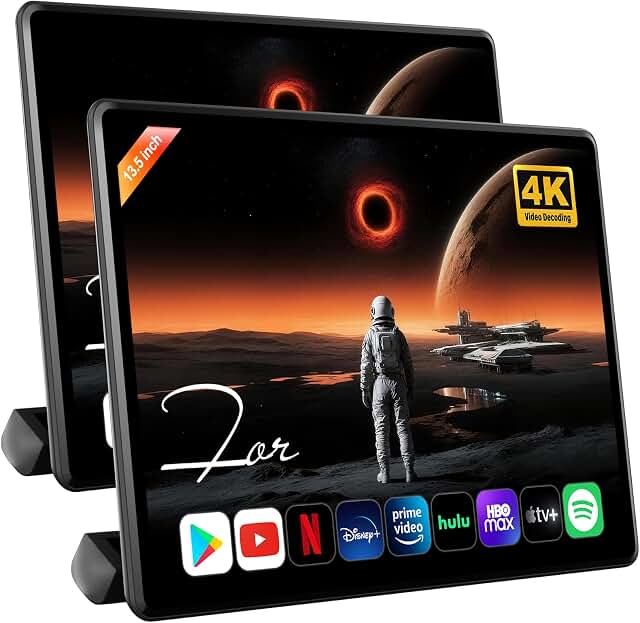
This pair of 13.5-inch monitors is intended for rear-seat entertainment, not for replacing a dashboard stereo. Each screen is described as an Android 13 system with 4GB RAM and 64GB storage. The listing says passengers can use Wi-Fi to download movies for offline viewing, and the two displays can operate independently or synchronize the same movie through HDMI.
The listed features also include 4K video decoding, anti-glare IPS displays with 1920-by-1280 resolution, AirPlay mirroring, Wi-Fi, Bluetooth, USB, FM, OTA upgrades, and parental controls. HDMI input is identified as supporting devices such as a PS5 or Switch.
Best for: Families who want two screens and the option for each passenger to watch different content. Limitation: These are headrest monitors, so they do not provide the driver with an in-dash display. Confirm the mounting arrangement for your seats before purchase.
UNITOPSCI Single-DIN Flip-Out Car Stereo

The UNITOPSCI is a single-DIN stereo with a retractable 7-inch touchscreen. Its listed screen resolution is 1024 by 600, and the screen folds out at a 95-degree angle. The receiver supports wireless CarPlay and Android Auto, Bluetooth, mirror link for Android and iOS, FM/AM/RDS, USB, Type-C, AUX input, steering-wheel control, and a rear-camera input.
Best for: Drivers seeking a screen-equipped stereo for a vehicle with a compatible single-DIN opening. Wireless phone connectivity brings navigation, contacts, and music to the display, while mirror link is listed for syncing a phone by USB.
Choose this if a flip-out screen better suits your dashboard than a fixed double-DIN unit. Limitation: The listed installation dimensions are 6.83 by 8.27 by 2.28 inches, so compare those measurements with the vehicle opening and available clearance. The screen is smaller than the 9-inch portable option.
Buying Guide: How To Choose A Car TV
Do you want a dashboard screen or rear-seat entertainment?
Start by deciding who will use the screen and where it needs to sit. An in-dash stereo is primarily a driver-facing interface for phone-connected navigation, calls, and audio. An overhead player is positioned for passengers to share. Headrest screens put displays closer to individual rear passengers. A portable screen may offer a way to add phone features without replacing the factory stereo, but its mounting and audio connections still need to suit the vehicle.
These product types are not interchangeable. A headrest pair may be a stronger match for two children who want separate shows, while an overhead monitor is more appropriate when passengers can share a movie. Neither rear-seat format replaces an in-dash receiver’s role in the dashboard.
Will the stereo fit the dashboard opening?
Check whether your vehicle accepts a single-DIN or double-DIN stereo, and compare the unit’s stated dimensions with the opening and surrounding trim. The WOWiViD model is listed as double-DIN; the UNITOPSCI is listed as single-DIN with a flip-out screen. A retractable display also needs room to open without obstructing controls or visibility. Verify fitment and installation requirements for the specific vehicle rather than relying on the screen size alone.
For overhead and headrest screens, check the mounting approach and seat or ceiling layout. The supplied product details do not establish fitment for every car, SUV, or commercial vehicle. Professional installation may be worth considering when the job involves vehicle wiring, roof mounting, or modification.
Which phone features matter most?
Wireless CarPlay and Android Auto are useful when you want supported phone functions, such as navigation, calls, messages, and music, presented through a car display. The WOWiViD and UNITOPSCI dashboard stereos and the 9-inch screen list both wireless systems. The XTRONS overhead player is described around video playback and passenger audio instead; its supplied features do not list CarPlay or Android Auto.
Mirror link is a separate feature from CarPlay or Android Auto. The 9-inch screen lists iOS and Android mirroring, while UNITOPSCI specifies mirror link by USB cable. If a particular app or phone function is important, check the device’s documentation and compatibility details before choosing.
How should you compare screen size and resolution?
A larger display can be easier for passengers to see from a distance, but screen placement matters as much as diagonal size. The XTRONS overhead unit is 14 inches, and the AINAVITO headrest pair has two 13.5-inch screens. The portable CarPlay display is 9 inches; the UNITOPSCI is 7 inches. The listed resolution figures vary and should be compared as stated, not treated as a complete measure of viewing quality.
Consider glare, viewing angle, and whether the display location suits the intended passenger. The AINAVITO listing specifically describes anti-glare IPS screens. Avoid choosing by screen size alone if the display could interfere with the driver’s view or access to dashboard controls.
What video and audio sources do you need?
Choose based on how you expect to play content. The WOWiViD includes CD/DVD playback, while the XTRONS supports listed video and audio file formats and has built-in stereo speakers. The AINAVITO monitors include Android systems, storage, Wi-Fi, HDMI, and USB features. The 9-inch screen lists Bluetooth, FM, built-in speakers, and AUX; UNITOPSCI lists USB, Type-C, and AUX connections.
Audio routing can affect passenger comfort. Built-in speakers may be convenient, while Bluetooth, AUX, or headphones can offer other listening arrangements when supported. Confirm the specific output method you plan to use; do not assume every screen connects to the vehicle speakers in the same way.
What should you check before ordering?
- Confirm vehicle fit, opening dimensions, and required mounting hardware.
- Check whether the product is a receiver, portable screen, overhead player, or headrest system.
- Match phone connectivity to your device and preferred wired or wireless setup.
- Review audio output options and the media formats you expect to use.
- Consider whether passengers need one shared display or independent screens.
- Follow local laws and safe-use practices; do not watch video on a driver-facing screen while driving.
Frequently Asked Questions
What does “car in-dash TV” usually mean?
It commonly refers to a screen installed in or near the dashboard for media, phone connectivity, or navigation. Some shoppers also use the term for overhead and rear-seat video screens, which are separate product categories.
Can a car stereo screen replace a portable CarPlay display?
It can serve a similar phone-interface purpose if the stereo supports the required CarPlay or Android Auto features and fits the vehicle. A portable display may suit buyers who do not want to replace the existing receiver, but mounting and audio connections differ.
Which option is best for two rear passengers?
The AINAVITO pair is designed with two headrest monitors and supports independent viewing or HDMI synchronization. The XTRONS overhead player is another option when passengers are expected to share one screen.
Do all the listed screens play DVDs?
No. DVD playback is explicitly listed for the WOWiViD double-DIN player. The other product descriptions identify different video, phone, streaming, or media features.
Can I watch video on an in-dash screen while driving?
Do not watch video while driving. Use dashboard screens for appropriate driver functions and follow local laws and the vehicle’s safety guidance. Passenger entertainment screens should be positioned and used so they do not distract the driver.
Should I install a car TV myself?
That depends on the product, vehicle, and your experience. Dashboard wiring, overhead mounting, and headrest installation can involve different requirements. Review the manufacturer’s installation instructions and seek qualified help if the installation is not straightforward.