
The best car stereo with Android control depends on whether you want a built-in replacement receiver, a portable display, or a simple phone-control button. The wireless Android Auto stereos below suit drivers looking for dashboard integration; the portable screen is an option for buyers who do not want to replace the factory stereo, while the Bluetooth media button is for basic phone control. Check your vehicle’s fit and wiring needs before choosing.
| Product | Best For | Android-Related Control |
|---|---|---|
| Single DIN 6.36-inch touchscreen stereo | Single-DIN installations | Wireless Android Auto |
| Bluetooth media button | Basic media control | Android phone remote |
| Wireless double-DIN stereo | Screen and audio upgrades | Android Auto |
| Portable CarPlay screen | Drivers seeking a separate display | Wireless Android Auto |
| SJoyBring 7-inch QLED stereo | Double-DIN feature upgrades | Wireless Android Auto |
Single DIN 6.36-Inch Touchscreen Stereo

Best for: Drivers who need a single-DIN receiver format but want a larger touchscreen and wireless Android Auto. Its listed features include a 6.36-inch touchscreen, backup camera, voice control, 10-band EQ, steering-wheel control support, FM radio, and USB-C.
This model is a useful fit for shoppers prioritizing phone-based navigation and media access alongside audio adjustments. The 10-band EQ gives users more listed sound-shaping options than a basic receiver, while voice control and steering-wheel control support offer additional ways to interact with the system. A backup camera is also included in the product name.
Why it was selected: It combines wireless Android Auto with several useful controls and a single-DIN format, making it a distinct choice among the replacement stereos in this list.
Consider: Confirm the receiver’s physical fit, wiring requirements, and steering-wheel-control compatibility for your specific vehicle before purchase. A single-DIN label alone does not confirm installation fit.
Bluetooth Media Button for Android Phones

Best for: Drivers who want a compact way to control phone media rather than replace their car stereo. The product is described as a wireless Bluetooth phone remote compatible with iPhone and Android phones, and it is listed as waterproof and intended for car, bike, and motorcycle use.
This button is different from a receiver with Android Auto. It is a phone-control accessory, so it may suit someone who wants a separate media control without adding a full touchscreen stereo. Its stated use across cars and other vehicles may also appeal to riders who want a portable control option.
Why it was selected: It directly addresses basic Android phone control, giving this roundup an alternative for buyers who do not need a new head unit.
Consider: The listed information does not describe specific controls, mounting method, or Android Auto support. Choose it for phone media control, not as a substitute for a navigation display or integrated receiver.
Wireless Double-DIN Car Stereo With 7-Inch Screen
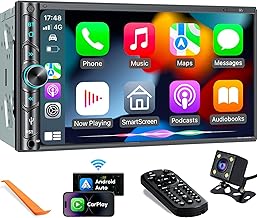
Best for: Drivers shopping for a double-DIN replacement stereo with wireless Android Auto and a 7-inch HD capacitive touchscreen. Listed features also include Bluetooth, a backup camera, four-channel RCA, high power, and two subwoofer ports.
Choose this receiver if screen-based phone integration and audio connections are both important. The 7-inch touchscreen provides a display for supported functions, while the four-channel RCA and two subwoofer ports are relevant to shoppers planning an audio setup with external connections. The backup camera is another listed feature.
Why it was selected: It offers a broad combination of Android Auto, touchscreen operation, and audio-output connections in a double-DIN format.
Consider: The product name does not specify vehicle fitment, installation components, or which camera accessories are included. Verify those details, along with the meaning of the listed high-power description, before buying.
Portable Screen With Wireless Android Auto

Best for: Drivers who want a separate touchscreen for wireless Android Auto without selecting a conventional double-DIN receiver. The product is described as a portable Apple CarPlay screen with wireless Android Auto, voice control, mirror link, music playback, GPS navigation, and built-in customized speakers.
A portable screen can be appealing when the goal is adding a display rather than choosing a dashboard receiver replacement. The listed functions cover navigation, music, voice control, and phone mirroring. Because this is presented as a portable screen, buyers should compare its placement and audio connection approach with their intended setup.
Why it was selected: It gives Android users a screen-based option that is distinct from the single- and double-DIN stereos in this roundup.
Consider: The product information provided does not explain its mounting system, power source, or how audio reaches the car’s speakers. Confirm these details before deciding whether its portable design suits your vehicle.
SJoyBring 7-Inch QLED Double-DIN Stereo

Best for: Buyers looking for a double-DIN stereo with a 7-inch QLED display and wireless Android Auto. Its listed features include wireless Apple CarPlay, Bluetooth, FM/AM radio, steering-wheel control support, two subwoofer outputs, a backup camera, and a 240W 4.2-channel description.
This model is a strong comparison option for shoppers who want phone integration and a range of audio-related connections in one receiver. Steering-wheel control support is relevant to drivers who want to use existing dashboard controls, while the two subwoofer outputs may matter to buyers planning a system that uses subwoofers.
Why it was selected: Its QLED screen, wireless Android Auto, radio functions, and stated audio outputs make it a feature-rich alternative to the other double-DIN option.
Consider: Confirm that the stereo fits your vehicle and determine whether any installation parts or camera components are needed. The listed “240W 4.2CHN” description should not be treated as a complete guide to real-world audio output.
Buying Guide: How to Choose a Car Stereo With Android Control
Do you want Android Auto or basic phone control?
These are different kinds of Android control. Android Auto is the phone-integration feature named for several receivers and the portable screen in this list. It is intended to bring supported phone functions to a vehicle display. A Bluetooth media button, by contrast, is described as a phone remote for media control. It is not listed as an Android Auto receiver.
Start by deciding whether you need a dashboard screen for navigation and supported apps, or only a physical control for phone media. If you want an integrated screen experience, compare the wireless Android Auto products. If you want a simpler accessory, evaluate the Bluetooth button and confirm its specific controls in the product details.
Should you choose single-DIN, double-DIN, or portable?
DIN size is a key fitment consideration for a replacement stereo. The single-DIN model is listed in a single-DIN format, while two receivers are described as double-DIN. These format labels do not by themselves prove that a unit will fit your dashboard; vehicle openings, trim, wiring, and installation requirements vary.
A portable screen offers a different approach because it is described as a separate display rather than a DIN receiver. This may be worth comparing if you prefer not to select a standard head-unit format, but check mounting, power, and audio-routing details first.
Which screen and controls matter most?
Compare screen size and display descriptions with how you expect to use the system. The products include a 6.36-inch touchscreen, two 7-inch options, and a portable screen whose size is not specified in the supplied product information. One double-DIN unit is described as HD capacitive, and the SJoyBring model is described as QLED.
Also consider how you prefer to interact. Voice control is listed for the single-DIN stereo and portable screen. Steering-wheel control support appears in the single-DIN receiver and SJoyBring model. Verify the specific control requirements for your car rather than assuming that support means a direct, parts-free connection.
What audio connections do you need?
Shoppers planning an expanded audio system should compare the listed outputs. One double-DIN model names four-channel RCA and two subwoofer ports; the SJoyBring model lists two subwoofer outputs. The single-DIN stereo lists a 10-band EQ, which is relevant to buyers who want sound-adjustment options. These feature descriptions are not a substitute for checking the full specifications of your planned components.
What installation details should you confirm?
- Check the stereo’s dimensions and DIN format against your vehicle’s dashboard opening.
- Confirm what wiring, trim, or other installation parts may be required.
- For steering-wheel controls, verify whether additional vehicle-specific components are needed.
- If you want a backup camera, confirm how the camera connects and whether required accessories are included.
- For portable screens, check mounting, power, and how sound is routed through the vehicle.
- Confirm that your Android phone and preferred functions meet the manufacturer’s requirements.
Product names provide a useful feature overview, but the supplied information does not establish fitment for every vehicle or detail every accessory included in the box. Use the product’s full specifications and your vehicle information to make the final fit decision.
Frequently Asked Questions
What does Android control mean in a car stereo?
It can refer to Android Auto integration on a display or basic control of an Android phone, such as media control. Check the product description to see which type is offered.
Is a Bluetooth media button the same as Android Auto?
No. The listed media button is described as a Bluetooth phone remote. It is not described as a touchscreen receiver or an Android Auto system.
Do these stereos work with every Android phone?
The supplied product details do not confirm compatibility with every phone. Check the manufacturer’s requirements for the specific stereo and phone before purchasing.
How do I know if a single-DIN or double-DIN stereo fits my car?
Check your vehicle’s stereo opening, dashboard configuration, and installation requirements. The DIN format alone does not confirm that a receiver fits a particular vehicle.
Should I choose a portable screen or a replacement stereo?
Choose a portable screen if a separate display better suits your setup, and compare its mounting, power, and audio-routing needs. Choose a replacement receiver if you want a DIN-format stereo, after confirming vehicle fit and installation details.
Do these products include a backup camera?
Backup cameras are named in the descriptions of the single-DIN stereo and both double-DIN stereos. The supplied information does not specify whether every required camera component is included, so verify the package contents.