
The best CD digital storage player depends on whether you want to play several discs, access CDs and other media from one compact unit, or read and transfer discs using a computer. The Onkyo DXC390 is best for a home stereo setup with multiple CDs; the MEGATEK and Gueray players suit listeners who want built-in speakers and extra playback options. The ORIGBELIE external drive is better for using CDs with a computer. These products do not all store music internally, so check the format and storage method you need before choosing.
| Product | Best for | Key distinction |
|---|---|---|
| Onkyo DXC390 | Home stereo listening | Six-disc changer |
| MEGATEK Boombox | Portable, speaker-based playback | CDs, USB playback, Bluetooth, and FM radio |
| ORIGBELIE External Drive | Computer-based CD access | Reads and writes optical discs |
| Gueray Desktop CD Player | Multifunction desk listening | CD, Bluetooth, TF card, USB, and FM playback |
| Gueray Bluetooth Desktop Player | Basic desktop CD and radio use | Desktop design with Bluetooth and USB-C in the name |
Onkyo DXC390 Six-Disc CD Changer
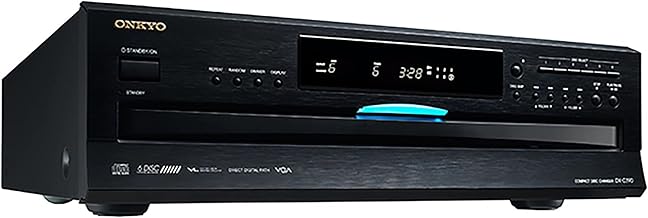
Best for: A home listener who wants a dedicated CD changer and a larger disc selection ready to play. The Onkyo DXC390 holds six discs and lets you remove and replace five while one continues playing, which is useful for changing much of the selection without stopping playback.
It plays audio CDs, MP3-encoded CDs, and CD-R/RW discs. Listed audio features include a 192 kHz/24-bit DAC, a digital filter, Direct Digital Path, and a stated frequency response of 5 Hz–20 kHz. Its listed dimensions are 17 1/8 inches wide, 5 3/16 inches high, and 17 1/16 inches deep.
Why it was selected: It is the clearest fit for buyers who mean a multi-disc CD player when they search for a CD storage player. Limitation: This is a sizable component-style unit, not a portable player, and the listed features do not describe built-in speakers or digital music storage.
MEGATEK Portable CD Boombox

Best for: People who want a portable, all-in-one player with speakers rather than a component for a home stereo. The MEGATEK has dual 3-inch front-facing speakers, an LCD display, and AC or battery power, according to its product description.
The top-loading player supports CDs, CD-R/RW, CD-G, audiobooks, and MP3/WMA discs. It also offers shuffle, repeat, and resume functions. The listed features include Bluetooth, FM radio, USB playback, an AUX input, a headphone jack, and five EQ modes. Large controls and a backlit display are intended to make basic operation more direct.
Why it was selected: It combines disc playback with several additional listening options, making it a better fit for flexible everyday use than a single-purpose CD changer. Limitation: The listing describes a portable speaker-based player, not a device that archives CDs or stores a music library internally.
ORIGBELIE External CD/DVD Drive

Best for: Computer users who need to read, write, or back up optical discs from a laptop or desktop. Unlike the standalone players here, this external USB drive is designed to connect to a computer and handle disc access or burning.
The listing describes a USB 3.0 drive that is backward compatible with USB 2.0 and USB 1.0. It supports CD and DVD formats including CD±R/RW, CD-ROM, DVD±R/RW, DVD-ROM, and DVD-RAM, along with VCD and SVCD. Its stated maximum speeds are 24x for CD reading and writing and 8x for DVD reading and writing. The product also has USB and TF/SD card ports and comes with a carrying case.
Why it was selected: It is the most relevant option when “digital storage” means accessing or backing up disc contents on a computer. Limitation: The listing says it does not support use with cars, TVs, tablets, phones, projectors, or Blu-ray discs. Windows 11 use requires a media player and network, according to the product details.
Gueray Multifunction Desktop CD Player

Best for: Someone who wants a desk-friendly player for CDs and several other audio sources. This Gueray model combines a CD player with built-in Bluetooth speakers, FM radio, TF card playback, USB flash drive playback, and a 3.5 mm audio connection.
The listing says it supports CD, CD-R, CD-RW, MP3, and WMA formats. Bluetooth works in both transmitter and receiver roles: the unit can connect with Bluetooth-enabled devices, and it can transmit audio to Bluetooth headphones or speakers. Its LCD shows the track number, playback time, and selected mode. The product description also lists a timer and remote control.
Why it was selected: It is a better fit than a basic CD player for buyers who want multiple source options at a desk or in a room without assembling a separate speaker system. Limitation: The supplied features describe playback options, not a built-in system for ripping or storing a CD collection.
Gueray Bluetooth Desktop CD Player

Best for: Buyers comparing compact desktop CD players who want Bluetooth, radio, and USB-C mentioned in the product name. This listing identifies the unit as a portable Bluetooth desktop CD player with a timer, built-in speakers, an LCD screen, FM radio, and USB-C.
Why it was selected: Its stated features make it relevant to shoppers who prefer a desktop player with speakers and more than disc playback. Limitation: Detailed supported-disc formats, USB playback functions, Bluetooth modes, and other specifications were not provided for this listing. Verify those details before choosing it over the Gueray model above; the two listings may overlap, but the supplied information does not establish whether their features are identical.
Buying Guide: How To Choose A CD Digital Storage Player
Do you need a CD player, a changer, or a computer drive?
Start by deciding what “storage” means for your setup. A CD changer holds multiple discs for selection and playback; it does not necessarily copy music into a digital library. A standalone player reads discs and sends audio to built-in or connected speakers. An external optical drive connects to a computer and can read or write supported discs, making it the relevant category for disc backup or transferring audio with suitable software.
For a multi-disc home listening setup, compare the Onkyo’s six-disc capacity with the single-disc loading approach of the portable and desktop players. For computer access, choose an external drive and check that its supported operating system, connection, and disc formats fit your equipment.
Which disc formats should you check?
Do not assume every player handles every disc. Check whether the product supports your collection, including standard audio CDs, CD-R and CD-RW discs, and MP3 or WMA discs if you use them. The Onkyo lists audio CD, MP3-encoded CD, and CD-R/RW support. The MEGATEK lists CD-R/RW and MP3/WMA discs, among other formats. The Gueray multifunction listing specifies CD, CD-R, CD-RW, MP3, and WMA.
If you plan to burn or back up data discs, a playback-focused boombox may not meet that need. Look for an explicitly stated reader/writer or burner function and confirm the exact disc types supported.
Would built-in speakers or a separate stereo work better?
Built-in speakers make a portable or desktop player easier to use without a separate audio system. The MEGATEK has dual front-facing speakers, while the Gueray listing describes built-in Bluetooth speakers. A component-style changer such as the Onkyo is better suited to a home stereo arrangement, but the supplied product details do not list built-in speakers.
Consider where the player will sit and how you want to listen. If you use headphones or existing speakers, check for the required connection rather than assuming one is included. The MEGATEK lists a headphone jack and AUX input; the Gueray product lists a 3.5 mm audio connection and Bluetooth options.
Which extra playback options matter?
Bluetooth, FM radio, USB playback, and memory-card playback can make one device useful for more than CDs. The MEGATEK lists Bluetooth, FM radio, and USB playback. The multifunction Gueray lists Bluetooth, FM radio, TF card, and USB flash drive playback. Compare those options against the sources you actually use; a longer feature list is not a substitute for confirming compatibility with your specific files or devices.
What should computer buyers verify?
Check the computer’s operating system, available ports, and intended use. The ORIGBELIE listing describes USB 3.0 with backward compatibility and names several Windows, Linux, and Mac operating systems. It also states that Windows 11 requires a media player and network. Check current product details and your computer’s requirements before purchase, especially if you need to burn discs or use a particular format.
Frequently Asked Questions
Does a CD digital storage player save music internally?
Not necessarily. A CD player or changer may only play discs. To save or back up disc contents, look for an optical drive with an explicitly stated writing function and use appropriate computer software or storage.
What is the difference between a CD changer and an external CD drive?
A CD changer is designed to play discs through an audio setup and may hold several discs. An external CD drive connects to a computer to read or write supported optical media.
Can these players play MP3 CDs?
Some listed models support them. The Onkyo specifies MP3-encoded CDs, and the MEGATEK specifies MP3/WMA discs. Check the product’s format list before relying on support.
Which option is best for a laptop without a disc drive?
The ORIGBELIE external CD/DVD drive is the product in this selection designed to connect to a computer for disc reading and writing. Confirm operating-system and disc-format support for your setup.
Is Bluetooth the same as digital music storage?
No. Bluetooth sends or receives audio wirelessly; it does not by itself mean a device stores music. Check for a specific USB, memory-card, or internal storage feature if you want to play or save digital files.