
The best CD player for a sound bar is one with an output your sound bar can accept, such as Bluetooth, optical audio, or an appropriate wired connection. The THINKYA JA-310R is best for sound bars with optical input; the MEGATEK Portable CD Player offers Bluetooth transmission and AUX output; and the RetroAudio player is a simple Bluetooth option. DVD players can also play audio CDs, but they are better suited to setups that route sound through a TV.
| Player | Best suited for | Connection options listed |
|---|---|---|
| THINKYA JA-310R | Sound bars with optical input | Optical, Bluetooth transmitter, AUX |
| MEGATEK Portable CD Player | Bluetooth or wired audio setups | Bluetooth transmitter, AUX output |
| RetroAudio CD Player | Wireless listening | Bluetooth output, AUX |
| MEGATEK DVD Player | TV-based home theater setups | HDMI, RCA |
| Majority DVD Player | TV setups needing a compact disc player | HDMI, AV |
THINKYA JA-310R Bluetooth CD Player

The THINKYA JA-310R is the most directly specified option for connecting a CD player to a sound bar. Its listed outputs include SPDIF optical and Bluetooth transmission, plus USB and AUX. Choose it if your sound bar has a matching optical input or supports Bluetooth audio reception.
The player is described as a pure CD player with no built-in speaker. Its transparent cover shows the disc during playback, while a real wood base is described as helping damp vibration. The product also lists a high-precision laser pickup and lossless CD decoding.
- Best for: Sound bar owners who want optical or wireless connection choices.
- Why it stands out: Optical output can provide a direct digital connection when the sound bar has an optical input.
- Limitation: It has no speaker, so it needs a compatible external audio device to produce sound.
Before buying, check the sound bar’s input list. Bluetooth pairing requires the sound bar to accept Bluetooth audio; optical connection requires a suitable optical input and cable.
MEGATEK Portable CD Player

This MEGATEK model is best for buyers who want a compact music system with more than one way to send sound to an external device. Its Bluetooth transmitter can send audio from CDs or USB playback to Bluetooth speakers, and its AUX output is listed for powered speakers or a home audio system.
It also includes built-in stereo speakers, FM radio, Bluetooth receiver mode for streaming from a phone or tablet, and USB playback. Supported disc formats include CD, CD-R, CD-RW, CD-G, MP3 CDs, and audiobook CDs; listed audio files include MP3, WMA, and WAV.
- Best for: People who want a CD player that can also function as a standalone desktop music system.
- Why it was selected: Bluetooth transmission and AUX output give buyers two potential routes to external audio equipment.
- Limitation: The product description does not specify an optical output. Confirm that the sound bar supports Bluetooth or a compatible AUX connection.
For a Bluetooth setup, use the player’s transmitter mode and the sound bar’s Bluetooth receiving mode. For a wired setup, verify that the sound bar accepts the signal from the player’s AUX output.
RetroAudio Bluetooth CD Player
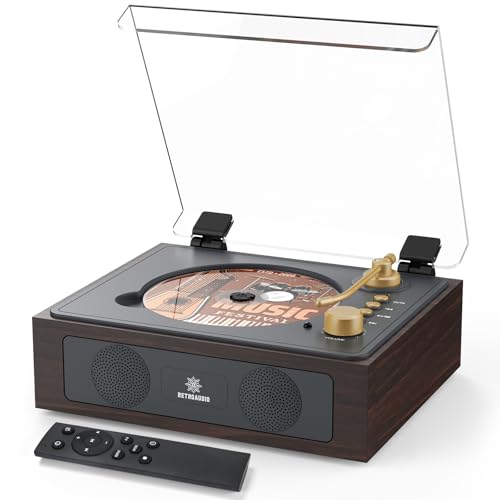
The RetroAudio CD player is best for listeners who prefer a straightforward wireless connection and also want built-in speakers for listening without a sound bar. Its Bluetooth 5.3 feature supports both Bluetooth input and output, according to the product details. Bluetooth output is the relevant mode for sending CD audio to a sound bar that can receive Bluetooth audio.
Other playback choices include AUX-in and USB-in. The unit has a remote control, headphone jack, and built-in stereo speakers. It supports CD, CD-R, CD-RM, and CD-G discs, as well as MP3, WMA, and WAV formats.
- Best for: Buyers who want Bluetooth listening with a built-in-speaker fallback.
- Why it was selected: Bluetooth output is directly relevant to wireless sound bar use, while built-in speakers add another listening option.
- Limitation: It does not play DVD discs, and Bluetooth connection depends on the sound bar supporting audio reception.
Check the sound bar’s Bluetooth pairing instructions before choosing a wireless player. The listed AUX-in is an input for the player, not a stated AUX output for connecting the player to a sound bar.
MEGATEK Region-Free DVD Player

This MEGATEK DVD player is best for a TV-based system where the TV and sound bar are already connected. It plays audio CDs as well as DVDs, and its HDMI connection can connect the player to a TV. In a typical routed setup, the TV then sends audio to the sound bar, but the exact signal path depends on the ports and settings of the individual TV and sound bar.
Features include 1080p HDMI upscaling for standard-definition DVDs, multi-region DVD playback for regions 1–6, and support for PAL and NTSC video standards. It also supports CD, CD-R, CD-RW, MP3, WMA, and JPEG formats, among several video disc formats.
- Best for: Buyers who want one device for DVDs and audio CDs in a TV-centered setup.
- Why it was selected: It supports CD playback and provides HDMI and RCA connections for home entertainment equipment.
- Limitation: It is not a dedicated CD player and is not compatible with Blu-ray discs.
Choose this model when DVD playback matters as well as CD listening. Confirm how your TV passes audio to the sound bar before relying on the TV as the connection bridge.
Majority Compact HDMI DVD Player

The Majority DVD player is best for buyers who want CD playback as part of a compact TV and DVD setup. Its listed HDMI and AV connections can connect it to a compatible TV or display. As with other DVD players, a sound bar may receive audio through the TV, depending on the equipment’s connections and audio settings.
The product description lists 1080p HDMI video, region-free DVD playback, and support for DVD, DVD-R, DVD-RW, CDs, and USB video formats. It also has an LCD display, memory playback, and a low-noise design. The included accessories are described as an HDMI cable, an RCA cable, and a remote control.
- Best for: A TV owner who wants a compact player for DVDs, CDs, and USB media.
- Why it was selected: It supports CDs and offers both HDMI and AV connections for compatible equipment.
- Limitation: The listing does not specify optical or Bluetooth output for direct sound bar pairing.
Choose this player if the TV is part of the audio path. If you need a direct connection to a sound bar, confirm that the player’s output and the sound bar’s input can be connected appropriately.
Buying Guide: Choosing a CD Player For A Sound Bar
Matching the player’s audio output to the sound bar’s input is the most important buying consideration. A player can support CDs perfectly well but still require another device, such as a TV, to route audio to the sound bar. Check the manuals or port labels for both devices before ordering cables or selecting a player.
Which connection should you choose?
| Connection | What to check | Useful for |
|---|---|---|
| Optical audio | Both devices need compatible optical ports; use an optical cable. | A direct digital connection, when supported by the player and sound bar. |
| Bluetooth | The sound bar must receive Bluetooth audio, and the player must transmit it. | A wireless setup without a cable between the player and sound bar. |
| AUX or line output | Confirm that the player has an output and that the sound bar has a compatible input. | A wired analog connection when the ports match. |
| HDMI through a TV | Check the TV’s audio output and its connection to the sound bar. | DVD players that connect to the TV rather than directly to the sound bar. |
Do not assume that every port labeled AUX can send sound out. AUX-in accepts sound into a device; AUX-out or line-out sends sound from it. Similarly, Bluetooth input and Bluetooth output describe different functions. For sound bar playback, the CD player must transmit and the sound bar must receive.
Do you need a dedicated CD player or a DVD player?
A dedicated CD player is usually the more direct choice when your main goal is listening to music. The THINKYA, MEGATEK portable, and RetroAudio options list wireless or wired audio features suited to external playback. A DVD player can be a practical alternative if you also watch DVDs or already use a TV as the connection bridge. The MEGATEK and Majority DVD players list CD support, but neither product description specifies Bluetooth output.
Remember that DVD compatibility does not mean Blu-ray compatibility. The MEGATEK DVD player specifically states that it does not support Blu-ray discs. If you have a mixed disc collection, check each format against the player’s supported formats.
How important are built-in speakers?
Built-in speakers let a player work without the sound bar, which can be useful in another room or when the sound bar is off. The MEGATEK portable and RetroAudio models list built-in speakers. The THINKYA player explicitly has no speaker, so it depends on an external audio device. If you plan to use the sound bar every time, built-in speakers may be less important than having the correct output.
What disc and file formats should you verify?
Check whether your collection includes standard CDs, recordable CD-R discs, rewritable CD-RW discs, CD-G discs, MP3 CDs, or audiobook CDs. The listed support differs by product. For example, MEGATEK’s portable player lists CD-G and audiobook CDs, while the RetroAudio listing includes CD-G and CD-RM. File support also varies: MP3 is common among these options, but WMA and WAV support should be checked against the product details if those formats matter to you.
For DVD players, verify the specific disc types and region needs. The MEGATEK DVD model lists multi-region DVD playback for regions 1–6 and PAL/NTSC support. Do not infer that another player has the same regional features unless its listing says so.
What is the simplest way to avoid connection problems?
- Write down the sound bar’s available inputs: optical, Bluetooth, AUX, HDMI, or another labeled connection.
- Confirm that the CD player provides the matching output, not merely an input of the same type.
- For wireless use, check that the player transmits Bluetooth audio and the sound bar accepts it.
- For TV-based setups, confirm that the TV can pass the player’s audio to the sound bar.
- Check whether cables are included when you compare models; included accessories can differ.
If you cannot find a matching direct connection, a TV-based route may work with a DVD player, but only when the TV and sound bar support the required audio connection. Avoid assuming that an adapter will solve every mismatch: some connections require compatible audio formats or settings, not just a plug that fits.
Frequently Asked Questions
Can I connect any CD player to a sound bar?
No. The CD player needs an audio output that matches an input the sound bar can use, or the audio must be routed through a compatible TV or other device.
Is Bluetooth a good way to connect a CD player to a sound bar?
Bluetooth can be convenient when the CD player transmits audio and the sound bar receives Bluetooth audio. Check both devices’ Bluetooth functions before pairing.
Can a DVD player play audio CDs through a sound bar?
Yes, if the DVD player supports CDs and its audio can reach the sound bar, either directly through compatible connections or through a TV that routes audio to the sound bar.
Which listed player has an optical output?
The THINKYA JA-310R listing specifies SPDIF optical out. The sound bar also needs a compatible optical input for a direct optical connection.
Do these CD players include speakers?
The MEGATEK portable and RetroAudio models list built-in speakers. The THINKYA JA-310R is described as having no speaker. Check each product’s listed features for other models.