
Best CD Player Lens Cleaning Solutions for Clearer Playback
Whether you’re trying to fix slow loading, skipping, or distorted audio and video, a dedicated CD player lens cleaner can help. This guide highlights five top Amazon picks and explains who each product is best for, plus practical considerations to help you choose.
Summary of selected products:
| Product | Brand | Best For | Why It Stands Out |
|---|---|---|---|
| Arsvita ARCD-04 | arsvita | Owners with slow-loading discs | 2-brush cleaning process targets dirt and dust deposits |
| Arsvita CD Laser Lens Cleaner Disc Cleaning Set | arsvita | Users needing a complete cleaning kit | Two-brush system and kit format for flexible use |
| Arsvita ARCD-02 | arsvita | General lens cleaning maintenance | Two-brush cleaning method and extended life benefits |
| Maxell CD407 Laser Lens Cleaner | Maxell | Gentle, chemical-free cleaning | Advanced microfiber brush system; no liquids |
| Mwin CD Cleaner Disc | Mwin | Home and car CD players | Easy to use; microfiber brush technology |
Arsvita ARCD-04 Laser Lens Cleaner Disc

Why it’s a fit: This laser lens cleaner is designed for CD, VCD, and DVD players that experience slow loading, skipping, or freezing. The two-brush cleaning process targets built-up dirt and dust that cause audio and video dropouts. Best for: users who notice skip or load delays and want a straightforward disc-cleaning solution to extend player life and improve playback quality.
Who should avoid: If you prefer liquid cleaners or a more comprehensive maintenance kit, this disc-alone option may feel limited. The device relies on brush-based cleaning to reach the lens.
Arsvita CD Laser Lens Cleaner Disc Cleaning Set
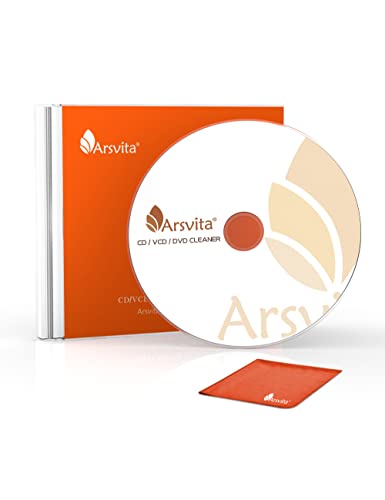
What makes it notable: This set uses the same two-brush technology to remove dirt and dust that cause audio and video dropouts. It’s well suited for households that want a reliable, ready-to-use cleaning kit without liquid cleaners. Best for: owners seeking a complete kit with convenient disc-based cleaning for regular maintenance.
Limitation: The two-brush approach may require occasional replacement or supplemental cleaning if heavy contamination is present.
Arsvita ARCD-02 Laser Lens Cleaner

Why it stands out: Also employing a two-brush system, this cleaner aims to extend a CD/VCD/DVD player’s life while improving sound and image quality. Best for: users who want a compact, purpose-built lens cleaning solution with a focus on longevity of the player.
Consideration: For very dirty players, a deeper cleaning or multiple passes may be needed beyond a single cleaning cycle.
Maxell CD407 Laser Lens Cleaner
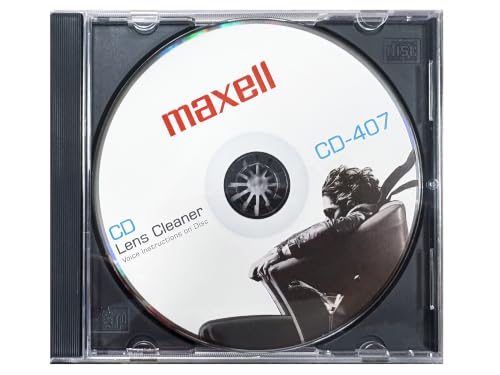
How it helps: This cleaner uses an advanced microfiber brush system to gently remove dust and debris from the laser lens without liquids. Best for: users who want a chemical-free cleaning method and a reusable solution that reduces skipping and read errors. Caution: It is a cleaner disc; it does not replace ongoing maintenance if dust accumulates quickly in a busy environment.
Mwin CD Cleaner Disc for CD Player

Why choose this: The Mwin cleaner disc is designed for use in home and car CD players, featuring easy operation and advanced microfiber brushes to protect the laser lens while cleaning. Best for: people who need a simple, quick-clean solution that works in multiple environments. Limitation: May require careful handling in car stereos to avoid jostling during cleaning.
Buying Guide
Key considerations when selecting a CD lens cleaner include how you want to use it (disc alone vs. full cleaning kit), the cleaning technology (brush-based vs. liquid cleaners), compatibility with your player types (CD, VCD, DVD), and how often you plan to clean.
What type of cleaning method should I choose?
Two-brush systems are common for brushes-only cleaning that avoids liquids, reducing chemical exposure. Kit-based options add flexibility, while liquid cleaners may offer deeper cleaning for heavily dirty lenses.
Is this safe for all CD players?
Most products specify compatibility with CD, VCD, and DVD players. Some cleaners exclude gaming consoles or legacy players. Always verify device compatibility before use to avoid accidental damage.
How often should I clean my lens?
For best results, consider cleaning after about 10 hours of use or when you notice slower loading, skipping, or degraded playback. Repeated cleaning may be needed for infrequent use in dusty environments.
What’s the benefit of a reusable cleaning solution?
Reusable microfiber-based cleaners reduce ongoing costs and waste, while providing steady performance over time. They are generally safe and do not require chemicals, which can be beneficial for sensitive environments.
What are potential drawbacks?
Brush-based cleaners rely on physical contact with the lens and may miss hard-to-reach dust in some cases. Kits vary in completeness, so assess whether you need a standalone disc or a broader maintenance set.
How to choose between a kit and a single disc?
Choose a kit if you want ongoing maintenance and the option to clean multiple components. Choose a single disc if you prefer a simple, ready-to-use solution without extra parts or liquids.
FAQ
- Do lens cleaners damage CDs? No, when used as directed, microfiber brushes are designed to be safe for lenses. Avoid applying liquids directly to discs.
- Can I use a lens cleaner on gaming consoles? Some products exclude gaming consoles; check product compatibility before use.
- How often should I replace cleaner discs? Reuse is common, but replace when signs of wear appear or performance declines.
- Will cleaning fix all playback issues? Cleaning can improve performance but may not fix hardware lens alignment or other mechanical faults.
- Is a kit better than a single disc? A kit offers more tools for routine maintenance; a single disc is simpler for occasional use.