
For affordable desktop audio, the Edifier MR3 is the closest fit for buyers who want active speakers with monitoring-focused connections, while the Edifier R1280T suits listeners who prefer simple wired connections and physical tone controls. The other picks prioritize compact computer use, easy placement, or extra features. Compare their inputs and intended use before choosing: not every inexpensive powered computer speaker is designed for accurate studio monitoring.
| Product | Best For | Notable Feature |
|---|---|---|
| Edifier MR3 | Basic monitoring and music production | Balanced TRS, RCA, AUX, and Bluetooth |
| Edifier R1280T | Wired desktop listening | Two AUX inputs and bass/treble controls |
| NSY Audio Store Powered Speakers | Small desks and mixed device use | Bluetooth plus several wired connections |
| FUNLOGY 14W Stereo PC Speakers | Compact computer setups | USB-powered design and volume dial |
| Hupoaf Clip-On Monitor Speaker | Space-saving monitor placement | Clip-on mounting and switchable RGB lighting |
Edifier MR3 Powered Studio Monitor

The Edifier MR3 is the strongest match here for shoppers specifically searching for affordable active monitor speakers. Its listed features include Hi-Res Audio certification, a stated 52Hz–40kHz response, 18W per channel RMS output, and 3.5-inch mid-low drivers paired with 1-inch tweeters. Balanced TRS inputs make it more studio-oriented than basic desktop speakers in this selection.
Best for: Home creators and listeners who want several connection options in one powered speaker pair. The MR3 offers TRS, RCA, AUX, a headphone output, and Bluetooth with multipoint connection. RCA and AUX inputs can connect multiple audio devices without relying on a single input.
Choose this if you need balanced inputs as well as everyday wireless listening. Limitation: its stated low-frequency response begins at 52Hz, so buyers seeking deep sub-bass should not assume these compact monitors will provide it on their own.
Edifier R1280T Powered Bookshelf Speakers

The Edifier R1280T is a practical choice for buyers who want powered speakers for desktop listening without prioritizing Bluetooth. Its listed driver setup includes a 13mm silk-dome tweeter and a 4-inch full-range unit. The pair has two AUX inputs, allowing two devices to remain connected at once, and includes a remote control for volume adjustments.
Best for: A desk or small room where a computer and another wired audio source need to share speakers. Bass and treble controls are located on the side of the main speaker, which gives users a direct way to adjust tonal balance. The larger 4-inch unit may also appeal to buyers who want more driver area than a very compact computer speaker provides.
Choose this if you value simple wired connectivity and accessible controls. Limitation: the provided product details list AUX connections but do not list Bluetooth or balanced TRS inputs, so it is less suited to shoppers who specifically require those connections for a studio setup.
NSY Audio Store Powered Computer Speakers

These NSY Audio Store speakers are a flexible desktop option for buyers who want both wireless streaming and wired inputs. The listing describes a 60W maximum output, 3-inch drivers, and MDF enclosures. Listed connections include Bluetooth 5.3, RCA, USB-C, and 3.5mm AUX. The compact format is intended for desktops and smaller rooms.
Best for: Users who switch among a computer, television, or other audio devices and want multiple connection types. Bluetooth is specified for wireless streaming up to 33 feet, while the included cables are described as supporting wired setup. This range of input choices is the main reason to consider this pair over a more basic USB-powered computer speaker.
Choose this if connection flexibility and a compact desktop footprint matter more than dedicated studio features. Limitation: the listed maximum output is not the same specification as continuous RMS output, and the supplied details do not identify balanced TRS inputs or a stated frequency response. Buyers seeking precise production monitoring should compare those specifications carefully.
FUNLOGY USB-Powered 14W PC Speakers
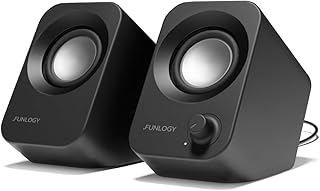
The FUNLOGY speaker is described as a compact 14W stereo PC speaker with USB power, a 30-degree tilt design, and a volume dial. Those details make it a space-conscious alternative for a basic desktop setup. The listing also names laptops, monitors, and gaming consoles as intended uses, but does not provide further connection details in the supplied product information.
Best for: Buyers who want a small computer speaker with a simple on-device volume control and a tilted design. Its USB-powered format may suit desks where reducing the number of separate power arrangements is a priority, provided the buyer confirms the required connection details for their equipment.
Choose this if compact size and straightforward computer audio matter more than studio-oriented inputs. Limitation: the supplied information does not state the audio input type, driver size, frequency response, or whether it has balanced connections. Check the listing for connection requirements before buying; it cannot be compared with the MR3 on monitoring specifications from the available details.
Hupoaf Clip-On Monitor Speaker

The Hupoaf is a compact speaker designed to attach to a monitor edge or sit freestanding. The listing describes a non-slip spring clamp, dual drivers, dual passive radiators, and six RGB lighting modes. The lighting can be switched off using a press-and-hold control, which gives buyers a way to keep the setup less visually active when needed.
Best for: Desktop users who want to save space around the monitor base or add lighting to a gaming setup. Its mounting approach is the key distinction from conventional speaker pairs, and the listing says it can also be placed freestanding for a different layout.
Choose this if monitor-mounted placement and adjustable lighting are more important than a traditional two-speaker arrangement. Limitation: the supplied information does not specify output power, frequency response, or input types. Because the product is described as a clip-on speaker, buyers seeking separated left-right monitoring should confirm the exact channel arrangement before choosing it.
Buying Guide: How to Choose Cheap Active Monitor Speakers
“Active” or “powered” means the speaker system includes amplification, so it does not need a separate external amplifier for ordinary use. However, the terms do not guarantee a flat frequency response or studio accuracy. The product details matter: compare the inputs, stated response, driver configuration, and output specifications with the way you plan to use the speakers.
Do you need studio monitors or general computer speakers?
Choose a model with monitoring-oriented features if you create or edit audio and need to connect studio equipment. In this selection, the Edifier MR3 lists balanced TRS inputs and a stated frequency range, making it the clearest fit for that purpose. For games, video calls, and casual music, convenience features such as Bluetooth, USB power, or a monitor clip may matter more than balanced inputs.
Which connections should you check?
- Balanced TRS: Listed on the MR3 and useful when the rest of a setup supports balanced connections.
- RCA and AUX: The MR3, R1280T, and NSY speakers list these connections in some form. Confirm the exact cable and device requirements.
- Bluetooth: Listed for the MR3 and NSY pair. It can simplify casual playback, but it is not a substitute for checking wired studio connections.
- USB power: Listed for the FUNLOGY speaker. The supplied details do not specify its audio input, so verify how sound reaches it before purchase.
How much desk space do you have?
Measure the available space and consider where each speaker will sit relative to your screen. The FUNLOGY is described as compact, while the Hupoaf is designed to clip onto a monitor or stand freestanding. The NSY pair is also described as compact. Conventional bookshelf-style speakers such as the R1280T need suitable surface space for each cabinet and room for their controls.
How should you compare power and sound specifications?
Do not compare maximum output and RMS output as if they were identical measurements. The NSY listing states 60W maximum, while the MR3 lists 18W per channel RMS. These figures describe different types of output specification. A stated frequency response, like the MR3’s 52Hz–40kHz range, can also help set expectations, but it does not by itself prove that a speaker will suit every room or production task.
Are two separate speakers better than a clip-on speaker?
Separate left and right speakers can be positioned apart for stereo listening, which may be useful for music and monitoring. A clip-on design can free desk space and keep sound near the screen, but the supplied Hupoaf details do not fully specify its channel layout. Check that detail if stereo separation is important to your work or listening preferences.
What should you verify before ordering?
- Confirm that the listed inputs match your computer, interface, console, or other audio source.
- Check the speaker dimensions and available placement area.
- Look for a stated frequency response and determine whether the low-frequency range meets your needs.
- Distinguish RMS output from maximum or peak output when comparing specifications.
- For a clip-on product, check that the mounting approach suits your monitor and desired speaker placement.
Frequently Asked Questions
What are cheap active monitor speakers?
They are powered speakers marketed for near-field or desktop audio use at a more accessible cost than many professional studio systems. “Active” means amplification is built into the speaker system; it does not automatically mean the sound is neutral or suitable for professional mixing.
Which product here is best for basic music production?
The Edifier MR3 is the clearest match based on the supplied details because it lists balanced TRS inputs and a 52Hz–40kHz response. Buyers should still compare its specifications with their audio interface and monitoring requirements.
Which option has Bluetooth?
The Edifier MR3 lists Bluetooth with multipoint connection, and the NSY Audio Store speakers list Bluetooth 5.3. The R1280T, FUNLOGY, and Hupoaf details provided here do not specify Bluetooth.
Which speakers have the simplest wired setup?
The Edifier R1280T lists two AUX inputs and a remote control, while the FUNLOGY is described as USB-powered but does not specify its audio input in the supplied information. Check the input type before selecting the FUNLOGY for a particular computer.
Can compact computer speakers replace studio monitors?
Not necessarily. Small computer speakers can be convenient for everyday audio, but buyers making or mixing music should compare frequency-response information, input types, and channel configuration. The MR3 has the most explicit monitoring-related details among these five products.