
The best cheap DJ mixing board depends on what you need to connect: the Kaschun and Aveek are compact four-channel choices for basic audio mixing, while the Riworal offers six input channels and built-in reverb. The Numark Party Mix III is a two-deck DJ controller for beginner software-based mixing, not a traditional multi-input audio mixer. Compare the options below by channels, connections, recording features, and intended use.
| Product | Best For | Key Feature |
|---|---|---|
| Kaschun 4-Channel Mixer | Portable streaming and simple recording | USB recording, Bluetooth input, and phantom power |
| Aveek 4-Channel Mixer | Flexible connections and monitoring | Type-C PC recording and headphone output |
| 4-Channel DJ Audio Mixer | Music playback and basic DJ setups | Bluetooth, USB, and MP3 playback |
| Riworal 6-Channel Mixer | More connected sources and karaoke | Six channels and DSP reverb |
| Numark Party Mix III | New DJs learning software-based mixing | Two-deck control and built-in lights |
Kaschun 4-Channel Audio Mixer

Best for: Buyers who want a small mixer for home recording, live streams, or portable audio setups. Its compact listed dimensions make it easier to pack than a larger console, and it combines several useful input and playback options.
The four-channel board includes XLR and 6.35mm connections, a USB audio interface, and +48V phantom power. The listing says it can connect with condenser and dynamic microphones, electric guitars, bass, and electronic keyboards. USB connectivity supports plug-and-play PC recording and streaming, while a USB flash drive can play MP3 files or record audio.
Bluetooth is available for wireless music input from phones, tablets, and laptops. The controls include playback and track navigation. Choose this model if recording and portable use matter as much as mixing music. One limitation: Bluetooth supports input only, not wireless audio output to a speaker or other device.
Aveek 4-Channel Mixer With Recording

Best for: Users who want a four-channel mixer with several connection types and a dedicated headphone-monitoring output. It is a better fit than a basic playback-only board when monitoring and connecting different audio sources are priorities.
The listed inputs include two XLR/6.35mm line jacks, 6.35mm left and right inputs, and RCA left and right inputs. The board also has balanced XLR and 1/4-inch outputs, a headphone jack, and an AUX signal output for effects or monitoring equipment. A built-in recording chip supports recording and playback through a Type-C connection to a PC without additional software, according to the product description.
USB flash drive playback and recording are also listed, along with Bluetooth music input. Choose Aveek if you need to connect sources such as microphones, guitars, a computer, or a CD player and want headphone monitoring. The Bluetooth connection is for receiving audio, not sending it to a Bluetooth output device; the listing also describes Bluetooth use with active equipment.
Four-Channel DJ Audio Mixer With Bluetooth
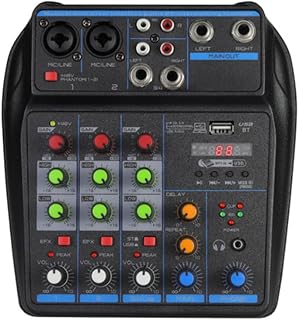
Best for: Buyers focused on playing music from multiple common sources for a small DJ setup, karaoke, or a home audio system. Its listed strengths are playback flexibility and straightforward track controls rather than detailed input specifications.
The product description highlights an integrated MP3 playback module and support for Bluetooth, USB, flash media, and computer input. It is designed to stream music wirelessly from a phone or tablet, and the controls allow play, pause, track skipping, and mode switching. Those features can make it convenient when a setup needs both stored music and wireless playback.
Choose this model if Bluetooth and USB/MP3 playback are the main requirements. The product name mentions XLR and 1/4-inch interfaces and +48V phantom power, but the supplied feature details do not explain the number or arrangement of inputs and outputs. Check the product listing carefully before buying if you need a particular connection layout or microphone setup.
Riworal 6-Channel Audio Mixer

Best for: Buyers who need more input channels for a karaoke setup, small performance, or streaming arrangement with several connected sources. Compared with the four-channel options here, its six-channel layout provides more listed input positions.
The mixer has four XLR input jacks and 1/4-inch inputs, plus stereo 1/4-inch connections for channels five and six. The listing describes +48V phantom power for the XLR inputs, Bluetooth, USB playback, three-band equalization, and a built-in DSP reverb effect. It is intended for connecting microphones and instruments, including condenser microphones, guitars, and other audio sources.
Choose Riworal if channel count and onboard reverb are more important than having a particularly simple, minimal board. A practical caution is that the listing itself warns that operating errors can result in no sound. Buyers unfamiliar with mixer controls should allow time to learn the input and phantom-power settings before relying on it for an event.
Numark Party Mix III DJ Controller

Best for: First-time and casual DJs who want to learn two-deck mixing with DJ software and add a light effect to a party. This product is a DJ controller, so it suits a different buyer than the audio mixers above.
The Party Mix III is described as a two-deck controller with USB-C connectivity, Bluetooth MIDI connectivity for wireless DJing from iOS and Android devices, and a built-in beat-synchronized LED light show. The listing includes access to Serato DJ Lite for Mac and Windows and Algoriddim djay for multiple platforms. These software and controller features make it a more suitable choice for learning software-based DJ techniques than for mixing several microphones or instruments.
Choose it if your priority is controlling DJ software and creating a beginner-friendly party setup. Avoid it if you specifically need a conventional multi-input mixer with several XLR or instrument connections: the supplied product details do not list those inputs. The light show is a visual feature, not a substitute for audio connections or mixing controls.
Buying Guide: How to Choose a Cheap DJ Mixing Board
Do you need a mixer or a DJ controller?
A traditional audio mixer combines signals from connected sources such as microphones, instruments, and playback devices. A DJ controller is designed to operate DJ software and control music decks. These product types can both be used in DJ-related setups, but they are not interchangeable. Choose a mixer when physical inputs and outputs are central to your setup. Choose the Numark controller if you want two-deck software control and beginner-oriented DJ features.
Before buying, list the devices you plan to connect. A phone playing background music, a microphone for announcements, and a computer for recording create different connection needs. Match the product’s documented inputs and outputs to those devices rather than relying only on a broad label such as “DJ mixer.”
How many channels should you look for?
Four channels can be enough for a simple home or streaming setup, but the right number depends on how many sources you need to manage at once. The Kaschun and Aveek are listed as four-channel mixers. Riworal offers six channels, including stereo inputs on channels five and six. Consider both the number of channels and the type of connection each channel accepts.
More channels do not automatically mean a better fit. A smaller board may be easier to set up if you only need a microphone and music playback. A six-channel model is more relevant when you expect to connect several sources, but you should still confirm that its input types match your equipment.
Which connections matter for your setup?
Check whether you need XLR, 1/4-inch, RCA, USB, or headphone connections. XLR and 1/4-inch inputs are commonly listed for microphones and instruments in these product descriptions, while RCA and stereo jacks can accommodate other audio sources. Outputs matter too: verify how the mixer connects to your speakers, amplifier, computer, or monitoring system.
The Aveek listing provides the most detailed connection description among these four-channel boards, including RCA inputs, balanced outputs, headphones, and AUX output. The Kaschun emphasizes USB recording and several instrument and microphone connections. For the unnamed four-channel model, confirm the exact input and output arrangement before selecting it for a specific setup.
Do you want Bluetooth or USB recording?
Bluetooth can be useful for sending music from a phone or tablet into a mixer without a cable. In the Kaschun and Aveek descriptions, Bluetooth is input-only; it does not send the mixer’s audio to a Bluetooth speaker. Do not assume that a Bluetooth feature works in both directions.
USB features also vary. Some mixers use USB for computer recording, while others support playback or recording with a flash drive. If you need to record directly to a computer, look for a clearly described PC audio interface or recording connection. If you only need to play stored MP3 files, check for explicit USB drive playback support.
When is phantom power important?
Phantom power supplies power to certain condenser microphones through compatible connections. The Kaschun and Riworal listings specify +48V phantom power. Consider this feature if your planned microphone requires it, and follow the mixer’s instructions for connecting and powering equipment. If you use a dynamic microphone or do not plan to connect a condenser microphone, phantom power may not be a deciding feature.
What should beginners check before an event?
Confirm that every source, cable, output, and monitoring device works together before using the mixer for a party or performance. Read the product instructions for input selection, levels, and special settings. This is especially sensible for a board with phantom power or built-in effects, where incorrect settings can affect the signal. For software-based DJing, check the listed software and device platform requirements before choosing a controller.
Frequently Asked Questions
What is the best cheap DJ mixing board for beginners?
For software-based two-deck DJing, the Numark Party Mix III is the clearest beginner-focused option in this selection because it is described as a first-time and casual DJ controller with included DJ software access. For connecting microphones or instruments, consider a traditional mixer instead.
Can I use a four-channel audio mixer for DJing?
A four-channel audio mixer can combine connected audio sources, but it is not necessarily a DJ controller. Check whether it has the inputs and controls your setup requires. If you want to control DJ software decks, choose a controller designed for that purpose.
Can these mixers connect to Bluetooth speakers?
The Kaschun and Aveek listings specify Bluetooth music input, not Bluetooth audio output. That means their Bluetooth feature is for receiving music from a device, not sending the mixed signal wirelessly to a speaker.
Which option has the most channels?
The Riworal is listed as a six-channel mixer. The Kaschun, Aveek, and other DJ audio mixer are described as four-channel products, while the Numark is a two-deck controller.
What is the difference between USB recording and USB playback?
USB recording sends or saves audio through a USB connection, while USB playback plays audio files from a USB drive. A product may support one or both, so check its listed functions rather than assuming every USB port handles recording and playback.