
For PC gaming on a budget, compare connection type, microphone controls, comfort features, and how each headset describes its sound. The BENGOO G9000 is best for broad platform support, while the Logitech G432 is a better fit for shoppers who want named DTS Headphone:X 2.0 support. The KAVLORN model specifies USB plug-and-play for PC, and Jimonyer uses a 3.5mm audio jack. Product features vary, so check the connection and controls that match your setup before choosing.
| Headset | Best For | Connection Or Standout Feature |
|---|---|---|
| BENGOO G9000 | Multi-platform use | Noise-isolating microphone; 40mm drivers |
| BENGOO Wired Gaming Headset | Long sessions and team chat | Memory foam; flip-to-mute microphone |
| KAVLORN Wired Gaming Headset | Simple PC setup | USB plug-and-play; inline volume roller |
| Jimonyer Gaming Headset | 3.5mm device flexibility | 50mm drivers; adjustable microphone |
| Logitech G432 | Named surround-sound technology | DTS Headphone:X 2.0 with required software |
BENGOO G9000 Stereo Gaming Headset
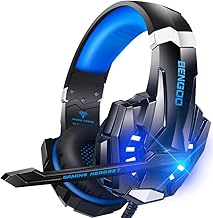
The BENGOO G9000 is best for PC players who also want a headset described as supporting multiple consoles and mobile devices. Its listed platform range includes PC, PlayStation, Xbox, Nintendo 3DS, laptops, tablets, and phones. The product description identifies 40mm magnetic neodymium drivers and 7.1 surround sound.
For multiplayer use, the headset has an omnidirectional microphone with a flexible boom and noise-isolating features. The product listing also mentions LED lighting and soft memory earmuffs, making it a practical option for shoppers comparing basic comfort and appearance features alongside audio.
- Best for: Buyers who value listed compatibility across several device types.
- Why it stands out: It combines a flexible microphone, 40mm drivers, and multiple-platform support in one headset.
- Limitation: The listing says an extra Microsoft adapter is needed for an older Xbox One controller. Confirm the connection arrangement for your PC before buying.
BENGOO Wired Gaming Headset

This BENGOO wired headset is best for PC gamers who prioritize extended-session comfort and quick microphone control. Its features include 50mm drivers, virtual 7.1 audio, memory foam ear cushions, and a self-adjusting headband. The over-ear design is described as helping reduce pressure, while breathable materials are intended to support longer gaming sessions.
For team chat, the headset has an adjustable directional microphone with a 120-degree flexible boom. A flip-to-mute design and inline mute button provide two stated ways to control the microphone. Those controls are useful for players who need to mute quickly during multiplayer sessions or calls.
- Best for: Buyers looking for memory foam, a flexible microphone, and accessible mute controls.
- Why it stands out: The feature set emphasizes comfort and communication rather than only audio positioning.
- Limitation: The listing describes virtual 7.1 audio but does not specify its software or setup requirements. Check the product details for the intended PC configuration.
KAVLORN Wired PC Gaming Headset

The KAVLORN wired headset is best for PC users who want a straightforward USB setup. The listing describes it as plug-and-play with no drivers required, and it includes a one-key volume roller on an ear cup. That combination may suit someone who prefers adjusting volume directly on the headset rather than navigating menus.
Its sound features include 50mm drivers and 7.1 surround sound. Gradient RGB lighting is also listed for a gaming-themed appearance. These details make the model a useful comparison for buyers seeking a PC-focused headset with onboard volume adjustment and a USB connection.
- Best for: PC players who want listed USB plug-and-play operation and an ear-cup volume control.
- Why it stands out: The connection method and basic control are clearly described in the product features.
- Limitation: The supplied feature information focuses on PC USB use. Do not assume it will connect to a console or another device without checking the full listing.
Jimonyer Gaming Headset With 3.5mm Jack

The Jimonyer headset is best for buyers who want a listed 3.5mm audio connection and support across several device categories. Its stated platforms include PC, PlayStation, Xbox, Switch, laptop, Mac, and mobile phones. The listing says an extra Microsoft adapter is required for older Xbox One controllers.
For sound, the product description specifies 50mm neodymium drivers and a large PET diaphragm, with crisp stereo sound, deep bass, and positional audio among its stated features. Its noise-canceling microphone has a flexible 120-degree boom that can be adjusted for voice pickup.
- Best for: Shoppers who prefer a 3.5mm connection and want a headset listed for multiple devices.
- Why it stands out: It pairs a flexible microphone with 50mm drivers and broad stated platform support.
- Limitation: Connection details and controller requirements can differ by device. Check your PC’s available audio ports and the listing before purchase.
Logitech G432 Wired Gaming Headset

The Logitech G432 is best for PC gamers comparing a headset with a specifically named surround-sound technology. It has 50mm audio drivers and DTS Headphone:X 2.0, which the listing describes as producing positional, three-dimensional audio. This may matter to players who want to hear directional game cues, such as movement or environmental sounds.
The headset also includes a 6mm boom microphone that mutes when flipped up. This provides a clear physical mute action for team chat. Unlike models whose supplied descriptions refer only to generic virtual surround sound, the G432 identifies the DTS feature by name.
- Best for: Buyers who value a named positional-audio feature and a flip-up microphone mute.
- Why it stands out: The product listing specifies DTS Headphone:X 2.0 and 50mm drivers.
- Limitation: DTS Headphone:X 2.0 requires Logitech G HUB software, according to the product information.
Buying Guide: How To Choose Cheap Gaming Headphones For PC
When comparing budget gaming headsets, begin with the features that affect everyday use: whether the connection fits your PC, whether the microphone has convenient controls, and whether the headset feels suitable for the length of your sessions. Sound labels such as “7.1” do not tell the whole story. Check whether the feature needs software and whether it is described as virtual or tied to a named technology.
Which connection should you choose?
Connection type determines whether a headset fits your computer without extra steps. The KAVLORN listing specifies USB plug-and-play for PC. Jimonyer specifies a 3.5mm audio jack. Before choosing, check your PC’s available ports and whether you prefer a USB connection or a standard audio jack. The supplied information does not give a connection method for every model, so verify those details in the relevant product listing.
For a headset you may use with multiple devices, compare the stated platform list with the devices you own. Multi-platform claims do not automatically mean every connection works in the same way on every device. Controller adapters, audio ports, and device settings can affect setup. The BENGOO G9000 and Jimonyer listings both note an adapter requirement for older Xbox One controllers.
Does virtual surround sound matter for PC gaming?
Surround-sound features may help convey directional cues, but the product descriptions differ in how they identify the technology. The BENGOO G9000, the second BENGOO headset, KAVLORN, and Jimonyer list 7.1 or virtual 7.1 sound. Logitech names DTS Headphone:X 2.0 and states that it requires Logitech G HUB software. If you want a specific software feature, include its setup requirement in your comparison.
Driver size is another specification shoppers often compare. Several products here list 50mm drivers, while the BENGOO G9000 lists 40mm drivers. A driver measurement alone does not establish which headset will sound best to you. Use it as one specification among several, alongside connection, microphone, and comfort details.
What microphone controls are useful?
Look for microphone features that match how you play or communicate. A flexible boom can be repositioned, while a mute button, flip-up mute, or inline control can make muting more direct. The second BENGOO headset lists both flip-to-mute and inline mute controls. Logitech describes a boom microphone that mutes when flipped up. The G9000 and Jimonyer list adjustable microphones, while the KAVLORN features supplied here do not specify microphone controls.
Noise reduction wording varies across listings. Some describe noise isolation or noise cancellation, but the supplied product information does not provide a standardized measure of microphone performance. If voice clarity is a priority, compare the microphone’s placement and controls, and review the complete product details for the specific headset.
How should you compare comfort features?
For long sessions, check for stated cushioning, headband design, and materials. The second BENGOO headset lists memory foam ear cushions, a self-adjusting headband, and breathable materials. The G9000 lists soft memory earmuffs. These are useful points of comparison, but comfort depends on fit and personal preference. If possible, choose a seller with a return policy that suits your needs; return terms are not specified in the product information provided here.
Which features are most important on a budget?
Prioritize the features you will use regularly instead of choosing solely by the number of specifications. A PC-only player may favor the KAVLORN’s stated USB plug-and-play setup and onboard volume roller. A player who also uses other devices may prefer to compare the BENGOO G9000 or Jimonyer platform lists. For team play, microphone placement and mute access may matter more than lighting. For directional audio, compare the listed surround-sound features and any software requirements.
Frequently Asked Questions
Which headset in this list is specifically described for PC USB use?
The KAVLORN wired gaming headset is described as a PC USB plug-and-play model that does not require drivers, according to its supplied features.
Which option lists a 3.5mm audio jack?
The Jimonyer gaming headset is listed with a 3.5mm audio jack and support for several device types. Check the connection requirements for your specific computer.
Do all the headsets provide software-based surround sound?
No. The Logitech G432 listing specifically says DTS Headphone:X 2.0 requires Logitech G HUB software. The other supplied descriptions refer to 7.1 or virtual 7.1 sound without providing the same software requirement.
Which models list convenient microphone mute controls?
The second BENGOO headset lists flip-to-mute and inline mute controls. The Logitech G432 lists a boom microphone that mutes when flipped up.
What should I check before buying a multi-platform headset?
Confirm that the connection matches your PC and any other device you plan to use. Check for adapter requirements, audio ports, and any stated software needs. Broad platform support does not remove the need to verify the setup for each device.