
The best cheap high-quality computer speakers depend on whether you prioritize simple Bluetooth, gaming features, or more connection options. The Logitech Z207 is best for switching between devices, the Nylavee sound bar suits buyers who want a compact form with Bluetooth and AUX, and the Edifier G2000 is aimed at gaming setups. The H1 offers the most detailed wired-input list, while the OHAYO is a 60W stereo option. Compare the listed features and connection types before choosing; the product information does not include prices or enough detail to verify which model is cheapest.
| Product | Best suited for | Listed highlights |
|---|---|---|
| Logitech Z207 | Switching between audio devices | Bluetooth, 3.5mm input, Easy-Switch |
| Nylavee Computer Sound Bar | Bluetooth and wired sound bar setup | Bluetooth 5.0, AUX, four speaker units |
| Edifier G2000 | Gaming-oriented desktop setups | 32W, Bluetooth, USB, AUX, RGB lighting |
| H1 Computer Speakers | Multiple wired digital inputs | 60W, USB-C DAC, optical, AUX, Bluetooth |
| OHAYO 60W Speakers | Buyers seeking a 2.0 stereo pair | 60W, Bluetooth 5.3, stereo 2.0 |
Logitech Z207 2.0 Stereo Speakers

The Logitech Z207 is best for a desktop user who wants to connect a computer and another audio device without relying on a single connection method. Its listed options are Bluetooth wireless and a 3.5mm cable. Easy-Switch technology is designed to let users move between audio devices by pausing playback on one and starting it on another.
Each speaker has one active, powered driver for full-range audio and one passive radiator for bass extension. That configuration gives buyers a straightforward stereo pair with a stated bass-supporting component, rather than a separate subwoofer.
- Best for: People who switch between compatible Bluetooth and wired audio sources.
- Why it was selected: It combines two connection methods with a clearly described device-switching feature.
- Limitation: The supplied product details do not state output power, frequency response, or speaker dimensions, so compare those specifications elsewhere if they are essential to your setup.
Choose this if convenient device switching matters more than a long list of digital inputs. It is a less suitable pick for buyers specifically seeking USB-C or optical connections based on the information provided.
Nylavee Bluetooth and AUX Computer Sound Bar

The Nylavee computer speakers are best for buyers looking for a sound bar-style desktop speaker with both wireless and wired playback. The product listing describes four speaker units and two independent bass diaphragms. It also specifies Bluetooth 5.0 and a 3.5mm AUX connection.
Nylavee says the units use double-layer neodymium magnets and mica-fiber diaphragms, with a cavity design intended to support the loudness of the audio units. These are useful specification details for comparison, but they do not establish how the speakers will sound in every room or at every listening level.
- Best for: Desktop or laptop users who want a sound bar form and a choice of Bluetooth or AUX.
- Why it was selected: Its listed four speaker units, bass diaphragms, and two connection options make it a feature-rich choice in this group.
- Limitation: Bluetooth is listed as version 5.0, and the supplied information does not give output power or dimensions.
The listing names laptops, desktop PCs, phones, tablets, Xbox, and PS5 among possible devices. Check the connection available on your specific equipment before buying, especially if you plan to use a wired connection.
Edifier G2000 Gaming Computer Speakers

The Edifier G2000 is best for a buyer building a gaming-focused desktop setup who wants several stated ways to connect. Its product name lists 32W output, Bluetooth, USB, and 3.5mm AUX inputs, along with RGB lighting. Those details make it easy to distinguish from simpler stereo speakers without lighting or USB listed in their supplied descriptions.
USB and AUX provide wired options, while Bluetooth can suit wireless listening. The RGB feature is a visual consideration for a gaming desk, not a substitute for checking audio specifications or the physical fit of the speakers.
- Best for: Gamers and desktop users who value RGB lighting and a choice of Bluetooth, USB, or AUX.
- Why it was selected: It combines a stated 32W output with multiple connection types and a gaming-oriented lighting feature.
- Limitation: The supplied product data does not describe driver construction, dimensions, or frequency response.
Choose this if lighting and flexible inputs matter to your setup. If you need detailed acoustic specifications to compare sound performance, the available listing details here are limited.
H1 60W Computer Speakers With USB-C DAC

The H1 is best for buyers who want a broad selection of wired inputs alongside Bluetooth. The listing specifies a powered 2.0 stereo system with 60W output and Bluetooth 5.3. Wired options include USB-C DAC, optical, and 3.5mm AUX, which can be useful when a computer, monitor, or other source provides one of those outputs.
The stated driver arrangement is dual 3-inch carbon-fiber woofers and dual 1-inch silk-dome tweeters. The listing also gives a 40Hz–20kHz frequency range and a signal-to-noise ratio of at least 95dB. Bass and treble controls are included in the product name, making this a potential fit for listeners who want adjustment controls.
- Best for: Users comparing several wired input types or seeking listed bass and treble controls.
- Why it was selected: It has the most detailed input and driver information among the products in this comparison.
- Limitation: Confirm that your intended source has a compatible output and that the speaker inputs suit your desk setup; the listing alone does not confirm every device configuration.
Choose this if connection flexibility is a priority. It may be more than necessary if you only need a basic pair of speakers with one connection method.
OHAYO 60W Bluetooth Stereo Speakers
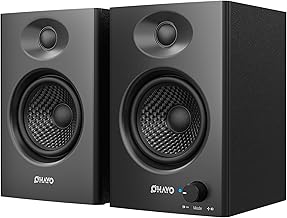
The OHAYO is best for shoppers looking for a named 60W stereo 2.0 pair with Bluetooth 5.3. The product title identifies a pair of black computer speakers and specifies wireless Bluetooth connectivity. That makes it a direct comparison for buyers who want a conventional two-speaker setup rather than a sound bar.
Its listed name does not provide details about wired inputs, driver design, frequency response, or adjustment controls. Buyers should check the full current product listing for those points if they affect their decision. The 60W figure is part of the supplied product name; it does not, by itself, describe loudness or sound quality in a particular room.
- Best for: Buyers seeking a Bluetooth 5.3 stereo pair with 60W stated output.
- Why it was selected: It offers a clearly named stereo 2.0 format and newer Bluetooth version in the supplied product information.
- Limitation: The provided details are sparse, so wired connectivity and acoustic specifications cannot be compared here.
Choose this if Bluetooth and a two-speaker layout are your main requirements. Avoid assuming it includes a wired input unless the current product listing confirms one.
Buying Guide: How to Choose Computer Speakers
Which connections do you need?
Start with the ports on the computer or other device you plan to use. Bluetooth can reduce cable clutter, while AUX is a common wired option listed for the Logitech Z207, Nylavee, and Edifier G2000. The H1 adds USB-C DAC and optical inputs to its listed Bluetooth and AUX options. The OHAYO product details supplied here identify Bluetooth 5.3 but do not specify a wired input.
Do not assume that every speaker works with every device just because the product title mentions computers or gaming systems. Check the exact connection method, any required cable, and the outputs available on your source before choosing.
Do you want a sound bar or separate speakers?
A sound bar can be a practical shape when you want one central speaker unit on a desk. The Nylavee listing identifies its product as a computer sound bar. The Logitech Z207 and OHAYO are described as speaker pairs, while the Edifier and H1 are computer speaker systems. Compare their listed form factors with your available desk space and preferred listening arrangement.
Dimensions are not included for these products in the supplied details. Measure the space you have and consult the full product listing before purchase if the footprint or height must fit a specific shelf, monitor stand, or desk area.
How should you compare power and sound specifications?
Output figures can help distinguish products, but they do not tell the whole story. The product names or descriptions list 60W for the OHAYO and H1 and 32W for the Edifier G2000. The Nylavee and Logitech details provided here do not state output power. Compare specifications using the same measurement basis where possible, and avoid treating a wattage number as a guarantee of sound quality.
The H1 listing supplies driver sizes, a frequency range, and a signal-to-noise figure. Nylavee describes its speaker units and bass diaphragms. The other product details are less extensive, so consult their current listings if driver construction or acoustic measurements are important to you.
Which features matter for gaming, work, or music?
For gaming, the Edifier G2000’s listed RGB lighting and connection options may suit a gaming desk. For work and general desktop use, Bluetooth and AUX on the Logitech Z207 or Nylavee can support different playback arrangements. The H1 may suit users who need USB-C or optical input. Match the features to your actual devices and habits rather than paying attention only to a product category label.
Consider whether you need speaker controls, a particular input, or a pair that can connect to more than one source. The H1 names bass and treble controls, and the Logitech lists Easy-Switch. The supplied details do not confirm similar controls or switching functions for the other models.
How can you find a budget-friendly option?
Because no prices are included in the product data here, this comparison cannot identify the cheapest model. Check current prices, shipping, and return terms directly before ordering, since these can change. Compare the total cost with the features you will use: a basic Bluetooth or AUX setup may be enough for everyday computer audio, while extra inputs, lighting, or controls may matter more for a specialized desk.
For value, prioritize a connection that matches your equipment and a form factor that fits your space. Avoid paying for a feature you will not use, but do not select a speaker solely by a wattage claim or a low listed price. Read the current product details to confirm included cables and the exact configuration.
Frequently Asked Questions
What should I look for in cheap computer speakers?
Check connection type, size, speaker layout, and the specifications you care about. Make sure the speakers can connect to your computer, and compare listed features rather than relying on price or wattage alone.
Are Bluetooth computer speakers better than wired speakers?
Neither option is automatically better. Bluetooth can reduce cable clutter, while a wired connection may suit a setup with an available AUX, USB-C, or optical output. Choose based on your devices and preferences.
Which product lists the most connection options?
The H1 lists Bluetooth 5.3, USB-C DAC, optical, and 3.5mm AUX. The Edifier G2000 lists Bluetooth, USB, and 3.5mm AUX, while the other products have fewer connection details in the information provided.
Which speakers are best for switching between devices?
The Logitech Z207 is the clearest choice based on the supplied details because it lists Easy-Switch technology for moving between audio devices, as well as Bluetooth and a 3.5mm cable connection.
Can I tell which model is the cheapest?
No. The supplied product information does not include prices, and prices can change. Check current listings and compare the features, connection needs, and total purchase cost before choosing.