
The best cheap mixer for podcasting depends on how many audio sources you need and whether you want a simple recording interface or live-streaming effects. The Aveek 5 Channel Mixer is best for connecting several microphones and devices; the MAONO G1 Neo is better for a solo streamer who wants XLR input and voice effects; and the TENLAMP G10 bundle suits beginners who want a microphone included. Compare the input types and recording options before choosing: a low-cost mixer is useful only if it supports your microphone and recording setup.
| Product | Best For | Standout Feature |
|---|---|---|
| MAONO G1 Neo | Solo streaming and podcasting | XLR input, 48V phantom power, voice effects |
| Aveek 5 Channel Mixer | Multiple audio sources | Three XLR inputs and PC recording |
| PUPGSIS Gaming Mixer | Live content with sound effects | Noise reduction and customizable sound pads |
| 4-Channel DJ Audio Mixer | Portable, multi-source recording | Bluetooth input and USB recording |
| TENLAMP G10 Bundle | New creators starting from scratch | Mixer and condenser microphone included |
MAONO G1 Neo Gaming Audio Mixer
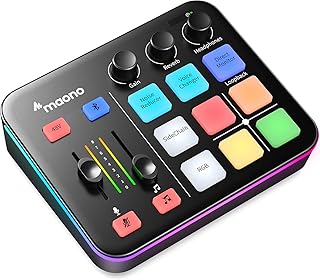
Best for: A solo podcaster or streamer who wants an XLR microphone connection plus live voice effects. The MAONO G1 Neo has a built-in preamp and 48V phantom power, which the product description says helps support XLR microphones requiring phantom power.
Its listed features include one-click noise reduction, voice-changing effects, reverb, sidechain, RGB lighting, and customizable sound pads. These features make it a more effects-focused option than a basic mixer, especially for live shows where a host wants to trigger audio or alter a voice in real time.
Why it was selected: It combines an XLR input and phantom power with podcast- and streaming-oriented controls in a compact unit. Limitation: The listed features emphasize gaming and streaming effects. Choose another model if you need several microphone inputs or straightforward multi-person mixing.
Aveek 5 Channel Audio Mixer

Best for: Podcasters who need multiple microphone and stereo-source connections. This mixer lists three XLR inputs, a pair of 6.35 mm stereo inputs, and a pair of RCA stereo inputs. Its input selection can suit a small recording setup with microphones alongside a computer, keyboard, or other listed audio source.
The built-in recording chip connects to a computer through USB-B for plug-and-play recording, according to the product description. It also supports playback and recording through a USB flash drive. The listed outputs include RCA and 6.35 mm connections for active speakers or other compatible equipment.
Why it was selected: Its three XLR inputs and several stereo connections make it the most connection-focused choice in this group. Limitation: The product description says its outputs are for active equipment and that Bluetooth output devices cannot be connected. Check your speaker setup before buying.
PUPGSIS Gaming Audio Mixer

Best for: A podcaster or live streamer who wants noise reduction and sound effects in the same unit. The listed features include a microphone input, built-in reverb, four custom sound-effect pads, a voice changer, and noise reduction intended to filter background sounds such as fan noise and hum.
These controls are useful for live content that benefits from sound cues or voice changes. For a conventional interview podcast, the effects may be less important than microphone compatibility and the number of inputs, so compare this model with the Aveek if you need to connect multiple microphones.
Why it was selected: It offers a focused combination of background-noise reduction and live audio effects. Limitation: The product description says it does not support USB microphones or 48V dynamic microphones. It also specifies that connecting an XLR microphone requires a 1/4-inch TRS-to-XLR cable, which may need to be added separately. Confirm the cable and microphone requirements before ordering.
4-Channel DJ Audio Mixer

Best for: Creators who want a compact mixer with several ways to bring audio into a recording. The feature list includes XLR and 6.35 mm connections, USB recording, USB flash-drive playback, and Bluetooth input for music from a phone, tablet, or laptop. It also lists +48V phantom power for compatible condenser microphones.
The product description gives dimensions of 7.87 by 6.7 by 1.57 inches and describes the unit as portable. Its USB interface is listed for PC recording and live streaming without extra drivers or complicated software. Bluetooth can add background music without a wired source connection.
Why it was selected: It combines recording, playback, and wireless audio input in a small mixer. Limitation: Bluetooth supports input only, not output. Do not choose it expecting to send the mix wirelessly to Bluetooth headphones or speakers.
TENLAMP G10 Creator Audio Mixer Bundle

Best for: A first-time creator who wants a mixer and microphone in one listed bundle. The product description says the package includes an audio mixer, condenser microphone, and essential accessories, making it an option for people assembling a basic recording setup without sourcing every component separately.
Its stated uses include podcasting, streaming, voice recording, and content creation. The feature list also mentions built-in noise reduction and a follow-singing mode that lets the performer monitor the original track while the audience hears the voice and music mix.
Why it was selected: The included microphone makes it distinct from the standalone mixers, and the listed modes address both spoken content and live performance. Limitation: The supplied details do not specify the mixer’s input count or connection types. Check those details before choosing it for a multi-microphone podcast or a setup with particular computer connections.
Buying Guide: How To Choose A Cheap Podcast Mixer
How many people will record at once?
Start with the number of microphones you plan to use, not the number of available effects. A solo host may need only one suitable microphone input. A two-person interview or roundtable needs enough microphone inputs for each participant, along with any additional sources such as a phone or playback device.
Among these five options, the Aveek explicitly lists three XLR inputs. The other product descriptions do not provide the same clear count of microphone inputs, so verify their connection details if you plan to record multiple people. An input count alone does not establish how each channel can be adjusted or routed; review the product’s complete specifications for those details.
Does your microphone need phantom power?
Check the microphone’s connection and power requirements before selecting a mixer. The MAONO G1 Neo lists 48V phantom power, and the 4-Channel DJ Audio Mixer lists +48V phantom power. Those details may matter if you use a microphone that requires phantom power.
Do not assume every XLR microphone needs phantom power, or that every mixer input supports every microphone. The PUPGSIS description gives specific compatibility limits, while the TENLAMP listing does not provide detailed input specifications in the supplied information. Match the mixer’s stated support to the microphone’s requirements.
Do you need simple recording or live sound effects?
For a podcast recorded and edited later, prioritize reliable computer connection, microphone compatibility, and enough inputs. The Aveek and 4-Channel DJ mixer both list USB recording features. The Aveek also describes a built-in recording chip and USB-B computer connection; the 4-Channel model lists a USB recording interface and USB-drive recording.
For live streaming, sound pads, voice changes, and reverb can be useful additions. The MAONO and PUPGSIS list those types of features. They are not substitutes for choosing the correct microphone input or checking how the mixer connects to your computer. If you do not plan to use effects, a model with suitable input and recording options may be a better fit.
Which connection types should you check?
- XLR: Check whether the mixer accepts your microphone’s XLR connection and whether phantom power is needed.
- USB: Confirm whether the mixer’s USB connection is for computer recording, playback, or both. A USB port for a flash drive is not necessarily the same as a computer interface.
- RCA and 6.35 mm: These may be useful for connecting compatible stereo sources or output equipment. Verify that your devices use the right connectors.
- Bluetooth: Check the direction of the wireless connection. The 4-Channel DJ mixer specifies Bluetooth input only, not Bluetooth output.
- Microphone cable: Check whether a required adapter or cable is included. PUPGSIS specifies a separate 1/4-inch TRS-to-XLR cable requirement.
Should you choose a bundle or a standalone mixer?
A bundle can reduce the number of separate purchases when you do not already own a microphone. The TENLAMP G10 listing says it includes a condenser microphone and accessories. However, the supplied product information does not give its input count or detailed connection types, so verify that it can support your intended setup.
A standalone mixer may be more appropriate if you already own a microphone or need several sources. The Aveek is the clearest option here for multiple listed inputs, while the MAONO and PUPGSIS emphasize live effects. Compare the included equipment against what you already have to avoid paying for duplicate components.
What matters most for a clean podcast recording?
A mixer can help route and control audio, but it cannot guarantee a clean recording by itself. Choose a quiet recording space, position the microphone consistently, and check levels before recording. Noise-reduction features appear in the MAONO, PUPGSIS, and TENLAMP descriptions, but the listings do not establish that they will remove every unwanted sound or replace good recording conditions.
For a spoken-word show, prioritize intelligible voice capture and a recording workflow you can repeat. Sound effects and Bluetooth playback are optional conveniences. If you plan to edit episodes later, confirm how the mixer records to your computer and whether your chosen recording software accepts that connection.
Frequently Asked Questions
What should a beginner look for in a cheap podcast mixer?
Choose a mixer with the right microphone input, enough channels for the people recording, and a clear way to connect to your computer or recording device. If you do not own a microphone, consider a bundle, but confirm its connection details before buying.
Can I use a USB microphone with every mixer?
No. Mixer compatibility depends on the specific model. The PUPGSIS listing explicitly says it does not support USB microphones. Check the product details for your chosen mixer instead of assuming a USB microphone can connect directly.
Do I need a mixer with 48V phantom power?
Only if your microphone requires phantom power. Check the microphone’s specifications and the mixer’s listed support. The MAONO G1 Neo and 4-Channel DJ Audio Mixer both list 48V phantom power.
Is Bluetooth useful for podcasting?
Bluetooth input can be convenient for adding music or another audio source, but it is not essential for recording a spoken podcast. The 4-Channel DJ Audio Mixer specifies Bluetooth input only, so it does not provide Bluetooth audio output according to its listing.
Which listed mixer has the most clearly specified microphone inputs?
The Aveek 5 Channel Audio Mixer lists three XLR inputs. This makes it the clearest choice in this selection when the number of microphone connections is a priority, although you should still verify the complete channel and control specifications for your recording needs.
Are sound effects necessary for a podcast mixer?
No. Sound pads, reverb, and voice-changing effects are optional features that can suit live shows and streams. For a conventional interview or narration podcast, microphone compatibility, channel count, and computer recording connections are usually more important.