
The best budget speakers for music production are stereo speakers that fit your workspace and let you hear your work clearly. The PreSonus Eris 3.5 pair is the most directly positioned for desktop production; the Mackie CR3.5 adds a tone knob for quick voicing adjustments. OHAYO and NSY Audio offer compact powered designs with Bluetooth and multiple wired inputs, while the white PreSonus pair provides the same listed core speaker specifications in a different finish.
| Product | Best For | Key Listed Feature |
|---|---|---|
| PreSonus Eris 3.5, Black | Entry-level desktop production | 50W pair, 80 Hz–20 kHz range |
| OHAYO 60W Computer Speakers | Compact desktop setups | Bluetooth 5.3 and wired inputs |
| NSY Audio 60W Powered Speakers | Flexible desktop listening | Bluetooth, USB-C, RCA, and AUX |
| PreSonus Eris 3.5, White | Production with a white setup | Same listed core specs as black pair |
| Mackie CR3.5 | Adjustable desktop voicing | Front-accessible tone knob |
PreSonus Eris 3.5 Studio Monitors, Black

Best for: New producers who want a pair explicitly designed for near-field desktop use and music production. The product is sold as a stereo pair and has 50 watts of built-in amplification, so it does not require a separate power amplifier.
PreSonus lists 3.5-inch woven-composite woofers, 1-inch silk-dome tweeters, and a frequency range of 80 Hz to 20 kHz. Those details give buyers useful reference points when comparing compact speakers. The manufacturer describes the sound as balanced, with tighter bass and clear highs, and also lists gaming, movies, streaming, and everyday audio as uses.
Why it was selected: Among these options, its listed near-field design and production use make the intended role especially clear. Limitation: The stated range begins at 80 Hz, so buyers who need to assess very low bass should consider how they will check that part of a mix.
OHAYO 60W Compact Computer Speakers
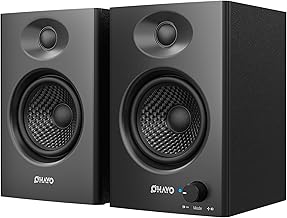
Best for: Producers who want compact desktop speakers that can also handle general computer listening. OHAYO lists a 30-watt-per-speaker, 60-watt total output, Bluetooth 5.3, and 3.5 mm AUX, RCA, and USB inputs.
The listed drivers are a 0.75-inch carbon-fiber silk-dome tweeter and a 3-inch carbon-fiber full-range driver. The MDF enclosure and rear bass port are described as supporting clearer playback and added low-end depth. A front volume knob provides a direct way to adjust listening level. These features make the pair versatile for a home office or small desktop setup, as well as music playback.
Why it was selected: It combines several connection options with a space-conscious design and a stated range of music and gaming uses. Limitation: The supplied product details do not give a frequency-response range or describe it specifically as a studio monitor, so buyers prioritizing documented monitoring specifications should compare those details carefully.
NSY Audio 60W Powered Speakers

Best for: Buyers who need several ways to connect a desktop audio system. The listed options include Bluetooth 5.3, USB-C, RCA, and 3.5 mm AUX, with the product presented for computers, laptops, monitors, TVs, consoles, and turntables.
NSY Audio describes this as a 60-watt powered pair with 3-inch drivers and an MDF enclosure. The compact design is intended for desks and small rooms, and the product listing describes the sound as stereo with tight bass. Wired connections are useful when a producer wants to connect a source directly, while Bluetooth is available for wireless playback from compatible devices.
Why it was selected: Its combination of common wired inputs and wireless listening makes it a flexible option for a shared work and entertainment setup. Limitation: The supplied details do not identify a frequency-response range or a dedicated studio-monitor design, so the available specifications may not answer every mix-accuracy question.
PreSonus Eris 3.5 Studio Monitors, White

Best for: Producers who want the listed Eris 3.5 specifications in a white finish. The product is sold as a complete pair and has 50 watts of built-in amplification, 3.5-inch woven-composite woofers, and 1-inch silk-dome tweeters.
Its stated frequency range is 80 Hz to 20 kHz. PreSonus presents the speakers for music production as well as gaming, movies, streaming, and everyday listening. The company describes the woofers as providing deeper, tighter bass and the tweeters as smoothing harshness in the highs. These are the same core specifications listed for the black Eris 3.5 option.
Why it was selected: It gives shoppers another finish choice without changing the main listed monitoring specifications. Limitation: The listed lower frequency limit is 80 Hz; anyone mixing bass-heavy material should account for the fact that this compact pair may not tell the whole story about the lowest frequencies.
Mackie CR3.5 Studio Monitors

Best for: Desktop users who want a simple, physical control for changing speaker voicing. Mackie lists the CR3.5 as a pair with 3.5-inch woofers, sized for desks and small studios.
The notable feature is its tone knob, which adjusts voicing from the desk without navigating menus. Mackie says the monitors are intended to help listeners hear a mix or stream without flattering it. That makes the model a useful candidate for buyers comparing a compact production-oriented pair with options that emphasize wireless and multiple input types.
Why it was selected: The dedicated tone control is a clearly stated point of difference among these five products. Limitation: The supplied product information does not list wattage, frequency response, or connection types, so confirm those specifications if they are essential to your setup.
Buying Guide: How to Choose Budget Speakers for Music Production
Cheap speakers can help you start producing, but choosing a pair involves more than comparing wattage. Consider whether the product is presented as a studio monitor, how it connects to your equipment, how much desk space it uses, and what audio details its specifications actually provide. A speaker with many convenience features may suit a shared work area, while a clearly specified near-field pair may be a more direct match for a production desk.
Do you need studio monitors or general desktop speakers?
Start with the intended use. The two PreSonus Eris 3.5 listings explicitly describe near-field desktop speakers for music production. Mackie describes the CR3.5 as studio monitors for desks and small studios. OHAYO and NSY Audio present their products primarily as computer or powered speakers for a wider mix of music, gaming, and everyday listening.
That distinction does not prove that one speaker will produce better mixes than another. It helps you compare what each listing emphasizes. If production is the priority, look for clearly stated monitoring features and technical specifications. If the speakers will serve multiple purposes, connection options and convenience controls may carry more weight.
How much power and what driver size should you compare?
Compare wattage only within the context of the rest of the product. The listed PreSonus pair has 50 watts of built-in amplification, while OHAYO and NSY Audio state 60 watts. These numbers alone do not establish which pair is more accurate or suitable for a particular room. Driver sizes also vary: the PreSonus and Mackie products list 3.5-inch woofers, while the OHAYO and NSY Audio listings refer to 3-inch drivers.
For a small desk, a compact pair may be easier to position. For mix decisions involving low bass, check whether a frequency-response range is provided and consider cross-checking the mix on other playback systems. The Eris listings specify 80 Hz to 20 kHz; the supplied details for the other products do not state a range.
Which connections fit your production setup?
Check the audio outputs on your computer, audio interface, or other source before choosing speakers. The OHAYO listing names Bluetooth 5.3, AUX, RCA, and USB inputs. The NSY Audio listing names Bluetooth 5.3, USB-C, RCA, and AUX. Those options can support a flexible desktop or home entertainment arrangement, but the precise connection you plan to use should match your equipment.
The supplied information for the PreSonus and Mackie products does not list their input connections. Do not assume a particular port is included based only on the product category. Confirm the connection details in the full listing before purchase, especially if you plan to connect an audio interface using a specific cable type.
Does Bluetooth make sense for production?
Bluetooth can be convenient for casual listening and wireless playback, and it is listed for the OHAYO and NSY Audio models. For production work, a direct wired connection is often the more straightforward choice because it avoids relying on a wireless audio link. The product details describe Bluetooth features but do not provide latency measurements, so do not assume wireless playback is appropriate for every recording or monitoring task.
How should you compare bass and mix translation?
A speaker’s bass presentation affects decisions about kick drums, bass lines, and low-frequency effects. Look for a stated frequency range rather than relying only on claims such as “deep bass.” The two Eris listings provide a range of 80 Hz to 20 kHz. OHAYO mentions a rear bass port and added low-end depth, while NSY Audio describes tight bass, but their supplied specifications do not give a lower frequency limit.
Regardless of which pair you choose, check a finished mix on more than one playback system when possible. Headphones, a car, or a familiar consumer speaker can reveal imbalances that are harder to judge on compact desktop speakers. This is especially useful when the selected product does not include a stated frequency-response range.
What matters in a small room or on a crowded desk?
Measure your available desk space and think about where the speakers will sit in relation to your listening position. OHAYO and NSY Audio describe compact, space-saving designs. The PreSonus and Mackie products are also described for desktops or small studios. A stereo pair needs room for both speakers, and placement should allow you to listen from a consistent position.
Also consider how you will control everyday playback. OHAYO lists a front volume knob, and Mackie lists a tone knob that adjusts voicing from the desk. Those controls may be useful when you want to make quick changes without relying on software menus. The supplied details do not list comparable control features for every model.
What specifications should you verify before buying?
- Pair or single speaker: Confirm that the listing includes the stereo pair you need. All five products here are described as pairs.
- Power: Check whether the speakers are powered and whether the listed wattage applies to the pair or each speaker.
- Inputs: Match the product’s named connections to your computer, interface, or other source.
- Frequency response: Compare stated ranges when available; do not treat a general bass description as a measured range.
- Size and controls: Check the available desk area and identify any listed front-panel controls that matter to your workflow.
- Intended use: Distinguish products explicitly presented for music production from general-purpose computer speakers.
Frequently Asked Questions
Are cheap speakers good enough for music production?
Budget speakers can be useful for learning production and making initial mix decisions. Their value depends on the information provided, fit for your workspace, and how well you learn their sound. Check mixes on additional playback systems, especially when a compact speaker’s low-frequency range is not fully specified.
Which product here is most directly aimed at music production?
The PreSonus Eris 3.5 listings most directly describe near-field desktop speakers for music production. Mackie also identifies the CR3.5 as studio monitors for desks and small studios. This comparison reflects the supplied product descriptions, not independent testing.
Are the black and white PreSonus Eris 3.5 versions different in listed specifications?
The supplied details list the same core specifications for both: a stereo pair, 50 watts of built-in amplification, 3.5-inch woven-composite woofers, 1-inch silk-dome tweeters, and an 80 Hz–20 kHz frequency range. The listed difference is the finish.
Should I use Bluetooth speakers for mixing?
The OHAYO and NSY Audio speakers list Bluetooth 5.3, which can be useful for convenient playback. The supplied details do not state latency measurements. For production work, compare the available wired inputs with your equipment and verify that the connection suits your workflow.
Do these compact speakers replace a subwoofer?
The supplied product details do not establish that any of these pairs replaces a subwoofer. The Eris models list a lower frequency limit of 80 Hz, while the other listings do not provide a frequency-response range. Producers who need to evaluate very low bass should check mixes on additional systems.