
The best cigarette lighter socket MP3 player for most drivers is a plug-in Bluetooth FM transmitter that sends music to the car radio and adds hands-free calling. Choose the BAISHUN for Bluetooth, TF-card, and USB-drive playback; the CCAKRZY for USB or TF-card playback and a Type-C charging port; or the OVAQUIXI if you also need extra socket and USB connections. These devices use different playback methods, so check the features against your preferred music source and available radio or socket setup.
| Product | Best For | Music Options |
|---|---|---|
| BAISHUN Bluetooth FM Transmitter | Multiple playback sources | Bluetooth, TF card, USB drive |
| CCAKRZY Bluetooth Transmitter | USB or TF-card playback with fast charging | Bluetooth, U disk, TF card |
| OVAQUIXI Socket Splitter | Playback plus extra socket connections | Phone, U disk |
| Tayderley Bluetooth 5.3 Adapter | Bluetooth streaming and call features | Bluetooth |
| Monster Bluetooth FM Transmitter | Bass controls and dual USB charging | Bluetooth, SD card |
BAISHUN Bluetooth FM Transmitter
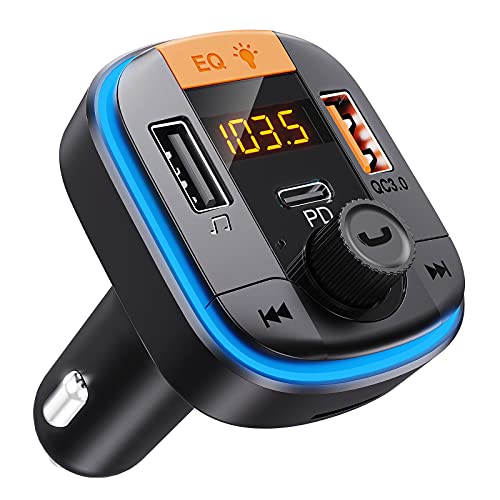
The BAISHUN is best for drivers who want several ways to play music from a cigarette lighter socket adapter. It supports Bluetooth streaming, TF-card playback, and USB-drive playback, letting you choose a source instead of relying on a phone connection alone. Its product details list Bluetooth 5.0, hands-free calling, noise suppression, and Siri and voice-navigation support.
It also has two quick-charging ports and an additional USB charging port that can serve as a U-disk music port. This combination makes it a practical choice when the driver wants audio playback and charging in one device. The listed USB-C port supports PD 20W, while the product description identifies a USB 3.0 port and a 5V/1A port.
- Best for: Drivers who want Bluetooth, TF-card, and USB-drive playback options.
- Why it stands out: The three listed music methods offer flexibility for different listening habits.
- Consider: The listing specifies Bluetooth 5.0, not a newer Bluetooth version.
Choose this model if using stored music from a card or USB drive matters as much as wireless streaming. Check which ports are assigned to playback and charging before connecting accessories.
CCAKRZY Bluetooth Transmitter

The CCAKRZY is best for drivers looking for a cigarette lighter socket MP3 player with Bluetooth, USB-drive, and TF-card playback. It broadcasts audio through an FM frequency that the car radio can receive. The listed frequency range is 87.5–108.0 MHz, so the driver can tune the transmitter and radio to a matching frequency.
The adapter includes Type-C and USB ports, and its Type-C port is listed as PD 30W fast charging. Its hands-free calling controls support answering, rejecting, and ending calls, as well as redialing. The product description also lists noise reduction and support for connecting two mobile phones at the same time.
- Best for: Drivers who want FM transmission, stored-music playback, and a Type-C fast-charge port.
- Why it stands out: It combines Bluetooth, U-disk, and TF-card playback in a socket-mounted adapter.
- Consider: FM transmission requires the car radio to be tuned to the same frequency as the adapter.
Choose this option if you want to play music from a phone or supported storage device and charge a phone through the same adapter. Confirm that your intended card or USB music source matches the product’s listed playback support.
OVAQUIXI Bluetooth Socket Splitter

The OVAQUIXI is best for drivers who need music playback and additional power connections. Its dual cigarette lighter sockets and USB ports are designed to let users connect multiple devices without relying on a single original socket. For audio, the listing describes phone and U-disk connections, multiple playback modes, and HD lossless sound quality.
A built-in microphone and one-button hands-free calling controls are included for answering, hanging up, or rejecting calls. This makes the product a broader accessory than a basic MP3 transmitter: it combines socket expansion, USB ports, music playback, and call handling.
- Best for: Drivers who want a socket splitter as well as phone or U-disk music playback.
- Why it stands out: Its dual socket design addresses the need to connect more than one cigarette-lighter-powered device.
- Consider: The supplied details do not specify a particular FM frequency range or Bluetooth version.
Choose this model if extra socket connections are a priority. If your main requirement is a clearly specified FM transmitter frequency or Bluetooth generation, compare those details with other options before buying.
Tayderley Bluetooth 5.3 Car Adapter

The Tayderley adapter is best for drivers who mainly stream music from a Bluetooth-connected phone and want hands-free calling. Its Bluetooth 5.3 connection is described as supporting a stable connection and lower transmission delay. A built-in microphone and call controls handle answering, rejecting, hanging up, and redialing.
The adapter sends audio through an FM transmitter, and its display shows the FM channel and car battery voltage. It also offers seven selectable LED backlight colors and a button to switch the lights on or off. The listed charging output includes USB-C PD 30W and 12W charging, and an EQ button provides a deep-bass sound mode.
- Best for: Drivers who want Bluetooth streaming, call controls, and a displayed FM channel.
- Why it stands out: Bluetooth 5.3, a voltage display, and selectable lighting are listed features.
- Consider: The supplied features describe Bluetooth streaming but do not list USB-drive or card playback.
Choose this model if your music comes from a phone and you value visible tuning information and simple call controls. It is less suited to buyers who specifically need playback from removable storage.
Monster Bluetooth FM Transmitter

The Monster Bluetooth FM Transmitter is best for drivers who want Bluetooth music streaming, SD-card playback, and physical audio controls. It sends music, podcasts, and audiobooks from a Bluetooth device to the car’s FM radio. The listing also specifies SD-card support, a built-in microphone for hands-free calls, and a multifunction button for call handling.
A dedicated bass-boost button provides a simple way to adjust the sound, while forward and backward track buttons help control playback. The device has two USB charging ports, including a high-speed 3.4A port, according to the supplied product details. Those features make it a useful option for drivers who want charging and audio controls in one socket-mounted accessory.
- Best for: Drivers who want SD-card playback, track controls, and bass boost.
- Why it stands out: Physical track buttons and a dedicated bass button make key controls easy to identify.
- Consider: The listed music sources are Bluetooth and SD card; USB ports are described for charging.
Choose this model if SD-card playback and on-device controls are more important than USB-drive music playback. Do not assume its USB charging ports also play music from a USB drive, since that function is not stated in the supplied features.
Buying Guide: Choosing a Cigarette Lighter Socket MP3 Player
How will the device play music through your car?
Many socket-mounted car audio adapters use an FM transmitter. The adapter broadcasts audio on an FM frequency, and the car radio is tuned to that same frequency. This approach can add phone audio to a car stereo without relying on a direct wired connection. For a model with FM transmission, check that the listing explains how to select or match the frequency.
Playback sources differ by device. Bluetooth models stream audio from a connected phone or other compatible device. Other products add USB-drive, U-disk, SD-card, or TF-card playback. These storage formats are not interchangeable in every product, so look for the exact source named in the feature list.
Do you need Bluetooth, removable storage, or both?
Bluetooth is convenient when your playlists, podcasts, and navigation audio are on a phone. It can also allow hands-free calls on products with a microphone and call controls. For music stored on removable media, choose a device that explicitly lists the card or USB playback method you plan to use.
The BAISHUN lists Bluetooth, TF-card, and USB-drive playback. The CCAKRZY lists Bluetooth, U-disk, and TF-card playback. The Monster listing specifies Bluetooth and SD-card music. The Tayderley feature list focuses on Bluetooth, while the OVAQUIXI describes phone and U-disk connections.
Which charging ports and socket connections matter?
Check the number and type of charging ports if you regularly power a phone or other device while listening. The supplied product details list Type-C PD charging for the CCAKRZY and Tayderley models, while the Monster lists two USB ports, including a 3.4A charging port. The BAISHUN lists multiple USB charging ports. Charging specifications vary, so match the port and output to your device’s needs.
If you need to power several cigarette-lighter-plug devices, consider a splitter such as the OVAQUIXI. A splitter is different from a simple FM transmitter: its key benefit is socket expansion. Check the arrangement of ports and sockets against the accessories you intend to connect.
What features help with calls and everyday use?
For calls, look for a built-in microphone and clearly described controls for answering or ending calls. Some product descriptions also mention noise suppression, which is intended to reduce unwanted background sound. Voice-navigation support can be useful when you want spoken directions to play through the car audio system.
Display information and physical controls can also influence ease of use. The Tayderley display shows the FM channel and car battery voltage. The Monster lists track-forward and track-back buttons. The Nulaxy product details describe a large display with information such as the FM frequency, track name, and battery voltage, though it is not included among the five selections above.
What should you check before buying?
- Confirm the power connection: Make sure the product is intended for the vehicle’s cigarette lighter socket.
- Match the audio source: Check for Bluetooth, USB-drive, U-disk, SD-card, or TF-card playback as needed.
- Check FM setup: For FM transmitters, verify that the radio can be tuned to the transmitter’s selected frequency.
- Separate playback from charging: A USB charging port does not necessarily support music playback from a USB drive.
- Review call controls: Look for a microphone and the specific answer, reject, or hang-up functions you want.
- Consider extra connections: A splitter may suit drivers who need more than one cigarette lighter socket.
Frequently Asked Questions
Can a cigarette lighter socket MP3 player work with a car radio?
Many models use an FM transmitter to send audio to the car radio. Tune the radio to the same FM frequency selected on the adapter. Confirm that the product you choose supports FM transmission.
Can these adapters play music from a USB drive?
Some can, but USB ports do not all have the same purpose. The BAISHUN and CCAKRZY list USB-drive or U-disk playback. The Monster product details describe its USB ports as charging ports and list SD-card playback instead.
Can I stream music from my phone?
Bluetooth FM transmitters can stream audio from a Bluetooth-connected phone to the car radio. Check the specific listing for Bluetooth support and follow its pairing and FM-tuning instructions.
Do all cigarette lighter MP3 adapters support hands-free calls?
No. Some listed products include a microphone and call controls, but features vary. Check the product details for a built-in microphone and the call functions you need.
What is the difference between an FM transmitter and a socket splitter?
An FM transmitter sends audio to a car radio through an FM frequency. A socket splitter adds extra cigarette lighter connections and may also include USB ports or audio functions. Some products combine both types of features.
Will a USB charging port play music?
Not necessarily. A USB port may be intended only for charging. Choose a product whose feature list explicitly identifies USB-drive or U-disk playback if you want to play stored music from a USB device.