
Best Coax Audio to Optical Converters for Crystal-Clear Digital Audio
If you’re looking to bridge coaxial and optical (Toslink) audio formats, these converters deliver clean, reliable signal transfer for home theaters, soundbars, and receivers. They’re ideal for: upgrading older equipment, expanding connectivity on mixed-brand setups, and avoiding complex wiring. The top options below are chosen for bidirectional use, easy plug-and-play setup, and broad compatibility with LPCM, DTS, Dolby Digital, and 5.1ch formats. A quick buyer’s table is provided to compare core specs at a glance.
| Product | Best Use Case | Key Benefit |
|---|---|---|
| PROZOR 192K Bi-Directional Optical Converter | Home theater with mixed inputs | Bi-directional, high sampling rate up to 192 kHz |
| Bi-Directional Coax Digital Audio Adapter | Compact setups | Two-way convert, simple plug-and-play |
| LUKFOCAB Bi-Directional Optical/Coax Converter | Older TVs or soundbars | Built-in switch, 192 kHz support |
| LiNKFOR 192kHz Coaxial to Optical Converter | Long-distance audio runs | Built-in cables for ease and distance |
| DigitConvert DAC 192K | PS4/HD setups needing analog output | DAC to analog with simultaneous RCA/3.5mm |
PROZOR 192K Bi-Directional Optical Converter

Best for: Audio enthusiasts who need flexible input switching between coaxial and Toslink with high-res performance. Why selected: It supports LPCM 2.0, DTS, Dolby AC3, and 5.1, plus 192 kHz/24-bit sampling for lossless digital audio. The built-in bi-directional design minimizes clutter and ensures clean signal transfer across formats.
Notes: The device uses a simple switch for input selection. While it offers broad compatibility, ensure your source and receiver support the same formats for best results. The unit emphasizes noise-free transmission and can handle the higher end of the sampling spectrum.
Bi-Directional Coax Digital Audio Adapter

Best for: Small living rooms or setups needing a compact two-way converter without drivers. Why selected: It provides plug-and-play operation with no software, delivering noise-free transmission for amplifier and speakers. It’s particularly suitable where space is at a premium and quick connections are valued.
Caution: The listing emphasizes high-definition output, but verify your source supports the required formats (DTS/Dolby Digital/PCM) to avoid compatibility gaps.
LUKFOCAB Bi-Directional Coax/Optical Converter
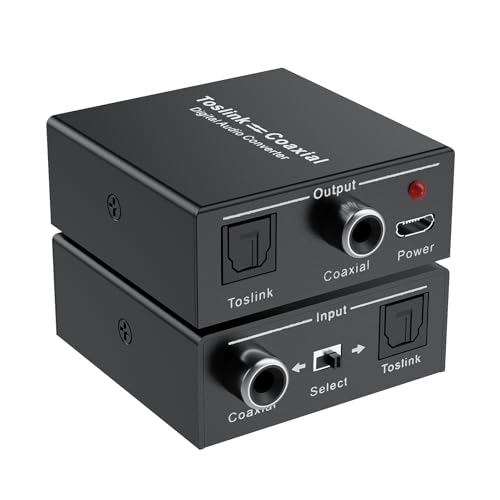
Best for: Those needing a robust dual-direction converter with a clear input switch. Why selected: Supports 192 kHz sampling and 24-bit depth, with a built-in amplification chip acting as a signal repeater. This helps extend transmission distance without additional hardware.
Limitation: As with many bidirectional units, some users report sensitivity to cable quality; using high-quality cables can help maintain signal integrity over longer runs.
LiNKFOR 192kHz Coaxial to Optical Converter
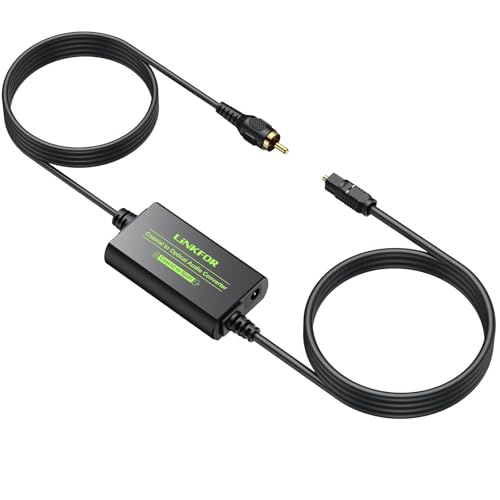
Best for: Viewers needing long-distance transmission with built-in cables. Why selected: It includes a 1-meter Toslink and 1-meter coaxial cable, simplifying setup and reducing extra cable clutter. The device supports 32–192 kHz sampling and 24-bit depth for lossless audio.
Tip: While built-in cables are convenient, ensure your setup doesn’t require unusually long runs that exceed the cable’s practical range for optimal results.
DigitConvert DAC 192K Optical To RCA Adapter

Best for: Players or consoles that need a direct path from digital to analog with simultaneous RCA and 3.5mm outputs. Why selected: The device converts digital to analog with a built-in DAC, supporting 32–192 kHz sampling and 24-bit depth, making it suitable for PS4, Blu-ray players, and home cinema systems.
Limitation: Only converts digital to analog; it does not support reverse digital input to digital output. Ensure your intended use aligns with its DAC-only behavior.
Musou RCA Analog to Digital Optical Toslink Coaxial Adapter

Best for: Scenarios where you need to convert analog RCA to digital coaxial and Toslink simultaneously. Why selected: It converts analog stereo to both digital coaxial and optical outputs, supporting 2-channel LPCM up to 48 kHz. It’s useful when upgrading legacy gear to a digital system.
Note: Dolby isn’t supported on the analog input side, so plan accordingly if you require Dolby digital out from an analog source.
Azduou Bi-Directional Optical/Coax Converter

Best for: Users seeking a straightforward bidirectional audio interface with no software required. Why selected: It is designed for easy plug-and-play operation with noise-free transmission, suitable for amplifiers and speakers that need a quick digital-to-analog or analog-to-digital path.
Limitation: The product description emphasizes basic functionality; verify your formats (DTS/Dolby/PCM) align with your source material to avoid format mismatches.
Buying Guide: Coaxial To Optical Digital Audio Converters
- Bidirectionality: If you need both directions, pick a unit explicitly labeled bi-directional to avoid compatibility gaps.
- Supported formats: Ensure LPCM, DTS, Dolby Digital, and 5.1ch are supported if that’s part of your setup. Check sampling rates up to 192 kHz for high-resolution needs.
- Input/output compatibility: Verify your source and receiver have matching connectors (coaxial RCA or Toslink) and formats to avoid signal loss.
- Power requirements: Some converters include a USB power cable. If yours relies on bus power, ensure your device can supply needed current.
- Signal path and noise: Look for noise-free transmission claims and test results if possible. A built-in repeater/amp can extend distance for long runs.
- Cable quality: For long runs, use well-shielded cables. Poor cables can cause jitter or dropouts, especially at higher sample rates.
- Ease of setup: Plug-and-play designs reduce setup time; look for single-button input switching if you want minimal configuration.
Frequently Asked Questions
- What formats do these converters typically support? Most support LPCM, DTS, Dolby Digital, and 5.1ch, with sampling rates up to 192 kHz in many models.
- Do bidirectional converters require drivers? No. These are designed as plug-and-play devices without drivers.
- Can I extend signal distance with these converters? Some include a built-in repeater to help extend distance; for longer runs, use high-quality cables.
- Will these work with any TV or soundbar? They work with devices that have coaxial or Toslink outputs/inputs; verify format support and compatibility with your specific models.
- Is it better to use optical or coaxial? It depends on your system layout and cable length. Optical can be immune to electrical interference, while coaxial can be simpler with shorter runs.
- Do these convert digital to analog? Some models are digital-to-analog (DACs) and provide RCA/3.5mm outputs; others focus on digital-to-digital or two-way digital paths.