
The best coaxial audio cable converter depends on the connection you need: convert coaxial digital audio to optical, change digital audio to analog RCA or 3.5mm, or connect a TV’s ARC output to a digital audio system. The PROZOR bidirectional converter suits switching between coaxial and optical; the LiNKFOR is a straightforward coaxial-to-optical option; and the PROZOR DAC is better for connecting digital audio to analog inputs. Check the signal direction and audio format before buying, because these converters do not all perform the same job.
| Product | Best for | Conversion type |
|---|---|---|
| PROZOR Bidirectional Converter | Flexible digital connections | Coaxial and optical |
| LiNKFOR Coaxial-to-Optical Converter | Coaxial source to optical input | Coaxial to optical |
| PROZOR 192kHz DAC | Analog RCA or 3.5mm inputs | Digital to analog |
| Hdiwousp 192kHz DAC | Digital-to-analog setup with included cables | Digital to analog |
| 192kHz HDMI ARC Converter | TV ARC output to digital audio | ARC to optical or coaxial |
PROZOR Bidirectional Optical Converter

This PROZOR unit converts digital audio between coaxial and optical SPDIF connections. Its selectable input supports coaxial-to-optical or optical-to-coaxial conversion, making it more flexible than a one-direction adapter. The listed features also describe coaxial or optical input feeding both coaxial and Toslink outputs, with input selection controlled by a switch.
Best for: A home audio setup where the source and receiving device use different digital connection types, or where the required conversion direction may change. It supports LPCM 2.0, DTS, Dolby AC-3, and 5.1-channel formats, with sampling rates up to 192 kHz and 24-bit audio.
Limitation: This is a digital-to-digital converter, not a DAC for analog RCA or headphone inputs. Confirm the selected input and the formats supported by the connected equipment before use.
LiNKFOR Coaxial-to-Optical Converter

The LiNKFOR converter changes a coaxial digital signal into an optical SPDIF Toslink signal. The listed package features include built-in 1-meter coaxial and Toslink cables, which can simplify a setup when both cable types are needed. It is described as plug and play and supports 32, 44.1, 48, 96, and 192 kHz sampling rates at 24-bit.
Best for: Connecting a device with a coaxial digital output to a soundbar, amplifier, or other audio equipment with an optical input. Its one-way conversion makes the purpose easy to identify, and the listed audio support includes LPCM 2.0, DTS, Dolby AC-3, and 5.1-channel audio.
Limitation: The listed conversion direction is coaxial to optical only. Choose another model if your source outputs optical and your receiver needs coaxial, or if you need analog audio.
PROZOR Digital-to-Analog DAC

This PROZOR DAC converts coaxial or optical digital PCM audio into analog left and right RCA and 3.5mm outputs. The listed features say both analog outputs work simultaneously. It supports sampling rates up to 192 kHz and 24-bit S/PDIF input and includes an upgraded audio amplifier chipset and dual-channel operational amplifier.
Best for: Connecting a TV, game system, or other digital audio source to equipment with analog RCA or 3.5mm inputs. Choose this model when the receiving device does not have a matching digital input and needs an analog signal instead.
Limitation: The converter works from digital to analog, not analog to digital. The source should be set to PCM audio; the product notes that TV volume may need to be adjusted in the TV settings. It does not provide a volume knob.
Hdiwousp 192kHz Digital-to-Analog DAC
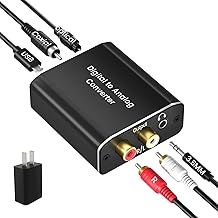
The Hdiwousp DAC accepts coaxial or Toslink digital audio and outputs analog RCA stereo or 3.5mm audio. Its listed features include a Toslink optical cable and a power adapter, as well as plug-and-play operation without an extra driver. Supported sampling rates are 32, 44.1, 48, 96, and 192 kHz, with 24-bit S/PDIF input.
Best for: Buyers who need digital-to-analog conversion and want an optical cable included. It can suit a TV, Blu-ray player, or other listed digital source when the receiving audio device uses analog stereo inputs.
Limitation: This DAC cannot be reversed, and the source needs to output PCM or LPCM audio. Check that the selected source output and the destination’s analog input match before connecting the equipment.
192kHz HDMI ARC Audio Converter

This converter takes audio from a TV’s HDMI ARC or eARC connection and provides digital optical or coaxial output. It is intended for TVs without the optical or coaxial connection needed by a home audio system. The listed specifications include 24-bit/192 kHz sampling support and output connections for soundbars, amplifiers, or active speakers.
Best for: Connecting a TV’s ARC audio channel to an audio system that accepts optical or coaxial digital input. The setup instructions call for enabling the TV’s CEC function, selecting the ARC device as the audio output, and choosing a supported audio format.
Limitation: This is not a direct coaxial-to-optical converter for a coaxial source. It depends on a TV with an ARC/eARC connection and correct TV settings. The listed supported formats include PCM 2.0, Dolby, and DTS 5.1.
Buying Guide: How to Choose a Coaxial Audio Converter
What connection are you converting?
Start by identifying the audio output on the source and the input on the destination. Coaxial digital, optical Toslink, HDMI ARC, RCA, and 3.5mm connections carry signals in different forms. A converter must match both the signal type and the direction. A coaxial-to-optical converter cannot automatically serve as a digital-to-analog DAC, and an ARC adapter does not replace a coaxial-to-optical unit.
- For coaxial digital output to optical digital input, choose a coaxial-to-optical converter such as the LiNKFOR.
- For optical output to coaxial input, select a model that explicitly supports that direction, such as the bidirectional PROZOR.
- For coaxial or optical digital input to RCA or 3.5mm analog output, choose a DAC such as either PROZOR or Hdiwousp.
- For a TV’s HDMI ARC/eARC output to optical or coaxial audio input, use an ARC audio converter.
Do you need one-way or bidirectional conversion?
One-way converters are appropriate when the signal path is fixed and clearly stated. They can be a straightforward choice for a coaxial source and optical receiver. A bidirectional converter is more suitable when you may need to switch between coaxial-to-optical and optical-to-coaxial. Do not assume a device is bidirectional just because it has multiple ports; confirm the product’s stated signal directions and input-selection method.
Will the converter support your audio format?
Check the audio format settings on the source and the format support listed for the converter. The DAC products in this list require PCM or LPCM input. If a TV or media player is set to an unsupported encoded format, the converter may not produce the expected analog output. Other listed products specify support for formats such as LPCM 2.0, DTS, Dolby AC-3, or 5.1-channel audio. Verify that both the source and receiving equipment support the format you plan to use.
Sampling-rate figures also need context. A stated maximum of 192 kHz indicates supported input sampling rates under the product’s specifications; it does not guarantee that every connected device will output audio at that rate. Set the source and receiver to a mutually supported format when troubleshooting silence or playback problems.
Do you need analog outputs or digital outputs?
RCA and 3.5mm connections carry analog audio. They are useful when the receiving equipment has analog inputs but no matching digital input. Optical and coaxial SPDIF connections remain digital, so a digital-to-digital converter is the relevant type when changing connector formats. Choose a DAC only when the receiving device needs analog audio; choose a digital converter when both devices accept digital audio.
Consider the output arrangement as well. The PROZOR and Hdiwousp DAC listings describe both RCA stereo and 3.5mm outputs. The PROZOR listing says these outputs operate simultaneously. Check the listed output options against the specific input available on your amplifier, speakers, or other destination device.
What setup details should you check?
Before connecting equipment, inspect the labels beside each port and follow the converter’s stated input and output direction. Use the required power adapter if the unit lists one, and confirm that the source is sending audio through the selected output. For TV-based DAC setups, try PCM audio when specified. For ARC models, enable CEC and choose the ARC audio device as the TV output, following the listed setup requirements.
If there is no sound, check the TV or player’s output selection, audio format, cable seating, and converter input switch. Also confirm whether the destination device is set to the input receiving the converter’s output. A converter cannot make an incompatible signal direction or unsupported format work by itself.
Are included cables important?
Included cables can reduce the need to buy separate connections, but cable length and connector type still matter. The LiNKFOR listing describes built-in 1-meter coaxial and Toslink cables. The Hdiwousp listing includes a Toslink cable and power adapter. Compare those details with the distance between your devices and the ports you plan to use. An included cable does not change the converter’s direction or expand its audio-format support.
Frequently Asked Questions
Can a coaxial audio converter improve sound quality?
A converter changes the connection or signal type. The products listed specify supported formats and sampling rates, but those details alone do not guarantee a noticeable sound improvement. The result also depends on the source signal, settings, receiving equipment, and correct connection.
Can I use a coaxial-to-optical converter in reverse?
Only if the product explicitly supports optical-to-coaxial conversion. The LiNKFOR model is listed for coaxial-to-optical conversion, while the PROZOR bidirectional model lists both conversion directions.
Why does a digital-to-analog converter require PCM?
The PROZOR and Hdiwousp DAC listings specify PCM or LPCM input. Set the source to a supported PCM format when required; an incompatible output format can prevent the DAC from producing usable analog audio.
Is a DAC the same as a coaxial-to-optical converter?
No. A DAC converts digital audio into analog output such as RCA or 3.5mm. A coaxial-to-optical converter changes a digital signal from one connection type to another while keeping it digital.
Can I connect a TV without optical or coaxial output to a digital audio system?
A TV with an HDMI ARC/eARC connection may work with an ARC audio converter that provides optical or coaxial output. The TV must support ARC/eARC, and its CEC, audio-output, and format settings may need to be configured.