
The right coaxial-to-AUX converter depends on the signal: digital coaxial audio needs a DAC, while an F-type antenna connection uses a simple adapter and does not convert digital audio to stereo. The Veeloon cable is best for a direct coaxial digital-to-3.5mm connection; the Hdiwousp DAC suits buyers who also need RCA outputs; and the two F-type adapters are for antenna-style coax connections. Check the connector and signal direction before choosing.
| Product | Best For | Signal Type |
|---|---|---|
| Veeloon DAC cable | Direct digital coaxial to 3.5mm AUX | Digital to analog |
| Hdiwousp DAC | Digital coaxial or optical to AUX and RCA | Digital to analog |
| Fancasee adapter | F-type coax connection to a 3.5mm mono plug | Connector adaptation |
| 2-Pack F-type adapter | Spare or two antenna-style connections | Connector adaptation |
| VPFET converter | Analog AUX/RCA source to digital output | Analog to digital |
Veeloon Coaxial-To-AUX DAC Cable

This cable is designed to convert a coaxial digital audio signal into analog audio for a 3.5mm AUX input. It is a better fit than a passive plug adapter when the source is a TV, game console, Blu-ray player, or other device with a coaxial digital audio output and the destination is headphones or powered speakers with a 3.5mm input.
- Best for: A direct digital coaxial-to-AUX setup with a short cable run.
- Why it stands out: Its built-in DAC supports up to 24-bit/192kHz audio, and the 1.5-foot cable has a braided jacket, aluminum-alloy shell, and gold-plated RCA connector.
- Power and setup: It uses USB power and requires no driver installation. The listed audio direction is coaxial digital input to 3.5mm analog output.
- Important limitation: It is unidirectional, so it will not convert a 3.5mm AUX source into digital coaxial audio. The source may need to be set to PCM.
Choose this if the system needs a compact cable-style DAC and the source has a single RCA coaxial digital output. Confirm that the connection is digital audio rather than an F-type antenna or cable-TV connection; the connectors and signals are not interchangeable.
Hdiwousp Coaxial And Optical DAC
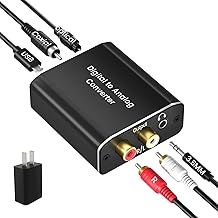
The Hdiwousp converter changes digital coaxial or Toslink optical audio into analog stereo through 3.5mm or left/right RCA outputs. It is best for a home entertainment setup where the source has a digital audio output and the receiving equipment has an AUX input, RCA inputs, or both.
- Best for: Buyers who want both 3.5mm and RCA analog output options, or who may use either coaxial or optical digital input.
- Why it was selected: It supports listed sampling rates from 32kHz through 192kHz and includes an optical cable and power adapter.
- Setup note: The product information says to set the source to PCM/LPCM. It is described as plug and play, without a separate driver installation.
- Important limitation: Conversion is one-way, from digital to analog. It cannot turn AUX or RCA analog audio into digital coaxial output.
Choose this model when a small converter box with multiple analog output choices is more useful than a cable with only a 3.5mm jack. Avoid it if the required connection is antenna coax or if the source must send an analog signal to a digital-only receiver.
Fancasee F-Type To 3.5mm Adapter

This adapter connects an F-type coaxial cable plug to a 3.5mm mono jack. Its described use is an antenna-style connection, not digital audio conversion. It is best for someone matching an F-type cable to a device with a compatible 3.5mm antenna jack.
- Best for: Antenna or other compatible F-type coax connections that need a 3.5mm mono connector.
- Why it was selected: It provides a straightforward connector change and is described as supporting reliable, stable signal transmission.
- What it does not do: It has no listed DAC or powered conversion circuitry, so it should not be treated as a digital coaxial audio-to-AUX converter.
- Important limitation: The connector is mono. It is not a stereo headphone adapter, and the listing does not specify conversion of digital audio formats.
Choose this if the device documentation specifically identifies a 3.5mm antenna input and the cable has an F-type male plug. Avoid it for a TV’s digital coaxial audio output when the goal is to listen through AUX headphones or speakers; that application calls for a DAC.
Two-Pack F-Type Coaxial Adapters

This two-pack has an F-type female connector terminal and a 3.5mm mono male plug. The listing identifies RG6 and RG59 coaxial cable use. It is best for a compatible antenna-style coax connection where a small, passive connector adapter is needed.
- Best for: Buyers who need two adapters or want a spare for an F-type coaxial connection to a 3.5mm mono jack.
- Why it was selected: The two-piece set offers the same basic connector adaptation as a single F-type-to-3.5mm adapter, with nickel-plated brass/zinc construction.
- Portability: The listing describes the adapters as easy to use and convenient to carry.
- Important limitation: This is a passive mono connector adapter, not a powered DAC. It does not convert coaxial digital audio into analog stereo AUX.
Choose this over a single adapter when having a second piece is useful. As with any F-type adapter, check that the equipment expects an antenna-style signal and that its 3.5mm port serves the intended purpose.
VPFET Analog-To-Digital Audio Converter

The VPFET converter is included as a direction-specific alternative. It accepts analog stereo audio through RCA or a 3.5mm AUX jack and outputs digital coaxial and Toslink optical audio. It is best for connecting an analog source to equipment that accepts one of those digital inputs, not for converting a digital coaxial output to AUX.
- Best for: A source with analog AUX or RCA output that needs a digital coaxial or optical output.
- Why it was selected: It handles both analog input connector types and provides coaxial and optical outputs at the same time.
- Format support: The listing specifies uncompressed two-channel PCM output and 32kHz, 44.1kHz, and 48kHz sampling rates.
- Important limitation: Its direction is the reverse of a coaxial-to-AUX DAC. It has no volume control, and the listing advises disconnecting power before connecting audio cables to help avoid humming.
Choose this only when the intended path is analog-to-digital. If the goal is to hear a TV’s digital coaxial audio through an AUX device, select a digital-to-analog product instead.
Buying Guide: How To Choose A Coaxial-To-AUX Converter
What Kind Of Coaxial Connection Do You Have?
“Coaxial” can describe different connections. A digital audio coaxial output commonly uses a single RCA-style connector and carries a digital signal. An F-type coaxial connector is commonly used for antenna or cable connections. Although both may be associated with coaxial cable, their signals and intended equipment differ.
Start by checking the device’s port label and manual. Look for terms such as “digital audio out,” “coaxial,” or “S/PDIF” for digital audio. An F-type port or antenna label indicates a different connection. Do not choose an adapter based only on the word “coaxial” or on a connector that appears to fit.
Do You Need A DAC Or Only A Connector Adapter?
A DAC is needed when a digital audio source must feed an analog AUX input. It decodes the digital signal and produces analog audio. The Veeloon cable and Hdiwousp unit are listed for this digital-to-analog direction.
A passive adapter only changes the connector form. The F-type adapters in this roundup do not list digital-to-analog circuitry or stereo DAC functions. They suit compatible antenna-style connections, not a digital S/PDIF audio output going to headphones.
Which Direction Must The Signal Travel?
Signal direction is essential. A digital-to-analog converter takes digital audio in and sends analog audio out. An analog-to-digital converter does the reverse. These products generally cannot be used backward simply by switching the cables.
The VPFET model accepts analog AUX or RCA and outputs digital coaxial and optical signals. It will not solve a digital-coaxial-to-AUX connection. Read the listed input and output labels before ordering, and confirm the source and destination match them.
What Output Does Your Listening Device Need?
Check whether the receiving equipment has a 3.5mm AUX input, RCA stereo inputs, or another connection. The Veeloon cable provides a 3.5mm analog jack. The Hdiwousp DAC offers both a 3.5mm jack and left/right RCA outputs, giving it more output connector options.
A 3.5mm mono plug is not the same as a stereo AUX output. The F-type adapters are described as mono, so they should not be selected as a replacement for a stereo DAC cable or headphone adapter.
Will The Source Output Format Work?
Digital-to-analog converters may require a particular output format. The Veeloon and Hdiwousp product information specifies PCM support or asks users to set the source to PCM/LPCM. If a TV or player is set to a different digital audio format, the converter may not produce the expected sound.
Check the source’s audio settings and the converter’s stated sampling-rate support. The two DAC products list support up to 192kHz, while the VPFET analog-to-digital converter lists two-channel PCM output up to 48kHz. These specifications apply to their respective signal directions.
How Should You Compare Power And Setup?
The Veeloon cable requires USB power, and the Hdiwousp unit includes a power adapter. The VPFET converter also requires power according to its setup instructions. A passive F-type adapter has no listed power requirement because it is a connector adapter rather than an active audio converter.
For an active DAC, check that a suitable power source is available near the equipment. Follow any connection sequence noted by the product listing, especially the VPFET instruction to unplug power before connecting audio cables.
Which Option Fits Common Setups?
- TV digital coaxial output to 3.5mm headphones or powered speakers: Use a digital-to-analog DAC, such as the Veeloon cable, and verify PCM output.
- Digital coaxial or optical source to AUX or RCA equipment: The Hdiwousp DAC provides both analog output types.
- F-type antenna cable to a compatible 3.5mm antenna jack: Consider one of the F-type mono adapters, after confirming the device’s port purpose.
- Analog AUX source to digital coaxial or optical input: The VPFET is the direction-matched option among these products.
Frequently Asked Questions
Can I connect a digital coaxial audio output directly to an AUX jack?
Usually not. Digital coaxial audio and analog AUX use different signal types. A digital-to-analog converter is needed to decode the digital signal and provide analog output.
Is an F-type-to-3.5mm adapter the same as a coaxial DAC?
No. An F-type-to-3.5mm adapter changes the connector form for a compatible mono or antenna-style connection. It does not list the circuitry needed to convert digital audio into analog stereo.
Can I use the VPFET converter from digital coaxial to AUX?
No. The VPFET listing describes analog RCA or AUX input and digital coaxial or optical output. Its signal direction is analog to digital.
What does PCM mode mean for a coaxial-to-AUX DAC?
PCM is an audio format that the listed DACs specify for digital input. If the source is set to another format, change its digital audio output setting to PCM or LPCM when available.
Should I choose a cable DAC or a converter box?
Choose a cable DAC when a compact digital coaxial-to-3.5mm path meets the setup. Choose a converter box such as the Hdiwousp when optical input or RCA analog output is also useful.
How can I identify the correct product before buying?
Match three things: the source port and signal, the converter’s stated input direction, and the destination’s connector. Confirm whether the connection is digital S/PDIF or F-type antenna coax, then check required power and supported audio format.