
The right audio and microphone jack adapter depends on which direction you need to connect. To combine a headset’s separate headphone and microphone plugs for a device with one combo jack, choose a 2-female-to-1-male adapter. To connect a single-plug headset to a computer with separate audio and microphone ports, choose a 1-female-to-2-male splitter. The options below cover both setups, plus a USB audio adapter for devices with a USB port.
| Product | Best For | Connection Direction |
|---|---|---|
| KINGTOP 3.5mm Headphone Mic Splitter | Separating a combo headset connection | One plug to two jacks |
| Headphone Splitter for Computer | Connecting a single-plug headset to PC ports | One jack to two plugs |
| ENVEL Headset Splitter Cable | PC users needing separate mic and audio plugs | One jack to two plugs |
| Braided TRRS to Dual TRS Adapter | Headset owners seeking a braided cable | One jack to two plugs |
| MOSWAG USB to 3.5mm Adapter | Adding a 3.5mm connection through USB | USB to audio and mic jack |
KINGTOP 3.5mm Headphone Mic Splitter

The KINGTOP adapter has a 3.5mm male connector and two 3.5mm female connectors. Its listed configuration is intended to take separate headphone and microphone plugs and connect them to a single headset-style connection. That is the reverse direction from the common PC splitter that takes one headset plug and separates it into two computer plugs.
Best for: People combining separate headphone and microphone plugs for a device with one compatible 3.5mm headset jack. The product listing names laptop, PS4, Xbox One, and Android among its intended use cases, but the device must have a suitable combo jack.
Why it was selected: Its connector layout directly addresses the need to combine audio and microphone connections into one jack. Check the port and plug arrangement before buying; a standard two-port desktop PC may need the opposite adapter direction.
Limitation: This is a 1-male-to-2-female adapter, not a 1-female-to-2-male PC splitter. It does not turn one headset plug into two separate computer plugs.
Headphone Splitter for Computer

This adapter is described as a 3.5mm female-to-two-male Y splitter. It accepts a compatible single-plug smartphone headset and separates the connection into two 3.5mm plugs for headphone audio and microphone input. This layout is commonly used when a computer has separate headset and microphone ports.
Best for: Someone with a headset that has one 3.5mm plug who needs to connect it to a computer with distinct headphone and mic jacks. It is also a useful choice when the main requirement is converting a phone-style headset connection for PC use.
Why it was selected: The listing explicitly describes the female-to-dual-male configuration and its purpose for connecting a smartphone headset to a PC. Those details make its direction easy to compare with a combo-jack adapter.
Limitation: It is not the right direction for combining two separate plugs into one jack. Confirm that the computer has separate audio and microphone ports and that the headset plug matches the adapter’s input.
ENVEL Headset Splitter Cable

The ENVEL cable is described as a 3.5mm female connector that converts a headset connection into two 3.5mm male connectors: one for headphone audio and one for microphone use. The listing positions it as a PC audio Y splitter for computers with separate ports.
Best for: Desktop and laptop users whose headset has one compatible 3.5mm plug but whose computer provides distinct headphone and microphone connections. Choose this type when you need to separate a headset’s audio and mic signals rather than combine two plugs.
Why it was selected: Its stated connector layout and PC-focused description make it a direct match for the single-plug-headset-to-dual-PC-port task. The separate plugs make the intended connection direction clear.
Limitation: The product description does not establish compatibility with every headset or computer. Check the headset plug and port arrangement, and do not select this cable if you need two inputs to become one combo plug.
Braided TRRS To Dual TRS Adapter
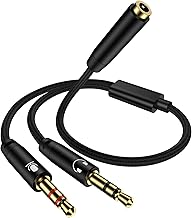
This adapter is described as a 3.5mm TRRS female-to-dual-TRS-male cable. In practical terms, it accepts one compatible headset plug and provides separate male plugs for audio and microphone connections. Its listing names gaming computers, PCs, laptops, headsets, microphones, and speakers as use contexts.
Best for: A headset owner who needs the common one-headset-jack-to-two-PC-plugs arrangement and prefers the listed braided Y-cable construction. It is a reasonable option to compare when the connector format matters as much as the basic splitter function.
Why it was selected: The product description identifies the TRRS input and dual TRS outputs, making it especially straightforward to distinguish from adapters with the opposite connector direction.
Limitation: The description does not confirm support for every headset wiring standard or device. Verify the headset’s plug type and the computer’s separate port layout before ordering.
MOSWAG USB To 3.5mm Audio Adapter

The MOSWAG adapter connects through USB and provides a 3.5mm audio connection with listed TRRS microphone support. Its description calls it an external stereo sound card, says no driver is required, and lists Windows PC, laptop, Mac, Linux, speaker, and PS4 among its intended contexts. The cable is listed as nylon braided and 7.84 inches long.
Best for: Buyers who need a USB-to-3.5mm route for a headset or audio device rather than a simple analog Y cable. Choose it if a USB port is available and the device’s built-in 3.5mm connection is unavailable or not the connection you plan to use.
Why it was selected: It offers a distinct alternative to passive 3.5mm splitters and specifically lists microphone support through a TRRS connection.
Limitation: This is a USB audio adapter, not a 3.5mm female-to-two-male splitter. Check the device’s USB availability and the headset’s connector before choosing it.
Buying Guide: How To Choose An Audio And Microphone Jack Adapter
Do you need to combine plugs or split one plug?
Start by counting the plugs on the headset and the jacks on the device. If the headset has separate headphone and microphone plugs but the device has one combo jack, look for an adapter with two female inputs and one male output. The KINGTOP listing has this general 1-male-to-2-female layout.
If the headset has one plug and the computer has separate headphone and microphone ports, look for one female input and two male outputs. The Headphone Splitter for Computer, ENVEL, and braided TRRS-to-dual-TRS options have this stated layout. These two adapter types may look similar, but they serve opposite directions.
What do TRRS and TRS mean for headset connections?
TRRS refers to a 3.5mm connector format commonly used for combined headphone and microphone signals. TRS connectors are commonly used for separate stereo audio or microphone connections. In the listed products, the braided adapter specifies a TRRS female input and dual TRS male outputs. Match the connector arrangement to the ports and headset rather than relying only on the word “splitter.”
How can you identify the correct computer ports?
Look for separate headphone and microphone jacks on the computer. If both are present, a 1-female-to-2-male headset splitter may be appropriate. If the computer has one combined headset port, a dual-input-to-single-output adapter may be the relevant type. Port labels and the computer’s documentation can help distinguish them.
Some laptops and other devices use a single combo jack, while some desktop PCs provide separate ports. Do not assume a device has one layout based on its category alone. Check the actual ports before selecting an adapter.
When should you consider a USB audio adapter?
A USB audio adapter is a different solution from a passive 3.5mm Y cable. The MOSWAG option connects through USB and lists TRRS microphone support, so it may suit a setup where using a USB port is preferable. It does not provide the same two-male analog output arrangement as a PC headset splitter.
Before choosing USB, confirm that your device has an available USB port and that you want an external USB audio connection. The product description lists operating systems and devices, but it does not establish compatibility with every configuration.
What should you check before ordering?
- Count the headset plugs and the device’s available jacks.
- Confirm whether the adapter needs one male and two female connectors or one female and two male connectors.
- Check whether the headset uses a combined TRRS connection or separate audio and microphone plugs.
- Consider whether you need a direct 3.5mm adapter or a USB audio adapter.
- Read the device and headset documentation if the port labels or connector format are unclear.
For microphone use, connector direction is especially important: an adapter that routes signals the wrong way may not connect the headset as intended. If the headset’s microphone is not recognized, verify that the microphone plug is connected to the correct port and that the adapter type matches the device’s jack layout.
Frequently Asked Questions
How do I combine headphone and microphone plugs into one jack?
Choose an adapter with two female 3.5mm inputs and one male 3.5mm output, provided the headset plugs and device combo jack are compatible. The KINGTOP listing describes a 1-male-to-2-female arrangement.
How do I connect a one-plug headset to a PC with two ports?
Use a 3.5mm female-to-two-male headset splitter. Connect the headset plug to the female input, then connect the separate male plugs to the computer’s headphone and microphone ports.
Is a headphone splitter the same as a headset mic splitter?
Not always. Some headphone splitters duplicate audio for two listeners, while a headset mic splitter separates headphone audio and microphone signals. Check the product’s connector count and stated purpose.
Can a USB audio adapter replace a 3.5mm Y splitter?
Not in every setup. A USB audio adapter connects through USB and provides a 3.5mm audio connection, while a Y splitter connects analog 3.5mm plugs in a specific direction. Choose according to the ports on the device and headset.
Why might the microphone not work after connecting an adapter?
The adapter may have the wrong direction, the headset plug may not match the adapter, or the microphone plug may be connected to the wrong computer port. Check the plug layout, port labels, and device documentation.