
To combine separate headphone and microphone plugs into one headset jack, choose a 3.5mm adapter with two female ports and one male TRRS plug, such as the StarTech.com adapter below. If you need the reverse connection—one headset plug into separate headphone and mic jacks on a desktop PC—choose a splitter with one female TRRS socket and two male plugs. The right adapter depends on which device has the single combo jack.
| Product | Best For | Connection Direction |
|---|---|---|
| StarTech.com Headset Adapter | Combining separate mic and headphone plugs | Two female ports to one male combo plug |
| DUKABEL 30CM Splitter | Compact desktop connections | One female headset socket to two male plugs |
| DUKABEL 4FT Splitter | More cable reach | One female headset socket to two male plugs |
| ENVEL Headset Splitter | Color-coded PC ports | One headset connection to separate PC ports |
| VIFIGEN Headphone Splitter | TRRS headset users seeking broad stated compatibility | One female headset socket to two male plugs |
StarTech.com Headset Adapter

Best for: Connecting separate headphone and microphone plugs to a computer or mobile device with one combo headset jack. This is the most direct match for buyers who want to combine two audio connections into one jack.
The adapter has one 3.5mm male TRRS connector and two 3.5mm female TRS connectors. Plug the headphone and microphone connectors into the adapter’s separate female ports, then connect its male plug to the device’s combo jack. The listed features describe it as a way to use older audio accessories with newer PCs and devices.
- Two female ports accommodate separate headphone and microphone plugs.
- The male TRRS connector is intended for a combo headset jack.
- The compact design is described as suitable for travel.
Limitation: This is not an audio splitter for two headphones. Choose it only when your source device has one combo port and your headset has separate plugs; it does not provide the reverse connection for a single-plug headset and two PC ports.
DUKABEL 30CM Headset Splitter
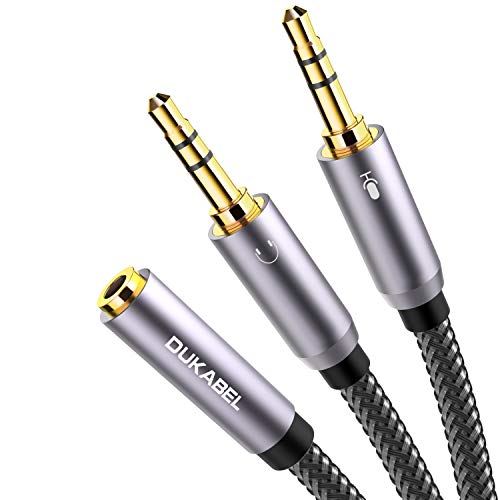
Best for: Connecting a single-plug headset to a desktop PC or laptop with separate headphone and microphone ports. This adapter handles the reverse direction from the StarTech.com model.
It has one 3.5mm female four-position socket for a headset with audio and microphone, plus two 3.5mm male plugs for separate computer ports. The listed construction includes gold-plated contacts, a metal housing, triple shielding, a braided exterior, and oxygen-free copper wiring. Its 30-centimeter length suits setups where the PC ports are close to the headset cable.
- Use the two male connectors for the computer’s separate audio and mic inputs.
- Designed for online gaming and voice-chat applications, according to the product details.
- A step-down design is intended to fit devices with cases.
Limitation: The product listing excludes iOS earphones and Beats headsets for microphone use. It will not combine two separate headset plugs into one device jack.
DUKABEL 4FT Headset Splitter

Best for: Users who need more distance between a headset and separate PC audio and microphone ports. Like the shorter DUKABEL cable, it connects one four-position headset plug to two separate 3.5mm computer ports.
The stated configuration is one female 3.5mm socket and two male 3.5mm connectors. Its 4-foot (1.2-meter) length is the main distinction in the supplied product details. It can be a practical choice when the computer ports are farther away, or when a short adapter would leave the headset cable under tension.
- One female socket accepts a compatible four-position headset plug.
- Two male plugs connect to separate audio and microphone ports.
- The longer cable provides more reach than a compact splitter.
Limitation: The provided features do not specify additional construction materials or device exclusions. Confirm that the headset has one compatible TRRS plug and that the computer has separate headphone and microphone jacks before choosing it.
ENVEL Headset Splitter Cable

Best for: Buyers who want clearly identified connections for a desktop PC. ENVEL describes a green plug for audio and a pink plug for the microphone, making the two destinations easy to distinguish during setup.
This adapter connects a stereo headset to a PC’s separate audio and mic ports. The listed features include oxygen-free copper wiring, a braided cable, and gold plating. Those details make it a suitable option for someone seeking a straightforward cable adapter with color-coded plugs rather than a device for sharing sound between two listeners.
- Green plug connects to the PC audio port.
- Pink plug connects to the PC microphone port.
- Braided wire is listed as a protective feature.
Limitation: This model is for a headset connection to separate computer ports, not for combining separate headphone and mic plugs into one combo jack. The supplied product information does not state a cable length, so check the listing if reach is important.
VIFIGEN Headphone And Mic Splitter
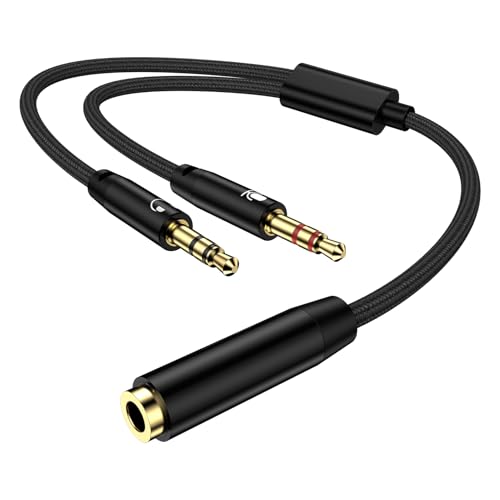
Best for: Users with a single-plug TRRS headset who need separate audio and microphone plugs for a PC or laptop. The listing describes a four-pole female socket and two three-pole male connectors, with black for headphone audio and red for the microphone port.
The product details state compatibility with many TRRS headphones and name several headset and computer examples. They also describe gold-plated plugs, oxygen-free copper wire, and plug-and-play operation without additional software. That makes it a useful alternative to the DUKABEL and ENVEL models when the listed compatibility information is relevant to your equipment.
- One female TRRS socket accepts a compatible single-plug headset.
- Separate male connectors lead to PC headphone and microphone ports.
- The listing says TRS headphones or speakers work for sound only.
Limitation: The product listing says microphone functionality will not work with original iPhone earbuds or Beats headphones. It is not the right adapter for joining two separate headset plugs into a combo jack.
Buying Guide: How To Choose A Headphone And Mic Adapter
Which direction does the adapter need to work?
Start by counting the plugs on your headset and the jacks on your device. This determines whether you need an adapter that combines two plugs into one jack or separates one headset plug into two computer ports. The connector shape alone can be misleading because both types may be called a headset splitter or headphone adapter.
- Two headset plugs to one device jack: Choose a cable with two 3.5mm female ports and one male TRRS plug. The StarTech.com adapter in this guide has this configuration.
- One headset plug to two PC jacks: Choose a cable with one female TRRS socket and two male 3.5mm plugs. The DUKABEL, ENVEL, and VIFIGEN models have this general configuration.
Check the device port as well as the headset. A single 3.5mm port may be a combo headset jack, while a desktop computer may have distinct headphone and microphone ports. An adapter with the wrong connector direction will not solve the connection problem.
What is the difference between TRRS and TRS?
TRS and TRRS describe the conductor sections on a 3.5mm plug. A TRRS headset plug typically carries headphone audio and microphone signals through one connector. A TRS plug is commonly used for a separate audio or microphone connection in these adapters. Match the plug arrangement to the adapter’s stated configuration and your device’s ports.
Do not assume every headset with a 3.5mm plug has a working microphone through every adapter. The product details may specify exclusions or limitations for particular earbuds or headsets. Check those notes if microphone input matters.
How much cable length should you choose?
Measure the distance between the headset cable and the computer ports before selecting a cable. A compact adapter such as the 30-centimeter DUKABEL model can reduce excess cable around a nearby desktop connection. The 4-foot DUKABEL version is better suited to a setup that needs more reach.
The ENVEL and VIFIGEN feature descriptions supplied here do not state a cable length. If you need a particular amount of slack, verify the current product details before buying. A cable that is too short may pull on the ports, while extra length can add clutter to a portable setup.
Do you need a two-headphone audio splitter?
A headset-and-microphone adapter is not necessarily designed to connect two headphones to one source. The StarTech.com product explicitly says it is not an audio splitter for two headphones. The IIISOGNO product in the supplied list is a different type: it is described as a dual-headphone splitter that supports two TRRS headsets with audio and microphone functions.
Choose that style only when sharing audio or calls is the goal. A dual-output splitter does not replace an adapter intended to join separate headphone and microphone plugs, or to connect one headset to separate PC ports.
What should you check before ordering?
- Count the headset plugs and device jacks, then identify which side has the single combo connection.
- Check whether the adapter has male or female connectors in the required places.
- Confirm that the headset’s microphone is supported by the adapter’s stated compatibility information.
- Look for color labels if your PC has separate headphone and microphone ports.
- Choose a cable length that reaches comfortably without pulling on either connector.
- Do not treat two-headphone sharing adapters as interchangeable with headset-and-mic adapters.
Frequently Asked Questions
Can I combine separate headphone and microphone plugs into one jack?
Yes. Use an adapter with two female 3.5mm ports for the separate headphone and microphone plugs and one male TRRS connector for the device’s combo headset jack. The StarTech.com adapter listed above has that layout.
How do I connect a one-plug headset to a desktop with two ports?
Use a splitter with one female TRRS headset socket and two male plugs. Connect the plugs to the computer’s separate headphone and microphone ports, following any color labels on the cable.
Will any 3.5mm adapter make my headset microphone work?
No. The adapter must support the microphone signal and have the correct connector arrangement. Some product listings also identify headset exclusions, so check those details before buying.
Can a headset splitter connect two headphones?
Not necessarily. Some adapters separate audio and microphone signals for a PC, while others provide outputs for two listening devices. Check the product’s stated purpose and connector layout; the StarTech.com adapter is explicitly not intended for two headphones.
Do these adapters need software?
The VIFIGEN listing describes its adapter as plug and play with no additional drive or software. The other listed products are cable adapters, but their supplied features do not all make a software statement. Check the product details for the specific model if this is a requirement.