
The right USB audio interface depends on how many sources you record, which connections you need, and whether features such as loopback or effects matter. The Focusrite Scarlett Solo is suited to a vocalist or solo musician seeking detailed recording specifications; the four-input interface is better for buyers who need more connection options; and the BOMGE models offer compact or streaming-oriented feature sets. Compare the listed inputs, outputs, and functions below before choosing.
| Interface | Best For | Key Listed Feature |
|---|---|---|
| BOMGE Mini 2 Channel | Compact vocal or guitar setups | XLR input and 48V phantom power |
| BOMGE 32-bit/192 kHz | Streaming and recording workflows | Direct monitoring and loopback |
| Pyle PMUX9 | Users who want varied connections and effects | 24 digital effects and RCA inputs |
| 4-In 2-Out USB Interface | Recording setups needing more inputs | Four inputs and two outputs |
| Focusrite Scarlett Solo 3rd Gen | Solo music and podcast recording | 24-bit/192 kHz recording and Air mode |
BOMGE Mini 2 Channel USB Audio Interface

The BOMGE Mini is presented as a two-channel interface for recording, streaming, and podcasting. Its listed features include an XLR connection and 48V phantom power, making it a candidate for users recording a microphone that requires phantom power, as well as guitarists and vocalists seeking a small setup.
Best for: A beginner or home creator who mainly records one or two sources and wants an interface described as mini. It was selected because its stated use cases cover music, podcasting, and streaming without emphasizing complex routing.
Limitation: The supplied product information does not specify its sample rate, bit depth, output configuration, or monitoring options. Compare those details before choosing it for a workflow that depends on particular recording specifications or connections.
BOMGE USB Interface With Loopback

This BOMGE model lists 32-bit/192 kHz audio, XLR connectivity, phantom power, direct monitoring, and loopback. Those functions make it distinct from the mini model: loopback can be relevant when a creator needs to route computer audio into a recording or stream, while direct monitoring addresses listening to an input during recording.
Best for: Streamers, podcasters, and recording users who specifically want loopback and direct monitoring listed among the features. It was selected because these functions address workflow needs beyond basic microphone input.
Limitation: The supplied details do not state the total number of inputs and outputs or provide connection-layout specifics. Check the product listing for those details if you plan to connect several microphones or monitor speakers.
Pyle PMUX9 USB Audio Interface
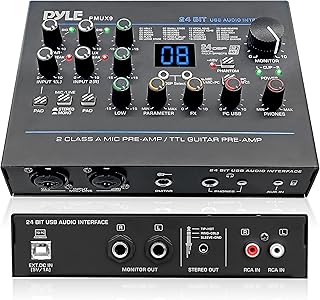
The Pyle PMUX9 combines MIC/LINE, guitar, AUX stereo, and RCA input options with 24 digital effects. Its listed outputs include phone, stereo, monitor, and headphone connections. Phantom power is also specified, giving this model a broader range of named connection types and onboard features than the simpler two-channel options.
Best for: Buyers comparing an interface that offers varied input formats and built-in digital effects. It was selected for users who want to connect more than a single microphone or instrument type and value a range of listed output options.
Limitation: The product details provided do not state its recording bit depth or sample rate. If those specifications are important to your work, verify them before comparing it with interfaces that list specific recording resolutions.
4-In 2-Out USB Audio Interface
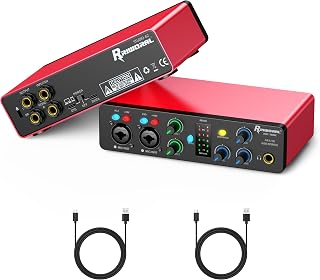
This interface is identified as a 4-in/2-out model with 48V phantom power and 24-bit/192 kHz recording. Its title also specifies dual TS/XLR inputs and plug-and-play use for recording, podcasting, streaming, guitar, and vocals. The four-input designation sets it apart from products described as two-channel or solo-focused.
Best for: Users who expect to connect several sources and want four inputs rather than a basic two-input setup. It was selected because its input count and dual TS/XLR connections address a different need from the smaller interfaces in this comparison.
Limitation: The provided product information does not explain the purpose or configuration of every input, or specify software requirements. Confirm the connection layout and operating-system details for your intended setup.
Focusrite Scarlett Solo 3rd Gen

The Focusrite Scarlett Solo 3rd Gen is a solo-oriented interface with microphone preamps, two high-headroom instrument inputs for guitar or bass, and recording and mixing up to 24-bit/192 kHz. Its switchable Air mode is described as adding clarity to acoustic instruments. Gain Halos are listed as a way to help capture takes without unwanted clipping or distortion.
Best for: A solo musician, vocalist, or podcaster who wants a named interface with clearly specified recording resolution and an Air mode. It was selected because the supplied feature list explains its preamps, instrument inputs, and recording specifications.
Limitation: This is the solo-oriented choice in the group. Choose a product with a higher stated input count if you need to record several separate sources at once.
Buying Guide: How To Compare USB Audio Interfaces
How many inputs do you need?
Start by counting the sound sources you need to record at the same time. A solo vocal or guitar recording may need fewer inputs than a session involving multiple performers or instruments. In this comparison, the BOMGE Mini is described as two-channel, the Scarlett Solo is positioned for solo work, and the generic interface explicitly lists four inputs. Do not assume that an input count means every source can use every connection type; check the input layout.
Which connections match your equipment?
Microphones, guitars, and line-level devices can require different input types. The BOMGE products list XLR connections, while the four-input model specifies dual TS/XLR inputs. The Pyle PMUX9 names MIC/LINE, guitar, AUX stereo, and RCA inputs. Match the interface connections to the cables and equipment you already use, and check whether phantom power is listed if your microphone requires it.
Do sample rate and bit depth matter for your workflow?
Sample rate and bit depth describe digital recording formats, but a larger number alone does not establish that an interface is the best fit. Compare the specifications you need with the product details: the Scarlett Solo and four-input interface list 24-bit/192 kHz, while one BOMGE model lists 32-bit/192 kHz. The supplied information does not give these figures for every option, so verify missing details rather than treating them as equivalent.
Will you monitor or stream live audio?
Direct monitoring can help you listen to an input while recording. Loopback is a feature to consider when capturing computer audio as part of a stream or recording. The second BOMGE model lists both functions. The Pyle model lists phone, stereo, monitor, and headphone outputs, but the supplied details do not describe direct monitoring or loopback. Match these workflow features to the way you plan to record.
Do onboard effects or a simple setup matter more?
The Pyle PMUX9 lists 24 digital effects, a feature that may appeal to someone seeking effects as part of the device. A simpler interface may be a better fit if you only need microphone or instrument connections and prefer to handle processing elsewhere. Compare the functions you will actually use, rather than choosing based on the longest feature list.
What should you verify before buying?
- Count the simultaneous sources you plan to record, not just the instruments you own.
- Confirm the interface has the right input types, outputs, and phantom power for your equipment.
- Check whether direct monitoring, loopback, or onboard effects are necessary for your workflow.
- Verify operating-system support, included cables, and software details in the current product information.
- Compare the stated recording resolution only after confirming the interface meets your connection needs.
Frequently Asked Questions
What does a USB audio interface do?
A USB audio interface connects audio sources such as microphones and instruments to a computer for recording, streaming, or podcasting. Its inputs, outputs, and monitoring features determine how it fits a particular setup.
Is a two-channel interface enough for a beginner?
A two-channel interface can suit a simple setup recording one or two sources. If you plan to capture multiple microphones or instruments simultaneously, compare it with an interface that explicitly provides more inputs.
What is 48V phantom power used for?
Phantom power provides power through a microphone connection for microphones that require it. Check your microphone’s requirements and the interface’s listed features before connecting equipment.
What is loopback on an audio interface?
Loopback is a feature used to route computer audio into a recording or stream. It can be useful for creators who need to capture audio playing on the computer alongside microphone input.
Should I choose 24-bit/192 kHz or 32-bit/192 kHz?
Compare the recording specifications against your production needs, but do not use bit depth alone to choose an interface. Input count, connection types, monitoring functions, and compatibility with your setup also matter.