
The best computer gaming headphones with a microphone depend on your connection, preferred sound features, and play setup. The JBL Quantum 100M2 is best for lightweight comfort and a detachable mic, while the Logitech G432 is better for a flip-to-mute boom mic and large drivers. The Razer BlackShark V2 X emphasizes sound isolation, and the EKSA E1000 offers USB plug-and-play surround sound. The BENGOO G9000 is a multi-platform option with an important adapter caveat for some Xbox One controllers.
| Headset | Best For | Notable Feature |
|---|---|---|
| JBL Quantum 100M2 | Comfort and removable mic | Memory foam and detachable directional microphone |
| Logitech G432 | Positional audio and quick mute | 50 mm drivers and flip-up microphone |
| Razer BlackShark V2 X | Sound isolation | Closed earcups and 3.5 mm audio jack |
| EKSA E1000 | USB PC gaming | Driver-free 7.1 surround sound |
| BENGOO G9000 | Multi-device use | Flexible noise-isolating microphone |
JBL Quantum 100M2: Best for Comfort

The JBL Quantum 100M2 is a wired over-ear headset designed for gaming sessions where comfort and straightforward voice chat matter. Its listed features include JBL QuantumSound Signature, breathable fabric ear cushions, memory foam padding, and a detachable directional microphone with a mute option.
Best for: Players who want a removable mic for solo listening and cushioned earcups for longer sessions. The detachable design lets users take the microphone off when they do not need to communicate, while the directional mic is intended to focus on the speaker’s voice.
Why it stands out: The combination of a detachable, mute-capable mic and memory foam comfort makes it a practical choice for buyers who prioritize flexibility over extra software-driven audio features.
Limitation: The supplied product information does not specify connection compatibility or surround-sound software. Check the connection requirements for your computer before choosing it.
Logitech G432: Best for Positional Audio

The Logitech G432 is a wired gaming headset with 50 mm audio drivers and a 6 mm boom microphone. Its listed DTS Headphone:X 2.0 surround sound feature is designed to provide positional audio cues, including sounds coming from behind the player. The microphone mutes when flipped up.
Best for: PC gamers who want to explore software-enabled positional audio and prefer a microphone that can be muted with a physical movement. The larger listed drivers and surround-sound feature make this a better fit for buyers focused on immersive game audio.
Why it stands out: The flip-up mute is simple to use during calls or breaks, and the headset pairs that mic convenience with a stated focus on three-dimensional sound.
Limitation: DTS Headphone:X 2.0 requires Logitech G HUB Software. Buyers who do not want to install software should account for that before relying on the surround feature.
Razer BlackShark V2 X: Best for Isolation

The Razer BlackShark V2 X is a wired gaming headset with a 3.5 mm audio jack, closed earcups, memory foam cushions, and custom-tuned 50 mm drivers. Its product information describes passive noise cancellation from the earcup design and software-enabled 7.1 surround sound for positional audio.
Best for: Players who prefer a closer earcup seal and want to reduce sound leakage into or out of the headset. The closed earcups and cushions are the main reasons to choose this model for a gaming area with nearby distractions.
Why it stands out: Its driver design is described as separately tuning highs, mids, and lows, while the 3.5 mm connection offers a simple wired connection format for devices with a matching audio jack.
Limitation: The listed 7.1 surround sound is software-enabled and is available only on Windows 10 64-bit. Do not assume that feature will work on other systems based on the supplied details.
EKSA E1000: Best for USB Plug and Play

The EKSA E1000 is a USB gaming headset featuring a built-in audio chip, 50 mm neodymium drivers, driver-free 7.1 surround sound, and an adjustable noise-cancelling microphone. The listed compatibility includes Windows 7, 8, and 10 PCs, PS4 and PS5 consoles, laptops, and other devices with a USB audio port.
Best for: Buyers whose computer or device has a USB audio port and who want to use the stated surround feature without downloading extra drivers. The 120-degree adjustable microphone is also useful for positioning the mic near the speaker.
Why it stands out: This model is the clearest match in the selection for shoppers who specifically want USB audio and a plug-and-play setup. Its product details also name several computer and console use cases.
Limitation: The manufacturer’s listed information says the E1000 is not compatible with game controllers. Check the device’s USB audio support rather than assuming a controller connection will work.
BENGOO G9000: Best for Multiple Devices
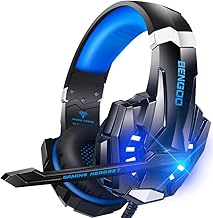
The BENGOO G9000 is a wired over-ear gaming headset with a flexible omnidirectional noise-isolating microphone, 40 mm neodymium drivers, and soft memory earmuffs. Its listed platforms include PlayStation, Xbox, PC, Nintendo 3DS, laptops, tablets, and mobile devices.
Best for: Buyers comparing a headset for several types of devices, provided the connection method suits each device. The adjustable mic can be angled for voice chat, and the broad platform list makes it a candidate for households that use more than one system.
Why it stands out: The feature set combines a flexible microphone with a wide stated range of device types. This makes it worth considering when platform variety is more important than choosing a headset for one specific PC audio feature.
Limitation: An older Xbox One controller requires a separate Microsoft adapter, which is not included. Verify the exact connection needed for your setup before buying.
Buying Guide: How to Choose Computer Gaming Headphones
Which connection should you choose?
Start by checking the audio connections on your computer and any other device you plan to use. USB headsets, such as the EKSA E1000, need a USB audio port. A 3.5 mm headset, such as the Razer BlackShark V2 X, needs a matching audio jack. The supplied information identifies the JBL, Logitech, and BENGOO models as wired but does not provide a specific connector for each; confirm the product’s connection details before ordering.
For a headset that will move between a computer and a console, look beyond a general platform list. Confirm whether the connection is made directly to the system or through a controller, and whether an adapter is required. The EKSA details specifically exclude game-controller use, while the BENGOO listing notes an extra adapter requirement for an older Xbox One controller.
Do you need software for surround sound?
Surround-sound descriptions are not always equivalent. The Logitech G432’s DTS Headphone:X 2.0 requires Logitech G HUB Software. The Razer BlackShark V2 X lists software-enabled 7.1 surround sound, with availability limited to Windows 10 64-bit. The EKSA E1000 describes its 7.1 sound as driver-free and powered by a built-in USB audio chip. Choose based on your operating system and willingness to install or configure software.
Do not select a headset based only on a surround-sound label. Consider whether the feature works on your computer, whether it requires an application, and whether you prefer a simple stereo setup. A headset can still be suitable for voice chat and game audio even if a particular surround feature is unavailable on your system.
What microphone style fits your use?
A detachable mic, like the JBL Quantum 100M2’s, can be removed when voice chat is not needed. A flip-up microphone, like the Logitech G432’s, offers a physical mute action when raised. The EKSA E1000 and BENGOO G9000 feature adjustable microphones that can be repositioned. Consider how often you mute, whether you want the microphone out of the way, and whether your play area has background noise.
Microphone descriptions such as “noise-cancelling” or “directional” indicate stated design features, not a guarantee that all background sounds will disappear. For clearer communication, position the mic according to its design and check whether the headset provides a convenient mute control.
How important are fit and sound isolation?
For long sessions, compare the earcup material and padding. The JBL listing calls out breathable fabric cushions and memory foam, while the Razer listing specifies memory foam cushions and closed earcups. The BENGOO G9000 also lists soft memory earmuffs. These descriptions can help narrow choices, but comfort depends on personal fit, so shoppers sensitive to headset pressure should review the product’s sizing and return terms separately.
Closed earcups and passive noise isolation may help limit distractions, but they are different from active electronic noise cancellation. Choose the Razer for its stated closed-earcup design if isolation is a priority. Choose the JBL if the listed breathable fabric and removable microphone better match your needs.
Which specifications matter most for PC gaming?
- Connection: Match USB or 3.5 mm requirements to the computer and any additional device.
- Microphone control: Compare detachable, adjustable, and flip-up designs against your chat habits.
- Audio processing: Check operating-system limits and software requirements for surround features.
- Fit: Compare the stated cushioning and earcup construction for extended use.
- Multi-device use: Verify adapter requirements and controller compatibility rather than relying only on a platform list.
Frequently Asked Questions
Are these headsets wired?
All five products are described as wired gaming headsets. The supplied details identify USB for the EKSA E1000 and a 3.5 mm audio jack for the Razer BlackShark V2 X. Check the full product specifications for the connector on the other models.
Which headset has a detachable microphone?
The JBL Quantum 100M2 has a detachable directional microphone with a mute option. It is the clearest choice in this group for buyers who want to remove the mic when they are not gaming with voice chat.
Which model can mute the microphone by flipping it up?
The Logitech G432’s 6 mm boom microphone mutes when flipped up. This suits players who want a physical mute action instead of removing the microphone.
Does the EKSA E1000 work with a game controller?
No. Its listed product details state that the EKSA E1000 is not compatible with game controllers. The headset is described for devices with a USB audio port.
Which headsets require software for surround sound?
The Logitech G432 requires Logitech G HUB Software for DTS Headphone:X 2.0. The Razer BlackShark V2 X lists software-enabled 7.1 surround sound that is available only on Windows 10 64-bit. The EKSA E1000 describes its surround sound as driver-free.