
The best computer headset with a single jack depends on whether you want stereo sound, a simple mono earpiece, or an adapter for a headset that has separate headphone and microphone plugs. The Logitech H111 is best for flexible stereo use, while the Logitech H151 adds in-line controls. The Cyber Acoustics AC-104 suits buyers who prefer mono audio, and the Amazon Basics headset offers a foldable design. A splitter is useful when a computer has separate audio and microphone ports.
| Product | Best for | Connection note |
|---|---|---|
| Logitech H111 | Everyday stereo listening and calls | 3.5 mm audio jack |
| Logitech H151 | Calls with in-line controls | 3.5 mm audio jack |
| Cyber Acoustics AC-104 | Mono audio and an ambidextrous boom mic | Check the device’s port setup before buying |
| Amazon Basics On-Ear Headset | Foldable use and a flexible microphone | 3.5 mm port or USB-A connection |
| 3.5 mm Headphone Splitter | Connecting a headset to separate audio and mic ports | One female jack to two male plugs |
Logitech H111 Stereo Headset

The Logitech H111 is a wired stereo headset with a 3.5 mm audio jack. Its listed compatibility includes PC, Mac, laptops, smartphones, and tablets. The noise-cancelling microphone is designed to reduce room noise during internet calls, and the rotating boom can be worn on either side.
- Best for: Buyers who want a straightforward stereo headset for calls, music, movies, or games.
- Why it stands out: It combines stereo sound, a rotating microphone, and a single 3.5 mm connection in one headset.
- Choose this if: You want a flexible microphone position and use a device with a compatible 3.5 mm headset jack.
Limitation: A device with separate headphone and microphone ports may need a splitter. Check the computer’s port arrangement before purchase.
Logitech H151 Wired Stereo Headset

The Logitech H151 is an analog stereo headset with a 3.5 mm audio jack and a rotating microphone. The product name lists compatibility with PC, Mac, laptops, tablets, and smartphones, as well as in-line controls. Those controls can be a useful distinction for buyers comparing basic wired headsets.
- Best for: Buyers who want stereo headphones and the convenience of in-line controls.
- Why it stands out: Its listed features include an analog 3.5 mm connection and a rotating microphone, making it a practical option for calls and general listening.
- Better for: Someone who values in-line controls over a mono headset design.
Limitation: The supplied product information does not specify the control functions or microphone noise reduction. Confirm that the connection and controls meet your needs.
Cyber Acoustics AC-104 Mono Headset

The Cyber Acoustics AC-104 is a mono headset with an ambidextrous boom microphone. Its listed uses include classrooms, VoIP, and gaming, and the product name states PC and Mac compatibility. A mono headset is a different choice from stereo models: it is intended for listening through one earpiece rather than full stereo playback.
- Best for: Buyers who prefer a single-ear listening setup for communication-focused use.
- Why it stands out: The ambidextrous microphone design makes it suitable for positioning on either side, and the listed use cases center on voice communication.
- Choose this if: Calls or classroom communication matter more than stereo listening.
Limitation: The supplied details do not identify the connector type. Verify the headset’s plug and your computer’s port requirements before ordering, especially if you specifically need one 3.5 mm jack.
Amazon Basics Foldable Computer Headset
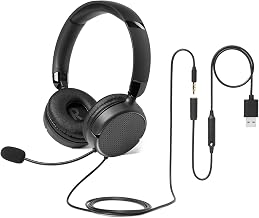
This wired on-ear headset has a foldable design and an adjustable boom microphone. Its listed connection options are a 3.5 mm port or an in-line control with a USB-A port. The unidirectional microphone is described as reducing background noise when positioned in the correct direction. The product is identified as a small-to-medium fit.
- Best for: Buyers who want a compact headset for calls, meetings, or online learning.
- Why it stands out: It offers a foldable design, an adjustable microphone, and two stated connection options.
- Choose this if: You need a headset that can be folded away and your device supports one of the listed connection methods.
Limitation: The listing notes that the on-ear fit may feel snug initially and recommends breaks during extended use. Its small-to-medium sizing may not suit every wearer.
3.5 mm Headphone and Microphone Splitter

This splitter cable has one 3.5 mm female connection and two 3.5 mm male plugs. It is designed to connect a smartphone-style headset plug to a computer setup with separate headphone and microphone connections. It is an accessory rather than a headset, so it is relevant when the computer’s ports do not match the headset’s single plug.
- Best for: Buyers who already own a headset with one 3.5 mm plug and need to connect it to separate computer audio and microphone ports.
- Why it stands out: The listed female-to-dual-male configuration addresses a common difference between combined headset jacks and split computer ports.
- Choose this if: Your computer has distinct headphone and microphone sockets.
Limitation: This cable does not include headphones or a microphone. Check the plug configuration on both the headset and computer before choosing an adapter.
Buying Guide: How to Choose a Computer Headset With One Jack
What does “single jack” mean for a computer headset?
A single-jack headset has one plug that carries headphone audio and microphone input through a combined connection. Many headsets use a 3.5 mm plug for this purpose. However, not every computer has a combined headset port. Some desktops and older computers have separate headphone-out and microphone-in sockets, which may require a splitter with one headset socket and two computer plugs.
How can you tell whether your computer has a combined port?
Inspect the computer’s audio connections and consult its documentation if the port labels are unclear. A combined headset port is intended for both listening and microphone input. Separate sockets are usually identified independently for headphones or line output and microphone input. Do not assume that every 3.5 mm port supports a headset microphone; some ports may support audio output only.
Should you choose stereo or mono?
Choose stereo if you want sound in both ears for music, movies, games, or general computer use. The Logitech H111 and H151 are stereo options among these products. Choose mono if you want a one-ear listening arrangement focused on communication. The Cyber Acoustics AC-104 is identified as a mono headset. Compare the intended listening style before focusing on secondary features.
Which microphone features matter for calls?
Look at microphone position and the way the headset is described. A rotating or adjustable boom lets you position the microphone, while an ambidextrous design supports use on either side. The H111 lists noise-cancelling microphone performance, and the Amazon Basics model lists a unidirectional microphone that should face the correct direction. These descriptions are product features, not a guarantee that every room noise will be removed.
When is a splitter the right solution?
Use a splitter when your headset has one combined 3.5 mm plug but the computer has separate microphone and headphone ports. The splitter in this guide has one female 3.5 mm connection and two male 3.5 mm connections. If the computer has a combined jack, an extra splitter may not be necessary. Confirm the connector layout before buying an adapter.
What else should you compare before buying?
- Connection: Check whether the headset uses a 3.5 mm jack, USB-A, or more than one connection option.
- Device ports: Match the plug to the computer, tablet, or phone you plan to use.
- Fit: Consider on-ear versus other headset styles and any stated size guidance.
- Controls: If you want adjustments within reach, check whether in-line controls are listed and what they operate.
- Use case: Prioritize stereo playback for broad listening or a mono design for communication-focused use.
Frequently Asked Questions
Can I use a 3.5 mm headset with a computer that has two audio ports?
Often, a headset splitter is used when a headset’s single combined plug must connect to separate headphone and microphone ports. Match the splitter’s plugs to the computer’s sockets and confirm the headset uses the compatible 3.5 mm connection.
Does a single 3.5 mm plug always support the microphone?
No. A 3.5 mm port may provide audio output without microphone input. Check the computer’s specifications or port labels to confirm it supports a combined headset connection.
Which headset in this list is stereo?
The Logitech H111 and Logitech H151 are identified as stereo headsets. The Cyber Acoustics AC-104 is identified as a mono headset.
Do I need a splitter for a laptop?
Not necessarily. A laptop with a combined headset port may accept a compatible single-plug headset directly. A laptop with separate headphone and microphone ports may need a splitter.
Which option is designed to fold for storage?
The Amazon Basics On-Ear Wired Computer Headset is described as foldable. Its listing also notes a small-to-medium fit and recommends taking breaks during extended use.