Best Computer Headset With Microphone for Clear Calls and Comfort
Looking for a reliable computer headset with a microphone? This guide highlights five solid options designed for different needs—from all‑day office calls to gaming chats and online classes. The best picks balance clear audio quality, noise reduction, and comfort. Ideal buyers include remote workers, students, casual gamers, and professionals who need dependable inline controls. Below is a quick snapshot of the selected products to compare at a glance.
| Product | Brand | Best For | Key Benefit |
|---|---|---|---|
| Logitech H390 Wired Headset (Black) | Logitech | Remote work and calls | Noise-canceling mic and inline controls for easy muting and volume |
| Logitech H391 Wired Headset (Graphite) | Logitech | Students and professionals on USB-C devices | Rotating noise-canceling mic with USB-C connectivity |
| EKSA E1000 USB Gaming Headset | EKSA | Gamers and casual listeners | 7.1 surround sound with a noise-canceling mic |
| Lenovo USB-A Wired Stereo Headset | Lenovo | Busy call environments | AI noise cancellation and lightweight design |
| Amazon Basics On-Ear Headset | Amazon Basics | Budget-conscious buyers | Foldable, compact design with adjustable mic |
Logitech H390 Wired Headset for PC/Laptop

Best for: remote workers and students who want clear calls and simple controls. The H390 uses fine-tuned drivers for clear stereo sound and a rotating noise-canceling mic that tucks away when not in use. Inline controls let you adjust volume or mute without interrupting your flow. This model is a solid choice for day-long calls in busy environments. A potential limitation is that the USB-A connection may require an adapter on some devices lacking standard USB-A ports.
Logitech H391 Wired Headset (Graphite)

Best for: Chromebook users and those who prefer USB-C connectivity. The H391 provides digital stereo sound with a rotating noise-canceling microphone and inline controls for quick muting and volume adjustments. It’s designed for comfortable all-day wear. Limitation: USB-C only; may need adapters for older USB-A devices.
EKSA E1000 USB Gaming Headset

Best for: gamers and voice chats where clearer directional sound helps in-game communication. The EKSA E1000 includes a dedicated noise-canceling microphone and a built-in USB audio chip with 7.1 surround sound for immersive audio. A caution: 7.1 work best when used with compatible software; basic use on non-supporting devices may not realize the full effect.
Lenovo USB-A Wired Stereo Headset

Best for: professionals needing clear calls with AI-assisted noise cancellation. The Lenovo headset emphasizes crystal call quality and comfort with a lightweight build. The inline controls simplify mute and volume tasks, keeping you focused. Limitation: AI noise cancellation depends on compatible software; performance may vary by platform.
Amazon Basics On-Ear Wired Headset
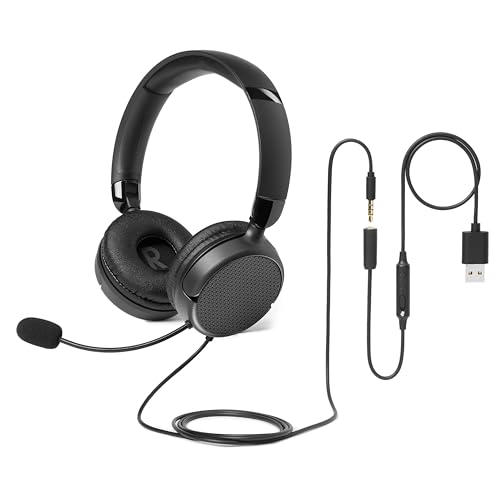
Best for: budget-minded buyers seeking a compact, portable headset. The Amazon Basics model features an adjustable, unidirectional mic to reduce background noise and a foldable design for easy transport. Caution: On-ear fit might feel snug for longer sessions; take periodic breaks to maintain comfort.
Buying Guide
What matters most in a headset with a microphone?
Look for a noise-canceling microphone, clear stereo sound, and comfortable ear cushions. Inline controls help minimize interruptions during calls. USB-A or USB-C compatibility affects which devices you can use without adapters.
Which mic design works best for calls?
Rotating or foldable boom mics make it easy to tuck the mic away when not in use. A unidirectional design helps focus on your voice and reduces surrounding noise in busy spaces.
Which headset is best for daily use and comfort?
Lightweight models (about 140 g) with breathable ear cushions and adjustable headbands are ideal for long periods behind a computer. Memory foam earpads provide lasting comfort.
Do I need a gaming headset for work or school?
If audio quality and immersive sound help with meetings or online classes, a gaming headset with 7.1 surround sound can be beneficial. Ensure your device supports the headset’s software features.
What about compatibility and setup?
Verify port type (USB-A, USB-C, or 3.5 mm) and any required drivers. Some headsets offer plug-and-play with built-in sound cards, while others rely on the computer’s audio stack.
Usage scenarios to consider
- Remote work: prioritize noise-canceling mic and reliable inline controls.
- Online classes: comfort for long sessions and clear voice capture.
- Casual gaming: prefer better positional audio and mic clarity for chats.
- Travel or commuting: folding or compact designs improve portability.
FAQs
- Q: Is USB-C or USB-A better for headsets? A: USB-C is convenient for newer devices; USB-A remains widely compatible. If you have both, a USB-C headset with adapter can help.
- Q: Do all headsets work with Zoom or Teams? A: Most do, but check for mute, volume, and mic controls compatibility with your platform.
- Q: Are wired headsets safer for lag-free calls than wireless? A: Wired connections generally avoid wireless latency and interference, offering more stable audio during calls.
- Q: Will a noise-canceling mic eliminate all background noise? A: It reduces background noise significantly but may not remove all ambient sounds in very noisy environments.
- Q: How long should I wear a headset daily? A: Start with 30–60 minutes and increase gradually to 1–2 hours, taking short breaks to prevent discomfort.
- Q: Can I use these headsets for gaming and calls at the same time? A: Yes, several models support both tasks, but check compatibility with your PC or console and software requirements.