
The best computer microphone with a stand depends on how you use your computer: the FIFINE AM8T is best for a complete boom-arm setup, the TONOR TC310+ is suited to creators who want RGB controls, and the JOUNIVO is a simple choice for calls and dictation. The picks below compare stand styles, connection options, controls, and practical limitations so you can choose a microphone that fits your desk and recording needs.
| Microphone | Best For | Stand Style or Setup |
|---|---|---|
| FIFINE AmpliGame AM8T | Streaming with upgrade options | Boom arm included |
| TONOR TC310+ | RGB gaming and content creation | Boom arm included |
| FIFINE AmpliGame AM8 | USB recording with XLR flexibility | Stand details not specified |
| MAONO PD200W | Wireless or multi-person recording | Desktop mic configuration described |
| JOUNIVO USB Microphone | Calls, dictation, and everyday use | Adjustable gooseneck base |
FIFINE AmpliGame AM8T XLR/USB Gaming Microphone Set
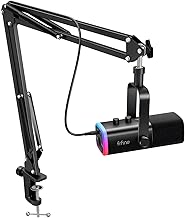
The FIFINE AmpliGame AM8T is a dynamic microphone kit with USB and XLR connectivity and an included boom arm. Its USB connection is described as plug-and-play for PC use, while XLR supports connection to a mixer or sound card. This makes it a flexible pick for someone who wants to start with a direct computer connection and may later use an audio setup with XLR.
Features include customizable RGB lighting, a cardioid pickup pattern, a mute button, a gain knob, a headphone jack for real-time monitoring, and headphone volume control. The product description lists -50 dB sensitivity and positions the mic for streaming, podcasting, vocals, or instruments.
- Best for: PC gamers and beginner streamers who want a boom arm, onboard controls, and a possible XLR path.
- Why it was selected: The kit combines a stand, two connection types, and monitoring controls in one setup.
- Limitation: XLR use requires a compatible mixer or sound card; the product description does not characterize that connection as plug-and-play.
TONOR TC310+ Gaming Microphone Set
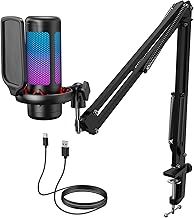
The TONOR TC310+ is a USB condenser microphone set with a boom arm, RGB lighting, tap mute, and gain control, according to its product name and listing details. It is aimed at content creators and gaming setups where a suspended microphone position and visual lighting matter. The listed sound description emphasizes clean, high-fidelity reproduction for team communication.
Its lighting offers four modes: static colors, a single-color gradient, a breathing effect, and a mixed-color gradient. A long tap on the RGB control adjusts brightness, while a quick tap changes the lighting mode. These physical controls can make adjustments straightforward without relying on software.
- Best for: Creators who want a boom-arm microphone with configurable RGB and simple lighting controls.
- Why it was selected: It offers the requested stand style and combines it with mute and gain controls for streaming use.
- Limitation: The supplied feature information does not specify XLR connectivity or a headphone-monitoring jack.
FIFINE AmpliGame AM8 USB/XLR Dynamic Microphone
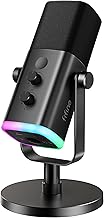
The FIFINE AM8 is a dynamic microphone that supports USB and XLR connections. Its listed frequency response is 50 Hz to 16 kHz, and its cardioid pattern is intended to focus on sound from the front while rejecting unwanted off-axis noise. The product description recommends placing the end-addressing microphone 2 to 6 inches from the sound source.
With USB, the microphone supports direct connection and tap-to-mute, with an LED reminder indicating mute status. RGB and function keys are available only in USB mode. When using XLR, the user needs a separate XLR cable and an audio interface or mixer; RGB and the microphone’s function keys are inactive in that mode.
- Best for: New creators who want direct USB operation and the option to move to XLR equipment later.
- Why it was selected: Its dynamic capsule, cardioid pickup, and clear connection-mode guidance suit voice recording and streaming.
- Limitation: The supplied details do not confirm that a stand is included, so check the package contents or plan to obtain a compatible stand separately.
MAONO PD200W Hybrid Wireless Podcast Microphone

The MAONO PD200W offers wireless, USB, and XLR connection options. Its product description lists use with a phone, tablet, or computer over USB, and an audio interface for XLR operation. A 30 mm dynamic capsule and cardioid pickup pattern are specified for podcasting, streaming, and vocal recording.
The microphone is also described as supporting two wireless desktop microphones with one receiver for interviews or duo podcasts. Each microphone can record to its own track, which can help with separate editing. The listing also gives an 82 dB signal-to-noise ratio and a maximum sound pressure level of 128 dB SPL.
- Best for: Podcasters who want wireless flexibility or plan to record two speakers.
- Why it was selected: Its three connection options and two-microphone recording feature cover more use cases than a basic desktop USB mic.
- Limitation: The supplied information does not confirm a stand is included. Camera and Lightning accessories are stated to be sold separately.
JOUNIVO USB Microphone With Adjustable Gooseneck

The JOUNIVO is a plug-and-play USB microphone with a 360-degree adjustable gooseneck design. Its flexible position makes it easy to direct the microphone toward the speaker, and the listing describes it for PC gaming, voice dictation, and talking to Cortana. It is an uncomplicated option for users who prefer a desktop base and adjustable neck over a boom arm.
The microphone has a one-click mute button and an LED indicator for operating status. The listing also describes an omnidirectional condenser pickup pattern and noise-canceling technology intended to reduce background noise and echo.
- Best for: Computer users who need a simple microphone for calls, dictation, or casual gaming.
- Why it was selected: The adjustable gooseneck provides a built-in positioning solution, and USB plug-and-play keeps setup simple.
- Limitation: The omnidirectional pickup is not the same as a front-focused cardioid pattern, so users seeking directional voice capture may prefer another pick.
Buying Guide: How to Choose a Computer Microphone With a Stand
Which stand style fits your desk?
A boom arm suspends the microphone above or beside the work area, which can free desk space and let you reposition the mic. The FIFINE AM8T and TONOR TC310+ are explicitly described as including boom arms. Check the arm’s mounting arrangement and your available desk space before buying; the supplied product details do not specify clamp dimensions or desk thickness limits.
A desktop base with a gooseneck is easier to place without mounting an arm. The JOUNIVO’s flexible neck lets you change the microphone’s position, although the base still occupies desk space. For the AM8, MAONO PD200W, and any product whose supplied details do not confirm a stand, verify what is included and whether a separate stand is needed.
Do you need USB, XLR, or wireless connectivity?
USB is usually the straightforward choice when the goal is to connect a microphone directly to a computer. The FIFINE AM8T and AM8 are described as plug-and-play over USB, and the JOUNIVO is also listed as plug-and-play. USB is a practical fit for everyday calls, gaming, and early-stage recording.
XLR is useful when connecting through an audio interface or mixer. Both FIFINE models offer XLR, but the AM8 requires a separate XLR cable and an interface or mixer. The AM8T is also described for XLR use with a mixer or sound card. Before choosing XLR, account for the additional equipment and setup steps.
Wireless operation can reduce cable clutter and allow more freedom of movement. The MAONO PD200W lists wireless, USB, and XLR options. Its two-microphone feature may be useful for conversations, but the listing notes that certain camera and Lightning accessories are sold separately. Confirm the specific connection accessories required for your intended setup.
Which pickup pattern is right for your room?
A cardioid pattern is designed to capture sound mainly from the front. The FIFINE AM8T, FIFINE AM8, and MAONO PD200W list cardioid pickup. This can be a sensible choice for a single speaker who can position the microphone close to their voice and away from unwanted sound sources.
The JOUNIVO is listed as omnidirectional, meaning its pickup is not focused only on the front. That approach can suit general desktop use, but it may capture sound from a wider area. Do not assume that a microphone’s noise-reduction description eliminates room noise; placement, distance, and the room environment still matter.
What controls and monitoring features matter?
For live streaming or meetings, a physical mute button can help you silence the microphone quickly. The FIFINE AM8T lists mute and gain controls, while the AM8 has tap-to-mute and a mute-status LED in USB mode. The JOUNIVO has a one-click mute control and an LED status indicator. These features are useful when muting from software would be inconvenient.
Real-time headphone monitoring can help a speaker listen to microphone audio while recording. The AM8T lists a headphone jack and headphone volume control. The other supplied product descriptions do not confirm a monitoring jack, so check the specifications if monitoring is important to your workflow.
Is RGB lighting useful or just decorative?
RGB lighting is a visual feature, not a substitute for sound quality or a suitable stand. The AM8T offers customizable lighting that can be changed or turned off using a button. The TONOR TC310+ lists several lighting modes and brightness adjustment. If you work in a shared space, record video, or prefer a low-distraction desk, consider whether lighting controls or the option to turn lighting off matter to you.
How should you compare microphone types?
Dynamic microphones such as the FIFINE AM8T, FIFINE AM8, and MAONO PD200W can suit close-mic voice use. The AM8 description specifically recommends a distance of 2 to 6 inches. The TONOR is identified as a condenser microphone, while the JOUNIVO is an omnidirectional condenser microphone. Compare the pickup pattern, recommended placement, stand, and connection type rather than choosing by microphone category alone.
Frequently Asked Questions
What is the best computer microphone with a stand for streaming?
The FIFINE AM8T is a strong match for streamers who want an included boom arm, USB and XLR connectivity, RGB, mute and gain controls, and headphone monitoring. The TONOR TC310+ is another option for buyers who prioritize RGB modes and a boom-arm setup.
Is a boom arm better than a desktop microphone stand?
A boom arm can keep the microphone off the desk and allow flexible positioning. A desktop stand or gooseneck is simpler to place and does not require mounting an arm. The better style depends on desk space, preferred microphone position, and whether the product includes the stand you need.
Can I use an XLR microphone directly with a computer?
An XLR microphone generally needs an audio interface or mixer to connect to a computer. The FIFINE AM8 listing specifically requires an interface or mixer and a separate XLR cable. Choose USB instead if you want a direct computer connection without that extra equipment.
Which microphone is easiest to set up for everyday computer use?
The JOUNIVO is listed as plug-and-play over USB and has a mute button, status light, and adjustable gooseneck. The FIFINE AM8 and AM8T also describe plug-and-play USB operation for computer use.
Does a microphone stand come with every product listed?
No. A boom arm is explicitly included with the FIFINE AM8T and TONOR TC310+. The JOUNIVO has an adjustable gooseneck design. The supplied details do not confirm a stand for the FIFINE AM8 or MAONO PD200W, so check package contents before ordering.