
The best computer monitor for a car depends on whether you need a fixed in-car entertainment screen or a portable display for a parked vehicle. The XTRONS overhead monitor is the most directly car-oriented option; the KYY is a portable 15.6-inch choice for passengers or stationary use; and the 7-inch mini monitor suits compact video-display needs. Do not operate or watch a computer monitor while driving. Check how a screen will be powered, secured, and connected before using it in a vehicle.
| Product | Best suited for | Key distinction |
|---|---|---|
| XTRONS 17.3-Inch Overhead Monitor | In-car entertainment | Roof-mounted display with HDMI |
| KYY 15.6-Inch Portable Monitor | Portable passenger or parked-car use | 1080p IPS screen with cover |
| 7-Inch Mini Monitor | Compact video display setups | HDMI, VGA, BNC, and AV inputs |
| 15.6-Inch Portable Monitor With Kickstand | Flexible portable use | USB-C and HDMI connectivity |
| ForHelp 15.6-Inch Portable Monitor | Portable second-screen use | 1080p display with smart cover |
XTRONS 17.3-Inch Car Overhead Monitor

Best for: Buyers looking specifically for a roof-mounted screen for in-car entertainment. This model is designed as an overhead car monitor rather than a general-purpose portable display, making it the most directly vehicle-focused option in this group.
The listed features include a 17.3-inch, 16:9 TFT display, 1920 × 1080 resolution, 1080p playback, HDMI, and a built-in speaker. The large screen and stated full-HD resolution may suit passengers who want a larger viewing area, while HDMI provides a way to connect a compatible video source.
Choose this if a dedicated overhead installation is your priority. Limitation: the supplied details do not specify installation requirements, power connections, vehicle compatibility, or included mounting hardware. Confirm these points before purchase and installation.
KYY 15.6-Inch Portable Monitor
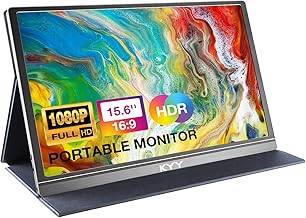
Best for: Passengers or users who want a portable 15.6-inch display for a parked vehicle or travel setup. Its portable format and included cover make it a more flexible alternative to a roof-mounted screen.
The product listing identifies a 1080p Full HD IPS screen, USB-C and HDMI connectivity, HDR, a built-in speaker, and a cover. These details make it a candidate for use with a compatible laptop or other video source. Its 15.6-inch size is larger than the compact 7-inch option in this roundup.
Choose this if you want a portable screen with both USB-C and HDMI listed. Limitation: the provided details do not state how the monitor is powered, how it can be secured inside a vehicle, or whether a specific device will work with it. Confirm power and connection needs before planning in-car use.
TngsChryxia 7-Inch Mini Monitor

Best for: Buyers who need a small display for a compatible video device or monitoring setup, rather than a large passenger entertainment screen. Its compact 7-inch size may be easier to accommodate than a 15.6-inch portable monitor.
Listed specifications include a 1024 × 600 LCD, 178-degree IPS viewing angle, 800:1 contrast ratio, 500 cd/m² brightness, and built-in speakers. Inputs include HDMI, VGA, BNC, and AV. The listing mentions use with devices such as PCs, Raspberry Pi systems, DVD players, and CCTV equipment.
Choose this if a small screen and multiple input types matter more than a larger viewing area. Limitation: the listing says BNC connects only to CVBS cameras; AHD, TVI, and CVI require an adapter. Its 7-inch screen and 1024 × 600 resolution are less suited to buyers seeking a large, high-resolution display.
15.6-Inch Portable Monitor With Kickstand

Best for: Buyers who want a portable display that can stand on a surface when the vehicle is parked or when the screen is used outside the car. The listing specifically identifies a kickstand, which differentiates it from models described with a cover but no stand in the product name.
The product name lists a 15.6-inch 1080p IPS display, USB-C and HDMI connections, an ultra-slim design, and a kickstand. It also names laptops, PCs, Macs, phones, and gaming systems among possible device categories. Check the device’s output and the monitor’s connection requirements before relying on a particular setup.
Choose this if you want a portable screen with a built-in standing option and common video connections. Limitation: a kickstand is not the same as a secure vehicle mount. The provided details do not specify vehicle attachment, power arrangements, or compatibility requirements for individual devices.
ForHelp 15.6-Inch Portable Monitor

Best for: Buyers seeking a portable second screen with a cover for transport. It is a better fit for flexible travel use than for shoppers who specifically need a fixed overhead car monitor.
The listed product name specifies a 15.6-inch 1080p IPS display, USB-C and HDMI, an ultra-thin design, and a premium smart cover. It is described for use with laptops, PCs, Macs, phones, PlayStation, Xbox, and Switch. These are product-listing claims; confirm the precise connection method required by the device you plan to use.
Choose this if a portable 15.6-inch screen and protective cover are useful for your travel routine. Limitation: the provided details do not explain how the screen is powered or secured in a car. A cover should not be assumed to function as a stable or crash-safe mounting system.
Buying Guide: How To Choose A Computer Monitor For A Car
Do you need a fixed car screen or a portable monitor?
A dedicated overhead monitor is the clearest fit when the goal is a screen installed for passenger entertainment. The XTRONS is the only product here explicitly described as roof-mounted. Before choosing it, verify installation needs, vehicle fit, power, and mounting hardware, since those details are not provided in the listing information.
A portable monitor offers more flexibility between a vehicle, home, and travel use. The KYY, kickstand model, and ForHelp are all listed as 15.6-inch portable displays. They may suit passengers or parked-car work, but their product details do not establish that they can be safely mounted in a moving vehicle.
What screen size and resolution make sense?
A 17.3-inch screen provides the largest stated size among these products, while the three portable models are 15.6 inches. The mini monitor is only 7 inches and has a listed 1024 × 600 resolution. For viewing video or using a larger workspace, compare the stated 1080p options; for a compact equipment display, the 7-inch model may be more appropriate.
Screen size alone does not determine whether a display will work in a particular cabin. Consider where passengers will sit, the distance to the screen, and whether the display can be positioned without blocking the driver’s view or interfering with vehicle controls.
Which connections should you check?
Match the monitor’s inputs to the video output available from your device. HDMI is listed on the XTRONS and all three 15.6-inch portable products. The KYY, kickstand model, and ForHelp also list USB-C. The 7-inch monitor adds VGA, BNC, and AV inputs, which may be useful for older or specialized equipment.
Do not assume that a connector guarantees compatibility. Check whether your laptop, phone, camera, or media device outputs video through that port, and whether an adapter is required. The mini monitor’s listing specifically notes that BNC supports CVBS cameras only and that other camera formats require an adapter.
How will the monitor receive power and stay in place?
Power is a key consideration for any screen used away from a desk. The available product details do not establish the power source or in-car power requirements for these monitors. Review the full product information and plan a suitable power arrangement before use; do not assume that USB-C video connectivity alone supplies enough power.
Also distinguish a portable cover or kickstand from a vehicle mount. A cover can protect a screen during transport, and a kickstand can support it on a suitable surface, but neither description confirms secure mounting in a moving car. Use a setup that does not obstruct visibility, distract the driver, or create a loose object hazard.
Who should avoid a particular type?
Choose a portable display only if you have a safe, stable place to use it and a compatible video source. Avoid treating a portable monitor as a permanent overhead screen unless the product and installation method are explicitly suitable. If you need a fixed vehicle installation, compare vehicle fit and installation requirements before selecting a general-purpose display.
Drivers should not watch or interact with a screen while driving. In-car screens should be intended for passengers or used when the vehicle is parked, with placement and use consistent with applicable laws and the vehicle manufacturer’s guidance.
Frequently Asked Questions
Can I use a computer monitor in a car?
Yes, a monitor can be used in a vehicle if it has a compatible video source, suitable power, and a safe position. The products here include a purpose-described overhead monitor and portable displays, but their listed details do not establish every vehicle’s installation or power requirements.
Which product is specifically designed for in-car use?
The XTRONS 17.3-inch model is described as a roof-mounted in-car entertainment monitor. The other products are portable or mini monitors, so their listings do not establish that they are designed for fixed vehicle installation.
Can a portable monitor be used while the car is moving?
A portable monitor should not be used in a way that distracts the driver or can become unsecured. The provided product information does not confirm that the portable models are crash-safe or approved for vehicle mounting. Use screens only for passengers or while parked, and secure equipment appropriately.
Which monitor is best for a compact setup?
The TngsChryxia 7-inch monitor is the smallest option listed. It offers HDMI, VGA, BNC, and AV inputs, but its 1024 × 600 resolution and small size make it a different choice from the 15.6-inch and 17.3-inch displays.
Do all of these monitors connect directly to a phone?
No universal phone compatibility is established by the supplied details. Some product names mention phones, but actual use depends on the phone’s video output, the monitor’s input, and any required adapter or power arrangement. Check the exact device and monitor specifications before buying.